Repository navigation
Export Nodes SourceIOExternalTextureNode
Feeds an image or VTF file on disk into the export graph as a Texture, without loading it into Blender first.
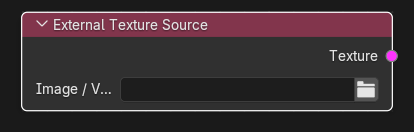
None.
| Output | Type | Description |
|---|---|---|
| Texture | Texture | The decoded pixels of the file. A .vtf connected directly to a VTF Output is copied through unchanged instead of being decoded. |
| Control | Meaning |
|---|---|
Image / VTF file (source_path) |
File path (Blender // relative paths are resolved). Required: an empty path raises "External Texture Source requires an image or VTF file path". |
You can also drag .bmp .dds .exr .hdr .jpeg .jpg .png .tga .tif .tiff .vtf .webp files from a file browser onto the node editor; SourceIO creates one External Texture Source per file, labelled with the file name.
-
.vtffile directly into a VTF Output: the file is checked for theVTF\0signature and copied bit-for-bit to the VTF Output's VTF path. The VTF Output's format, mipmap, Normal map and Linear space settings are ignored for such a copy. -
.vtffile into any other node (operators, preview): the VTF is decoded to RGBA float, flipped to bottom-up rows. For 8-bit data, a texture flagged sRGB (and not flagged Normal) has its RGB converted from sRGB to linear, so the graph sees linear values. Floating-point VTFs keep their values. - Other image files are loaded through a temporary Blender Image (which is removed afterwards) and are then treated exactly like an Image Source: stored values, no colour-space conversion.
- The file's size and modification time are part of the export cache fingerprint, so editing the file invalidates cached VTFs.
- Drop
crate_albedo.pnginto the node editor; an External Texture Source labelledcrate_albedo.pngappears. - Connect Texture to a VMT Base texture input and set the inserted VTF Output's name and format.
To repack an existing VTF unchanged into your game folder: External Texture Source (.vtf) -> VTF Output (set the VTF path) -> VMT input.
- Because an sRGB-flagged VTF is converted to linear when decoded, sending it through a texture operator and into a VTF Output with the default Linear space writes linear values and no sRGB flag (it will look darker). Either turn Linear space off on the VTF Output (it converts back to sRGB and sets the sRGB flag), or apply Color Space with Linear -> sRGB.
- A missing/unreadable file stops the export with an error from the file system or Blender image loader.
- Non-VTF files must be readable by Blender.
Pixel data in the graph. Texture sockets carry float RGB/RGBA images (values 0-1, rows stored bottom-up like Blender); Channel sockets carry a single float image (height x width). Only same-type sockets can be linked: a Texture-to-Channel (or other mismatched) link is removed automatically, so go through Split Channels / Combine Channels to convert. The one exception is a Texture link dropped on a VMT material's VTF input, which gets a VTF Output inserted automatically.