Repository navigation
Export Nodes SourceIOVTFOutputNode
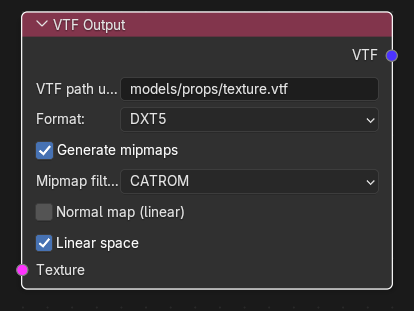
Encodes a texture into a Source engine .vtf file and exposes it to a VMT material node. This node is the bridge between the texture graph and the material graph.
| Input | Type | Description |
|---|---|---|
| Texture | Texture (single link) | The image to encode: an Image Source, an External Texture Source or the output of any texture operator. Required: without a link the export fails with "VTF Output requires a linked Image, external file, or pixel array". |
| Output | Type | Description |
|---|---|---|
| VTF | VTF texture | A reference to the generated file. Connect it to a texture input of a VMT node (VMT VertexLitGeneric and the other VMT nodes). The VMT gets the parameter value <VTF path without materials/ and .vtf>. |
| Control | Meaning |
|---|---|
VTF path under materials (vtf_name) |
Destination path relative to materials/ (default models/props/texture.vtf). A leading materials/ and the .vtf extension are normalised; the same safety rules as for VMT paths apply (relative only, no .., no :, no quotes). |
Format (img_format) |
VTF pixel format: DXT1, DXT3, DXT5 (default), RGBA8888, RGB888, BGR888, RGB565, BGR565, ABGR8888, ARGB8888, BGRA4444, BGRA5551, BGRX5551, BGRX8888, I8, IA88, A8. DXT1 has no real alpha channel; use DXT5 or an uncompressed format for textures whose alpha is used (translucency, alpha test, masks stored in alpha, normal-map specular masks). Use an uncompressed format for normal maps and data textures where compression artefacts matter. |
Generate mipmaps (generate_mipmaps) |
Build the mip chain (default on). |
Mipmap filter (mip_filter) |
Shown only while mipmaps are on: POINT, BOX, TRIANGLE, QUADRATIC, CUBIC, CATROM (default), MITCHELL, GAUSSIAN, SINC, BESSEL, HANNING, HAMMING, BLACKMAN, KAISER. |
Normal map (linear) (is_normal) |
Marks the texture as a normal map: the VTF is flagged Normal, never gets the sRGB flag and its values are never colour-converted. Turn it on for $bumpmap/$normalmap textures (the auto-inserted output for those sockets has it on). Default off. |
Linear space (linear_space) |
Hidden while Normal map is on. On (default): pixel values are written unchanged and the VTF has no sRGB flag, exactly as vtex does; for ordinary 8-bit images this keeps the original gamma-encoded numbers. Off: RGB is converted from linear to sRGB and the VTF is flagged sRGB; for an ordinary 8-bit image this makes the result look washed out (the numbers are encoded twice). Use Off only when the graph really holds linear data (for example a float/EXR source). |
- The input is resolved. A plain copy is made for an external
.vtfsource (see External Texture Source); everything else is converted to RGBA 8-bit. - Values are clamped to 0-1 (a texture operator output may exceed that range), rows are flipped to the top-down order VTF uses, and alpha is taken from the input (an RGB input gets alpha 1).
- Linear/sRGB handling and flags are applied as above, then the VTF is created with the chosen format, mip filter and mipmaps, plus an embedded thumbnail. Images whose size is not a power of two are resized down to the previous power of two.
- At export the file is written to
<game root>/materials/<VTF path>.vtf. If the same path is produced twice with different content the export stops with "Conflicting textures at materials/...". With the model output's Use export cache enabled, VTF Outputs whose upstream graph and external files are unchanged and whose file already exists are skipped.
- Colour map: Image Source -> VTF Output (DXT1 or DXT5, Linear space on) -> VMT Base texture.
-
Normal map: Image Source -> Normal Map Ops (Flip Green if from Blender) -> VTF Output (Normal map (linear) on,
DXT5orRGBA8888) -> VMT Normal texture. - Packed phong mask: PBR to Phong Phong exponent -> VTF Output (default settings, an alpha-capable format) -> VMT Phong exponent texture.
-
Existing VTF: External Texture Source (
.vtf) -> VTF Output (set VTF path) -> VMT input: copied unchanged.
- Linking a Texture directly to a VMT texture input makes SourceIO insert and name a VTF Output for you (
<vmt>_albedo.vtf,<vmt>_<parameter>.vtf); you still have to select a sensible format. - Several VMTs may share one VTF Output; two VTF Outputs may not write different data to the same path.
- An unknown format or filter name stops the export with "Unknown VTF format or mip filter".
- Settings of a copied external
.vtfare not changed by this node.
Pixel data in the graph. Texture sockets carry float RGB/RGBA images (values 0-1, rows stored bottom-up like Blender); Channel sockets carry a single float image (height x width). Only same-type sockets can be linked: a Texture-to-Channel (or other mismatched) link is removed automatically, so go through Split Channels / Combine Channels to convert. The one exception is a Texture link dropped on a VMT material's VTF input, which gets a VTF Output inserted automatically.