Repository navigation
Export Nodes SourceIOFlexRulesNode
Category: Flex rules · Node ID: SourceIOFlexRulesNode
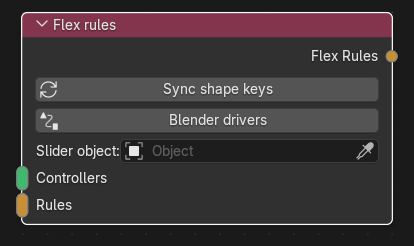
The collector of a flex setup. It gathers the flex controllers (the sliders, SFM-style) and the flex rules (which shape key is driven by which expression) into one rule set, applies the export transformations (stereo splitting, shape-key range scaling) and outputs it as Flex Rules. It can also preview the result live in Blender with drivers and sliders.
| Socket | Type | Multi-input | Description |
|---|---|---|---|
| Controllers | Flex controller | Yes | The Controller output of every Flex controller and Virtual controller that should exist in the exported model. |
| Rules | Flex rule | Yes | The Rule output of every Shape flex rule, Stereo flex rule and Corrective flex rule. |
Controllers and rules are separate inputs on purpose: the Value output of a controller feeds expressions (and thus rules), while its Controller output registers it here. Any controller whose name appears in a rule's expression must also be linked to Controllers, otherwise export fails with "unknown controller".
| Socket | Type | Description |
|---|---|---|
| Flex Rules | Flex rules | The finished rule set. Connect to a Model entry's Flex Rules input (single link), to the multi Flex Rules input of the Source 1 model output (shared set), or to the Group Output of a Flex rule group. |
| Control | Meaning |
|---|---|
| Warning line | Shown when shape-key changes were ambiguous (e.g. a key was deleted and a different one added in the same step). Inspect the orphaned rule nodes (they show "Orphaned" / "Ambiguous change" on the node), retarget them, then sync again. |
| "N shape keys have no rule" box | Lists up to four shape keys of the consuming geometry without a rule (object:shape) and how many more. They are not an error: they get automatic controllers at export. Add rules for them creates controller + rule nodes for them in the graph. |
| Sync shape keys | Follows Blender shape-key changes without touching your wiring: a unique one-for-one rename retargets the rule; a deleted key detaches its rule (marked Orphaned, kept for editing, and its controller leaves the collector); an orphan relinks when the key returns. It never creates nodes unless you click Add rules for them. A background handler runs the same sync when shape keys, meshes or collections change. |
| Blender drivers (toggle, with a refresh icon when on) | Builds a live Blender preview: see below. Turning it off removes everything it created. |
| Slider object | Mesh or armature (e.g. the model's skeleton) that receives the controller sliders. Blank: the mesh object with the most rules. |
| Error line | Why the driver preview could not be built (the toggle switches itself back off). |
In this order:
-
Stereo expansion – every controller used by a Stereo flex rule, or ticked Stereo and used in a rule, is split into
right_<name>thenleft_<name>(studiomdl pairs them back into one stereo slider). Stereo rules drive their left/right keys withleft_/right_copies of the expression; a plain rule using a split controller becomes two generated half rulesshape.L/shape.R, cut from the source shape by the mesh's stereo balance at export. Name collisions with existingleft_X/right_Xcontrollers orshape.L/shape.Rrules are errors. - Range application – rules with Use shape key range give the controller that feeds them directly the shape key's slider min/max.
-
Range scaling – a range outside 0..1 is converted to engine-friendly parts (scaled delta, plus a generated
shape.negkey for a negative minimum). - Controller shapes – a plain Flex controller that is the exact expression of exactly one rule becomes that shape's direct controller (and carries its wrinkle scale); otherwise it stays expression-only like a virtual controller.
Then the rule set is bound to model entries: a set linked straight to an entry belongs to it. A set linked to the model output is shared: each entry whose geometry contains a targeted mesh object gets the matching rules and the controllers they reference (bodygroup meshes not used by an entry get a flex-only entry). A rule matching no entry/bodygroup mesh is an error. Finally every shape key still without a rule gets an automatic controller named after the shape (X.L/X.R pairs become a right_X/left_X stereo slider); corrective shapes are never inferred.
With Blender drivers on, this node:
- creates one custom property per controller on the data of the slider object (mesh or armature), with min/max from the controller, and a slider per controller in the Flex Controllers panel (SourceIO utilities) of that object;
right_X/left_Xpairs become one split slider with L/R balance; - adds a scripted driver on every shape key that has a rule. Each controller name in the expression becomes a short variable (
c0,c1, …) reading its property; the expression is otherwise copied as written.
Limits and caveats:
- Only the rules of this collector are previewed; the automatic controllers for unruled shapes are not created, and shared-set binding is not applied.
- It is a rebuild-on-demand preview: after changing nodes press the refresh icon (or toggle off/on). Errors are shown on the node and turn the toggle off.
- Rules must target mesh objects that exist by name and shape keys that exist; linked (library) data is refused; a driver expression may be at most 255 bytes.
- If the slider object already has imported flex controller sliders, pick another slider object.
- Generated stereo halves (
shape.L/shape.R) are approximated as one driver on the whole source shape key using the average of the two halves, since Blender cannot split a key by side. - Turning the toggle off removes the drivers, resets those shape key values to 0, and deletes the properties and sliders it made.
- Add a Flex controller named
smileand a Shape flex rule targeting your mesh'ssmileshape key; link controller Value → rule Value. - Link the controller's Controller output to Controllers and the rule's Rule output to Rules.
- Link Flex Rules to the Model entry (or via a Flex rule group).
- Optionally tick Blender drivers to try the slider in Blender, then export.
- Controller names must be unique and valid identifiers; two rules may not target the same object + shape.
- A Model entry that receives a connected rule set must not also have direct flex controllers or advanced flex Text (and a shared set cannot be used on an entry with its own flex setup).
- Flex data needs the DMX geometry format and a
$modeldirective entry. - Unknown shape keys, shape keys omitted from the exported mesh, or mismatched coverage are reported when the model is built.
Back to Export Nodes