Repository navigation
Export Nodes SourceIOSfmIkChainNode
Describes one two-bone IK limb of an SFM rig: an arm, a leg or a generic limb. SFM gets an IK handle on the end bone and a pole (knee/elbow) handle.
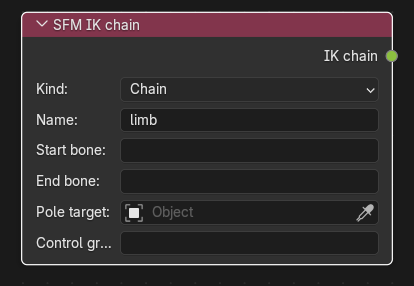
Category: SFM rig. Node ID: SourceIOSfmIkChainNode.
None.
| Socket | Type | Meaning |
|---|---|---|
| IK chain | SFM IK chain socket | Link to IK chains on an SFM IK rig node. |
| Property | Shown | Meaning |
|---|---|---|
| Kind | always |
Chain: controls rig_<name> and rig_<name>_pole. Arm: rig_hand_<name>, rig_elbow_<name> and an optional rig_collar_<name>. Leg: rig_foot_<name>, rig_knee_<name>, an optional rig_toe_<name> and foot roll. |
| Name | always | Suffix of the control names (default limb). The biped's own limbs are named R and L (classic names such as rig_hand_R, with coloured side groups); use something else like R2 or mid_L for extra limbs. Letters, digits and _ only. |
| Collar bone | Arm | Optional parent of the start bone that gets its own control. |
| Start bone | always | Upper bone of the limb (shoulder or thigh). |
| End bone | always | Bone that follows the IK handle (hand or foot). Must be the grandchild of the start bone. |
| Pole target | always | Optional Object marking where the pole control goes. Its rest-pose world position is used. Blank derives the position from the bend of the limb. |
| Toe bone | Leg | Optional child of the end bone; enables the foot roll slider and the rig_toe_<name> control. |
| Heel attachment | Leg with a toe bone | Attachment the foot rolls around. Blank uses pvt_heel_<name>. |
| Control group | always | SFM control group. Blank picks one from kind and name: arms in RigArms (children RightArm/LeftArm, or Arm_<name>), legs in RigLegs (RightLeg/LeftLeg, or Leg_<name>), other chains in RigExtra. |
The bone pickers search the armature of the rig node this chain is linked to; they become plain text fields while the chain is not linked or the rig has no armature.
- The quickest way: press Detect bones on the SFM IK rig; it creates chain nodes named
R/Lfor arms and legs. - For an extra limb, add a node manually: Kind
Chain, Namewing_R, Start bone the shoulder-like bone, End bone two bones further down. - Link IK chain to the rig's IK chains socket.
- Optionally press Pole targets on the rig node to create an empty for the bend direction.
- Start and End must satisfy
end.parent.parent == start; otherwise the export reports that the end bone must be the grandchild of the start bone (two-bone IK needs exactly one bone between them). - A Collar bone must be the parent of the start bone, and the Toe bone a child of the end bone.
- Only Arm chains can have a collar bone and only Leg chains a toe bone; fields of other kinds are ignored.
- The foot roll slider also requires the rig's Foot roll option and a matching attachment in the model (see Attachment and the rig's Heel attachments button).
- A pole target that sits exactly on the middle joint is rejected.
- Two chains using the same name and kind produce duplicate handles and fail validation, and a bone cannot be driven by two controls.
Back to Export Nodes.