Repository navigation
Export Nodes SourceIOPropHitboxNode
Adds one $hbox line: an axis-aligned box attached to a bone, used for hit detection.
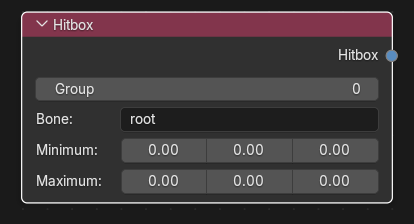
Category: Model settings. Node ID: SourceIOPropHitboxNode.
None.
| Socket | Type | Meaning |
|---|---|---|
| Hitbox | Hitbox socket | Link to Hitboxes on the Source 1 model output (multi-input; one link per box). |
| Property | Meaning |
|---|---|
| Group | Hitbox group number (integer, 0 or more). |
| Bone | Bone the box follows (default root). Passed through the Bone rename table when one is connected. This is a plain text field; type the Blender bone name. |
| Minimum | Lower corner of the box (X, Y, Z) in bone space. |
| Maximum | Upper corner of the box. Each component must be at least the matching Minimum component. |
Resulting QC:
$hbox 0 "root" -10 -10 0 10 10 20
Minimum and Maximum are multiplied by the output's Model scale.
- Add a Hitbox node for the torso: Group 0, Bone
spine, Minimum-8 -6 0, Maximum8 6 20. - Add more Hitbox nodes for other bones.
- Link each Hitbox into the output's Hitboxes socket. The boxes are written in link order.
- If Minimum exceeds Maximum on any axis the export is refused ("Hitbox minimum must not exceed maximum").
- The node does not check the bone name against the armature; type it exactly as the bone is named (or as renamed by the bone rename table).
- Direct export writes the boxes into a single hitbox set named
default.
Back to Export Nodes.