Repository navigation
Export Nodes SourceIOTexturePreviewNode
Shows what a texture or channel looks like at that point of the graph, so you can check operators and VTF input before exporting. It has no outputs and is not part of the exported files.
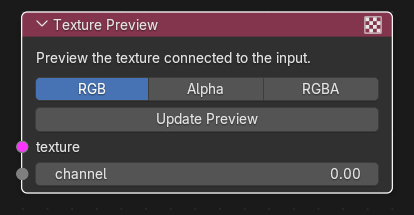
| Input | Type | Description |
|---|---|---|
| texture | Texture | Texture to preview. |
| channel | Channel | Single channel to preview (shown as grayscale). |
Each socket takes one link. If both are linked, the texture is shown. A source directly linked here (Image Source or External Texture Source) is decoded to pixels first, exactly as for the operator nodes.
None.
| Control | Meaning |
|---|---|
Show (display) |
RGB (default): colour at full opacity, like VTF viewers and the engine sample it. Alpha: the alpha channel as grayscale (an RGB texture shows white). RGBA: colour with alpha as transparency. Applies to texture input only; channels are always shown as grayscale. |
| Update Preview (button) | Evaluates the graph and refreshes the preview image. If this preview node is the active node only it is updated; otherwise all Texture Preview nodes in the tree are updated. Errors (for example a missing image or a size mismatch) are reported in the status bar and nothing is changed. |
The node writes its result into a Blender Image named SOURCE_NODES__Texture Preview <node tree name> <node name> (created on demand, re-created if the size changes). Open it in an Image Editor (or use it as a texture) to look at the preview; the node itself only shows the controls. Values are clamped to 0-1, because exported VTFs clamp too. The preview is refreshed only when you press Update Preview; it does not live-update when you edit the graph, and the model export never evaluates it.
Upstream operators are evaluated with the same resolver as the export: image sources are decoded to float arrays, each operator runs on whole images, and nothing is written to disk. If an upstream operator cannot produce a result (a required input is unlinked, sizes differ, wrong data type) the button reports an error such as ": output is unavailable".
- Build
Image Source -> Normal Map Ops -> VTF Outputas usual. - Add a Texture Preview and connect texture to the Normal Map Ops output.
- Click Update Preview, open the image
SOURCE_NODES__Texture Preview ...in an Image Editor and check the green-channel direction. - Use Show -> Alpha to inspect packed masks (for example the specular mask of PBR to Phong).
- The preview is static: press Update Preview after changing the graph or an upstream image.
- The preview does not use sRGB/linear display transforms beyond what the Image Editor applies to the generated image; it shows the graph's numbers.
- A preview with nothing linked does nothing (no error).
- Channel previews are not clamped and are always grayscale.