Repository navigation
Export Nodes SourceIOModelEntryNode
Turns a geometry job into a $model or $body line of the QC and optionally carries the flex setup of that mesh.
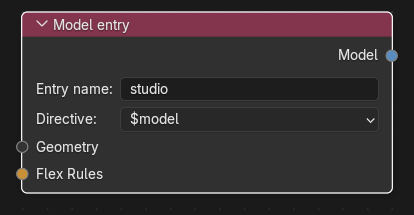
Category: Geometry. Node ID: SourceIOModelEntryNode.
| Socket | Type | Multi | Meaning |
|---|---|---|---|
| Geometry | Object socket | no | The mesh to use. Required; link a Geometry node. |
| Flex Rules | Flex Rules socket | no | Optional flex rule group or rule set for this entry only. |
| Socket | Type | Meaning |
|---|---|---|
| Model | Model entry socket | Link to Models on the Source 1 model output. |
| Property | Meaning |
|---|---|
| Entry name | Name written in the QC ($model "studio" "path.dmx"). Default studio. Must be non-empty, single-line and unique among all model entries and bodygroup names. |
| Directive |
$model writes a $model line; $body writes the shortcut $body line. |
The node body only shows the two properties above. The controllers live in the node editor sidebar (Group tab, panel DMX Flex Controllers) while the node is active:
- a list of controllers with Add / Remove buttons and Add shape-key controls, which creates controllers for every shape key of the linked geometry that has none;
- per controller: name, shape key, optional second shape key, Stereo, Eyelid, Min, Max, Wrinkle scale (and Second wrinkle scale);
- with no controllers, an Advanced DMX controller Text field takes a KeyValues2 Text block with controllers and rules.
When a flex rule group is linked to Flex Rules, the panel only says "Flex rule group connected" and the controllers are authored in the flex nodes instead.
- Link a Geometry node to Geometry.
- Set Entry name to
bodyand keep Directive$model. - Link Model to the Models socket of the model output.
- Add a second Model entry with the $body directive for an extra mesh; entries appear in the QC in link order.
- Direct controllers, an advanced Text and a linked Flex Rules set are mutually exclusive on one entry. Linking Flex Rules while direct controllers exist fails with "remove direct flex controllers before using Flex Rules"; adding controllers through the sidebar clears the advanced Text.
- Flex data (controllers from the sidebar, advanced Text, shared Flex Rules from the output) is only applied to
$modelentries, not to$bodyentries. Vertex animations also require a$modelentry. - Flex rules wired to the model output are matched to entries by the mesh objects the rules target; an entry with its own flex setup cannot also receive shared rules.
- The advanced Text is stored by name; if the Text is removed before export the export stops.
- Direct export cannot use an advanced Text that fails to parse; Check direct export lists it.
- The first Model entry's geometry is also the default geometry of the idle sequence.
Back to Export Nodes.