Repository navigation
Export Nodes SourceIOFlexCrossfadeNode
Category: Flex rules · Node ID: SourceIOFlexCrossfadeNode
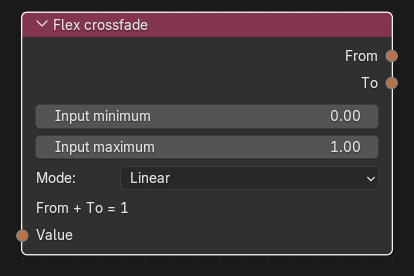
Splits one value into two complementary weights, From and To, that always add up to 1. As the input moves from its minimum to its maximum, the weight shifts from the From output to the To output. Use it to blend two shape keys from a single slider (e.g. "narrow ↔ wide").
| Socket | Type | Multi-input | Description |
|---|---|---|---|
| Value | Flex expression | No (one link, required) | The value that drives the blend. |
| Socket | Type | Description |
|---|---|---|
| From | Flex expression |
1 - position: 1 at the input minimum, 0 at the maximum. |
| To | Flex expression |
position: 0 at the input minimum, 1 at the maximum. |
Each output is an independent expression; link them to different rules (or to further expression nodes).
| Control | Meaning |
|---|---|
| Input minimum / Input maximum | Input range mapped to position 0..1 (defaults 0.0 / 1.0). Minimum must be less than maximum. Values outside the range are clamped. |
| Mode (Interpolation) |
Linear: constant blend rate. Ease in/out: smoothstep (3p² − 2p³), zero slope at both ends. |
The node also shows the note "From + To = 1".
position = min(max((value - minimum) * (1 / (maximum - minimum)), 0.0), 1.0) (terms omitted when the minimum is 0 or the scale is 1). Then:
- Linear: To =
position, From =(1.0 - position). - Ease in/out:
positionis replaced by((position * position) * (3.0 - (2.0 * position))).
Because the position expression is written out in full for each output, long chains can grow; Blender's driver preview limit is 255 bytes per shape-key expression.
Controller width (−1..1) → Flex crossfade (input −1..1) → From → Shape flex rule for narrow; To → Shape flex rule for wide. At −1 only narrow is on, at 0 both are half, at +1 only wide.
- Input minimum ≥ maximum fails the export.
- Only one blend is produced per node; for more than two targets chain nodes or use Flex remap and Flex arithmetic.
- The input is required, even if only one output is used.
Back to Export Nodes