Repository navigation
Export Nodes SourceIOPropModelNode
The final node of every Source 1 export graph. It collects everything that describes one .mdl (model entries, bodygroups, skins, LODs, attachments, hitboxes, collision, flex rules, bone renames, SFM rig, procedural bones), holds the paths and compiler settings, and carries the buttons that preview, export and compile the model. One graph can contain several model outputs; each exports its own model.
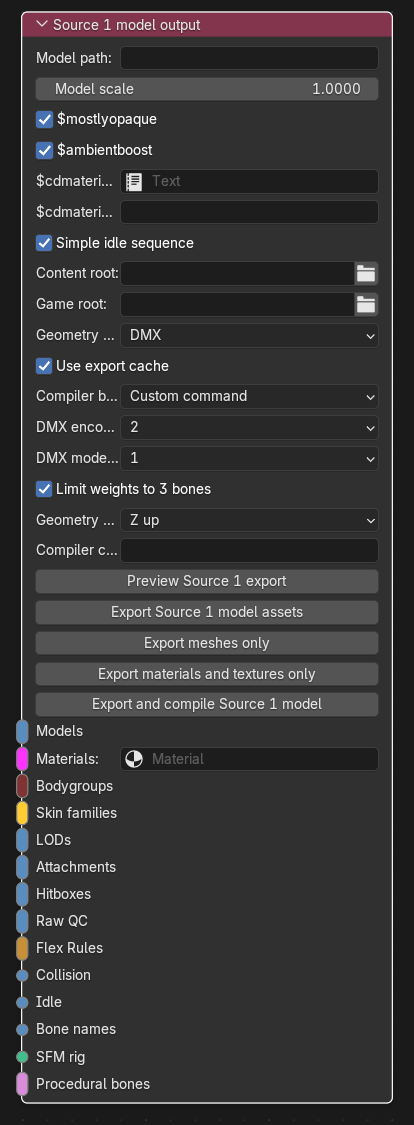
Category: Output. Node ID: SourceIOPropModelNode.
The node has no outputs. Sockets marked "multi" accept any number of links; the order of the links on the socket (top to bottom as drawn) is the order written to the QC.
| Socket | Accepts | Multi | Meaning |
|---|---|---|---|
| Models | Model entry | yes | The $model / $body entries. At least one is required. Entry names must be unique together with bodygroup names. |
| Materials | VMT material nodes (Material socket) | yes | Materials of the model. See How materials are found below. |
| Bodygroups | Bodygroup | yes |
$bodygroup blocks. |
| Skin families | Skin family | yes | Rows of the $texturegroup "skinfamilies" block. All rows must have the same number of materials. |
| LODs | LOD | yes |
$lod / $shadowlod replacements. |
| Attachments | Attachment | yes |
$attachment lines. Names must be unique. |
| Hitboxes | Hitbox | yes |
$hbox lines. |
| Raw QC | Raw QC | yes | Verbatim QC text appended after the typed directives. |
| Flex Rules | Flex rule group / rule sets (Flex Rules socket) | yes | Shared flex rule sets. They are bound to every $model entry whose geometry contains a mesh the rules target; a rule that matches nothing is an error. An entry that already has its own flex setup and also receives shared rules is an error. |
| Collision | Collision | no | One $collisionmodel / $collisionjoints block. |
| Idle | Idle sequence | no | The idle $sequence. |
| Bone names | Bone rename table | no | Export-time bone renames. |
| SFM rig | SFM IK rig | no | An SFM rig script written next to the model (never into the QC). |
| Procedural bones | Helper bone | yes |
$proceduralbones helper bones, written to a VRD. |
A single-link socket (Collision, Idle, Bone names, SFM rig) rejects a second link. A socket that receives the wrong kind of recipe reports an error naming the node and socket.
The export does not read the order of the Materials socket. It walks every node upstream of the output and exports every VMT node it finds (also ones reached through a Skin family). Each exported VMT is bound to the Blender Material it was created for, and:
- every material slot of the exported meshes must be bound to a linked VMT, otherwise the export stops with "No linked VMT bound to … slot …";
- skin family material names must match the file name of a linked VMT;
- the folder of each linked VMT below
materials/is appended to the$cdmaterialslist automatically, after the paths you list yourself.
None. This node is the end of the graph.
| Property | Meaning |
|---|---|
| Model path | Game-relative path of the compiled model, models/.../name.mdl. The path must start with models/ and end with .mdl. The QC $modelname is written without the leading models/; the QC and meshes are placed in the same relative folder under the content root. |
| Model scale | Multiplies every exported position, bone offset, shape delta, attachment position, hitbox bound and procedural-bone offset (Blender units to Source units, for example 39.37 for metres to inches). It is not the QC $scale. Must be greater than zero. |
$mostlyopaque |
Writes $mostlyopaque. On by default. |
$ambientboost |
Writes $ambientboost. On by default. |
$cdmaterials text block |
Optional Blender Text block with one material-root-relative path per line. |
$cdmaterials paths |
Inline version of the same list, shown only while no Text block is set. Empty lines are ignored. |
| Simple idle sequence | When no Idle node is linked, writes a one-frame idle sequence from the first $model/$body entry's geometry at 1 fps. |
| Property | Meaning |
|---|---|
| Content root | Folder that receives the QC, meshes (and the .vrd). Required. A path starting with // needs a saved .blend. |
| Game root | Game folder (gameinfo.txt level) that receives VMT/VTF files, the SFM rig script and the compiled model. Required. |
| Geometry format |
DMX or SMD, both written by SourceIO's own exporter. Hidden when the backend is Direct export. Vertex animations, stereo balance groups and collection auto-merge require DMX. |
| Use export cache | Re-exports only meshes and textures whose inputs changed. Fingerprints are stored in <model>.sourceio-cache.json next to the QC. With the Direct backend the label becomes Skip unchanged textures because no meshes are written. |
| Compiler backend | How the model is compiled (see below). |
| Backend | Behaviour |
|---|---|
| Custom command | Runs Compiler command without a shell. |
| Blender Source Tools | Uses Blender Source Tools' Windows studiomdl.exe backend with BST engine root. |
| Built-in studiomdl | Compiles the exported QC with SourceIO's bundled studiomdl, no external tools or Wine (x86_64 Blender only). |
| Direct export (built-in) | Builds the model in memory and compiles it with the bundled studiomdl; no QC or mesh files are written (x86_64 Blender only). Use Check direct export to see what it cannot build. |
| Property | Shown for | Meaning |
|---|---|---|
| DMX encoding version | DMX format, Custom command or Blender Source Tools | DMX binary encoding: 2, 3, 4 or 5 (default 2). |
| DMX model version | same | DMX model format: 1, 15 or 18 (default 1). |
| Limit weights to 3 bones | same | Keeps the three strongest weights per vertex and renormalizes, as Source 1 studiomdl skins with at most three bones. Off writes every weight. |
| Geometry up axis | all backends |
Z up keeps Blender coordinates; Y up rotates the geometry to Y up. |
| Native settings reviewed | only when unchecked | Shown for graphs migrated from Blender Source Tools. Enable after reviewing up axis, collection merge and triangulation (and DMX version for DMX graphs); until then planning/export stops with an error. New nodes start confirmed. |
| Fit weight poses | Built-in studiomdl, Direct export |
studiomdl -fitweights sample poses (default 24). Each vertex keeps the three bone weights that best match the original skinning over this many poses; 0 turns it off. |
| Compiler command | Custom command | Argument template containing {game} and {qc}. |
| BST engine root | Blender Source Tools | Folder that must contain studiomdl.exe for Blender Source Tools (the game root must contain gameinfo.txt). |
| Check direct export box | Direct export | Lists what the direct route cannot build; also refreshed by every plan. |
With the Built-in or Direct backend and DMX meshes, SourceIO always writes DMX encoding 5 / model 18 and does not trim weights itself (studiomdl does, or fits them). The node then shows "Mesh format and DMX settings don't apply" for Direct export.
The same buttons exist in the node editor sidebar (Group tab, Source 1 Export), together with Import VRD (see Helper bone).
| Button | Action |
|---|---|
| Preview Source 1 export | Writes a manifest plus the QC into the Blender Text SourceIO export preview - <node name>, and one preview Text for each VMT, SFM rig script and VRD. Nothing is written to disk and textures are not encoded. |
| Export Source 1 model assets | Writes meshes, VMT/VTF files and the QC (and the SFM script / VRD when linked). |
| Export meshes only | Writes only the DMX/SMD files (with flexes and vertex animation sequences). |
| Export materials and textures only | Writes only linked VMT/VTF files. |
| Export and compile Source 1 model | Exports, then compiles with the chosen backend. The compiler log is stored in the hidden Text .<model name>.compile.log; an error is raised if the compiler leaves the .mdl unchanged. |
- Add this node and set Model path (
models/props/crate.mdl), Content root and Game root. - Create a Geometry node for your mesh and link it through a Model entry to Models.
- Link the VMT nodes that belong to the mesh materials to Materials.
- Optionally add bodygroups, skin families, LODs, attachments, hitboxes, collision, bone renames, an SFM rig or helper bones and link them to their sockets.
- Press Preview Source 1 export and read the Text block; fix errors reported in the Info bar.
- Press Export and compile Source 1 model.
- The graph is validated as a whole on every button: unique entry and attachment names, equal skin family sizes, LOD sources that belong to a model or bodygroup entry, conflicting geometry stems, mismatching rigs and so on stop the export with a message.
- Two model outputs in the same graph must not share a model path or QC path, and their VMT/VTF assets that land on the same file must be identical.
- A VTF that would overwrite an image used as a texture source is rejected.
- Direct export refuses: Raw QC nodes,
$collisionjointsjoint QC text, vertex animations, and advanced flex Texts that cannot be parsed. Errors block compilation; warnings are added to the compile log. VMT/VTF files, the SFM script and the VRD are still written; the meshes and QC are not. - Several rigs on one model: SFM rigs and procedural bones need all
$model/$bodyentries to use exactly one armature.
Back to Export Nodes.