Repository navigation
Export Nodes SourceIOPropAttachmentNode
Adds an $attachment: a named point on a bone, used by the game for effects, weapons, particles and similar. The point can be typed in or taken from an Empty in the viewport.
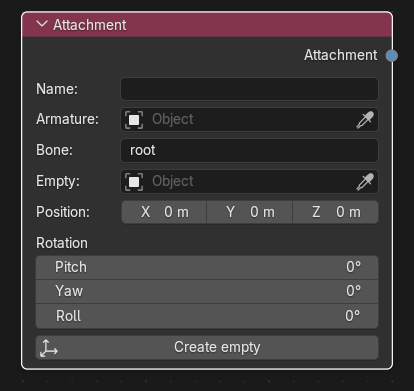
Category: Model settings. Node ID: SourceIOPropAttachmentNode.
None.
| Socket | Type | Meaning |
|---|---|---|
| Attachment | Attachment socket | Link to Attachments on the Source 1 model output (multi-input; one link per attachment). |
| Property | Meaning |
|---|---|
| Name | Attachment name. Required, single line, unique among the model's attachments. |
| Armature | Armature object. Used to pick the bone from a searchable list and to place the empty relative to the bone. The Create empty button fills it from the rig of the connected model output when it is blank. |
| Bone | Parent bone of the attachment (default root). A drop-down search of the armature's bones when an Armature is set, otherwise a text field. The name is passed through the Bone rename table if the graph has one. |
| Empty | Optional object marking the attachment. Its rest-pose transform relative to the bone replaces Position and Rotation. |
| Position | Offset from the bone, in bone space (shown only while no Empty is set). Multiplied by the output's Model scale on export. |
| Rotation (Pitch, Yaw, Roll) | QC angles: pitch turns around Y, yaw around Z, roll around X. Written to the rotate part of the line in degrees (shown only while no Empty is set). |
| Create empty (button) | Creates an Empty at the current Position/Rotation and uses it as Empty. The empty is parented to the bone when the armature (the node's, or the rig of the connected model output) contains that bone; otherwise it is created unparented and a warning is shown. |
Resulting QC:
$attachment "muzzle" "root" 0 12 3 rotate 0 90 0
- Add an Attachment node, set Name to
muzzle, pick the Armature and the Bone. - Press Create empty, then move/rotate the new Empty in the viewport.
- Link Attachment to the output's Attachments socket. The exported position and angles are computed from the empty in the bone's rest frame.
- Attachment names must be unique ("Attachment names must be unique").
- When Empty is set and an armature is known (the node's, or the parent of the empty), the bone must exist in it; otherwise the export fails.
- The empty's transform is evaluated in the rest pose, so posing the armature does not change the exported value.
- Rotation values are not scaled by Model scale; positions are.
- The SFM foot-roll slider looks for attachments named
pvt_heel_<name>; the SFM rig's Heel attachments button creates such Attachment nodes for you (see SFM IK rig).
Back to Export Nodes.