Repository navigation
Export Nodes SourceIOFlexRemapNode
Category: Flex rules · Node ID: SourceIOFlexRemapNode
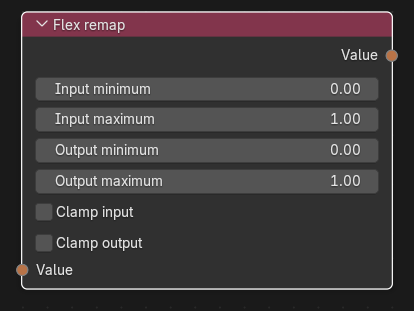
Linearly maps a value from an input range to an output range (scale and offset), with optional clamping – e.g. turning a −1..1 slider into a 0..1 weight, or reversing a range.
| Socket | Type | Multi-input | Description |
|---|---|---|---|
| Value | Flex expression | No (one link, required) | The value to remap. |
| Socket | Type | Description |
|---|---|---|
| Value | Flex expression | The remapped expression. |
| Control | Meaning |
|---|---|
| Input minimum / Input maximum | Source range (defaults 0.0 / 1.0). Minimum must be less than maximum. |
| Output minimum / Output maximum | Target range (defaults 0.0 / 1.0). Output minimum may be larger than maximum to reverse the mapping. |
| Clamp input | Clamps the value to the input range before mapping. |
| Clamp output | Clamps the result to the output range. Not needed (and not added) when Clamp input is on, since clamped input already bounds the result. |
With scale = (out_max - out_min) / (in_max - in_min) and offset = out_min - in_min * scale the result is (value * scale) + offset, omitting a scale of 1 or an offset of 0. Examples:
- −1..1 → 0..1:
((v * 0.5) + 0.5) - 0..1 → 1..0:
((v * -1.0) + 1.0) - output range with equal ends: the constant output minimum.
Clamps use min(max(x, lo), hi).
A controller with range −1..1 → Flex remap (input −1..1, output 0..1, Clamp input on) → a Shape flex rule: the shape follows the slider mapped to 0..1.
- Input minimum ≥ input maximum fails the export.
- Without clamping, values outside the input range extrapolate linearly.
- To give a controller a negative range for a single shape key, prefer the rule's Use shape key range option, which also handles the engine's weight ramp.
Back to Export Nodes