Repository navigation
Export Nodes SourceIOFlexGroupNode
Category: Flex rules · Node ID: SourceIOFlexGroupNode
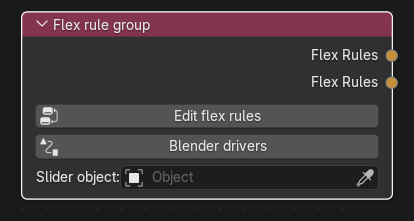
A node group that holds a whole flex rule graph (controllers, rules, expression nodes and one Flex rules collector) in its own inner node tree, and outputs the finished rule set as a single Flex Rules link. Use it to keep the model graph tidy: the outer graph shows one node, the flex details live one level down.
None. All flex data is authored inside the group.
| Socket | Type | Description |
|---|---|---|
| Flex Rules | Flex rules | The rule set built by the inner graph. Connect it to the Flex Rules input of a Model entry (one link), or to the multi-input Flex Rules socket of the Source 1 model output (shared rules, see below). |
Blender 5.2 shows two output sockets named Flex Rules. Both resolve to the same inner rule set; either can be linked.
The node has no editable properties of its own; it draws:
| Control | Meaning |
|---|---|
| Edit flex rules button | Enters the inner tree of the group (the editor switches to it). If the inner tree datablock was deleted, an empty one is created and a warning asks you to use Sync shape keys. |
| "N shape keys have no rule" box | Mirrors the inner collector's list of shape keys that have no rule (first four are listed). Add rules for them creates controller + rule nodes for those shapes. Shapes left without a rule get automatic controllers at export. |
| Blender drivers toggle, refresh button, Slider object | The driver-preview controls of the inner collector; see Flex rules for what they do. |
| Error line | The last driver-preview error of the inner collector, if any. |
The node's internal tree has a hidden type (sourceio.model_definition) and is named Flex rules - <node name>.
- Select the group node and click Edit flex rules on the node, or Edit group in the node editor sidebar (N panel → Group tab → Flex rules panel).
- A Model entry node that is connected to a group also offers Edit group in that same panel.
- Inside the group, the sidebar Group tab shows Flex group navigation with Back to model graph, which returns to the parent tree and re-selects the group node.
- The same Flex rules panel offers Sync shape keys (follow renamed/deleted shape keys; see the collector page).
Hidden generated contents
When the node is created it automatically builds its inner tree:
- a Group Output node with a Flex Rules socket,
- one Flex rules collector linked to that output (it carries a hidden unique group ID that ties rule and controller nodes to it).
Add your controller and rule nodes inside, connect their Controller / Rule outputs to the collector, and leave the collector linked to the Group Output.
Related generated content:
-
Generate flex rule graph (sidebar Group tab, with a Model entry selected that has no Flex Rules link and no advanced flex Text): creates a Flex rule group to the left of the entry, converts the entry's direct flex controllers into controller and shape-rule nodes, adds controllers and rules for every remaining shape key of the linked Geometry (a
.L/.Rpair becomes one stereo controller and a stereo rule), links the group to the entry's Flex Rules input and then clears the entry's direct controller list. It refuses when the Geometry has no shape keys or an old controller has no shape key / an invalid name. - A copied group node gets its own copy of the inner tree.
- If the inner tree datablock is deleted, the tree is re-created empty and the rules that were inside are lost.
- Link your Geometry to a Model entry.
- Add a Flex rule group and link its Flex Rules output to the entry's Flex Rules input.
- Click Edit flex rules, add Flex controller and Shape flex rule nodes, link controllers → rules → the collector.
- Click Back to model graph and export.
- The group node resolves its inner graph through the inner Group Output: if the Group Output's Flex Rules input is unlinked, export fails with "flex rule group needs a connected Group Output".
- Shape keys are looked up from the Model entries (or model output) that consume the group; a group that feeds nothing falls back to the objects its rules already target.
- Flex rules need a DMX geometry format and a
$modeldirective entry.
Back to Export Nodes