Repository navigation
Export Nodes SourceIOSfmConstraintNode
Adds an SFM constraint to the rig: a bone or rig control follows other bones/controls (point, orient, parent, aim), or a slider rotates it around an axis.
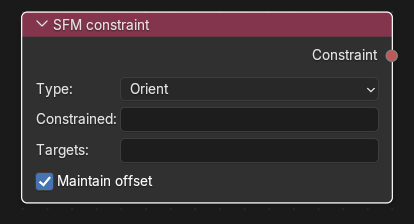
Category: SFM rig. Node ID: SourceIOSfmConstraintNode.
None. Targets are typed as names, not linked.
| Socket | Type | Meaning |
|---|---|---|
| Constraint | SFM constraint socket | Link to Constraints on an SFM IK rig node. |
| Property | Shown | Meaning |
|---|---|---|
| Type | always |
Point: follows the targets' position. Orient: follows their rotation (default). Parent: follows position and rotation as if parented. Aim: points at the targets. Rotation slider: a slider turns the constrained object around an axis. |
| Constrained | always | The bone or rig control (rig_...) that is constrained. A name that is a rig handle is used as the handle; otherwise it must be a bone of the model's armature. |
| Targets | all types except slider | Comma-separated bones or rig controls, each with an optional weight: rig_hand_R=0.5, rig_elbow_R=0.5. Weight defaults to 1. |
| Maintain offset | all types except slider | Keeps the constrained object where it is in the reference pose (default on). |
| Slider name | Rotation slider | Name of the slider (default rig_slider). Letters, digits and _ only. |
| Axis | Rotation slider |
X, Y or Z. |
| Degrees | Rotation slider | Rotation over the whole slider range (default 90). |
| Default | Rotation slider | Slider position of the reference pose, 0…1 (default 0.5). |
| Control group | Rotation slider | Group of the slider. Blank uses RigExtra. |
Make a twist bone follow the hand's rotation:
- Add a constraint node, Type
Orient, Constrainedforearm_twist, Targetsrig_hand_R. - Link Constraint to the rig's Constraints input.
Add an eyelid slider:
-
Type
Rotation slider, Constrainedeyelid_upper_L, Slider namerig_lid_L, AxisX, Degrees-35, Default0. - Link it to the rig.
- Non-slider constraints need at least one target; each target weight must be a positive number; a non-numeric weight is reported ("target weight … is not a number").
- Targets must be distinct and must differ from the constrained object.
- Rotation sliders take no targets; their names must be unique across all rotation sliders and finger curl sliders.
- A bone name that is not an existing rig handle must exist in the exported armature, otherwise validation fails.
- Slider names, groups and bones are written into a generated script; control group names must not contain quotes, backslashes or line breaks.
Back to Export Nodes.