Repository navigation
Export Nodes SourceIOPBRToPhongNode
Converts roughness/metalness and a normal map into the textures Source's VertexLitGeneric phong shading reads: a phong-exponent texture and a normal map carrying the specular mask in its alpha.
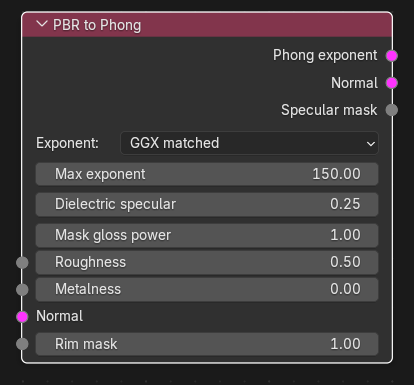
| Input | Type | Description |
|---|---|---|
| Roughness | Channel | Roughness 0-1 (0 = mirror smooth). Unlinked: socket value, default 0.5. |
| Metalness | Channel | Metalness 0-1. Unlinked: socket value, default 0.0. |
| Normal | Texture | Normal map (RGB/RGBA). Required; it defines the size, and all linked channels must match its width and height. |
| Rim mask | Channel | Rim-light mask 0-1. Unlinked: default 1.0. |
All inputs take a single link.
| Output | Type | Description |
|---|---|---|
| Phong exponent | Texture | RGBA texture for $phongexponenttexture: R = exponent (Source maps R 0-1 to exponent 1-150), G = albedo-tint mask (= metalness, used with $phongalbedotint), B = 0, A = rim-light mask. |
| Normal | Texture | The input normal RGB with the specular mask in alpha. VertexLitGeneric reads the phong mask from the bump-map alpha; $normalmapalphaenvmapmask also uses it as envmap mask. |
| Specular mask | Channel | The same mask as a channel, for further processing. |
| Control | Meaning |
|---|---|
Exponent (exponent_mode) |
GGX matched (default): Blinn-Phong exponent that matches GGX, n = 2 / roughness^4 - 2, clamped to 1..Max exponent, then stored as (n - 1) / 149. Linear gloss: the R channel is simply 1 - roughness. |
| Max exponent | Only for GGX matched (1-150, default 150). Exponent used for perfectly smooth texels. |
| Dielectric specular | Specular mask of non-metals (0-1, default 0.25); metals use 1. Mask = dielectric + (1 - dielectric) * metalness. |
| Mask gloss power | The mask is multiplied by (1 - roughness) ^ power (default 1; 0 disables the roughness influence). |
Roughness, metalness and rim mask are clamped to 0-1. The mask is clamped to 0-1 as well. No colour-space conversion is performed: all outputs are data textures and must not be gamma converted.
Texture operators are evaluated while the export graph is resolved (and by the Texture Preview node): upstream image sources are decoded to float arrays, the operator runs on whole images, and the result is passed on without being written anywhere. If an operator cannot produce a result (a required input is unlinked, sizes differ, wrong data type) the export stops with ": output is unavailable".
- Image Source (roughness map) -> Split Channels R -> PBR to Phong Roughness; likewise metalness.
- Normal map -> Normal Map Ops (Flip Green for Blender maps) -> PBR to Phong Normal.
- Phong exponent -> VTF Output (alpha-capable format, Linear space on) -> VMT VertexLitGeneric Phong exponent texture.
-
Normal -> VTF Output (Normal map (linear) on,
DXT5orRGBA8888to keep the alpha) -> VMT Normal texture. - In the VMT enable
$phong; enable$phongalbedotintto tint metals by the albedo and$rimlightif you use the rim mask.$phongexponentis omitted automatically because the texture is linked.
- Normal is mandatory; unlinked it produces nothing. A size mismatch of a linked channel stops the export with "PBR to Phong: is HxW, normal map is HxW".
- The exponent range 1-150 is a Source convention (R 0-1 -> 1-150), which is why the divisor is 149 even if Max exponent is lower.
- The mask in the normal map's alpha needs a format with alpha (DXT1 loses it).
- Rim mask only matters if
$rimlightis on in the VMT.