Repository navigation
Export Nodes SourceIOPropGeometryNode
Describes one mesh export job: a Blender mesh/curve object or a collection of them, an optional armature, and where the exported DMX/SMD file goes. Every node that needs a mesh (model entries, bodygroup choices, LODs, collision, idle sequences) takes its mesh from a Geometry node.
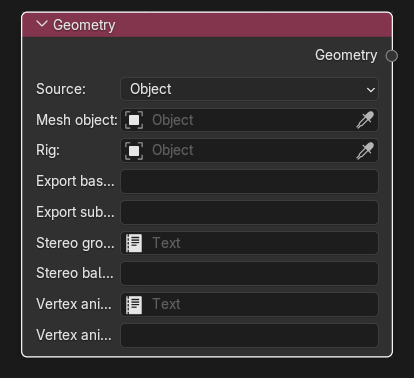
Category: Geometry. Node ID: SourceIOPropGeometryNode.
None.
| Socket | Type | Meaning |
|---|---|---|
| Geometry | Object socket | The geometry job. Link it to: Geometry of Model entry, Choices of Bodygroup, Original mesh / Replacement mesh of LOD, Collision or Idle sequence. The output may feed several of these at once; the same job is exported once. |
| Property | Meaning |
|---|---|
| Source |
Object or Collection. |
| Mesh object / Mesh collection | The thing to export (one field is shown, depending on Source). An object must be a mesh or curve; a collection must contain at least one mesh or curve object (nested collections included). |
| Rig | Armature for weighted meshes that have no armature parent and no Armature modifier. If the meshes already point at an armature, this must be the same armature, otherwise the export fails with "Geometry meshes refer to different armatures". A collection that contains exactly one armature and weighted meshes uses it automatically; several armatures require an explicit Rig. |
| Export basename | File name stem of the exported mesh. Blank uses the object or collection name (the node then shows "Using … as export basename"). Must start with a letter or digit and contain only letters, digits, _, . and -; it must not end in .dmx or .smd. Names with spaces fail validation, so set a basename. |
| Export subdirectory | Optional folder below the QC folder, written with / separators; each segment follows the same character rules as the basename. |
| Auto-merge collection | Collections only. Combines all meshes of the collection into one DMX mesh. Flex rules that targeted individual objects are retargeted to the merged mesh; two objects with the same shape key but different rules are an error. |
| Stereo groups Text / Stereo balance groups | One object_name=vertex_group line per object (blank lines ignored). The vertex group provides the left/right balance used to split stereo flex controllers. Pick a Text block, or type the lines inline while no Text is set. Each object may appear once. DMX only. |
| Vertex animation Text / Vertex animation ranges | One clip start end [sequence] line per clip. start and end are integer frames, 0 <= start < end, with end exclusive; the clip name may contain letters, digits, _ and - and must be unique. Add the literal word sequence to also create a QC sequence for the clip. DMX only. |
The mesh is written to <content root>/<folder of the model path>/<subdirectory>/<basename>.dmx (or .smd, as selected on the model output), and the QC refers to it with the same relative path. The pair subdirectory/basename is the job's identity.
With the Direct export backend no mesh file is written; the same capture is built in memory.
For clips marked sequence the exporter writes <basename>/vcaanim_<clip>.dmx next to the mesh and adds to the QC a $bonemerge "vcabone_<clip>" line and a $sequence "<clip>" … fps <scene fps> line. The fps comes from the scene render settings. A clip name must not equal the idle sequence name (case-insensitive).
- Select
Bodyin the Mesh object field, leave Rig blank when the mesh already has an Armature modifier. - Set Export basename to
crate_ref. - Link Geometry into a Model entry and the entry into the model output's Models socket.
- To reuse the mesh as a collision model or LOD source, link the same output a second time rather than creating a second node.
- Two Geometry nodes with the same subdirectory/basename but different object, rig, stereo groups, vertex animations or merge setting are reported as "Conflicting geometry exports".
- Auto-merge needs Source = Collection.
- Vertex animations need the geometry to be the geometry of a
$modelentry (not$body, not a bodygroup/LOD/collision-only geometry) exported as DMX. - With SMD output, vertex animations, stereo balance groups and auto-merge are rejected.
- Direct export does not support vertex animations yet; Check direct export reports them as errors. Stereo balance groups and auto-merge are supported by direct export.
- Rigged meshes must have vertices; a collection used for
$collisionjointsneeds an armature and every hull must be weighted to exactly one bone (see Collision). - Every material slot of an exported mesh must be bound to a VMT linked to the model output.
Back to Export Nodes.