Repository navigation
Export Nodes SourceIONormalBlendNode
Blends a detail normal map into a base normal map.
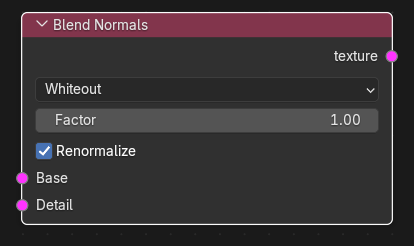
| Input | Type | Description |
|---|---|---|
| Base | Texture | Base normal map (RGB/RGBA). Required. Its alpha is kept. |
| Detail | Texture | Detail normal map (RGB/RGBA). Required. Must have the same width and height as Base. |
| Output | Type | Description |
|---|---|---|
| texture | Texture | Blended normal map (RGBA; alpha = Base alpha, or 1 if Base has no alpha). |
| Control | Meaning |
|---|---|
| Method |
Whiteout (default): x = a.x + b.x, y = a.y + b.y, z = a.z * b.z, then mixed with the base by Factor. Overlay: a + b - a*b per component, mixed by Factor. Lat/Long: blends the latitude/longitude angles of both vectors by Factor. |
| Factor | Detail strength (0-1, default 1). 0 returns the base normal; 1 applies the full detail. |
| Renormalize | Re-normalises the result to unit length (default on). |
Both RGB inputs are decoded to unit vectors (rgb * 2 - 1), blended with the chosen method, optionally renormalised and encoded back; the result is clamped to 0-1. Normal maps must use the same Y convention (both OpenGL or both DirectX).
Texture operators are evaluated while the export graph is resolved (and by the Texture Preview node): upstream image sources are decoded to float arrays, the operator runs on whole images, and the result is passed on without being written anywhere. If an operator cannot produce a result (a required input is unlinked, sizes differ, wrong data type) the export stops with ": output is unavailable".
Image Source (base normal) and Image Source (tiling detail normal) -> Blend Normals (Whiteout, Factor 0.5) -> VTF Output (Normal map) -> VMT Normal texture.
- Different resolutions make the node produce nothing; resize the textures first or use the VMT detail slot for tiled detail.
- Whiteout is the usual choice; Overlay and Lat/Long give different look for extreme angles.
- Alpha of the detail map is ignored.