Repository navigation
Export Nodes SourceIOTextureBrightnessContrastNode
Adjusts brightness and contrast of a whole texture or of a single channel.
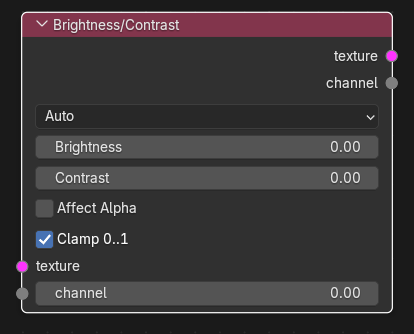
| Input | Type | Description |
|---|---|---|
| texture | Texture | RGB/RGBA texture to adjust. |
| channel | Channel | Single channel to adjust. |
Each socket takes one link; use one of them. Which one is used depends on Input.
| Output | Type | Description |
|---|---|---|
| texture | Texture | Adjusted texture (when a texture is processed). |
| channel | Channel | Adjusted channel (when a channel is processed). |
In Texture mode the channel input is hidden unless linked, in Channel mode the texture input is hidden unless linked; in Auto mode both inputs stay visible. The output pair narrows to the matching kind once an input is linked (the unused output is hidden); until then both outputs are shown.
| Control | Meaning |
|---|---|
Input (input_mode) |
Auto (default): processes the texture input if it is linked, otherwise the channel input. Texture / Channel: forces that kind (the other input is hidden unless linked). With nothing usable linked the node produces nothing. |
| Brightness | Added after the contrast step (default 0, -1 to 1 recommended). |
| Contrast | Contrast amount (default 0, -1 to 1 recommended; 0 = unchanged). |
| Affect Alpha | Texture mode only. Off (default): only RGB is changed and alpha is kept. On: alpha gets the same adjustment. |
| Clamp 0..1 | Clamp the result to 0-1 (default on). |
Formula per value: (x - 0.5) * (contrast + 1) + 0.5 + brightness, applied to the stored numbers (no colour-space conversion).
Texture operators are evaluated while the export graph is resolved (and by the Texture Preview node): upstream image sources are decoded to float arrays, the operator runs on whole images, and the result is passed on without being written anywhere. If an operator cannot produce a result (a required input is unlinked, sizes differ, wrong data type) the export stops with ": output is unavailable".
- Brighten an AO map: Image Source -> Brightness/Contrast (Brightness 0.1) -> VTF Output.
- Increase contrast of a mask channel: Split Channels G -> Brightness/Contrast (channel) -> Combine Channels.
- Contrast of -1 flattens everything to mid-gray + brightness.
- With Clamp 0..1 off the output may leave 0-1; the VTF Output clamps it again on export.
- This is not a colour-managed adjustment; use Color Space for sRGB/linear conversion.