Repository navigation
Export Nodes SourceIOHelperBoneNode
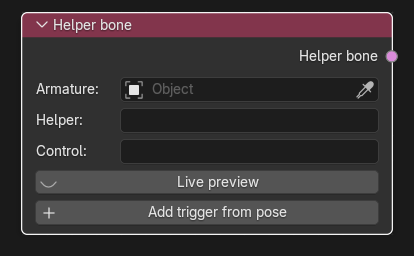
Creates a Source 1 quaternion helper bone (a <helper> in a $proceduralbones VRD file). The engine poses the helper bone automatically from the rotation of a control bone, blending between poses ("triggers") that you record in Blender. Typical uses: twist bones, shoulder/elbow/knee correctives.
Category: Procedural bones. Node ID: SourceIOHelperBoneNode.
None.
| Socket | Type | Meaning |
|---|---|---|
| Helper bone | Procedural bone socket | Link to Procedural bones on the Source 1 model output (multi-input; one link per helper bone). |
| Property | Meaning |
|---|---|
| Armature | Armature used to pick bones and to capture triggers. Blank uses the rig of the connected model output's geometry. |
| Helper | The bone the engine poses from the triggers (a drop-down of the armature's bones when an armature is known). |
| Control | The bone whose rotation, relative to its parent, selects and blends the triggers. |
| Live preview | Toggle. Poses the helper from the control bone the way the game will, whenever the scene updates or the frame changes, and shows each trigger's share as a percentage. Turning it off resets the helper bone's pose. It assumes the helper's pose channels are free (no constraints overriding them). |
| Triggers | One row per trigger: a Tolerance field (degrees) and three buttons: Pose (pose control and helper like this trigger; with Live preview on, the helper shows the game's result instead), Update (recapture from the current pose), Remove. |
| Add trigger from pose | Adds a trigger that records the current pose of the Control and Helper bones. A new trigger copies the tolerance of the previous one. |
The node's sidebar/extended view (N panel) also shows each trigger's stored Control rotation, Helper rotation and Helper location; these are pose values relative to the rest pose (XYZ Euler, in the bone's rest frame), so they survive bone renames and model scale changes.
For every trigger the weight is 1 - angle / tolerance, clamped at zero, where angle is the rotation between the trigger's control rotation and the control's current rotation (Tolerance default 90 degrees). The helper takes the normalized, weighted blend of the trigger targets. If no trigger is in range the first trigger is used ("No trigger in range: game uses trigger 1" in the live preview).
- The QC gets a
$proceduralbones "<model name>.vrd"line. - The VRD is written next to the QC in the content root as
<model name>.vrd, using exported (renamed) bone names and positions multiplied by the output's Model scale. Per helper it contains<helper>,<basepos>and one<trigger>line per trigger. - The VRD appears in the preview as a Text named
SourceIO VRD preview - <output node> - <path>. - With Direct export the helper rows are built in memory; the VRD file is still written as part of the assets.
The sidebar button Import VRD (node editor Group tab, Source 1 Export panel) reads a $proceduralbones VRD and creates one Helper bone node per <helper>, linked to the model output. Names are matched through the output's bone rename table, and values are converted for the output's rig and Model scale. It rejects <aimconstraint> helpers and <display> lines with a non-zero distance, requires parent bones in the VRD to match the armature, and refuses a VRD whose <basepos> values do not match the rig at the current scale (it tells you the scale to use).
- Add a Helper bone node, pick the armature, set Helper to the twist bone and Control to the forearm bone.
- Pose the forearm and twist bone as you want them at rest and press Add trigger from pose.
- Rotate the forearm, pose the twist bone to follow, press Add trigger from pose again (adjust Tolerance if needed).
- Toggle Live preview to test, then link the node to the model output's Procedural bones.
- Run Preview Source 1 export to inspect the VRD.
- Each helper needs at least one trigger and at most 32.
- Helper and Control must be different bones, must both have parent bones, and the Control cannot be a child of the Helper.
- A bone can have only one helper definition.
- Exported names of both bones and their parents must contain no whitespace and no
.; rename them with a Bone rename table. - Procedural bones require all
$model/$bodyentries to use exactly one armature, and the helper and control bones must exist in it. - Live preview and trigger capture need an armature (set on the node, or implied by rigged geometry connected to a model output). You cannot record triggers while Live preview is on.
- Rotations in the VRD use Blender's XYZ Euler order, which matches Source's RadianEuler.
Back to Export Nodes.