Repository navigation
Export Nodes SourceIOFlexShapeRuleNode
Category: Flex rules · Node ID: SourceIOFlexShapeRuleNode
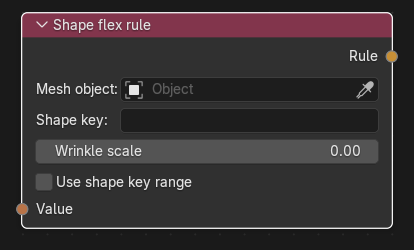
Drives one shape key of one mesh object from a flex expression. The shape key's weight is the value of the expression at runtime, so linking a controller's Value directly gives a plain slider-to-shape mapping, while linking expression nodes builds richer behaviour.
| Socket | Type | Multi-input | Description |
|---|---|---|---|
| Value | Flex expression | No (exactly one link, required) | A controller's Value, a constant, or the output of an expression node (Flex arithmetic, Flex clamp, Flex remap, Flex invert, Flex crossfade, Flex raw expression, Flex constant). An unlinked input is an error. |
| Socket | Type | Description |
|---|---|---|
| Rule | Flex rule | Link to the Flex rules collector's Rules input. |
| Control | Meaning |
|---|---|
| Mesh object | The mesh object that owns the shape key. Must be a mesh; the exported rule refers to it by object name. |
| Shape key | The shape key to drive (searchable list when the mesh has shape keys). |
| Wrinkle scale | Wrinkle-map scale written for this shape key (0 = none). The same shape key must not get conflicting scales. |
| Use shape key range | Gives the controller that is connected directly to Value the shape key's slider min/max (e.g. −1..1 so the key also applies reversed). A line "Controller range a .. b" shows the result. Needs an existing shape key and a controller wired straight to Value (not an expression), otherwise export fails. A range outside 0..1 is converted at export: the key is exported scaled by the maximum and, for a negative minimum, an extra generated <shape>.neg key is created (the engine ignores weights below 0 and caps them at 1). Ranges equal to 0..1 change nothing. |
| Status line | "Orphaned: retained for editing" (the shape key was deleted; the rule is detached from the collector) or "Ambiguous change: retarget and sync" (a deleted and a new key could not be paired). Retarget the Shape key and press Sync shape keys on the collector. |
- Add a Flex controller
jaw_open. - Add this node, pick Mesh object and Shape key
jaw_open. - Link controller Value → Value; controller Controller → collector Controllers; Rule → collector Rules.
- Two rules may not drive the same object + shape key.
- Every shape key of the exported mesh must be covered; any shape without a rule gets an automatic controller named after it.
- If the expression uses a stereo controller, the rule is split at export into generated
shape.L/shape.Rhalves cut by the mesh's stereo balance. For explicitly authored.L/.Rkeys use a Stereo flex rule. - The Blender driver preview drives the key from the same expression (see the collector page for its limits).
Back to Export Nodes