Repository navigation
Export Nodes SourceIOFlexStereoRuleNode
Category: Flex rules · Node ID: SourceIOFlexStereoRuleNode
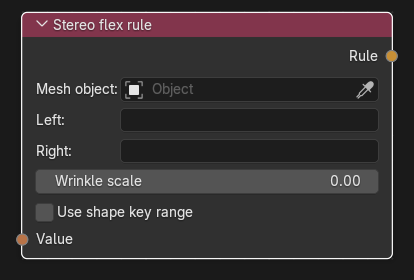
Drives a pair of shape keys – one for the left side, one for the right – from a single expression. A typical pair is smile.L and smile.R. Any controller in the expression becomes a stereo slider (left/right balance) in the exported model.
| Socket | Type | Multi-input | Description |
|---|---|---|---|
| Value | Flex expression | No (exactly one link, required) | A controller's Value or an expression node output. The expression is exported twice: with controller names prefixed left_ for the left key and right_ for the right key. |
| Socket | Type | Description |
|---|---|---|
| Rule | Flex rule | Link to the Flex rules collector's Rules input. |
| Control | Meaning |
|---|---|
| Mesh object | Mesh object that owns both shape keys. |
| Left / Right (Left shape key, Right shape key) | The two shape keys (searchable). They must differ. The left key follows left_<controller>, the right key right_<controller>. |
| Wrinkle scale | Wrinkle-map scale applied to both keys (0 = none). |
| Use shape key range | Gives the directly connected controller the union of both keys' slider ranges (see Shape flex rule for the details of range scaling and its requirements). |
| Status line | "Orphaned" / "Ambiguous change" when one of the shape keys was deleted or could not be matched; retarget and sync. |
Hidden generated outputs
At export, every controller used by a stereo rule is split into two controllers, right_<name> then left_<name> (studiomdl pairs adjacent right_X/left_X into one stereo slider X). The rule itself becomes two ordinary rules, one per key. Name collisions with an existing left_X/right_X are errors.
When the shape-key sync generates graphs for new X.L/X.R pairs it creates a Stereo Flex controller named after the stem plus this node.
- Add a controller
smileand a stereo rule with Mesh object = face, Left =smile.L, Right =smile.R. - Link controller Value → Value, Controller → collector Controllers, Rule → collector Rules.
- Export; the model gets a
smilestereo slider.
- In the Blender driver preview
right_X/left_Xbecome one slider with L/R balance; each key is driven by its own expression. - Corrective shapes that should react to one side should use a Corrective flex rule with a stereo controller among its drivers instead.
- The left/right assignment follows the key names you choose; the node does not check that the key names match the sides.
Back to Export Nodes