Repository navigation
Export Nodes SourceIOPropRawQcNode
An escape hatch: writes your own QC text into the generated QC for directives that no node covers.
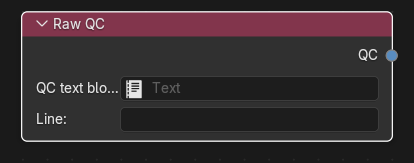
Category: Model settings. Node ID: SourceIOPropRawQcNode.
None.
| Socket | Type | Meaning |
|---|---|---|
| QC | Raw QC socket | Link to Raw QC on the Source 1 model output (multi-input; snippets are written in link order). |
| Property | Shown | Meaning |
|---|---|---|
| QC text block | always | A Blender Text block whose full contents are inserted. Takes priority over the inline line. |
| Line | while no Text block is set | One QC line typed inline. |
The snippet is emitted verbatim (trailing newlines trimmed), after all typed directives ($modelname, $model, $bodygroup, collision, attachments, hitboxes, $proceduralbones, sequences). Nothing is validated or rewritten, so paths and names must already be correct for the generated QC folder layout.
- Create a Text block
extra.qccontaining, for example,$surfaceprop "wood"and$illumposition 0 0 12. - Add a Raw QC node, assign the Text block.
- Link QC to the output's Raw QC socket.
- Use Preview Source 1 export; the snippet appears at the end of the QC in the preview Text.
- An empty snippet (blank text or only whitespace) or text containing a NUL character is rejected.
- Raw QC is only part of the QC route. Direct export cannot use it: each Raw QC node produces an error in Check direct export and blocks compilation. Use the Built-in studiomdl backend (or another QC-based backend) or replace the snippet with nodes.
- The text is read when the graph is evaluated, so later edits to the Text block are picked up by the next preview or export.
Back to Export Nodes.