Repository navigation
Home
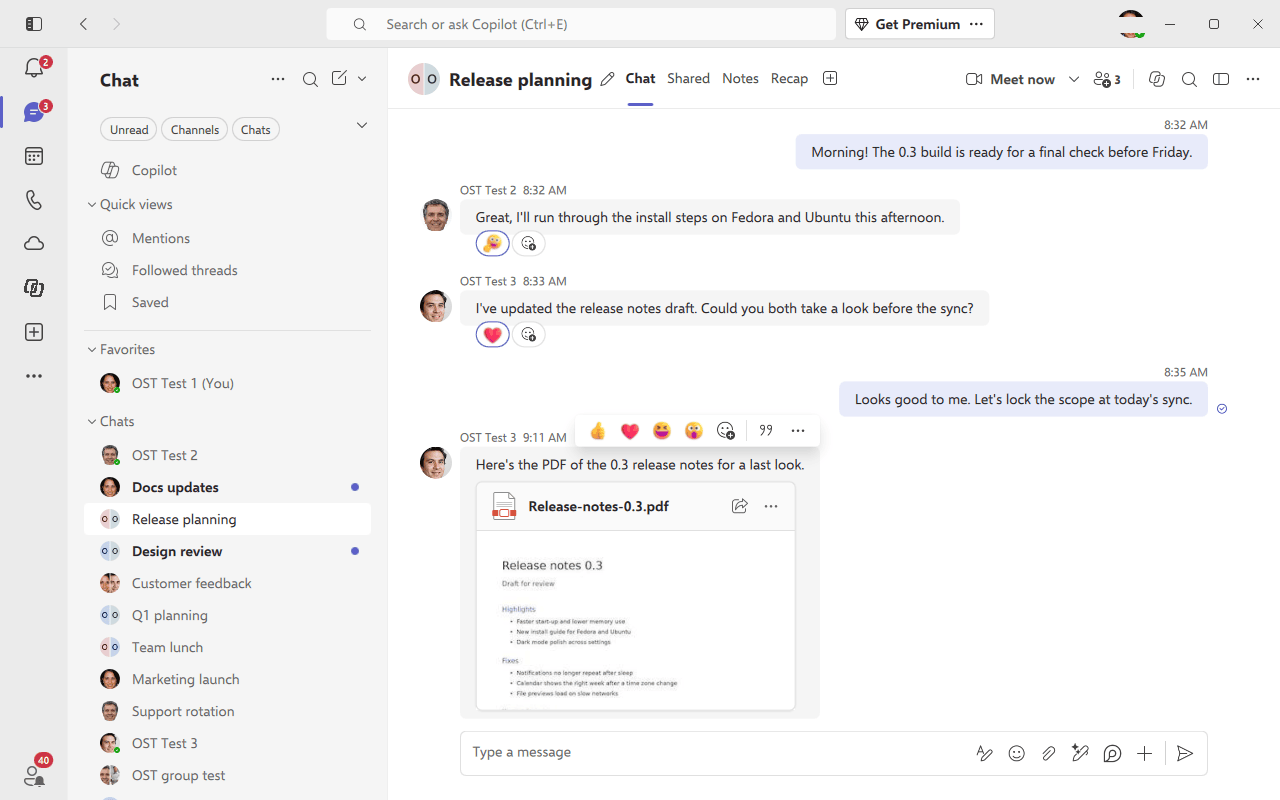
OST is a native Linux clone of the Microsoft Teams desktop app for
Windows, written in Rust with a Qt Quick interface. It looks and works like
Teams, one to one: the same app bar, chat list, conversations, channels,
calendar, call and meeting windows, settings and dialogs, measured from
Teams itself. Only the name and the logo differ. It also includes OST's
original terminal client, teams-cli.
OST is an independent open-source project. It is not affiliated with, endorsed by or supported by Microsoft. You sign in with your own Microsoft work or school account, and OST talks to the same Microsoft 365 services Teams does.
- Install OST from the latest release (verify the download), or build it from source.
- Sign in with your work or school account.
- Take the feature tour below, or press F1 in OST for its built-in Help.
| The app window | Sign-in, the title bar, Settings and more, Downloads, Teams Premium, pop-out windows |
| Chat | The chat list, quick views, filters, sections, new chats, the chat header and its tabs |
| Chat messages | Formatting, emoji and GIFs, mentions, files, scheduling, reactions, message actions, cards, suggested replies, video clips |
| Teams and channels | Posts and threads channels, channel menus, managing teams and channels, tags, channel tabs |
| Activity | Teams' activity feed, and activity in your other accounts |
| Search | The search box, the results page, Find in chat |
| Notifications | Teams' banners with quick reply, sounds, Do not disturb |
| Copilot | Copilot in chats, compose, meetings and the app bar |
| Calendar | Day, work week, week and month views, event cards and pages, scheduling, RSVP |
| Calls and meetings | Overview of everything below |
| Calls and voicemail | 1:1 and group calls, hold, transfer, park, encryption, voicemail, call delegation |
| Meetings | Joining, the pre-join screen, the lobby, the meeting window |
| Meeting controls | The toolbar, People, View, More, organizer controls, timer, call health |
| Sharing and presenting | Screen sharing, presenter modes, PowerPoint Live, Whiteboard, annotation |
| Captions and transcripts | Live captions, RTT, recording, transcripts, Interpreter |
| Breakout rooms | Rooms for organizers and participants |
| Town halls and webinars | The Events app and running events |
| Meeting recaps | Recaps, AI summaries, attendance, audio recaps |
| Video effects and clips | Backgrounds, filters, avatars, the clip recorder |
| Room mode | Run OST as a Teams Rooms device, and cast to a room |
| Files | OneDrive, files in chats and channels, the cloud file picker, the file viewer, sharing |
| Apps | The app bar, the Store, hosted apps (Planner, Shifts, Workflows), tabs |
| Loop, Notes and Whiteboard | Loop components and pages, OneNote, meeting notes, Whiteboard |
| Settings | Every Settings page and option |
| Presence and status | Status, status message, work location, out of office, accounts, the tray |
| People and profile cards | Profile cards, org charts, the People app |
| Devices | Speakers, microphones, cameras, headsets, room devices |
| Themes | Light, dark, classic and high contrast |
| Accessibility | Keyboard, screen readers, TTY, sign language, Immersive Reader |
| Help and feedback | Built-in Help, Report a problem, ideas |
| Terminal client |
teams-cli: a terminal interface and commands |
- Keyboard shortcuts
- Configuration and environment variables
- Bluetooth headsets
- Translations
- Privacy and data: sign-in storage, Flatpak permissions, optional system changes
- Verifying downloads
- Differences from Teams
- Troubleshooting and FAQ
- Contributing
Microsoft, Microsoft Teams, Microsoft 365, OneDrive, Outlook, Loop and Copilot are trademarks of the Microsoft group of companies.