Repository navigation
Requirements Search Filter
Fixed requirements search context variables for proper operation context.
Requirement search results did not properly maintain project context when opening requirements. Functions like openLinkedReqWindow() were missing the tproject_id parameter.
Before:
function openLinkedReqWindow(req_id, anchor)After:
function openLinkedReqWindow(req_id, tproject_id, anchor)Fixed 6 template files to pass tproject_id:
<!-- Before -->
<a href="javascript:openLinkedReqWindow({$requirement_id})">

<!-- After -->
<a href="javascript:openLinkedReqWindow({$requirement_id},{$gui->tproject_id})">Dashio Templates:
- gui/templates/dashio/execute/include/exec_test_spec.inc.tpl
- gui/templates/dashio/requirements/reqCreateTestCases.tpl
- gui/templates/dashio/requirements/reqViewVersions.tpl
Classic Templates:
- gui/templates/tl-classic/execute/inc_exec_test_spec.tpl
- gui/templates/tl-classic/requirements/reqCreateTestCases.tpl
- gui/templates/tl-classic/requirements/reqViewVersions.tpl
- Requirement windows lose project context
- Navigation issues when opening requirements
- Potential null reference errors
- Poor user experience
✅ Project context maintained
✅ Smooth requirement navigation
✅ No context loss
✅ Better user experience
Search Results
    ↓
[Click Requirement Link]
    ↓
Pass: req_id, tproject_id
    ↓
openLinkedReqWindow()
    ↓
Opens requirement in correct project context
tproject_id identifies which project the requirement belongs to:
- Prevents showing wrong requirement data
- Enables project-specific operations
- Validates user permissions
- Ensures data isolation
- Navigate to: Project → Requirements → Search
- Search for requirements
- Click on a requirement result
- Verify: Requirement opens in correct project context
- Verify: Navigation links work properly
- Verify: No console errors
- Requirement detail window opens
- Window shows correct project
- Related data loads properly
- Navigation back works smoothly
- Context-Variables - Systematic tproject_id/tplan_id propagation
- Code-Quality-Improvements - URL building consistency
- Security-Hardening - Input validation in search
- #165: Context Variables Management (similar fix)
- #169: Context Variables Propagation (extension)
Status: ✅ Fixed
Issue: #164
Commit: 3524ce2a1
Status: ✅ Implemented & verified (branch task/issue-1077)
Issue: #1077
Legacy TestLink 1.9.20 let you narrow a requirement search down to the requirements linked to a given test case:
-
gui/templates/dashio/requirements/reqSearchForm.tpl:157-161rendered a "Test Case ID" input (name="tcid", label$labels.th_tcid= "Test Case ID"), pre-filled with the project TC prefix ($gui->tcasePrefix). -
lib/requirements/reqSearch.php:368-391filtered only when the value actually changed (strcmp($argsObj->tcid, $guiObj->tcasePrefix) != 0), stripped the prefix and addedJOIN req_coverage RC ON RC.req_version_id = NH_REQV.id JOIN nodes_hierarchy NH_TCV ON NH_TCV.id = RC.tcversion_id JOIN tcversions TCV ON TCV.id = NH_TCV.id AND TCV.tc_external_id = '<id>'
on both branches of the search UNION (REQ versions and REQ revisions).
The modern screen had no such control at all (measured: the rendered form's labels were
Doc ID, Name, Scope, Status, Type, Version, Expected coverage, Relation type, Custom field, Value contains, Log message, Creation date from/to, Modification date from/to),
so the tcid parameter that GET /api/requirements/index.php/search already implemented
was unreachable from the UI.
- the project prefix (
testproject::getTestCasePrefix($tpid) . glue_character, the same value aslib/requirements/reqSearch.php:44-45) is resolved and the filter is skipped when the submitted value is unchanged from it; - the whole prefix is stripped from the entered value (legacy
str_replace($guiObj->tcasePrefix, "", $tcid)), falling back to dropping just the glue character, soTL-42,42and42-all resolve to42; - the
req_coverage → NH_TCV → tcversionsJOIN and itsver/revduplication are kept as they were.
- new
#grpTcidgroup, first field of the criteria grid, labeldata-i18n="search.tcid"rendered asinput-groupwith a#tcidPrefixAddonaddon — the shape already used by the moderngui/templates/search/searchView.html:76-84; - prefilled from
search-context's (previously unused)context.tcase_prefix; -
doSearch()sendstcidonly when it differs from the prefix; -
?tcid=deep-link prefill and Reset restoring the prefix default; - a notice line explaining that the project prefix in the field is ignored
(
search.prefixIgnored).
No new keys — search.tcid ("Test Case ID") and search.prefixIgnored already exist,
translated, in all 10 modern locale bundles (en, de, es, fr, it, ja, pt, ro, ru, zh).
All 10 bundles re-validated with python3 -m json.tool.
| input | before | after |
|---|---|---|
TL- (untouched default) |
0 rows (bogus filter on external id TL) |
whole-project result set, and no tcid in the request at all
|
42 |
1 row | 1 row |
TL-42 |
0 rows | 1 row |
42- |
0 rows | 1 row |
999 (unlinked TC) |
0 rows | 0 rows |
42 + Name ZZZ-no-match
|
0 rows | 0 rows (AND semantics kept) |
deep link ?tcid=TL-999
|
n/a | field prefilled, 0 rows |
| Reset | – | field back to TL-, results hidden |
Also: Event Viewer events table — only the LOGIN audit row, no new Error/Warning;
browser console — no errors or warnings; php -l clean on both files.

Status: ✅ Implemented & verified (branch task/issue-1078)
Issue: #1078
Legacy TestLink 1.9.20 offered a "Custom field" select + "Custom Field Value" textbox on the Search Requirements form:
-
lib/requirements/reqSearchForm.php:51-57—$gui->design_cf = get_linked_cfields_at_design($tpid, 1, null, 'requirement')with the default access key'id', so the map was keyed by numeric cfield id. -
gui/templates/dashio/requirements/reqSearchForm.tpl:168-186—{foreach from=$gui->design_cf key=cf_id item=cf}<option value="{$cf_id}">{$cf.label|escape}</option>, i.e. the option value was the cfield id. -
lib/requirements/reqSearch.php:196-199 + 351-365—custom_field_valueis in$strnull, and whencustom_field_id > 0both branches of the search UNION getJOIN cfield_design_values CFD ON CFD.node_id = REQV.id -- and REQR.id on the revision branch AND CFD.field_id = <id> AND CFD.value like '%<value>%'
The modern screen rendered the same two controls, but the filter could never filter. Two independent defects:
-
api/requirements/index.php:287-325 buildMeta()serialized each custom field as{name,label,type,verbose_type}— no numericid(the id was in the row all along:get_linked_cfields_at_design()selectsCF.*).searchReq.htmltherefore rendered<option value="undefined">,parseInt()→NaN, socustom_field_idwas never sent. -
GET /searchdid not readcustom_field_valueinto$args(missing from$strnull), soreqBuildSearchSql()fell back to''and the predicate degenerated toCFD.value like '%%'— "carries any value for this field".
Measured before the fix (fixture: 3 requirements, CF Req Severity with high / medium / none):
| request | before | after |
|---|---|---|
custom_field_id=9101&custom_field_value=high |
2 rows (REQ-1 and REQ-3) | 1 row (REQ-1) |
custom_field_id=9101&custom_field_value=medium |
2 rows | 1 row (REQ-3) |
custom_field_id=9101&custom_field_value= |
2 rows | 2 rows (legacy like '%%') |
custom_field_id=9101&custom_field_value=zzz |
0 rows | 0 rows, "no results" panel |
from the UI (cf.id undefined → param dropped) |
3 rows — filter inert | see below |
'id' => intval($cf['id']), // legacy: {foreach from=$gui->design_cf key=cf_id ...}Additive: the other 5 consumers of buildMeta() only read $cf['type'] / $cf['name'] / count().
custom_field_value (and legacy's targetRequirement) added back to $strnull, mirroring
lib/requirements/reqSearch.php:196-199. reqBuildSearchSql() already carried the legacy JOIN +
field_id / like predicates for both the ver and the rev branch of the UNION — only the
parameter plumbing was missing.
var cfId = parseInt(cf.id, 10);
if (!(cfId > 0)) { return; }          // never render value="undefined"
$('#custom_field_id').append('<option value="' + cfId + '">' + esc(cf.label) + '</option>');
searchReqSpec was not broken server-side — its route (api/requirements/index.php:2062-2071)
already emitted id from the map key — but it got the same guard.
No new keys. reqsearch.customField ("Custom field") and reqsearch.customFieldValue
("Value contains") were already translated in all 10 modern locale bundles.
Browser, admin, project CF1:CF1078 Project:
| Custom field | Value contains | match count | rows |
|---|---|---|---|
| Req Severity (9101) | high |
1 | REQ-1:REQ-1 has severity |
| Req Severity (9101) | medium |
1 | REQ-3:REQ-3 medium severity |
| Req Severity (9101) | (empty) | 2 | legacy like '%%'
|
| Req Severity (9101) | zzz |
0 | "no results" panel |
| (none) | high |
3 | value inert without a field |
deep link ?custom_field_id=9101&custom_field_value=high
|
— | 1 | URL prefill works |
| Reset | — | — | select → 0, value cleared |
Captured wire request after the fix:
/api/requirements/index.php/search?tproject_id=9001&custom_field_value=high&custom_field_id=9101
(before the fix custom_field_id was absent from the request entirely).
searchReqSpec re-checked with a spec-scoped CF 9102 "Spec Kind": options ["0|", "9102|Spec Kind"],
filter functional → Matches: 1. Event Viewer: SELECT COUNT(*) FROM events WHERE log_level<>16 → 0.
Browser console: no errors or warnings. php -l + node --check clean on all touched files.

Status: ✅ Implemented & verified (branch task/issue-1079)
Issue: #1079
Legacy TestLink 1.9.20 displayed the requirement-search results grouped, not as a flat
list. lib/requirements/reqSearch.php:100-183 built a two-column ExtJS grid
(req_spec, requirement) and configured it like this:
$table = new tlExtTable($columns, $matrixData, 'tl_table_req_search');  // :168
$table->setGroupByColumnName($labels['req_spec']);   // :170  <- GROUPING
$table->setSortByColumnName($labels['requirement']);  // :171  <- default sort
$table->sortDirection = 'DESC';                       // :172
$table->showToolbar = true;                           // :174
$table->toolbarRefreshButton = false;                 // :176
$table->toolbarShowAllColumnsButton = false;          // :177
$table->storeTableState = false;                      // :178
Four observable legacy behaviours follow from that:
-
Collapsible groups per specification path — one group per distinct requirement
specification, the group being the requirement's full tree path
(
$gui->path_info[$rfx['id']],reqSearch.php:149, fromtree_manager->get_full_path_verbose(..., 'path_as_string')). -
Item count in the group header —
showGroupItemsCountstaystrue(lib/functions/exttable.class.php:60), sogetGridViewConfig()emitsgroupTextTpl: '{text} ({[values.rs.length]} {[values.rs.length > 1 ? "Items" : "Item"]})'(lib/functions/exttable.class.php:585-596) →SRS Alpha (2 Items). -
The grouped column is hidden —
hideGroupedColumndefaults totrue(lib/functions/exttable.class.php:55), emitted ashideGroupedColumn:true, andreqSearch.php:177disables the one button that could reveal it. The specification path is therefore shown only by the group header, never repeated per row. -
Toolbar with a single button — with refresh / show-all-columns / store-state off,
gui/javascript/ext_extensions.js:184-199leaves exactly one control: Expand/collapse groups, togglingcollapseAllGroups()/expandAllGroups().
Default sort is specification path ascending (ExtJS sortOnGroupField keeps the groups
contiguous) and, inside each group, requirement descending.
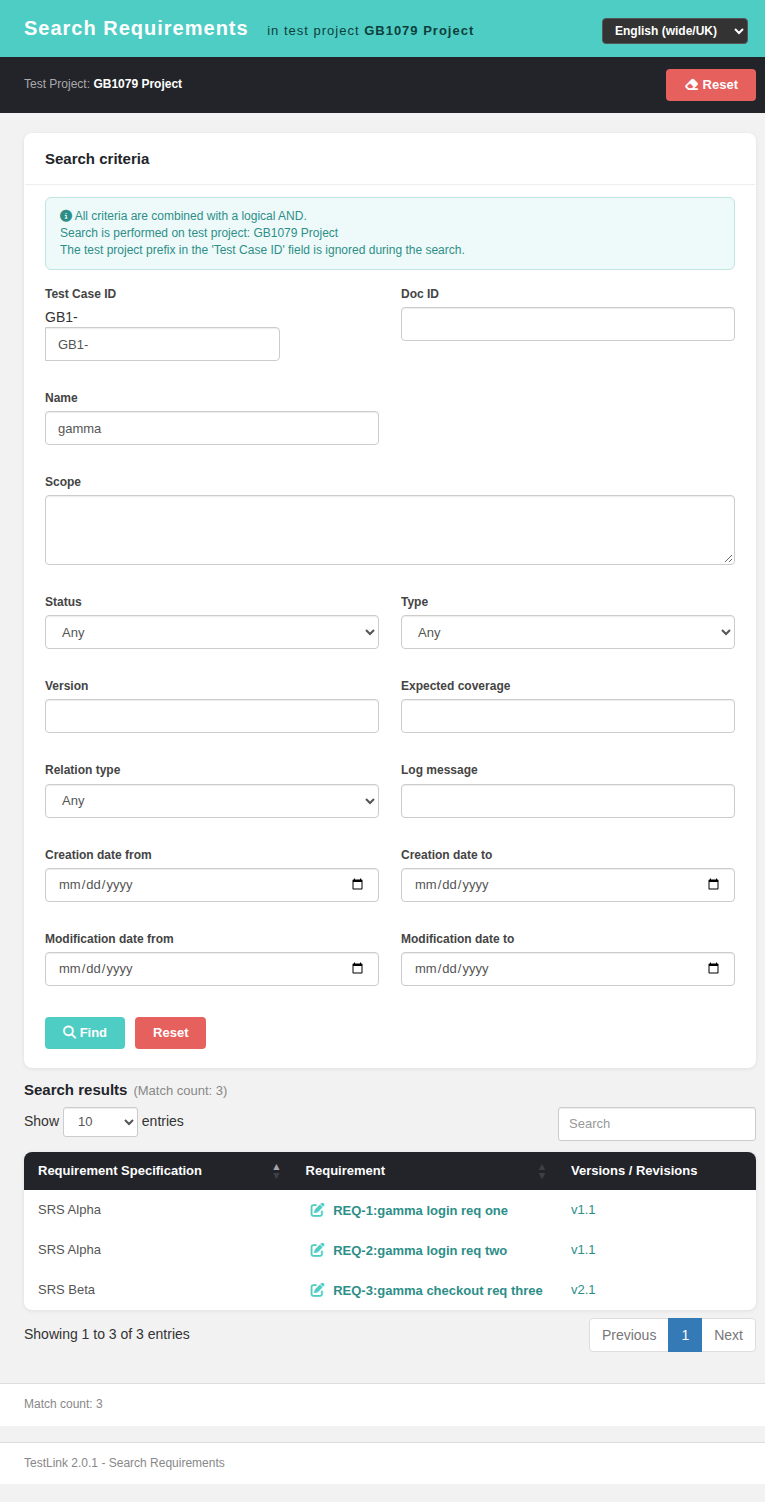
Measured gap before the fix (3 requirements under 2 specifications, Name = gamma):
{ "rows": [["SRS Alpha","REQ-1:gamma login req one","v1.1"],
           ["SRS Alpha","REQ-2:gamma login req two","v1.1"],
           ["SRS Beta","REQ-3:gamma checkout req three","v2.1"]],
  "groupHeaderRows": 0, "gridToolbarPresent": false,
"dtOrder": "[[0,\"asc\"]]", "groupedColumnVisible": true }The BFF needed no change: GET /api/requirements/index.php/search already returns
path per result row (api/requirements/index.php:2853, same source as
reqSearch.php:74-76), so path is used directly as the grouping key.
| legacy reference | modern implementation |
|---|---|
setGroupByColumnName('req_spec') (reqSearch.php:170) |
DataTables RowGroup 1.4.1 with rowGroup.dataSrc: 'path'; rows are now objects {path, requirement, reqSort, versions} instead of positional arrays |
groupTextTpl '{text} (N Item[s])' (exttable.class.php:591) |
rowGroup.startRender builds the teal group band with reqsearch.groupItem / groupItems, and spans the visible columns (the grouped one is hidden) |
ExtJS group collapse / expand |
clicking a group header toggles that group; the chevron flips fa-chevron-down ⇄ fa-chevron-right
|
collapseAllGroups() / expandAllGroups() (ext_extensions.js:186-197) |
toolbar button Expand/Collapse Groups → toggleGroups(), which decides from the live data whether to collapse or expand all, and reports Groups collapsed / Groups expanded
|
toolbarRefreshButton=false, toolbarShowAllColumnsButton=false, storeTableState=false (reqSearch.php:176-178) |
the toolbar carries only that one button — no refresh, no show-all-columns, no default-state |
hideGroupedColumn = true (exttable.class.php:55) |
the Requirement Specification column is visible: false; the path is shown by the group header |
setSortByColumnName('requirement') + sortDirection='DESC' (reqSearch.php:171-172) |
order: [[1,'desc']], with the sort value being the raw DOC-ID:name text (data: 'reqSort' + render) — the legacy renderer only changed the cell, not the sort value |
sortOnGroupField (groups stay contiguous) |
pinGroupOrder() re-applies [[0,'asc'], …] as the primary criterion whenever the user sorts by another column; deferred one tick because order.dt fires during a draw |
no grid at all when nothing matches (reqSearch.php:127) |
the empty-result path drops the stale grid and hides the toolbar |
State handling follows the pattern already shipped for the Requirements Overview grid
(reqOverview.html, issue #1034): collapsedGroups is a hasOwnProperty-keyed map (a
specification literally named toString must not inherit Object.prototype members), and
pruneCollapsedGroups() drops keys that no longer exist after a new search.
5 new keys, in all 10 bundles (en, de, es, fr, it, ja, pt, ro, ru, zh), inserted
in place among the existing reqsearch.* keys (diff +5/-0 per bundle):
| key | en | ro |
|---|---|---|
reqsearch.expandCollapseGroups |
Expand/Collapse Groups | Extinde/Restrânge Grupurile |
reqsearch.groupItem |
({count} Item) |
({count} Element) |
reqsearch.groupItems |
({count} Items) |
({count} Elemente) |
reqsearch.groupsCollapsed |
Groups collapsed | Grupuri restrânse |
reqsearch.groupsExpanded |
Groups expanded | Grupuri extinse |
Fixture tmp/fixtures_1079.sql: project 9001 (GB1), specs 9002 SRS Alpha /
9003 SRS Beta, requirements REQ-1, REQ-2 (SRS Alpha) and REQ-3 (SRS Beta, v2).
| # | check | expected | measured |
|---|---|---|---|
| 2 | group headers | 2 |
groupHeaderCount = 2 → SRS Alpha (2 Items), SRS Beta (1 Item)
|
| 3 | item count, singular/plural | {text} (N Item[s]) |
SRS Beta (1 Item), SRS Alpha (2 Items)
|
| 4 | group order + pinned sort | path asc |
SRS Alpha, SRS Beta; order() = [[0,"asc"],[1,"desc"]]
|
| 5 | order inside a group | requirement desc | SRS Alpha: REQ-2 then REQ-1
|
| 6 | grouped column | hidden | colVisible = [false,true,true] |
| 7 | click a header | group collapses, chevron flips, toolbar active | only REQ-3 visible, fa-chevron-right, collapsedGroups = ["SRS Alpha"]
|
| 8 | click again | re-expands | 3 rows visible, fa-chevron-down
|
| 9 | toolbar click (all expanded) | collapse all | 0 visible rows, info Groups collapsed
|
| 10 | toolbar click (all collapsed) | expand all | 3 visible rows, info Groups expanded
|
| 11 | toolbar click (one collapsed) | expand all (toggle semantics) | all groups expanded |
| 12 | new search without the collapsed group | state pruned |
collapsedGroups ["SRS Alpha"] → []
|
| 13 | search with no match | no grid, notice shown, toolbar gone |
groups = 0, toolbar = "none", No requirements match…
|
| 14 | Reset | everything cleared | toolbar/wrap hidden, collapsedGroups = 0, field blank |
| 15 | ?locale=ro |
localized |
Extinde/Restrânge Grupurile, SRS Alpha(2 Elemente), Grupuri restrânse
|
| 16 | ?locale=zh |
localized |
展开/折叠分组, SRS Alpha(2 项), 分组已折叠
|
| 17 | requirement / version links | still open reqView.html
|
handlers intact after the array → object row switch |
| 18 | browser console | clean | no errors, no warnings |
A subagent review of the branch (see the issue for the full report) found one BLOCKER and four MAJOR issues, all fixed in the same branch before landing:
| # | finding | fix |
|---|---|---|
| B1 |
drawCallback's this is oSettings.oInstance, not the settings object, so the stale-instance guard in pinGroupOrder() rejected every call and the group key stopped being the primary sort criterion — a spec then split into several group headers when the user sorted |
bind order.dt on document (which passes the real settings object), exactly like reqOverview.html:143; drop the drawCallback; group-header click moved to a delegated document handler reading data-key (also kills a per-draw .on('click') binding) |
| M1 | DataTables' default pageLength: 10 makes RowGroup merge only the current page → per-page item counts and split groups |
pageLength: -1, matching the legacy grid (tlExtTable height 500 + autoHeight, no paging) |
| M2 | double escaping: the BFF htmlentities()-encoded path/req_doc_id/name and the client escaped them again, so a spec named R&D / Bob's Spec rendered as R&D / Bob's Spec
|
the search payload now returns raw values; the client-side esc() is the single escaping layer |
| M3 | a throw inside the deferred re-apply left the reordering guard stuck true, permanently disabling the pin |
try { … } finally { reordering = false; } + a resTbl null check in the deferred callback |
| m3/m5/n1-n4 |
destroyTable() dropped the data-i18n hooks from the rebuilt <th>s; no defaultContent; unused var path, .path-cell, a dead renderer on the permanently hidden column, an unread data-key
|
all corrected |
Two further defects were found by the suite itself and fixed during the run (checkpoint 1/3 of the issue):
-
Uncaught TypeError: Cannot read properties of undefined (reading 'sType')— caused by my first attempt atorderData: ['reqSort','desc'], an array form DataTables 1.13.7 does not accept with a string data-property. Replaced withdata: 'reqSort'+render, which is also the closer analogue of the ExtJS renderer/store split. - the group key was never pinned: the initial draw happens inside the
DataTable()constructor, i.e. before the table reference is assigned, sopinGroupOrder()bailed out and the groups came outSRS Beta, SRS Alpha. Fixed by invoking it once after init.
Gates: node --check on the extracted inline script; python3 -m json.tool on all 10
bundles (+5/-0 each); Event Viewer events — 0 rows with log_level >= 2 (only the
log_level 16 audit_login_succeeded audit row); suite gate
TLU_REQUIRE_SUITE="Issue #1079" bash ai/verify_test_suites.sh → 7 PASS / 0 FAIL,
78 → 79 suites, none lost.
Before - flat list, the specification path repeated on every row:
After - results grouped by requirement specification, item counts in the group headers,
grouped column hidden (legacy hideGroupedColumn):

A collapsed group - click a group header to collapse/expand it, or use the Expand/Collapse Groups toolbar button:
