Repository navigation
User Management Modernized
TestLink provides four screens for managing users, roles, and role assignments. All four are accessible from the System section of the left navigation sidebar and share a common tab bar for quick navigation between screens.
Prerequisite: You must be logged in as admin (or a user with the mgt_users and/or user_role_assignment rights).
- User Management
- Role Management
- Assign Test Project Roles
- Assign Test Plan Roles
- Role Hierarchy
- Common Workflows
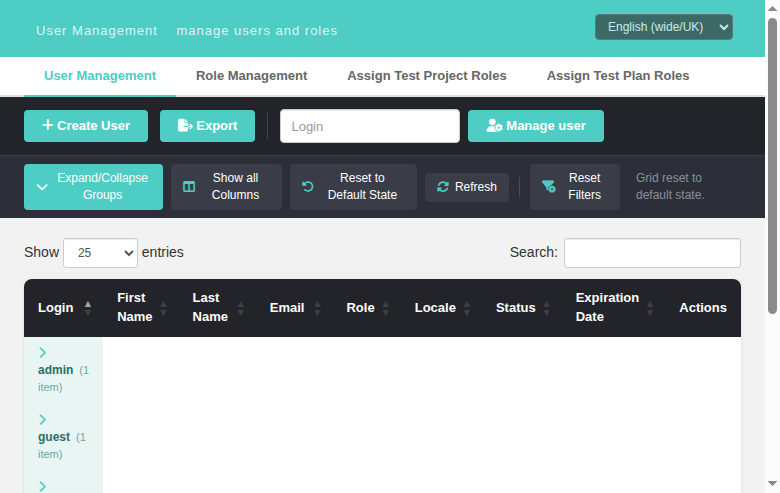
Path: System > User Management
URL: gui/templates/usermanagement/usersView.html
Purpose: Create, edit, enable/disable, and delete user accounts.
| Element | Description |
|---|---|
| Create User button | Opens the create user modal |
| Export button | Redirects to the modern User Management Export screen |
| Manage user box | Login lookup (legacy manage_user form): type a login and click Manage user to jump straight to that user's edit modal; an unknown login shows a localized "login does not exist" message |
| Data Table | Lists all active and inactive users (soft-deleted users are hidden) |
| Search box | Filters the table by any column |
| Show entries | Controls how many rows are displayed per page |

Legacy gui/templates/dashio/usermanagement/usersView.tpl showed a "Login [...] Manage user"
form below the buttons that posted to usersEdit.php?doAction=edit&login=<login>, where
initializeGui() resolves the login to a user id via tlUser::doesUserExist() and opens
the edit screen — or shows login_does_not_exist for an unknown login.
The modern screen reimplements this in the toolbar:
- Type a full login into the lookup box (placeholder = Login, maxlength 30, required).
- Click Manage user → the BFF resolves it (
GET /api/users/index.php?login=<login>) and opens the Edit User modal for that user. - Unknown login → localized alert "Login ___ does not exist"
(
user.loginDoesNotExist, present in all 10 locale bundles); empty input is blocked client-side (HTML5required), and an empty parameter to the API returns 400login_required.
| Column | Description |
|---|---|
| # | Auto-incremented user ID |
| Login | The username used to log in |
| Name | The user's display name (first + last) |
| The user's email address | |
| Global Role | The system-wide role assigned to this user |
| Locale | The UI language preference |
| Active | Active (green badge) or Inactive (red badge) |
| Expiration Date | Localized expiration date of the account (server-side localize_dateOrTimeStamp with the user's date_format, e.g. 31/12/2026); empty cell when no expiry set (legacy parity, issue #883) |
| Actions | Edit, Enable/Disable, Delete icons |
The two legacy columns were re-added to the DataTable (same order as legacy
lib/usermanagement/usersView.php:168-180): Locale sits between Role and
Status, Expiration Date between Status and Actions. The BFF list route
(api/users/index.php) already returned locale and expirationDate for
every user and now additionally computes expirationDateFormatted with the
same call legacy uses (localize_dateOrTimeStamp(null,null,'date_format',…)),
so e.g. 2026-12-31 renders as 31/12/2026. Users without an expiration date
show an empty cell.

- Edit (pencil icon): Opens the edit modal to change user details and global role
-
Reset password (key icon, issue #884): Generates a new random password for the user, then either emails it (default
password_reset_send_method = send_password_by_mail) or returns it to be displayed on screen (display_on_screen). Shown only for users whose effective authentication method hasallowPasswordManagement = true(legacyusersEdit.tpl:169-178parity) - Enable/Disable (toggle icon): Toggles the user between Active (1) and Inactive (0) states
-
Delete (trash icon): Soft-deletes the user (sets
active = 2, hidden from UI but retained in database). Not available for the admin user
A second toolbar row sits under the Create/Export toolbar — the port of the legacy
ExtJS grid toolbar (lib/usermanagement/usersView.php:215-217 +
lib/functions/exttable.class.php:96-124). Five buttons:
| Button | Legacy flag | Behaviour |
|---|---|---|
| Expand/Collapse Groups | toolbarExpandCollapseGroupsButton |
Groups the grid by role (DataTables RowGroup, same pattern as the Test Plan with Custom Fields report). Clicking a group header collapses/expands that single group; the button collapses or expands all groups at once |
| Show all Columns | toolbarShowAllColumnsButton |
Reveals/hides the three hidden technical columns: Role ID, User ID, Is Special (in demoMode, Is Special = 1 for demoSpecialUsers, default admin — legacy usersView.php:295-303). Button label flips to "Hide technical columns" while shown; the choice survives a Refresh |
| Reset to Default State | toolbarDefaultStateButton |
Restores the default grid state: hides the technical columns, expands all groups, clears the search box, sorts by Login ascending, page size 25 |
| Refresh | toolbarRefreshButton |
Re-fetches the user list from the BFF (GET /api/users/index.php), keeping the current column-visibility choice |
| Reset Filters | toolbarResetFiltersButton |
Clears the DataTables search box, showing "Filters cleared" |
The BFF list route now returns the raw role_id, user_id and is_special
fields per user so the technical columns are populated client-side.


The legacy edit screen had a dedicated Reset password form
(gui/templates/dashio/usermanagement/usersEdit.tpl:339-356 → usersEdit.php:222-269
createNewPassword() → lib/functions/users.inc.php:167-225 resetPassword()). The
modern screen ports it to a row action backed by a new BFF route:
-
UI (
gui/templates/usermanagement/usersView.html): a key icon in the Actions column per row, gated bycanResetPassword(u)against the/meta/authenticationpayload (the user's ownauthenticationvalue, falling back to the configured default method — same rule as the legacy template). Clicking shows a confirm dialog, thenPOST /api/users/index.php/{id}/reset-password; the outcome is shown as an alert: the bundle message for sent-by-mail,user.passwordShownOnScreenwith the fresh password for display-on-screen, or the localized error. -
BFF (
api/users/index.php,POST /users/{id}/reset-password), mirroring the legacycreateNewPassword()flow step by step:-
tlUser::isPasswordMgtExternal($u->authentication)→ refuse withpassword_mgmt_external(defense-in-depth; the UI hides the action anyway); -
config_get('demoMode')→ refuse (demo_reset_password_disabled); - reads
password_reset_send_method; unless it isdisplay_on_screen, validatesconfig_get('smtp_host')withZend_Validate_Hostname(ALLOW_ALL)→invalid_smtp_hostnameon failure; - calls the legacy
resetPassword($db,$userId,$method)(email send viaemail_send()when by-mail) and on success logslogAuditEvent(tls('audit_pwd_reset_requested',$login),'PWD_RESET',$id,'users').
-
-
Config:
config_get('password_reset_send_method')decides send-by-mail vs display-on-screen. With the default unconfigured SMTP host the by-mail path returns the same message as legacy: "Password Reset can not be done. Reason: SMTP Hostname seems to be invalid". - New i18n keys in all 10 locale bundles:
user.resetPassword,user.resetPasswordConfirm,user.passwordResetSent,user.passwordShownOnScreen,user.passwordResetInvalidSmtp,user.passwordResetDenied,user.resetFailed,user.passwordResetError.

The legacy edit screen offered a Generate a new key button
(gui/templates/dashio/usermanagement/usersEdit.tpl:351-355) gated on
$tlCfg->api->enabled and wired to usersEdit.php:274-318 createNewAPIKey().
The modern screen ports it to a row action backed by a new BFF route:
-
UI (
gui/templates/usermanagement/usersView.html): an id-card icon in the Actions column per row, rendered only when the/meta/authenticationpayload reportsapiEnabled = true(canGenerateApiKey()— legacy$tlCfg->api->enabledparity). Clicking shows a confirm dialog (user.generateApiKeyConfirm), thenPOST /api/users/index.php/{id}/generate-apikey; the result is shown as an alert: "New API key has been sent via mail" (user.apiKeySent) or the localized error. -
BFF (
api/users/index.php,POST /users/{id}/generate-apikey), mirroring the legacycreateNewAPIKey()flow step by step:- re-checks
$tlCfg->api->enabledserver-side →403 api_disabled(defense-in-depth; the UI hides the action anyway); - validates
config_get('smtp_host')withZend_Validate_Hostname(ALLOW_ALL)→400 invalid_smtp_hostnameon failure (same gate as legacy). The legacy lang keyapikey_cannot_be_reseted_invalid_smtp_hostnameis not defined in anystrings.txtbundle (lang_get would emit a "not localized" WARNING event), so the BFF returns a plain message and the UI maps thecodeto the localizeduser.apiKeyInvalidSmtp; - calls
APIKey::addKeyForUser($id)(lib/functions/APIKey.class.php:38-50UPDATE users SET script_key = md5(8×mt_rand())) and reads the fresh key viagetAPIKey(); - emails the key via
@email_send(...)(subjectmail_apikey_subject, bodyyour_apikey_is+ key +contact_admin). A delivery failure is caught and written to the PHP error log only (error_log) — never to the Event Viewer (no new WARNING events), matching legacy's silent@suppression; - on success logs
logAuditEvent(tls('audit_user_apikey_set',$login),'CREATE',...).
- re-checks
-
Config:
config_get('smtp_host')+ the legacymail_apikey_subject/your_apikey_is/from_emailglobals. With the default unconfigured SMTP host the route returns400 invalid_smtp_hostname, same as legacy. - New i18n keys in all 10 locale bundles:
user.generateApiKey,user.generateApiKeyConfirm,user.apiKeySent,user.apiKeyFailed,user.apiKeyInvalidSmtp,user.apiKeyDisabled.


| Field | Required | Description |
|---|---|---|
| Login | Yes | Unique username (4-25 chars, alphanumeric + underscores) |
| Password | Yes (create only) | Minimum length enforced by system config |
| First Name | Yes | User's first name |
| Last Name | Yes | User's last name |
| Yes | Valid email address | |
| Global Role | Yes | Select from available roles (e.g., admin, test designer, tester, etc.) |
| Locale | No | UI language (e.g., en_GB, ro_RO) |
| Authentication method | No | Legacy parity usersEdit.php:440-451 (issue #882): Default (configured) — value '', follows config_get('authentication')['method'] — plus one option per authentication['domain'] key (DB/LDAP), fed by the BFF meta endpoint GET /api/users/index.php/meta/authentication. Persisted into users.auth_method on create/update. |
| Expiration Date | No | Date picker (native type=date) + Clear Date button. Empty or cleared → expiration_date = NULL; otherwise stored ISO Y-m-d via tlUser::setExpirationDate(). Hidden for users listed in config_get('noExpDateUsers') (default ['admin']) — legacy expDateEnabled usersEdit.php:462-467; the BFF enforces the same guard server-side. |


Legacy creates a user only with a non-empty password: the create form
blocks submit with warning_empty_pwd (usersEdit.tpl:153-155 sets
check_password=1, validateForm hook, password input required) and the
server rejects empty passwords — doCreate() checks setPassword() and treats
tlUser::E_PWDEMPTY (< 0) as a failure, so writeToDB() never runs
(usersEdit.php:153-171).
The modern screen now enforces the same rule on both layers:
-
BFF (
api/users/index.php, POST create): thesetPassword()return value is checked — anything< tl::OK(i.e.E_PWDEMPTY= "The password must not be empty!") returns HTTP 400{status:error, code:'warning_empty_pwd', message:<legacy string>}beforewriteToDB(), so no blank-password row can be persisted (not even via a direct API POST).S_PWDMGTEXTERNAL(2 >= OK) remains allowed, matching legacydoCreate, which validates the password against the configured default auth method. -
UI (
usersView.html): the password input carriesrequiredin the create modal (removed again on edit — "leave empty to keep"), andsaveUser()blocks an empty-password create client-side with the localizeduser.passwordRequiredmessage, focusing the field — mirroring legacyvalidateForm(f, check_password=1). -
i18n: new key
user.passwordRequiredin all 10 locale bundles, used for both the client-side block and the server 400 mapping.


When $tlCfg->demoMode = ON; in config.inc.php the whole User Management screen becomes read-only, mirroring legacy usersEdit.tpl:312-355 where the Save button is replaced by the demo_update_user_disabled note (on doUpdate) and the Reset password / Generate key form by demo_reset_password_disabled.
-
BFF enforcement (
api/users/index.php): a shareddemoModeBlockedWrite()helper (mirror ofapi/userinfo) returns HTTP 403{status:error, code:'demo_mode'}from every write route — POST create, PUT update, PUT/active, DELETE, POSTreset-passwordand POSTgenerate-apikey. The UI can never bypass it. -
UI gating (
usersView.html): with demo mode on a read-only amber banner appears under the header, the Create User toolbar button disappears, grid rows show only the Edit icon (no reset-password / generate-API-key / enable-disable / delete), and the create/edit modal replaces Save with auser.demoUpdateDisablednotice and disables every field. Cancel/close stay usable. -
Discovery:
GET /api/users/index.php/meta/authenticationnow returnsdemoModeso the front-end knows the state. - New i18n keys in all 10 locale bundles (values from the legacy
strings.txt):user.demoUpdateDisabled,user.demoResetPasswordDisabled.


Legacy usersEdit.tpl:189-193 showed a question/help icon (title
show_event_history) next to the "User Details" legend that drilled into the
Event Viewer pre-filtered to the edited user's audit activity via
showEventHistoryFor(user_id,'users'). The icon was gated on
grants->mgt_view_events (usersEdit.php:457-458, hasRight('mgt_view_events')).
The modern edit modal replicates it:
-
BFF (
api/users/index.phpGET /meta/grants): the grants payload now includesmgt_view_events('yes'/'no'), mirroring the legacy separate assignment inusersEdit.php:457-458(the value is deliberately NOT part ofgetGrantsForUserMgmt(), exactly like legacy). -
UI (
usersView.html): a Show event history button (#btnEventHistory,fa-history+data-i18n="user.showEventHistory") appears in the edit modal header only while editing an existing user and the current logged-in user holdsmgt_view_events. It is hidden in the create modal and for users without the right. Clicking it submits a hidden GET form (object_id=<user id>&object_type=users) which opens the modern Event Viewer ateventviewer.html?object_id=<id>&object_type=usersin a new tab, showing "Filtered by users #" — the same pattern as the user profile (userInfo.html) and milestones (planMilestones.html) screens. - The Event Viewer BFF (
api/eventviewer/index.php) independently enforcesmgt_view_events(403 without it), so the filter cannot be abused. - New i18n key in all 10 locale bundles:
user.showEventHistory(values match the existingprofile.showEventHistorytranslations).


Legacy lib/usermanagement/usersView.php:47 (disable) and
lib/usermanagement/usersEdit.php:169/214 (create/update) filled
$gui->user_feedback with localized messages — user_created ("User %s was
successfully created"), user_disabled ("User %s was successfully disabled"),
getUserErrorMessage() for failures — rendered as a banner by
inc_update.tpl. The modern screen used to close the modal / reload the grid
after every write with no success feedback at all.
The 2.0.1 screen now mirrors that feedback with a Dashio toast (bottom-right, auto-hides after ~3 s, teal for success / red for errors):
-
BFF (
api/users/index.php): every write-success route now returnsfeedback_keywith the same key namespace legacy used for$gui->user_feedback: POST/users→user_created, PUT/users/{id}→user_updated, PUT/users/{id}/active→user_enabled|user_disabled, DELETE/users/{id}→user_deleted. -
UI (
gui/templates/usermanagement/usersView.html): a fixed.toastelement (same pattern ascfieldsAssignView.html/planUpdateTC.html) plus auserFeedback(feedbackKey, login)mapper to the client-side i18n keys. Create/update save (saveUser()), enable/disable (toggleActive()) and delete (deleteUser()) all show the localized toast with the affected login; toggle/delete errors moved fromalert()to the red toast; the confirm dialogs (user.confirmDelete/Disable/Enable) and the status badges (user.active/user.inactive) are localized too. -
i18n: new keys in all 10 bundles —
user.feedback.created,user.feedback.updated,user.feedback.disabled,user.feedback.enabled,user.feedback.deleted,user.confirmDelete,user.confirmDisable,user.confirmEnable— translations taken from the legacylocale/<XX>/strings.txtmessages.
Screenshot: docs/screenshots/issue-890-operation-feedback-toast.png (create
toast "User was successfully created").
- Only users with
active = 1(Active) appear in the table - Deleted users (
active = 2) are hidden but preserved for audit trail - The admin user cannot be deleted or disabled
- Changes to other users are logged in the Event Viewer as AUDIT events
Path: System > Role Management
URL: gui/templates/usermanagement/rolesView.html
Purpose: Create custom roles and manage their permission sets (rights).
| Element | Description |
|---|---|
| + Create Role button | Opens the create role modal |
| Data Table | Lists all roles (system + custom) |
| Search box | Filters roles by name or description |
| Show entries | Rows per page (10/25/50/100) |
| Column | Description |
|---|---|
| ID | Role ID |
| Name | Role display name |
| Description | Role description text |
| Rights | Color-coded permission tags (read/write/execute) |
| Type | System (grey badge) or Custom (teal badge) |
| Actions | Edit, Delete icons |
System roles cannot be edited or deleted. They are protected by the system:
| ID | Name | Description |
|---|---|---|
| 1 | <reserved system role 1> | Reserved for internal use |
| 2 | <reserved system role 2> | Reserved for internal use |
| 3 | <no rights> | Empty role with no permissions |
These roles ship with TestLink and can be edited (but not deleted):
| ID | Name | Typical Use |
|---|---|---|
| 4 | test designer | Design and manage test cases |
| 5 | guest | Read-only access to metrics |
| 6 | senior tester | Execute tests + create builds |
| 7 | tester | Basic test execution |
| 8 | admin | Full system administration |
| 9 | leader | Project and plan management |
| Field | Description |
|---|---|
| Name | Role name (required, must be unique) |
| Description | Optional description |
| Rights | Grid of checkboxes — select permissions for this role |
| Select All link | Toggles all checkboxes on/off |
Rights are color-coded in the table:
| Tag Color | Category | Examples |
|---|---|---|
| Blue | Read |
mgt_view_tc, mgt_view_req, testplan_metrics
|
| Red | Write |
mgt_modify_tc, mgt_modify_req, mgt_modify_product
|
| Green | Execute | testplan_execute |
- Only Custom roles can be deleted (roles with IDs > 3)
- Before deletion, the system shows how many users currently have this role assigned
- Users assigned to a deleted role are automatically reset to the configured
replacement role (
role_replace_for_deleted_roles, legacyrolesView.tpl:61warningwarning_users_will_be_reset)
Every create/update/duplicate/delete operation now surfaces a localized
feedback toast (bottom-right Dashio banner), mirroring the legacy
inc_update.tpl user_feedback/$sqlResult area of rolesEdit.tpl:53 and
rolesView.tpl:43:
-
BFF (
api/roles/index.php): write-success routes return the samefeedback_keynamespace #890 added for User Management —role_created(POST),role_updated(PUT),role_deleted(DELETE),role_duplicated(POST/duplicate). Error routes returnmessageKeythat resolves the legacy localized messages viagetRoleErrorMessage()(roles.inc.php:440-466):error_duplicate_rolename→role.error.nameExists,error_role_no_rolename→role.error.noRoleName,error_role_no_rights→role.error.noRights,error_role_not_updated→role.error.notUpdated,error_role_deletion→role.error.deleted; the system-role guards map torole.editLocked/role.systemDeleteDenied. -
UI (
rolesView.html): Dashio.toast(ok = teal, err = red, auto-hide ~3s),toast()+roleFeedback()helpers. Success → OK toast ("RoleXwas successfully created / saved / deleted / duplicated"); errors → red toast or the modal error line, always localized — noalert()dialogs remain. -
i18n: 9 keys added to all 10 bundles (
role.feedback.created/updated/ deleted/duplicated,role.error.deleted/nameExists/noRoleName/noRights/ notUpdated), translations taken from legacylocale/*/strings.txt.

- Create roles with only the permissions needed (principle of least privilege)
- Role rights apply globally — they are not project-specific
- Changes to roles immediately affect all users assigned to that role
Path: System > Assign Test Project Roles
URL: gui/templates/usermanagement/usersAssignProject.html
Purpose: Assign a role to each user at the test project level.
Test project roles control what a user can do within a specific test project. This overrides or supplements the user's global role for project-scoped activities.
| Element | Description |
|---|---|
| Test Project dropdown | Select which project to manage |
| User Table | Lists all active users with their current project role assignment |
| Save Changes button | Enabled only when changes are detected |
- Select a Test Project from the dropdown
- The table loads all active users and their current role assignment for that project
- Change the Assigned Role dropdown for any user
- Modified rows are highlighted in yellow with a modified badge
- Click Save Changes to persist
| Column | Description |
|---|---|
| # | User ID |
| Login | Username |
| Name | Display name |
| Assigned Role | Dropdown with available roles + "-- no role --" |
| Option | Meaning |
|---|---|
| -- no role -- | User has no project-specific role (inherits global role for public projects) |
| test designer | Can manage test cases within this project |
| guest | Read-only metrics access |
| senior tester | Execute + create builds |
| tester | Basic test execution |
| admin | Full project administration |
| leader | Project management |
| Test Manager | Custom role (if created) |
- Users see only projects they have access to (based on global role + project public/private settings)
- Admin users see all projects regardless of assignments
- A user with no project role on a private project will NOT have access to it
- Project roles do not override the global role — they supplement it
- For public projects, any user with a valid global role can participate unless explicitly denied
- For private projects, users must be explicitly assigned a role
Legacy opened this screen through usersAssign.php:23 testlinkInitPage(...), which ran
checkSessionValid() before the first render, so a session idle past
config_get("sessionInactivityTimeout") minutes never painted the assignment form — it went
straight to login.php?note=expired&destination=…, carrying the localized “Session expired.
Please log in again.” box.
The modern screen reproduces that behaviour on every request it makes:
| request | on 401 {"code":"session_expired"}
|
|---|---|
GET /api/roles/index.php/meta/tproject-roles (first request of the page) |
error toast + bounce to the login page |
project switch (loadUsers) |
same |
Save Changes (saveAssignments) |
same |
Between the toast and the redirect the page is put in the legacy “nothing to act on” state: the
tab bar, the toolbar and the grid are hidden, the Test Project combo is emptied and disabled,
Save is disabled and the footer is cleared — no misleading “Select a test project above…” box is
shown and no dead control can be clicked. A 403 is unaffected: it still shows the “You do not
have enough rights…” deny box. The helper keys on the HTTP status, so an absent session
(401 {"message":"Not authenticated"}, no code key) is handled too.
Because the Dashio shell never refreshes the session timer, this is the normal fate of a shell tab
left open past the timeout — a screen that handles the 401 itself bounces by itself. All four
user-management screens now do: the two assign-roles screens (this one, #1620, and
Assign Test Plan Roles, #1646), plus User Management and
Role Management themselves (#1760 — 12 and 8 request paths respectively, and
api/users/index.php never enforced the inactivity window at all, so a stale session could even
create users).
Details: Task-Issue-1760-User-Role-Management-Session-Expired-Bounce.md

Details: Task-Issue-1620-Assign-Project-Roles-Initial-Load-Session-Expired.md
Path: System > Assign Test Plan Roles
URL: gui/templates/usermanagement/usersAssignPlan.html
Purpose: Assign role overrides to users for a specific test plan.
Test plan roles allow you to narrow or change a user's permissions for a specific test plan, overriding their test project role. This is useful when a user needs different permissions for different test plans within the same project.
| Element | Description |
|---|---|
| Test Project dropdown | Select the parent project |
| Test Plan dropdown | Select the plan (loads after project is chosen) |
| User Table | Lists users with inherited role and plan override |
| Save Changes button | Enabled only when changes are detected |
- Select a Test Project from the first dropdown
- The Test Plan dropdown populates with active plans in that project
- Select a Test Plan
- The table loads all active users with:
- Their inherited role from the test project assignment
- Their current plan role override (if any)
- Change the Plan Role Override for any user
- Click Save Changes to persist
| Column | Description |
|---|---|
| # | User ID |
| Login | Username |
| Name | Display name |
| Inherited Role | The role inherited from the test project (read-only) |
| Plan Role Override | Dropdown to set a plan-specific override |
| Option | Meaning |
|---|---|
| -- no override -- | User uses their inherited project role (default) |
| test designer | Override to test designer for this plan only |
| guest | Override to read-only for this plan only |
| senior tester | Override to senior tester |
| tester | Override to tester |
| admin | Override to admin |
| leader | Override to leader |
| Test Manager | Custom role override |
When determining what a user can do in a test plan, TestLink checks (in order):
- Test plan role (highest priority) — if set, this overrides everything
- Test project role — the role assigned at the project level
- Global role (lowest priority) — the user's system-wide role
User
tester1has:
- Global role:
tester- Project role for P2:
tester- Plan role override for "smoke" plan in P2:
senior testerResult: On the "smoke" test plan,
tester1operates as asenior tester(can create builds, execute tests, view metrics). On all other plans in P2, they operate as atester.
- Use plan overrides sparingly — they add complexity to the permission model
- The Inherited Role column helps you understand what the user's effective role would be without an override
- Setting "-- no override --" removes the plan-specific override and falls back to the inherited project role
Global Role (system-wide, assigned in User Management)
  └── Test Project Role (assigned in Assign Test Project Roles)
        └── Test Plan Role Override (assigned in Assign Test Plan Roles)
- Global role applies everywhere unless overridden
- Project role applies within a specific project (supplements global)
- Plan role override applies within a specific test plan (overrides project role)
| Level | Role | Capabilities |
|---|---|---|
| Highest | admin | Full access to everything |
| High | leader | Project + plan management, user assignment |
| Medium | senior tester | Execute tests, create builds, view metrics |
| Low | test designer | Design and manage test cases |
| Lowest | tester | Execute tests only |
| Read-only | guest | View metrics only |
| None | <no rights> | No access (ID 3) |
- Go to User Management > click Create User
- Fill in login, name, email, password; select tester as global role
- Go to Assign Test Project Roles > select the project
- Set the user's role to tester for that project
- (Optional) Go to Assign Test Plan Roles > select project + plan
- Set a plan override if needed
- Go to Assign Test Project Roles > select the project
- Set the user's role to admin for that project only
- Their global role remains unchanged — admin access is limited to this project
- Go to Assign Test Plan Roles > select project + plan
- Set the user's Plan Role Override to guest (read-only)
- On all other plans they retain their normal project role
- Go to Role Management > click + Create Role
- Enter a name and description
- Use Select All to quickly check all permissions, then uncheck what you don't need
- Click Save
- The new role appears in all role assignment dropdowns across the system
Since issue #879, every User Management BFF endpoint enforces the legacy
mgt_users right (right id 13) on the session user — same check as legacy
lib/usermanagement/usersView.php checkRights(), also enforced in legacy
usersEdit.php and usersExport.php.
- A user with
mgt_users(e.g. admin): getsGET /api/users,POST,PUT,DELETEandGET /meta/grants— full management. - A user without
mgt_users(e.g. guest): any request to/api/users/…returns403 {"status":"error","message":"no_permissions_for_action","right":"mgt_users"}. No user data leaks; no mutation is possible. - The denial is also written to the audit trail as
audit_security_user_right_missing(AUTH event).
The modern User Management screen calls GET /api/users/meta/grants, which
mirrors legacy getGrantsForUserMgmt() (lib/functions/users.inc.php). The
resulting grant map controls which tabs the user sees:
| Tab | Required grant |
|---|---|
| User Management | user_mgmt |
| Role Management | role_mgmt |
| Assign Test Project Roles | tproject_user_role_assignment |
| Assign Test Plan Roles | tplan_user_role_assignment |
Legacy parity: when the user holds mgt_users, tproject/tplan assignment
grants are forced to "yes" (those tabs stay visible). A user without
mgt_users sees only the no-access notice (i18n user.noRights) instead of
the tab bar. This mirrors legacy gui/templates/dashio/usermanagement/menu.inc.tpl.