Repository navigation
Assigned Test Case Overview
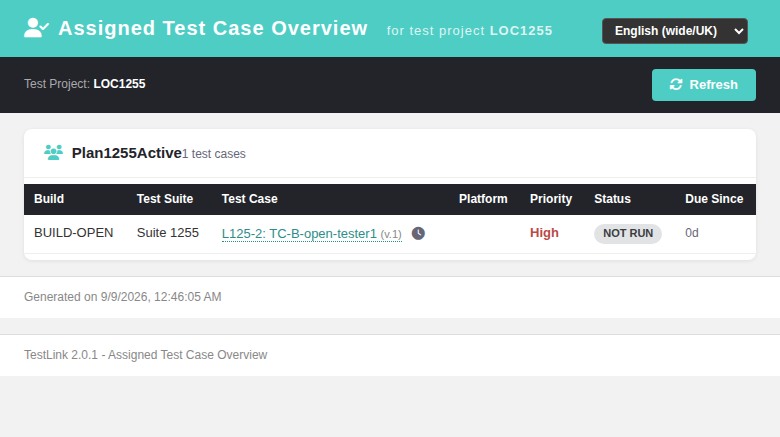
The Assigned Test Case Overview report (ASIDE → Reports → Assigned Test Case Overview) shows every test case whose execution is assigned to a user, grouped per test plan. Each row carries build, test suite, test case (with quick-execution, history and edit icons), platform (when the plan has platforms), priority, last execution status, and assignment age. It replaces the legacy 1.9.20 lib/testcases/tcAssignedToUser.php HTML view (in its show_all_users=1 Reports entry variant) with a modern Dashio-styled page backed by a plain-PHP REST BFF.
Path: ASIDE menu → Reports → Assigned Test Case Overview
URL: gui/templates/results/assignedTcOverview.html?tproject_id=<id>&show_all_users=1&show_inactive_and_closed=1
BFF API: api/reports/index.php — GET ?action=assigned_tc_overview&tproject_id=&show_all_users=&show_inactive_and_closed=&show_closed_builds=
Rights: testplan_metrics
Tracking issue: #684
Deep-link params: #1255
The header carries the test project context. The toolbar shows the test project name, a "Show closed builds" checkbox (session-persisted via sessionStorage), and a Refresh button. The checkbox is hidden when a specific build is deep-linked (build_id>0, legacy show_build_selector parity).
For each test plan with assigned test cases, a collapsible section renders:
| Column | Content |
|---|---|
| Build | build name |
| Test Suite | full suite path (legacy tcase_full_path) |
| Test Case | prefix-glue-extid: name (v.N) + icon links |
| Platform | platform name (when the plan has linked platforms) |
| Priority | High / Medium / Low (when testPriorityEnabled in project options) |
| Status | last execution result badge (PASSED/FAILED/BLOCKED/NOT RUN) |
| Due Since | days since test case creation |
Each test case cell contains:
-
Execution History — opens
execHistory.phppopup for the TC -
Quick Pass / Fail / Block — inline execution buttons (if user has
testplan_executeright on that plan). Click confirms, then POSTs to the BFFquick_execaction which inserts an execution row. -
Execute — opens
execSetResults.phppopup for the full execution flow
The quick-exec icons write an executions row directly via BFF POST:
POST /api/reports/index.php?action=quick_exec
{
  "tplan_id": <int>,
  "platform_id": <int>,
  "build_id": <int>,
  "tcversion_id": <int>,
  "result": "p" | "f" | "b"
}
Guards:
-
testplan_executeright on (tproject, tplan) context - Status whitelist: only
p,f,bare accepted - When
exec_cfg->exec_mode->tester == 'assigned_to_me': checksuser_assignmentsvia JOIN totestplan_tcversionsto confirm the clicking user is the assigned tester -
tester_idis always the session user (not the filter user, which collapses to TL_USER_ANYBODY=0 in the overview variant)
A test plan with no assigned test cases is omitted entirely. A project with zero assignments shows "No records found."
GET /api/reports/index.php?action=assigned_tc_overview
Parameters:
-
tproject_id(required) — test project context -
show_all_users(default 0, legacyinit_args:293 default) — overview-for-all-users variant (the Reports aside link pins1) -
show_inactive_and_closed(default 0) — include inactive/closed TC versions -
show_inactive_tplans(presence, legacyinit_args:291) —tplan_status='all'instead of'active' -
show_closed_builds/show_closed_builds_hidden(default 0, persisted in session) — include closed builds -
user_id(optional) — filter by specific user; whenshow_all_usersis absent the report scopes to it (deep-link target) -
tplan_id(optional) — restrict to one test plan -
build_id(optional) — restrict to one build and forcebuild_status='all'+tplan_status='all'(legacyinitFilters:457-463)
Response shape:
{
  "status": "ok",
  "hasData": true,
  "tproject_id": 901,
  "tproject_name": "ATO Demo Project",
  "glue_char": "-",
  "tplans": [
    {
      "id": 951,
      "name": "ATO Plan Alpha",
      "show_platforms": true,
      "priority_enabled": true,
      "has_exec_right": true,
      "rows": [
        {
          "user_login": "",
          "user_id": 1,
          "build_name": "b1",
          "suite_path": "ATO Root Suite",
          "tc_id": 921,
          "tcversion_id": 923,
          "prefix": "ATOD",
          "tc_external_id": 1,
          "name": "TC one",
          "version": 1,
          "tplan_id": 951,
          "status": "p",
          "status_key": "passed",
          "creation_ts_epoch": 1787630936,
          "age_days": 0,
          "can_exec": true,
          "platform_id": 971,
          "platform_name": "Desktop",
          "priority": 3,
          "priority_level": "high"
        }
      ]
    }
  ]
}The screen honors the exact deep-link parameter set of the legacy tcAssignedToUser.php init_args(), so emailed/guiding links open the report pre-filtered:
gui/templates/results/assignedTcOverview.html?tproject_id=<id>&user_id=<uid>&tplan_id=<plan>&build_id=<build>[&show_inactive_tplans]
-
user_id— report scoped to that user (whenshow_all_usersabsent; the flag wins and collapses to any-user, legacyinit_args:321-323) -
tplan_id— single test plan -
build_id— single build; the "Show closed builds" checkbox is hidden (show_build_selectorparity) and both build/tplan status filters are forced toall -
show_inactive_tplans— presence: include inactive test plans -
show_closed_builds/show_closed_builds_hidden— URL values take precedence over the sessionStorage value
The email "execution tasks assigned to me" link (lib/functions/assignment_mgr.class.php → ltx.php?item=xta2m) now redirects to this screen: launch_inner_xta2m() resolves the test project from the plan and builds assignedTcOverview.html?tproject_id=<resolved>&user_id=<target>&tplan_id=<plan>&build_id=<build> (legacy: lib/testcases/tcAssignedToUser.php). check_xta2m still requires the target user to match the session user.
The screen honors the exact deep-link parameter set of the legacy tcAssignedToUser.php init_args(), so emailed/guiding links open the report pre-filtered:
gui/templates/results/assignedTcOverview.html?tproject_id=<id>&user_id=<uid>&tplan_id=<plan>&build_id=<build>[&show_inactive_tplans]
-
user_id— report scoped to that user (whenshow_all_usersabsent; the flag wins and collapses to any-user, legacyinit_args:321-323) -
tplan_id— single test plan -
build_id— single build; the "Show closed builds" checkbox is hidden (show_build_selectorparity) and both build/tplan status filters are forced toall -
show_inactive_tplans— presence: include inactive test plans -
show_closed_builds/show_closed_builds_hidden— URL values take precedence over the sessionStorage value
The email "execution tasks assigned to me" link (lib/functions/assignment_mgr.class.php → ltx.php?item=xta2m) now redirects to this screen: launch_inner_xta2m() resolves the test project from the plan and builds assignedTcOverview.html?tproject_id=<resolved>&user_id=<target>&tplan_id=<plan>&build_id=<build> (legacy: lib/testcases/tcAssignedToUser.php). check_xta2m still requires the target user to match the session user.
The legacy screen (lib/testcases/tcAssignedToUser.php) uses:
-
testcase::get_assigned_to_user()withmode=full_path -
get_last_execution()for status per build/platform -
extTablefor rendering (grouped by first column) - Raw SQL INSERT for quick-execution (same
executionstable) - Session-based
show_closed_buildspersistence
The modern screen preserves all legacy behavior with Dashio visual patterns.