Repository navigation
Guide Recipes
Task-sized recipes for running, measuring, capturing and checking isotop. Each is marked verified here (run on the machine that built this page: Linux x86_64, 4 cores, no GPU, no graphical session, release build, with the output quoted where it is short) or not verified (with the reason). Anything that needs a graphics-capable terminal, a GPU, macOS or a network is the latter. The tree these recipes were last run on has eighteen views (--list-views prints them), and the outputs quoted below are from it. Commands assume the repository root and a release build (cargo build --release); the binary is ./target/release/isotop.
For the machinery behind the headless recipes see Guide: Headless and Reproducible Renders; for the views see Gallery.
| # | Recipe | Status |
|---|---|---|
| 1 | A reproducible screenshot | verified here |
| 2 | Prove two renders are the same file | verified here |
| 3 | Pick the right --time for a view |
verified here |
| 4 | Benchmark a view | verified here |
| 5 | Which rasterizer drew it, and no GPU | verified here (CPU side) |
| 6 | Tune --sample-ms
|
partly verified |
| 7 | Cap the scene with --limit and --processes
|
verified here |
| 8 | Focus a subtree | exercised by the smoke test |
| 9 | Search | exercised by the smoke test |
| 10 | The guided tour | exercised by the smoke test |
| 11 | Pause and rewind | pause exercised, rewind not verified |
| 12 | View playlists: --views and the picker |
verified here |
| 13 | Read --verbose and --list-views
|
verified here |
| 14 | Set up Ghostty | not verified |
| 15 | Capture a real Ghostty session on a headless sway | not verified |
| 16 | An animated file from frames (GIF, APNG, WebP) | verified here |
| 17 | Render the live machine headlessly | verified here |
| 18 | Enable the optional event sources with setcap
|
partly verified |
| 19 | Bless and compare golden hashes | verified here |
| 20 | Compare CPU and GPU renders | CPU side verified |
| 21 | Linux and macOS | not verified |
| 22 | Use isotop over SSH | not verified |
| 23 | Run the gates | verified here except the macOS type-check |
| 24 | Place the globe's home | verified here |
A cookbook is a list of procedures that each claim to be repeatable by a stranger. The oldest surviving Western collection is De re coquinaria, attributed to Apicius and usually dated to the late 4th or early 5th century, though it holds recipes a few centuries older and was probably assembled by several hands. Its recipes are terse and assume a trained cook, which makes them hard to follow today: the form began as a memory aid for people who already knew how.
The form moved toward the stranger in stages. Hannah Glasse's The Art of Cookery Made Plain and Easy (1747) wrote in plain language for household cooks. Its best-known line, "first catch your hare", is not in it; the nearest passage begins "Take your hare when it be cas'd", and the saying appears in print in the early 19th century as a misquotation (the earliest hare version found is from an 1815 newspaper). Fannie Farmer's edition of The Boston Cooking-School Cook Book (1896) is credited with standardising measurement, the level teaspoon among it, so that a recipe meant the same quantity in every kitchen. Reproducibility was an editorial achievement before it was a computing one.
Programming took the word in 1998 with the Perl Cookbook by Tom Christiansen and Nathan Torkington (O'Reilly, August 1998, foreword by Larry Wall), organised by task rather than by language feature and built as a companion to Programming Perl. The Python Cookbook (Alex Martelli and David Ascher, O'Reilly, July 2002) followed it, collecting about two hundred recipes from the community and, by its preface, modelled on the Perl book at the suggestion of O'Reilly's editor-in-chief Frank Willison. Its link to ActiveState's recipe site, which I expected, I could not confirm (unverified). Sources also disagree on the Perl book's page count (794 in O'Reilly's press release, 964 in a Wikipedia entry that describes a later edition), a reminder that the edition is part of the citation.
The recipes in this project's wiki follow the later habit: each carries a status, because a recipe that was not run is a rumour. The labels in the table above are that habit made explicit. The project's own sequence of gates, which recipe 23 reproduces, was written down in AGENTS.md on its first day of existence (2026-10-07) and has been edited since. Altitude was not varied.
Status: verified here.
./target/release/isotop --demo --view orbit --width 1600 --time 12 --renderer cpu --output orbit.png--demo is the deterministic synthetic workload; --time fixes its clock; --renderer cpu pins the rasterizer to the reference one; --width sets the size (the height is 16:9). The command prints Wrote orbit.png (1600x900, N visible). The PNG is the scene only: labels, popups and the status strip are terminal text and are not in it.
Status: verified here.
./target/release/isotop --demo --view city --width 480 --time 12 --renderer cpu --output a.png
./target/release/isotop --demo --view city --width 480 --time 12 --renderer cpu --output b.png
cmp a.png b.png && echo identical
python3 scripts/compare_png.py a.png b.png
# mean 0.0000 | share 0.0000 % | max 0 | size 480x270
Output: identical, and the same MD5 for both files. compare_png.py prints one line (per-channel mean absolute difference, the percentage of pixels with any channel more than --levels (default 2) off, the largest channel difference, the size) and exits 0 within its limits, 1 beyond them or on a size mismatch, 2 on an undecodable file. Rendering --time 13 instead gives mean 7.3395 | share 58.4360 % | max 242 against the first, exit 1: time is an input.
One trap: Matrix draws $USER into the frame, so its PNG differs between users. Pin it with USER=neo when comparing across machines.
Status: verified here.
The default --time is 12. A view whose window of history is not full by then needs a later one:
./target/release/isotop --demo --view ptolemy --time 300 --width 960 --renderer cpu --output ptolemy.pngPtolemy needs 30 samples before it has planets, and its reference renders use 300 (contract.time on its registry row). Tesseract and Necropolis replay a minute and ten minutes of samples before the frame (the necropolis from before time 0, so --time 12 already shows ten rows of graves); Strata replays a minute; Cortex, Murmuration and Arbor play 12, 15 and 8 seconds of frames (Phase::Play) so their simulations have settled. The list of which view warms up how is in the headless guide.
Status: verified here.
./target/release/isotop --demo --view city --width 960 --renderer cpu --benchmark 30
# 30 frames | 960x540 | 192 visible | 13.33 ms/frame | 75.0 renderer fps on cpu (excludes terminal transport)
./target/release/isotop --demo --view city --width 960 --renderer cpu --processes 1000 --benchmark 30
# 30 frames | 960x540 | 1000 visible | 14.36 ms/frame | 69.6 renderer fps on cpu (excludes terminal transport)
The benchmark measures scene recording and rasterization, not terminal transport. The project's budget (docs/VIEW_CONVENTIONS.md) is at least 10 fps on the CPU rasterizer at 1920x1080 with 192 processes and at least 5 fps at --processes 1000; measure that with --width 1920. The numbers above are this machine's. --benchmark alone does not run the Output-only settling of ripple, flow, cores, reef and coop, so for those add --output as well to measure a settled scene (matrix and the views from tesseract on settle under --benchmark too). Add --fps N to change the time step between benchmark frames (frame i is drawn at --time plus i / fps).
For end-to-end throughput in a real terminal, --duration 5 runs an interactive session for five seconds and prints presented frames per second after restoring the terminal. Not verified (needs a graphics-capable terminal).
Status: verified here (the CPU side; no GPU was available).
--renderer is auto (default), gpu or cpu. With no hardware adapter:
$ ./target/release/isotop --demo --view city --renderer gpu --benchmark 5
isotop: no GPU adapter: No suitable graphics adapter found; ...        (exit 1)
$ ./target/release/isotop --demo --view city --renderer auto --benchmark 5
5 frames | 960x540 | 192 visible | ... ms/frame | ... renderer fps on cpu (no GPU adapter: ...) (excludes terminal transport)
gpu is a hard error, auto falls back and the benchmark line names the reason; in the interactive status strip the fallback is shown as the rasterizer name. Software adapters are refused by Gpu::new. --gpu-power high (default) prefers a discrete GPU, low an integrated one, which keeps a laptop's discrete GPU asleep. The GPU path itself is not verified here.
Status: partly verified (the headless effect; the live effect is theory).
--sample-ms (100 to 10000, default 1000) is how often process data is sampled. Three things depend on it:
- Aliasing. A load that oscillates faster than half the sampling rate shows up as a slower wobble. See Theory: Model and Rates for the derivation.
-
How long the history is. The shared history keeps 240 samples, and a view asks for a window in seconds, so at
--sample-ms 100it holds 24 seconds and a view that wants a minute gets less.--history(default 120) separately sets how many snapshots pause and rewind retain. -
Headless warm-ups. In a demo headless run,
ReplayandPlayphases replayseconds / sample_secondssamples, so a different--sample-msis a different frame.
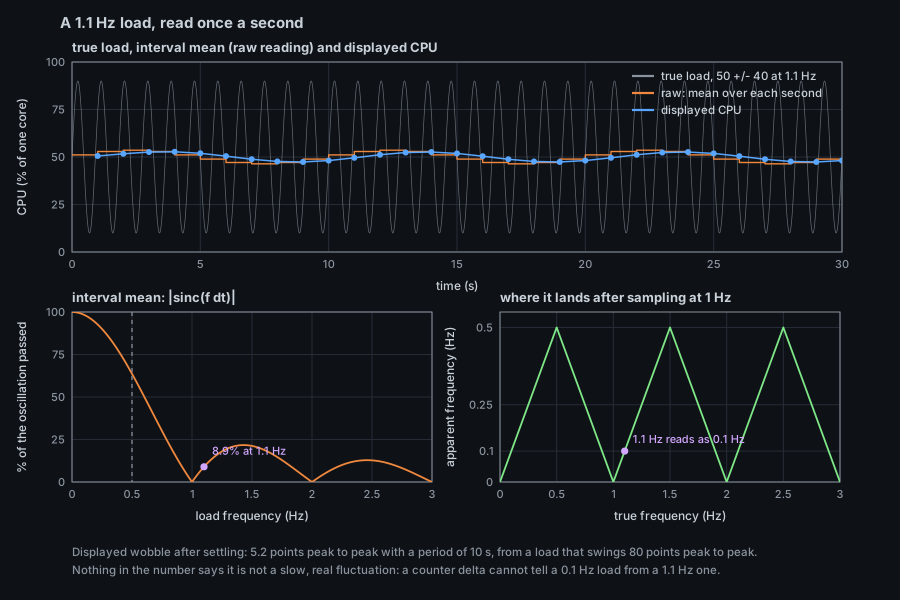
Verified: --demo --view tesseract --time 12 --width 480 (and --view arbor, a Play view) at --sample-ms 250 and 1000 writes two different files. The background sampler's own period (sockets, files, cgroups) is fixed at two seconds (model::BACKGROUND_PERIOD) and does not follow the flag.
Status: verified here.
./target/release/isotop --demo --view city --limit 50 --width 480 --renderer cpu --output l50.png     # 50 visible
./target/release/isotop --demo --view orbit --processes 16 --width 480 --renderer cpu --output o16.png  # 16 visible
--limit (default 1024) is the most processes a scene admits; the selection can bring one beyond the cap in. --processes sets the number of synthetic processes in --demo. Hidden processes keep their places in every view, so lifting the limit puts everything back where it was.
Status: exercised by the smoke test (scripts/smoke_terminal.py, which passes here); the behaviour is from the README.
Click or search to select a process, press f to draw only it and its descendants, Esc to clear the focus. The status strip says SUBTREE FOCUS while it is on. Every view keeps the places of the processes the focus hides, so clearing it changes nothing but what is drawn.
Status: exercised by the smoke test.
/ opens a search over names, command lines and exact PIDs. Type to narrow, Tab (or n afterwards) for the next match, Enter to accept, Esc to leave. The camera moves to the match; on the globe it also turns the earth so the match faces you.
Status: exercised by the smoke test.
g starts the tour at any time; g again, or any key or mouse movement, ends it. After --tour N seconds without input (default 20; 0 disables the idle tour) it starts by itself. It visits the view's own targets heaviest first, then the busiest and the largest processes, with a callout at each. A view can opt out (ViewInfo::tour); the necropolis does, since the living are not drawn there.
Status: pause is exercised by the smoke test; rewind is not verified.
Space pauses collection and animation; [ and ] step to the previous and next retained snapshot (--history, default 120). Views draw the window that ends at the shown snapshot's elapsed, so Strata, Ptolemy and Tesseract show the past they were taken in. The simulation does not step while paused or after a rewind (Stage::dt is zero).
Status: verified here (the command line); the picker is exercised by the smoke test, which visits reef, ptolemy, tesseract and necropolis through it.
./target/release/isotop --views reef,city,reef            # Tab cycles reef then city; starts on reef
./target/release/isotop --demo --views reef,city --output x.png          # renders reef (177 visible)
./target/release/isotop --demo --views reef,city --view city --output x.png   # --view wins (192 visible)
--views a,b,c sets the Tab and Shift+Tab playlist: a repeated name is kept once, an unknown name is a usage error (exit 2) that lists the valid ones, a name the platform does not support is skipped, and an empty result exits 1 with isotop: no available view in --views. A headless run renders --view if given, otherwise the first playlist entry. v opens the picker (filter by typing, Up/Down, Enter to show, Space to add or remove the highlighted view from the playlist); the digits 1 to 9 and 0 jump to the first ten registry rows regardless of the playlist.
Status: verified here.
./target/release/isotop --list-views | tr '\n' ' '
# city orbit ripple flow cores cells strata globe reef matrix coop ptolemy tesseract necropolis cortex horizon murmuration arbor
./target/release/isotop --verbose --list-views >/dev/null     # stderr: nothing on Linux
--list-views prints the views this platform supports, in Tab order, and exits; CI renders exactly this list. --verbose prints skipping view <name>: not supported on this platform to stderr, once per unsupported view, before the terminal is touched. Every view runs on Linux and macOS today, so on both it prints nothing; the flag exists for views that will be unavailable on one platform (docs/VIEW_CONVENTIONS.md records the switchboard, which is planned and not implemented, as unavailable on macOS).
Status: not verified (no Ghostty on the build machine).
What the project documents: Ghostty is the primary target and Kitty also works; run isotop directly in the terminal, because tmux does not pass the graphics protocol through (tmux support is investigated in issue 99, not implemented). At startup isotop queries graphics support and fails fast if it is missing; --force-graphics bypasses the query. Locally, frames travel through POSIX shared memory (the Kitty t=s transmission), with no compression and almost no pty traffic; over SSH, or with --direct, they go inline, zlib-compressed and base64-encoded. When the terminal reports SGR-Pixels mouse support (Ghostty and Kitty do), hover and clicks are pixel-precise. The terminal must be at least 40 columns by 12 rows. No Ghostty configuration is required beyond a version that implements the Kitty graphics protocol; no setting is invented here.
The pty pipeline itself is verified: python3 scripts/smoke_terminal.py ./target/release/isotop drives the binary through a pseudo-terminal in demo mode over shared memory and in live mode over inline zlib, and passes here ("20 valid RGB frames" in each mode, with view switching, search, focus, pause, number keys, tour, picker visits, quit and terminal restoration). That proves the protocol path, not how the picture looks in Ghostty.
Status: not verified (no sway, grim or Ghostty on the build machine). The commands are from AGENTS.md.
To check a real Ghostty on Wayland without disturbing the desktop, run a headless sway and capture with grim:
env -u WAYLAND_DISPLAY -u DISPLAY -u SWAYSOCK WLR_BACKENDS=headless \
  WLR_LIBINPUT_NO_DEVICES=1 setsid -f sway --unsupported-gpu -c <config>
WAYLAND_DISPLAY=<socket> ghostty --config-default-files=false -e ./target/release/isotop --demo
WAYLAND_DISPLAY=<socket> grim /tmp/ghostty.png
Kitty crashes when headless. Stop sway by PID, not with pkill -f and a pattern that can match your own shell. This is the way to see flicker, latency and the text overlay, which the headless PNG does not contain.
Status: verified here. This is a workaround: there is no animated export in isotop yet. Issue 100 specifies --record-media out.png --seconds N, an APNG written headlessly through the existing png crate with simulation time advancing at the frame rate; it is not implemented.
Render consecutive --time values (the animation clock is --time in a headless run, so consecutive times are consecutive moments of one motion) and join them:
for i in $(seq 0 29); do
  ./target/release/isotop --demo --view orbit --width 480 --renderer cpu \
    --time "$(awk "BEGIN { printf \"%.2f\", 12 + $i * 0.2 }")" \
    --output "$(printf 'f%03d.png' "$i")" > /dev/null
done
ffmpeg -framerate 10 -i f%03d.png -vf "split[a][b];[a]palettegen[p];[b][p]paletteuse" orbit.gif
ffmpeg -framerate 10 -i f%03d.png -plays 0 -f apng orbit.apng
ffmpeg -framerate 10 -i f%03d.png -loop 0 -quality 80 orbit.webp
convert -delay 10 -loop 0 f0*.png orbit-im.gif        # ImageMagick, no palette tuning
Result for 30 frames of orbit at 480 px: GIF 1.5 MB, APNG 2.9 MB (ffprobe: 30 frames, 480x270), animated WebP 0.4 MB. (ffprobe could not read the WebP back, so its playback is unchecked; open it in a browser.) The frame step is the animation speed: 0.2 s of motion per frame at 10 fps plays at twice real speed. Each frame pays the warm-up of its view, so views with a long warm-up (necropolis, tesseract) are slow per frame; use --sample-ms 1000 and a small --width while composing. The docs/media/*-motion.webp files in the repository were made by hand with a screen recorder; the project's own plan is to replace that with issue 100.
Status: verified here.
./target/release/isotop --view orbit --width 480 --renderer cpu --output live.png
# Wrote live.png (480x270, 79 visible)      (about one second: two samples, one --sample-ms apart)
Without --demo a headless run reads /proc. It takes two samples, because CPU is a rate, so the first-reading smoothing is barely started, and a live Strata shows only its newest slice. CI does exactly this for orbit and cells to catch layout and permission errors the demo cannot. It is not reproducible, by design.
Status: the capability step is verified here; the effect on the fork, exec and exit sources is not verified (the build machine is a container, where only sample diffing works).
isotop never raises its own privileges. Some views read optional sources only while they are shown. The necropolis, for example, asks for life events: the proc connector (Linux 6.6 or later without extra rights, earlier kernels need CAP_NET_ADMIN) and taskstats (always CAP_NET_ADMIN). You may grant the binary that capability yourself:
sudo setcap cap_net_admin+ep ./target/release/isotop
getcap ./target/release/isotop          # ./target/release/isotop cap_net_admin=ep
Verified on a copy of the binary: setcap succeeded, getcap printed isotop-cap cap_net_admin=ep, and the capable binary rendered the necropolis demo normally. What it adds: exact times and exit statuses for every exit, including processes that live and die between two samples, and per-exit records (command, run time, CPU time, peak memory). The necropolis legend lists the sources that delivered (deaths: ...) and names what is missing (no exit records: causes from the exit status, sizes as observed, no fork events: no unmarked markers); --demo synthesizes its own life and reports what a capable machine would. Inside a container with its own PID namespace only sample diffing works whatever the capability. A rebuilt binary is a new file, so expect to reapply the capability after cargo build (not verified). On macOS none of this applies: kqueue gives exec and exit times of your own processes with no setup, and sudo ./target/release/isotop is how you see processes of other users.
Status: verified here with a local baseline file.
tests/golden.txt holds three FNV-1a 64 hashes (pixels, picks, depth) of each view's --demo --time 12 --renderer cpu --width 480 frame, and is compared only on Linux x86_64. Change the code, then:
cargo test every_view_matches                       # fails and names the view and buffer that changed
ISOTOP_BLESS=1 cargo test every_view_matches        # rewrites tests/golden.txt
On any other platform, or to protect the checked-in file while you experiment:
ISOTOP_GOLDEN_FILE=/tmp/golden-local.txt ISOTOP_BLESS=1 cargo test every_view_matches   # baseline before the change
# ... make the change ...
ISOTOP_GOLDEN_FILE=/tmp/golden-local.txt cargo test every_view_matches                  # compare after it
A pull request that changes a hash says why in its description and attaches the renders. A refactor must leave every hash as it is. The mechanics are described in the headless guide.
Status: the comparison script is verified here; no GPU was available, so no CPU/GPU pair was measured.
./target/release/isotop --demo --view <name> --time 12 --width 960 --renderer cpu --output cpu.png
./target/release/isotop --demo --view <name> --time 12 --width 960 --renderer gpu --output gpu.png
python3 scripts/compare_png.py cpu.png gpu.png
The tolerance recorded in docs/VIEW_CONVENTIONS.md has two limits: the per-channel mean absolute difference and the share of pixels with any channel more than 2 levels off.
| Limit | Mean | Share | Views |
|---|---|---|---|
| Default | at most 0.25 | at most 0.25 % | every view not named below, and every new view |
Line-dominant (--max-mean 0.5 --max-share 1.0) |
at most 0.5 | at most 1.0 % | city, ripple, cores, cells, globe |
Orbit, flow and strata exceed even the line-dominant limit on the measured Apple GPU; they are known parity debt that predates the parity rule. Gpu::new refuses software adapters, and Linux CI has no hardware GPU, so the CPU/GPU comparison runs on the macOS CI job, which uploads parity.txt and the PNGs as the parity-macOS artifact. python3 scripts/compare_png.py --self-test checks the script itself (passes here). See Theory: GPU and Parity.
Status: not verified (Linux only here). From the README and the code.
Build and run the same way on both: cargo build --release, ./target/release/isotop --demo. The renderer is the same (GPU via Vulkan or Metal, or the CPU). The process data differs: /proc on Linux; libproc, Mach, sysctl and the IORegistry on macOS. Without root, macOS measures only your own processes and counts the rest beside the process count (+57 unreadable: run with sudo); run sudo ./target/release/isotop for the whole machine. Memory on macOS is the physical footprint. macOS has no per-core last CPU, run queue, cgroups, file-lock table or socket byte counters, and each view says what it lacks; the README's table "What macOS does not report and how each view shows it" is the reference. To type-check the macOS code from Linux:
rustup target add aarch64-apple-darwin
CARGO_TARGET_DIR=/tmp/isotop-macos cargo clippy --target aarch64-apple-darwin --all-targets -- -D warnings
(The target is not installed on the build machine, so this was not run.) CI runs the full gates and the live renders on macos-15.
Status: not verified over a real SSH connection. The inline transport itself is verified by the smoke test's live mode.
What works today: run ssh host from a local graphics-capable terminal and start isotop on the remote machine. Shared memory cannot cross the connection, so the startup probe falls back to inline frames: each frame is zlib-compressed, base64-encoded and sent through the pty (--direct forces this mode locally too). That is the whole frame, every frame, over your link, and it runs the rasterizer on the remote machine's CPU or GPU. Do not run it inside tmux (no graphics passthrough; issue 99 is the investigation of that).
What is planned, not implemented: issue 97 specifies isotop --emit (snapshots as a versioned binary stream on stdout) and isotop --stdin (render a stream), so that ssh host isotop --emit | isotop --stdin would render on the local GPU instead of shipping frames. isotop opens no sockets itself, so the no-network invariant would hold. Today neither flag exists.
Status: not verified on the current tree. An earlier revision of this page ran the whole sequence on the tree of Guide: Writing a View before the views were unified onto ViewModule; this revision rebuilt the release binary and ran the commands of recipes 1 to 4, 7, 12 and 13 only, so the test count is not quoted. The macOS type-check was never run here (the target is not installed). The full order is from AGENTS.md:
cargo fmt && cargo fmt --check
cargo clippy --all-targets -- -D warnings
cargo test
cargo build --release
python3 scripts/smoke_terminal.py
python3 scripts/code_report.py --check
code_report.py needs the tokei tool (14.0.0 is what CI pins and what is installed here); python3 scripts/code_report.py regenerates docs/METRICS.md and the README block, and --check fails when either is stale. Run python3 scripts/code_report.py --self-test for its own fixtures. On a clean tree --check reports docs/METRICS.md and the README block are up to date. The toolchain is pinned in rust-toolchain.toml.
Status: verified here, with a caveat that is a finding.
--home LAT,LON (latitude within plus or minus 90, longitude within plus or minus 180; --home 99,0 is refused with a message) sets the machine's location for the globe, which otherwise comes from the system time zone's city. --geoip PATH names a city-level MaxMind-format database (DB-IP Lite or GeoLite2 City). Both feed the live collector only: in --demo the home is the demo snapshot's fixed Amsterdam, and rendering the globe with and without --home 40.7,-74.0 produced byte-identical files. Downloading a database needs network access and is not verified; isotop itself sends nothing off the machine.