Repository navigation
Meeting links
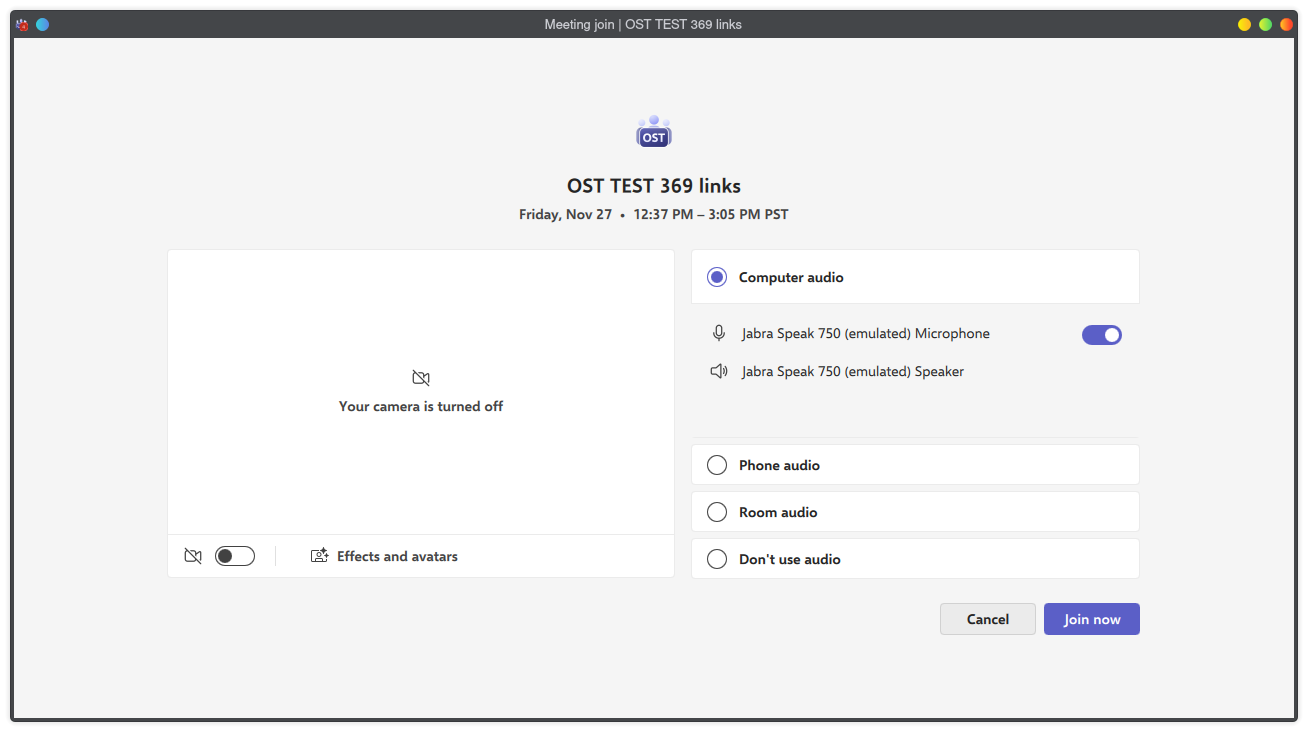
Meeting links open straight in OST, as they open in Teams desktop: OST is
your desktop's handler for Teams' msteams: links, and ost-desktop takes
a Teams link as its argument. A meeting's link shows OST's
pre-join screen with the meeting's title
and times, then the lobby when the meeting holds you there.
A meeting link opens Teams' launcher page. Where Teams has a desktop app (Windows, macOS) the page offers Join on the Teams app; on Linux it goes straight to Teams on the web ("Continue on this browser" is its only choice there). So on Linux:
- Copy the meeting link and open it with
ost-desktop '<link>'(below), or - turn it into an
msteams:link (replacehttps://teams.microsoft.comwithmsteams:) and open that withxdg-open.
When the browser reports Windows or macOS (for example with a user-agent
switcher extension), the page shows Join on the Teams app. Selecting it
hands the desktop a web+msteams: link; the browser or your desktop asks
once which app opens it (KDE Plasma shows Choose Application with OST
in the list), and OST comes forward on the meeting's pre-join screen.
Other apps that open msteams: links reach OST the same way.
ost-desktop 'https://teams.microsoft.com/l/meetup-join/19%3ameeting_...%40thread.v2/0?context=...'
ost-desktop 'https://teams.microsoft.com/meet/2873487134553?p=AbCdEf'
xdg-open 'msteams:/l/meetup-join/19%3ameeting_...%40thread.v2/0?context=...'
Quote the link: it contains ? and &. When OST is already running the
link goes to its window; otherwise OST starts and opens it once you're
signed in (after the sign-in page, if it shows). Links always go to the
default profile; OST_PROFILE=work ost-desktop '<link>' opens one in
another account's window (see Several accounts).
Every package (deb, rpm, AUR, Flatpak, the tarball's install-user.sh)
installs OST's desktop entry, which registers it for
x-scheme-handler/msteams and x-scheme-handler/web+msteams (Teams' web
page hands the desktop web+msteams: links). An AppImage or a build
folder writes its own entry in ~/.local/share/applications on first
start. When another app claims these links, or your desktop doesn't pick a
handler by itself, make OST the default:
xdg-mime default io.github.RandyNorthrup.ost.desktop x-scheme-handler/msteams
xdg-mime default io.github.RandyNorthrup.ost.desktop x-scheme-handler/web+msteams
xdg-mime query default x-scheme-handler/web+msteams
The last command prints io.github.RandyNorthrup.ost.desktop once OST is
the handler.
| Link | Opens |
|---|---|
…/l/meetup-join/… (as msteams:, web+msteams:, or https on teams.microsoft.com or teams.cloud.microsoft; Teams' launcher page too) |
The meeting's pre-join screen |
…/meet/<ID>?p=<passcode> |
Join with an ID, then the pre-join screen |
…/l/chat/<chat>/… |
The chat |
…/l/chat/0/0?users=…&topicName=…&message=… |
A new chat with those people, its name and first message filled in |
…/l/channel/<channel>/<name>, …/l/team/<team>/…
|
The channel (a team's link: its General channel) |
…/l/message/<chat or channel>/<message> |
The chat or channel at that message |
…/l/file/…?objectUrl=… |
The file in OST's viewer (files on SharePoint) |
…/l/app/<app>, …/l/settings/<page>
|
The app's details, the Settings page |
https://teams.live.com/meet/… (Teams free) |
"OST can't join Teams (free) meetings yet.", with Open in browser: personal accounts aren't supported yet |
Any other Teams link (/l/call/…, /l/meeting/new, …) |
"OST can't open this kind of Teams link yet.", with Open in browser |
Teams links in chat messages open the same way.
Only Teams' own links: the msteams: and web+msteams: schemes, and
https on teams.microsoft.com, teams.cloud.microsoft and
teams.live.com. Anything else (another host, http:, a user name or
port in the address, another scheme) is refused before OST reads it:
ost-desktop prints refused '<link>': only Teams links … are opened and
exits with status 2. OST never fetches the link it's given, and opens a
file link's document only from SharePoint.