Inward Timed Services
Inward Timed Services are charges applied to inpatients for time-based care such as ICU stays, theatre time, and room occupancy. The system tracks the start and end time of each service and automatically calculates the bill based on the number of time blocks consumed.
From version 3.x onwards, each timed service supports tiered block charges — the first block can have a different rate from subsequent blocks, allowing facilities to offer a lower (or higher) rate after the initial period.
Each timed service is divided into time blocks (e.g. 1-hour slots). When a patient consumes a timed service:
- The start time is recorded.
- When the service ends, the stop time is recorded.
- The system counts how many whole blocks were consumed.
- The bill is calculated by applying the correct fee per block.
| Block | Fee | Notes |
|---|---|---|
| Block 1 (first hour) | Rs. 500 | Slot Order = 1 |
| Block 2 (second hour) | Rs. 300 | Slot Order = 2, Repeating = Yes |
| Block 3, 4, 5 … | Rs. 300 | Automatically uses the last repeating slot |
For a 4-hour stay: 500 + 300 + 300 + 300 = Rs. 1,400
If only a single fee is configured (the original behaviour), it repeats for every block automatically — existing services continue to work without any reconfiguration.
Navigate to Inward → Manage Timed Services → Timed Service Categories.
- Click New.
- Enter a category name (e.g. "ICU Services", "Theatre Services").
- Select the Institution and Department.
- Click Save.
Navigate to Inward → Manage Timed Services → Timed Services.
- Click New.
- Fill in the service name (e.g. "ICU Hourly Charge").
- Select the Category created in Step 1.
- Select the Institution and Department.
- Click Save.
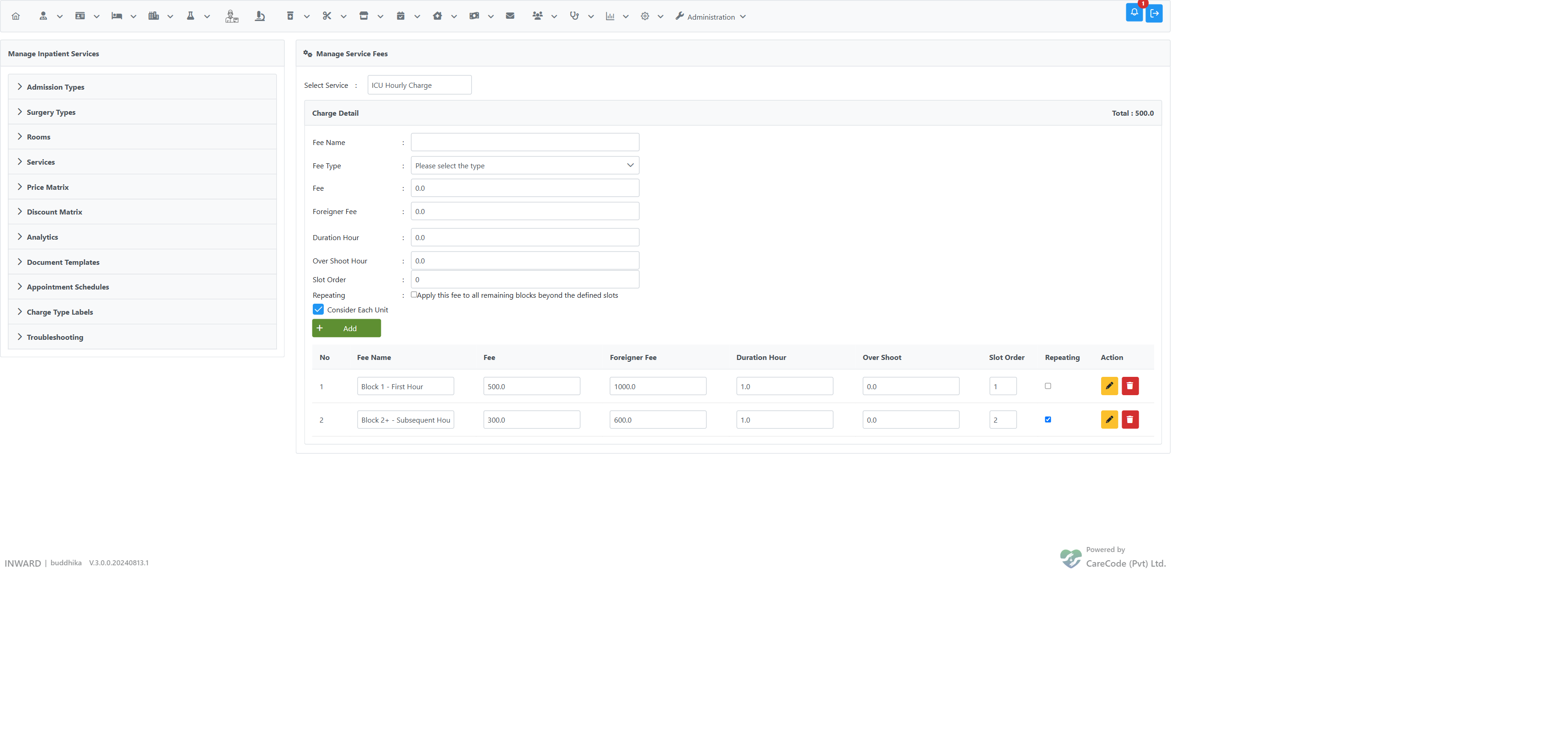
Navigate to Inward → Manage Timed Services → Timed Service Fees.
- Select the timed service from the dropdown.
- For each fee slot, fill in:
- Fee Name — a descriptive label (e.g. "Block 1 – First Hour")
- Fee — the local patient rate
- Foreigner Fee — the rate for foreign patients
-
Duration Hour — the length of one block (e.g.
1for hourly) - Over Shoot Hours — grace period before the next block is charged
- Slot Order — position in the tier (1 = first block, 2 = second block, etc.)
- Repeating — check this on the last slot to apply it to all remaining blocks
- Click Add.
Repeat for each tier. A single-slot configuration (one fee with no Slot Order) works exactly as before.
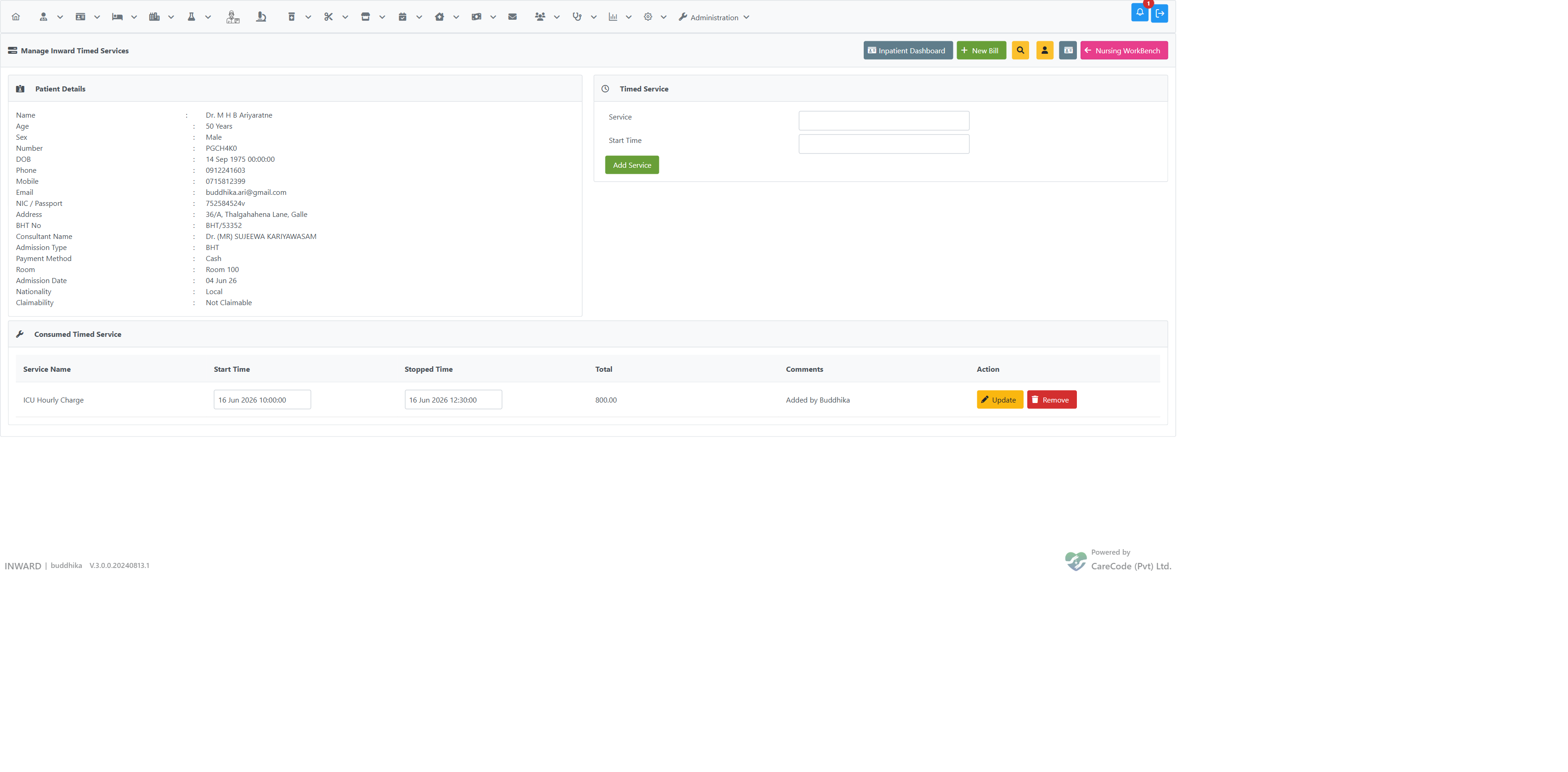
- Navigate to Inward → Timed Services → Consume Timed Service.
- Search for the patient by BHT number or name.
- In the Timed Service panel, select the service from the autocomplete.
- Verify or adjust the Start Time.
- Click Add Service — the service appears in the Consumed Timed Service table with the current time as the stop time and the calculated total.
- To correct the stop time, edit the Stopped Time field in the table row and click Update — the total recalculates immediately.
| Scenario | Result |
|---|---|
| 1 block consumed | Fee from Slot 1 |
| 2 blocks consumed | Fee from Slot 1 + Fee from Slot 2 |
| More blocks than defined slots | Remaining blocks use the last slot fee (if marked Repeating) |
| Only one slot defined | All blocks use that single fee (implicitly repeating) |
| Block beyond defined slots, last slot not repeating | No charge for extra blocks |
| Theatre (minute-based) | Fractional blocks are charged proportionally against the applicable slot fee |
In the Consumed Timed Service table:
- Update — saves changes to start/stop time and recalculates the total.
- Remove — deletes the consumption record for that service.
Can I have more than two tiers? Yes. Add as many fee slots as needed (Slot Order 1, 2, 3, …). Mark the last one as Repeating to cover all blocks beyond the defined list.
What if the start time was entered incorrectly? Edit the Start Time field in the consumed service row and click Update. The total recalculates based on the corrected times.
What happens to existing services configured before this feature?
Existing single-fee timed services work without any changes. A single fee is always treated as repeating, so the total is count × fee as before.
Why does the total change when I adjust the stop time? The system recalculates the number of blocks and applies the tiered fees each time Update is clicked.