Repository navigation
Training Captioner Settings Reference
Open with Server ▸ Settings… or Ctrl+,. Settings are saved to %APPDATA%\RulzCaptioner\settings.json (see Installation). Changing a model or GPU setting restarts the managed servers on the next caption run.
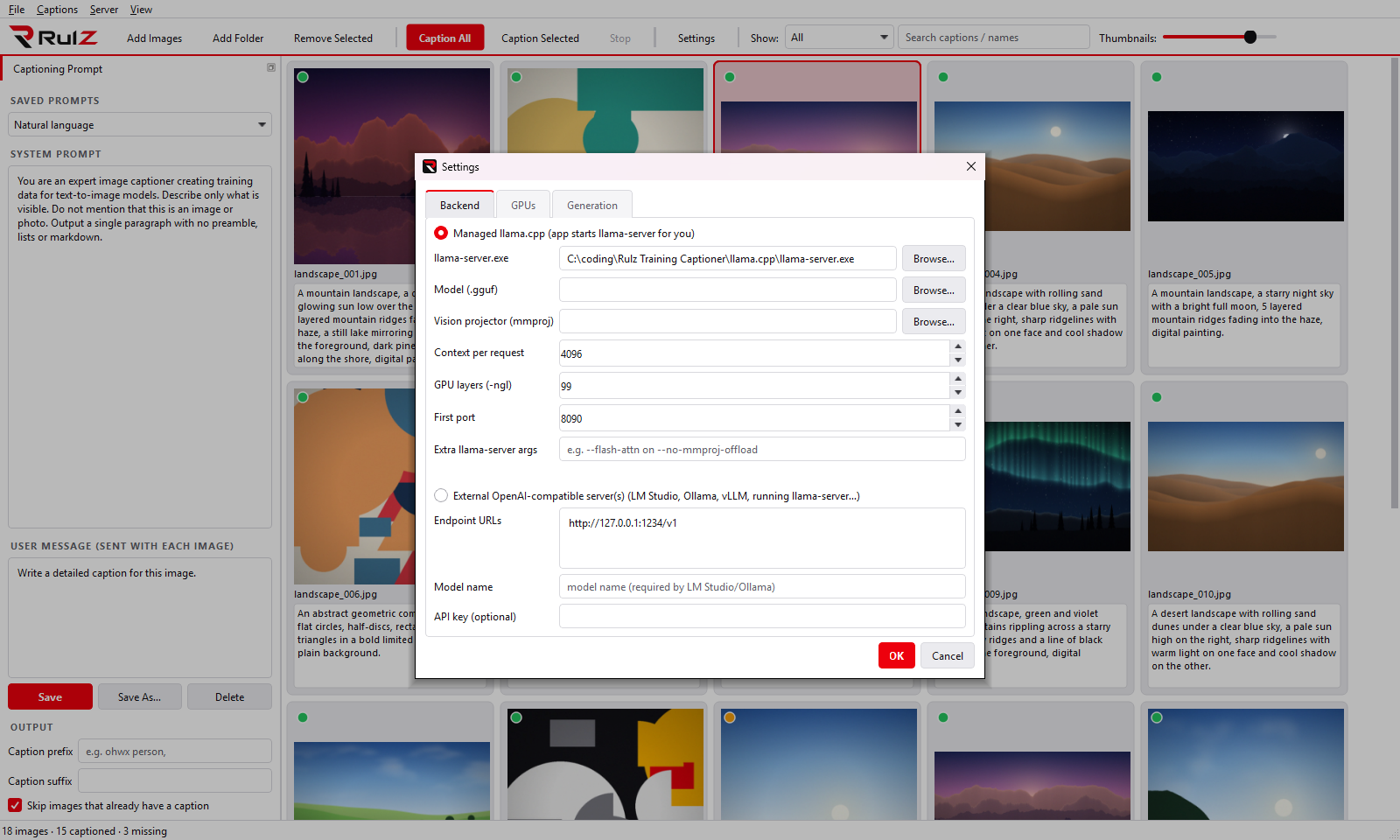
| Setting | Default | Notes |
|---|---|---|
| Managed llama.cpp / External | Managed | Whether the app starts llama-server itself or uses servers you run. See Models and Backends
|
| llama-server.exe | auto-detected | Looked for in llama.cpp\ next to the app, then on PATH
|
| Model (.gguf) | – | The vision model |
| Vision projector (mmproj) | – | The matching mmproj file. Leave empty only for text-only models (they cannot see images) |
| Context per request | 4096 | Tokens per request. Multiplied by Concurrent requests for the server's total context |
| GPU layers (-ngl) | 99 | Layers placed on the GPU. 99 = all |
| First port | 8090 | First local port. Parallel mode uses this +1, +2 … for further GPUs |
| Extra llama-server args | – | Passed through unchanged, e.g. --flash-attn on
|
| Endpoint URLs (external) | http://127.0.0.1:1234/v1 |
One base URL per line. Several URLs = captioned in parallel |
| Model name (external) | – | Needed by LM Studio and Ollama |
| API key (external) | – | Sent as a Bearer token if set |
| Setting | Default | Notes |
|---|---|---|
| GPU checkboxes | all | Cards to use (managed backend, NVIDIA only) |
| Parallel / Split | Parallel | One model copy per GPU, or one model across all ticked GPUs. See Multi-GPU |
| Tensor split | blank | Split mode only. Blank = automatic, or ratios like 16,16
|
| Concurrent requests per server | 1 | Images handled at once by each server (also applies per URL in external mode). Costs VRAM |
| Setting | Default | Notes |
|---|---|---|
| Temperature | 0.4 | Lower = more consistent, higher = more varied |
| Max new tokens | 400 | Upper limit on caption length. Roughly 0.75 words per token |
| Resize longest image side to (px) | 1024 | Images are scaled down to this before sending. Smaller = faster and less VRAM; larger = more detail. Images are sent as JPEG; originals are never modified |
| Collapse captions to a single line | on | Joins line breaks and extra spaces in generated captions |
| Disable thinking / reasoning | on | Recommended. See Thinking models |
| Thinking limit | 1024 tokens | Only active when thinking is enabled. -1 = Unlimited. Managed backend only |
These live in the left panel and toolbar rather than the dialog:
| Option | Where | Notes |
|---|---|---|
| Caption prefix / suffix | Left panel ▸ Output | Added to every generated caption. See Prompts |
| Skip images that already have a caption | Left panel ▸ Output | Applies to Caption All only |
| Light mode | View ▸ Light mode | Dark is the default |
| Log | View ▸ Log | llama-server output and any captioning errors |
| Thumbnail size | Toolbar slider | Remembered |
| Show / Search | Toolbar | Filters; not remembered |
| Menu | Items |
|---|---|
| File | Add Images, Add Folder, Add Folder (with subfolders), Remove Selected, Clear List, Exit |
| Captions | Caption All, Caption Selected, Stop |
| Server | Start Servers, Stop Servers, Settings |
| View | Log, Light mode |
| Variable | Effect |
|---|---|
RULZ_CAPTIONER_DIR |
Store settings.json and prompts.json in this folder instead of %APPDATA%\RulzCaptioner
|
Close the app and delete %APPDATA%\RulzCaptioner\settings.json (settings) and/or prompts.json (prompts; the four defaults come back). Your datasets and .txt files are never touched.