Repository navigation
HF Manager My Hub
The start page lists every model, dataset, space and bucket in one table.
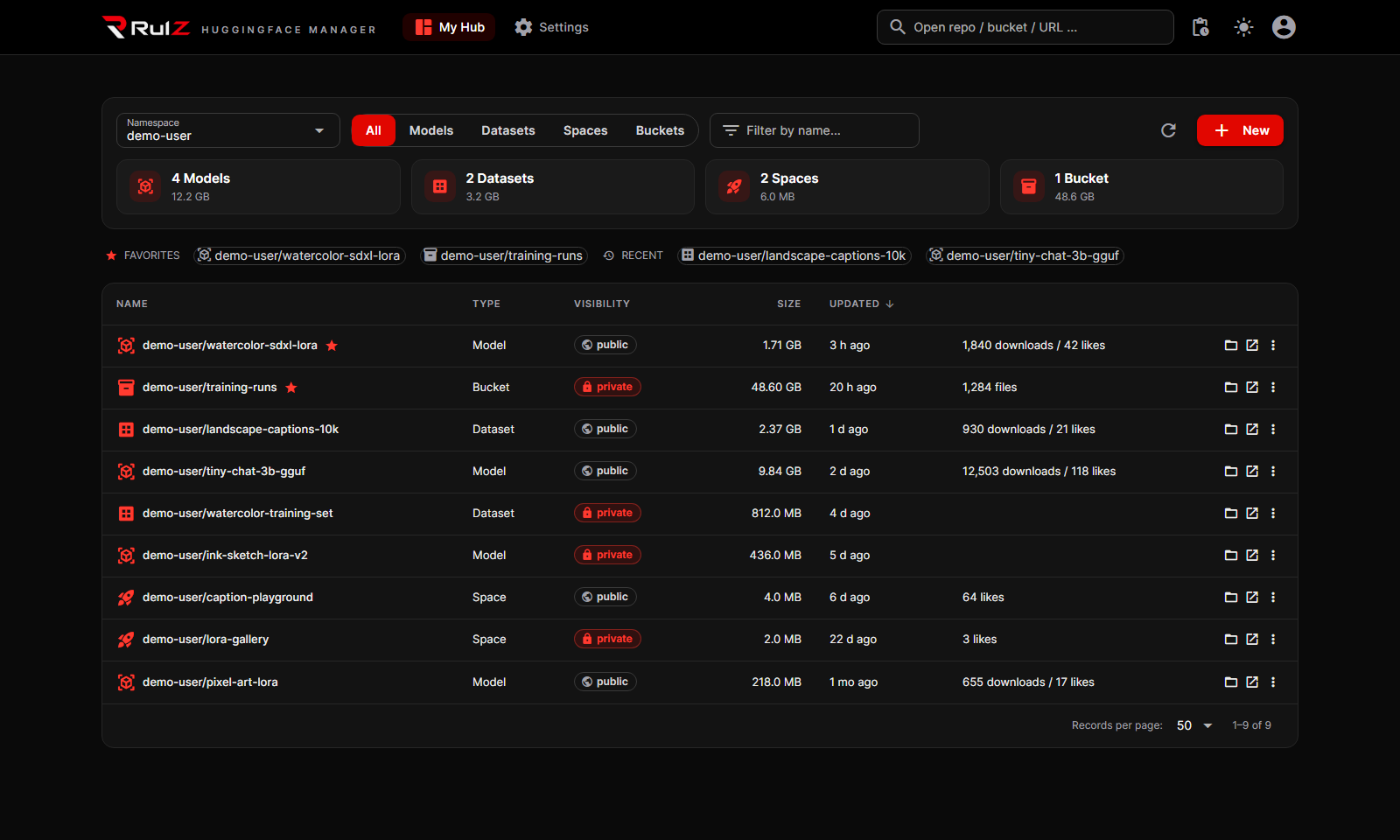
- Namespace picks whose repos you see: your account or one of your organizations. Type any other username to browse their public repos.
- All / Models / Datasets / Spaces / Buckets filters by type. The four tiles below show how many there are of each and how much storage they use; click a tile to show only that type, click it again to show everything.
- Filter by name… narrows the table as you type.
- Click a column heading to sort. The table starts with the most recently updated.
- Public and private show as a pill next to each repo; private ones are red.
- The refresh button reloads the list.
The row above the table has your favorites (the star) and the repos you opened recently. Click one to open it. Add or remove a favorite from a repo's ⋮ menu here, or with the star at the top of its file page.
Click a name (or the folder button) to open its files: see Working with Files. The arrow button opens it on huggingface.co instead.
New (top right) creates a model, dataset, space or bucket: pick the type, the owner (you or an organization), type a name and choose Private or not (it starts switched on). Spaces also ask for their SDK (Gradio, Docker or static). The new repo opens straight away. New is greyed out until you add a token.
The ⋮ menu on each row has:
| Item | What it does |
|---|---|
| Add to / Remove from favorites | Pins it to the favorites row |
| Rename / transfer | A new owner/name. A different owner moves it to that organization. For repos the Hub keeps a redirect from the old address. |
| Make private / Make public | Asks first |
| Duplicate | Makes a private copy on the Hub under a new owner/name (<name>-copy in your account is suggested), then opens it. Repos only, not buckets. |
| Delete… | Deletes it forever. You must type its full name to confirm. |
Buckets are Hugging Face's S3-like storage: no git history, so changes apply at once, and moves and copies inside a bucket run on the Hub without downloading anything.