Report Immutability and Cancellations Returns
This article explains a core design principle behind every financial and stock report in the system: a report, once generated for a given date or period, never changes afterward. Cancellations and returns are always shown on the date they happened, not subtracted from the original transaction's date.
If you have ever asked "why does this report still show a bill that was later cancelled?" or "why doesn't cancelling a bill reduce yesterday's total?" — this article answers that.
All bills are immutable. Once a bill is created and reported, its record and its place in that day's report never change, no matter what happens to it afterward.
When a bill is cancelled or an item is returned, the system does not go back and edit the original report. Instead:
- The cancellation or return is recorded as its own transaction, dated on the day it actually happened.
- It appears in that day's report, shown as a negative value (or clearly marked as cancelled/returned).
- The original day's report is left untouched.
This means a report you printed or exported last month will show the exact same figures if you run it again today.
Suppose on 1st, two bills are billed for Rs. 1,000 each — total Rs. 2,000.
| Date | Event | Amount |
|---|---|---|
| 1st | Bill A billed | Rs. 1,000 |
| 1st | Bill B billed | Rs. 1,000 |
Report for the 1st: Rs. 2,000.
On the 2nd, one of these bills is cancelled — say Rs. 500 worth of it.
| Date | Event | Amount |
|---|---|---|
| 2nd | Cancellation | -Rs. 500 |
Report for the 2nd: -Rs. 500 (the cancellation, listed on the day it happened).
Report for the 1st, run again today: still Rs. 2,000. It is not reduced to Rs. 1,500, even though Bill B was later partially cancelled.
If a user wants to know the net position combining both days, they run the report across the date range 1st–2nd, and the two entries (Rs. 2,000 and -Rs. 500) net out to Rs. 1,500 for that combined period. But the 1st, taken alone, always remains Rs. 2,000.
- Audit integrity. A report is a historical record of what happened on that day. If cancellations silently edited past reports, two people running "the same" report for the 1st on different days could see different numbers — with no way to tell which one is correct, or that anything changed at all.
- Reconciliation. Finance and audit teams close a day's books and file that report. If the system later rewrote history, closed periods could never be trusted as final.
- Traceability. Because the cancellation/return appears as its own line on the day it occurred, you can always see when and what was cancelled — not just a silently reduced total.
- This is consistent everywhere. The same rule applies across Daily Return, Cashier Summary Reports, and item-wise/drug-wise summaries such as the Inpatient Pharmacy Issue Summary. Cross-checks between reports (for example, bills vs. payments) rely on this same immutability guarantee to be meaningful — see Finance Day End Report for an example of such a cross-check.
Because cancellations/returns stay in the report of the day they occurred (rather than disappearing or retroactively editing an earlier day), most transaction-listing reports — including item-wise and drug-wise summaries — deliberately include cancelled and returned lines, typically:
- Shown with a distinct highlight color (e.g. a warning or "fatal" row style) so they're visually distinguishable from normal billed lines.
- Shown as a negative quantity/value, so that when the report is totalled, the net effect is already correct.
This is intentional, not a defect: it lets a supervisor see, on any given day, both what was billed and what was reversed — which is essential for stock and cash reconciliation. Removing cancelled/returned lines from the display would hide legitimate reversal activity and make it look like stock or cash "disappeared" without explanation.
Some reports are transaction logs (intentionally showing everything, including reversals, for audit purposes). Others are pure "what remains billed" summaries. If a specific report mixes both concerns and a clean, billed-only view is genuinely needed, the fix is to add a separate, netted report alongside the transaction log — never to edit the log itself. This keeps both guarantees: the original report stays byte-for-byte immutable, and a supervisor still gets a clean answer to "what did this patient actually end up billed for?"
Example — Inpatient Pharmacy Net Summary. The Pharmacy Issue Summary report (Inward Dashboard → Reports → Pharmacy Issue Summary) lists every pharmacy transaction line for an admission, including cancellations and returns as their own signed rows — exactly per the principle above, and it is unchanged. Once a patient is discharged and their bill is payment-finalized, a new Post-Discharge Reports button appears on the Inpatient Dashboard, leading to a Pharmacy Net Summary report: one row per drug, with the net quantity and value actually billed (issued minus cancelled minus returned), computed fresh from the same underlying signed transaction data.
| Step | Screenshot |
|---|---|
| New "Post-Discharge Reports" button on the Inpatient Dashboard (visible once discharged + payment finalized) | 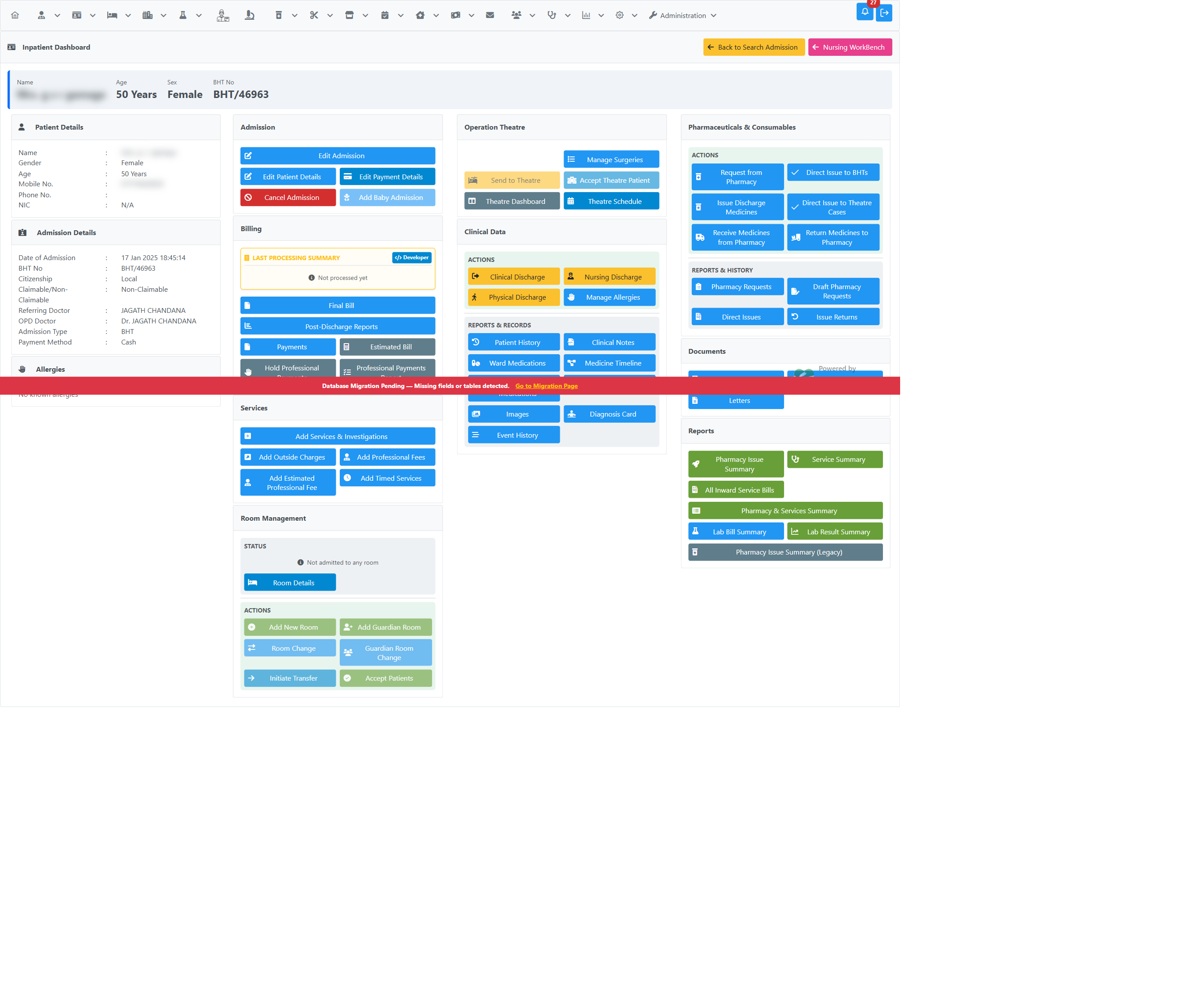 |
| Pharmacy Net Summary — one row per item, net of cancellations/returns | 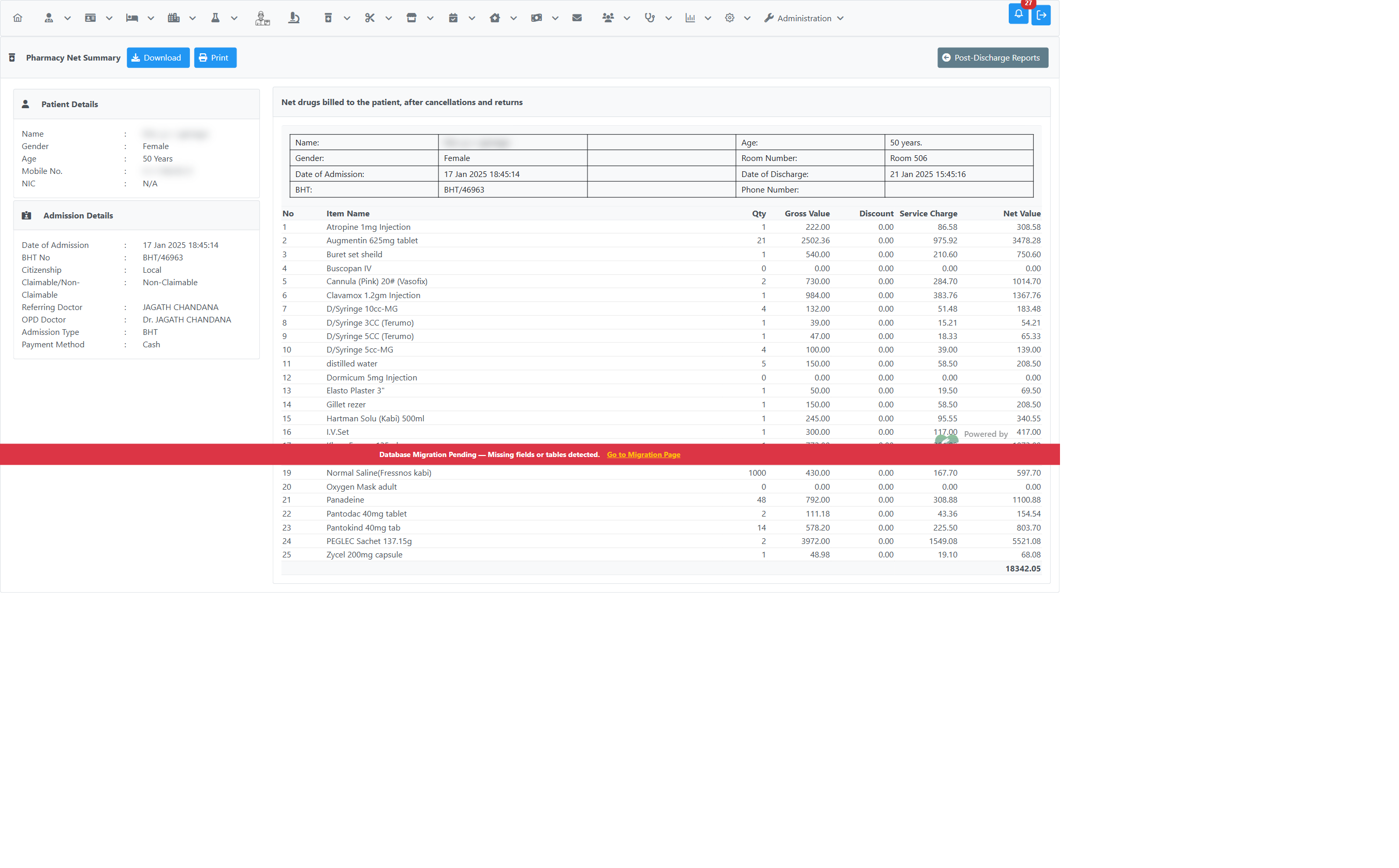 |
Because a discharged, payment-finalized admission can no longer have new pharmacy transactions posted against it, this net summary is naturally stable — there's no separate "freeze" step needed. The Post-Discharge Reports page is designed as a landing page for this kind of report; more net/summary reports will be added there over time as the same need comes up elsewhere.
- Cashier Summary Reports
- Finance Day End Report — an example of two figures (billed vs. collected) that are cross-checked against each other rather than merged into one edited number.
- Pharmacy Summaries & Reports