Itemized Service Summary Report
The Itemized Service Summary - OPD and Inward (Fast - DTO-Based) report lists every OPD and Inward service billing instance in a date range — one row per BillItem, not aggregated. Because nothing is grouped or summed together, re-billing the same service, cancelling a service bill, and refunding a service bill each show up as their own row instead of overwriting or merging into an existing one.
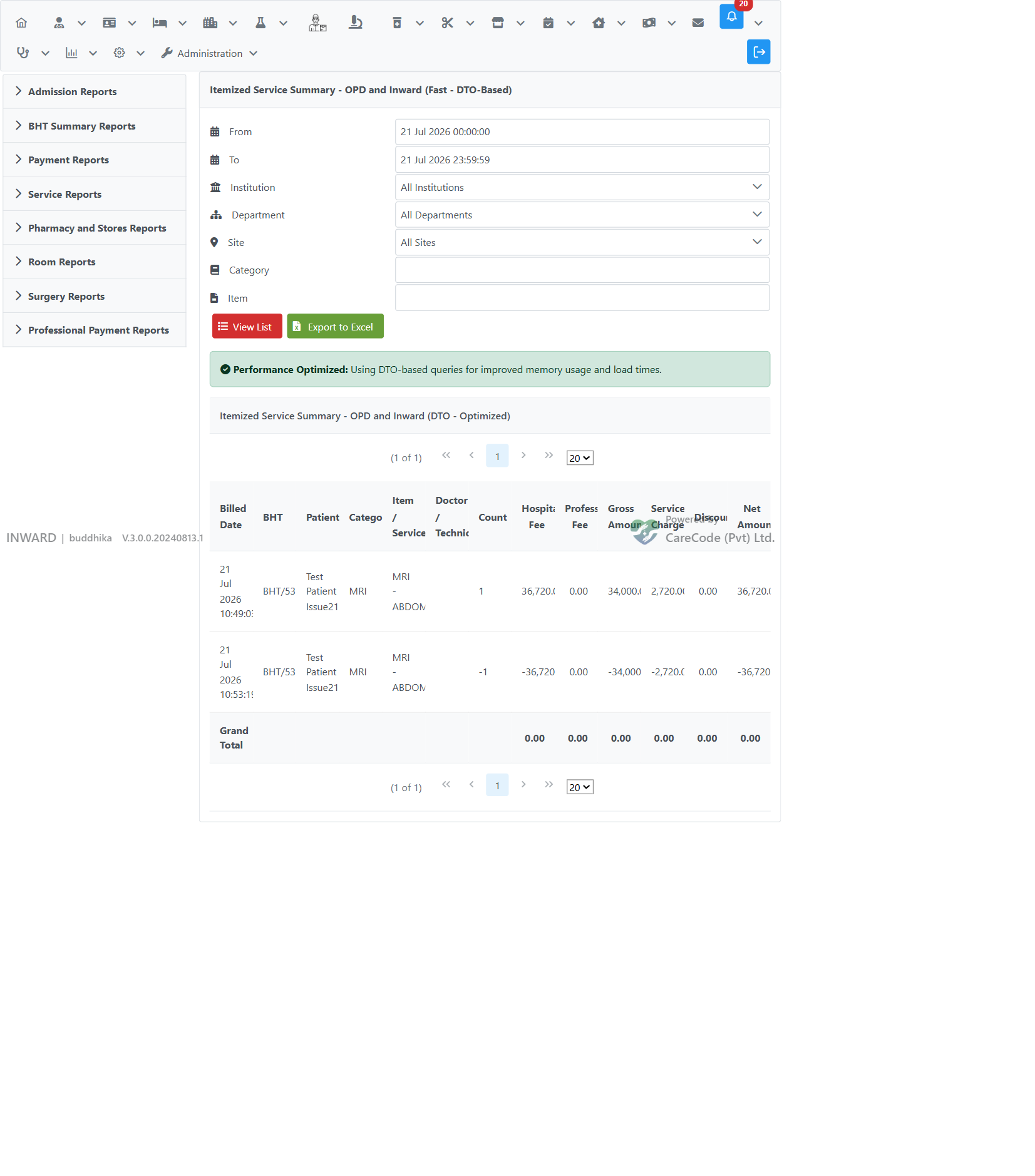
Cancelled and refunded service bills appear as a separate negative row (same item, negative Count and negative fee/value columns) rather than a flag on the original row. The report's Grand Total nets a cancellation against its original billing automatically — a fully cancelled service nets to 0.00 across every total column.
Path: Inpatient Analytics → Service Reports tab → Itemized Service Summary - OPD and Inward (Fast - DTO-Based)
Full click path: Inward → Reports/Analytics icon → Inpatient Analytics → Service Reports tab → Itemized Service Summary - OPD and Inward (Fast - DTO-Based)
XHTML: /inward/inward_itemized_service_summary_dto.xhtml
Controller: SearchController — createCombinedItemizedServiceSummaryDto()
Service layer: BillService.fetchItemizedServiceInstanceDTOs(...)
DTO: OpdSaleSummaryDTO
- Navigate to the report using the path above.
- Set the From / To date range (defaults to today).
- Optional filters:
- Institution
- Department
- Site
- Category
- Item
- Click View List to run the report, or Export to Excel to download it.
| Column | Description |
|---|---|
| Billed Date | Timestamp the bill (or cancellation/refund) was created |
| BHT | BHT number — populated for Inward rows, blank for OPD rows |
| Patient | Patient name — populated for Inward rows (via the patient encounter) |
| Category | Item category |
| Item / Service | Service name |
| Doctor / Technician | Staff assigned to the item, where available |
| Count |
1 for a normal billing, -1 for a cancellation/refund row |
| Hospital Fee | Hospital's share of the fee |
| Professional Fee | Staff/professional fee |
| Gross Amount | Gross value before discount |
| Service Charge | Service/margin charge |
| Discount | Discount applied |
| Net Amount | Final net value — negative on cancellation/refund rows |
The Grand Total row sums every column across all rows in the current filter, so a service that was billed and later cancelled nets to 0.00.
Cancelling or refunding an inward service bill does not modify or remove the original billing row — it creates a new CancelledBill/RefundBill with its own bill items, already stored with negated fee/value columns. The report keeps both rows so the full billing history (bill → cancel → re-bill, etc.) stays visible, while the Grand Total still reflects the correct net position.
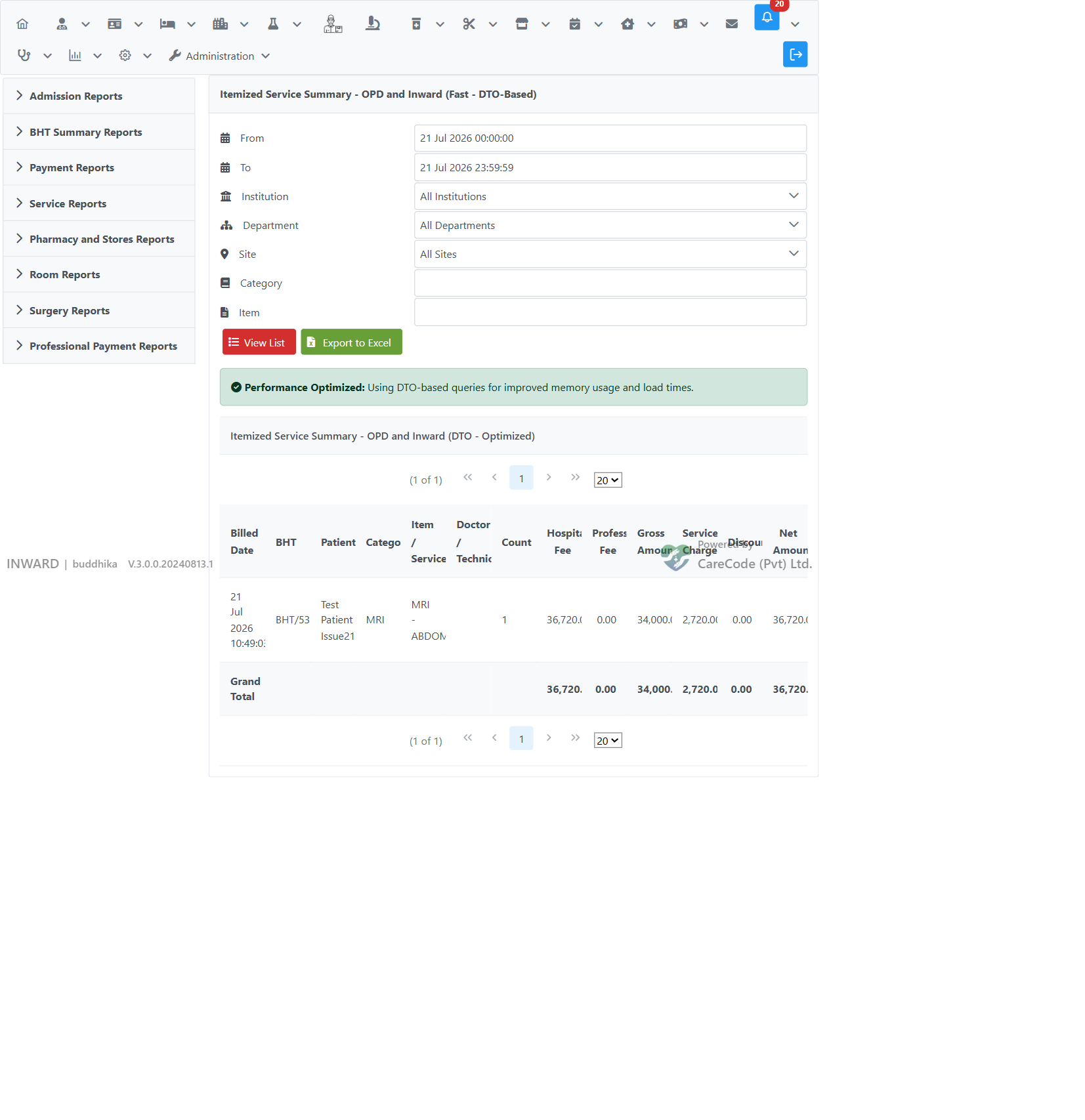
Before cancellation — a single MRI - ABDOMEN billing:
After cancellation — the cancellation appears as its own row (Count -1, Net Amount negative), and the Grand Total nets to 0.00:
- Inpatient Analytics — the report hub this page is accessed from
- Add services and Investigations — how Inward service bills are created
- Inward