Admin Bill Number Serial Per Admission Type
Admin — Separate Bill Number Serial Per Admission Type (Make a Payment, Make a Deposit & Post Final Payment)
Naming note: this setting's config key still reads "...for Inward Payments" for historical reasons, but it now applies to both Make a Payment and Make a Deposit bills — see Inpatient — Make a Payment and Make a Deposit for what these are. Earlier versions of this article referred to the pre-discharge payment as "Inward Deposit" — that name is now used only for the genuinely separate Make a Deposit feature.
By default, all inpatient admissions of a given department or institution share one bill-number sequence for Make a Payment bills, a separate shared sequence for Make a Deposit bills, and a separate shared sequence for Post Final Bill (post-discharge) Payments. This article explains an optional setting that lets each Admission Type (for example "BHT" ward admissions vs. "OPD Card" admissions) run its own independent serial for these payment types instead.
This is an administrator-level decision — it changes how bill numbers are generated hospital-wide, not something billing staff configure themselves.
Some institutions track and reconcile BHT-ward admissions separately from OPD-Card (or other) admission categories — for example, for internal auditing, separate cashier reconciliation, or reporting that expects each admission category's payments to run in its own numbered range. Without this setting, payment/deposit/post-final-payment bill numbers for all admission types are interleaved in a single sequence, which makes it harder to tell at a glance which numbered range belongs to which category.
| Payment | Affected when enabled |
|---|---|
| Make a Payment (pre-discharge payment) | Yes |
| Make a Deposit (pre-discharge deposit) | Yes |
| Post Final Bill Payment (post-discharge payment) | Yes |
| Cancellations and refunds | No — unaffected, unchanged |
| Any other bill type (OPD, Pharmacy, Purchase Orders, etc.) | No — unaffected, unchanged |
Every Admission Type (e.g. BHT, OPD Card, CT Card) has a short Code, set on the Admission Types admin page:

When this setting is turned on, that code is inserted into the Make a Payment, Make a Deposit, and Post Final Payment bill numbers, and each admission type gets its own counter, starting from that admission type's existing bill history so no numbers are skipped or repeated.
Since issue #22804, Make a Payment and Make a Deposit bill numbers also embed the year and use a configurable suffix (Bill Number Suffix for INWARD_PAYMENT / Bill Number Suffix for INWARD_DEPOSIT — see Application Options). With no suffix configured, a bill number looks like Ward//26/000123 (department code, delimiter, blank suffix, delimiter, two-digit year, delimiter, serial):
| Setting | Example bill number |
|---|---|
| Off (default) | Ward//26/000123 |
| On, patient admitted under BHT | Ward//BHT/26/000062 |
| On, patient admitted under OPD Card | Ward//OPDCARD/26/000014 |
The two admission types above are only an example — the counters split by whatever Admission Types the institution has actually configured. If a suffix is configured (e.g. WA for Payments), it appears between the department code and the admission type/year segments, e.g. WardWA/26/000123.
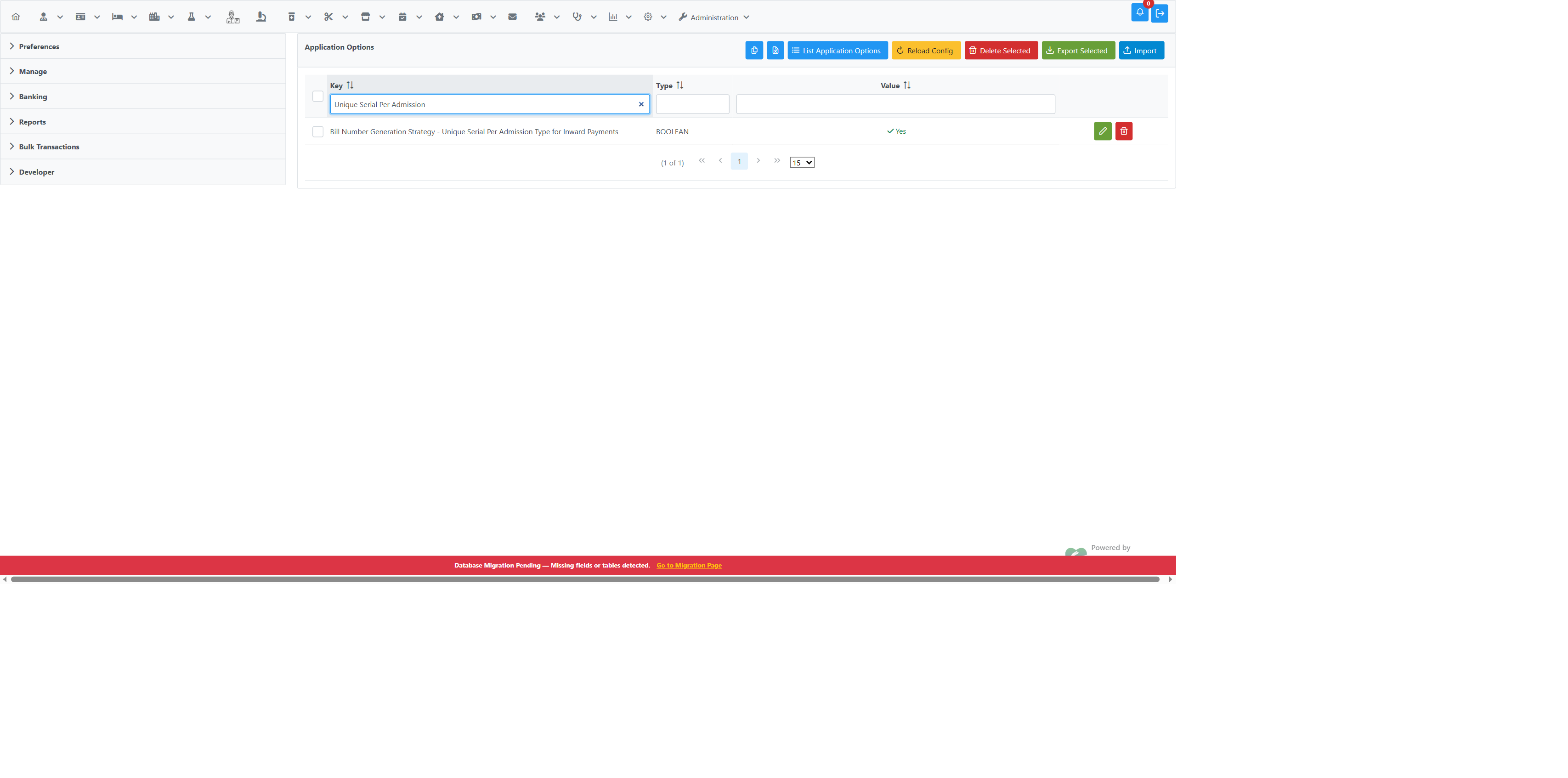
- Go to Administration → Manage Institutions → Application Options.
- Click List Application Options, then filter the Key column for
Unique Serial Per Admission. - Click Edit Option on the row for
Bill Number Generation Strategy - Unique Serial Per Admission Type for Inward Payments. - Toggle Key Value to On.
- Click Save.
The setting takes effect for the next Make a Payment, Make a Deposit, or Post Final Payment bill created — no application restart is required.
- Applies hospital-wide. This is an application-level option, not per-department or per-admission-type — it turns the behaviour on for every Make a Payment, Make a Deposit, and Post Final Payment bill across the whole installation.
- Give every relevant Admission Type a short, distinct Code first. The code is what appears in the bill number, so blank or duplicate codes will produce confusing bill numbers. See Admin — Inpatient Admission Types.
- Existing bill numbers are not renumbered. Turning this on only changes bill numbers going forward; past payment/deposit/post-final-payment bills keep their original numbers.
- A patient with no Admission Type recorded still uses the shared legacy sequence, even with this setting on.
Toggle the same Key Value back to Off and Save. New bills immediately return to the single shared sequence per department/institution; the per-admission-type counters are simply not used again (they are not deleted, so re-enabling later resumes from where each one left off).
- Admin — Inpatient Admission Types — where the Admission Type Code used in the bill number is configured
- Admin — Inpatient Module Behaviour (Config Keys) — other Inward-related configuration keys, including the equivalent BHT-number setting
- Inpatient — Make a Payment and Make a Deposit — what these two features are and how they're identified separately
- Application Options — general guide to finding and editing configuration keys
- Admin — Application-Level Configuration — how application-level options work