Repository navigation
Trainer Optimizer
Helps you get a character LoRA right in RulZ AI Trainer. It gives you starting settings with the reason for each one, reads your finished runs to show what went wrong and what to change, and can ask an AI assistant on your PC for a second opinion. It does not train anything and needs no graphics card.
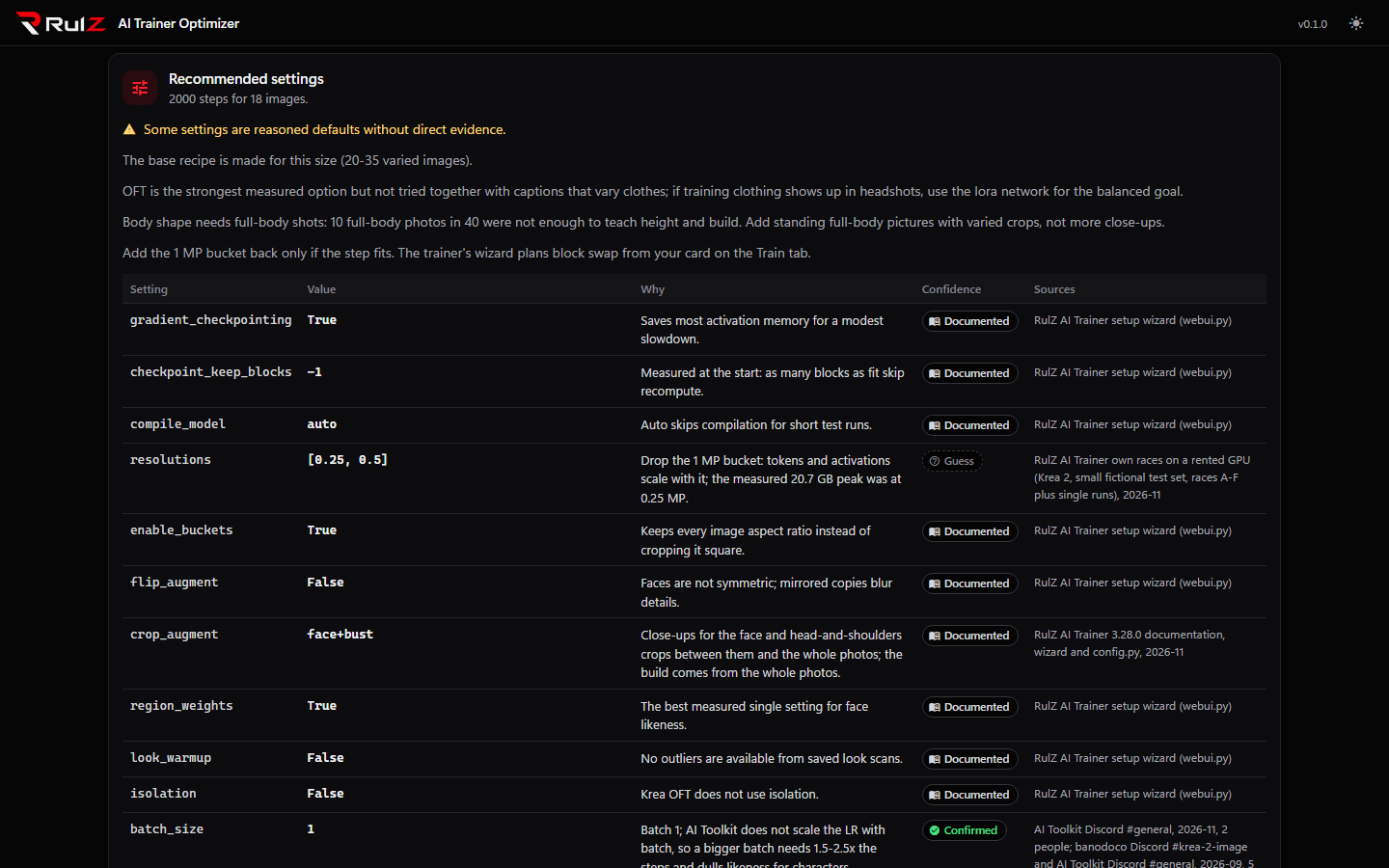
Version 0.3.0 has never been checked against a finished training run. The recommendations come from a knowledge base of community reports, model cards, the trainer's documentation and our own measured runs, not from experiments this app ran. The export, queue and vast.ai steps are tested against the trainer's code, but have not been used on a real run. Treat the result as a starting point, and tell us what you find.
- Recommend: pick a model, point the app at your dataset folder or folders, say what you want, and get a table of settings. Every row has the value, the reason, a confidence rating and the sources. Then save the config, check it with the trainer, or queue it on this PC or on vast.ai.
- Runs: read RulZ AI Trainer run folders. See face, body and combined likeness over the steps, the best checkpoint for each with its probe images, the problems the numbers show, and tick the flaws you see in the images. You get proposed fixes and a corrected config for the next run.
- Ask AI: send the knowledge for your model, your dataset summary, the recommendation and the run analysis to Claude Code, Codex, Grok Build or Antigravity (your choice) and read the answer.
- Knowledge: browse everything the recommendations are built from, one model at a time, read-only.
- It does not train, and it never starts a run by itself. Queueing hands a config to RulZ AI Trainer, which does the training.
- It does not promise a good LoRA. The settings are a starting point for one person's character LoRA, not a universal recipe.
- It does not change your dataset, your trainer install or your run folders. Everything it writes to the trainer goes through the trainer's own code, so the file formats stay the trainer's.
- It does not look at your images. The dataset scan counts and measures them and compares near-duplicates, and only that summary can be sent to an AI.
The Optimizer sits next to the trainer. It reads the trainer's output folder, writes config files the trainer can
load, and uses the trainer's own Python to validate a config and add it to the trainer's queue.
| Step | Where |
|---|---|
| Choose settings | Optimizer, Recommend tab |
| Train | RulZ AI Trainer (this PC) or a vast.ai instance, see Cloud and remote |
| Look at the result | Optimizer, Runs tab, or the trainer's Previous runs |
| Fix and go again | Optimizer, Export the next config |
You can use the Recommend tab and the Knowledge tab without the trainer installed: Save YAML writes a file you can load in the trainer later. Validate and the two Queue buttons need a RulZ AI Trainer install on the same PC, and the vast.ai queue also needs the trainer's vast.ai fleet set up.
| If you want to… | Read |
|---|---|
| Install it and set the trainer folder, helper and export folder | Getting Started |
| Get starting settings, and save or queue them | Recommendations |
| Find out why a finished run went wrong | Run Analysis |
| Get a second opinion from an AI assistant | Ask AI |
| See what the advice is based on, or add a recipe | Knowledge Base |
| Fix a problem | Troubleshooting |
- Windows 10 or 11 (it also runs under WSL / Ubuntu, see Getting Started).
- Python 3.10 or newer. The launcher installs it for you if it's missing.
- No graphics card.
- Optional: a RulZ AI Trainer install on the same PC (for Validate and Queue), and one or more of the Claude Code, Codex, Grok Build or Antigravity command line tools, signed in (for Ask AI).
It runs on your own computer and listens only to your own computer by default.
- Source code: https://github.com/speedyrulz/RulZ-AI-Tools-Suite/tree/main/apps/RulZ-AI-Trainer-Optimizer
- Full technical README: README
- Report a bug or request a feature: Issues
- License: MIT. The RulZ name and logo are excluded from it (see LOGO-NOTICE).
| Version | Highlights |
|---|---|
| 0.3.5 | Knows RulZ AI Trainer 3.40.0's resolution_shift and turns it on for Krea 2, Qwen-Image 2.1, FLUX.3 Klein, MOSS-Image, Ideogram 4 and FIBO 2, unless the suggested timestep sampling is reference (which already carries the shift). |
| 0.3.4 | Knows RulZ AI Trainer 3.38.0's new block audit settings (block_audit_every, block_audit_groups, block_audit_seeds). |
| 0.3.3 | Knows RulZ AI Trainer 3.37.0's new remote_render setting. |
| 0.3.2 | Knows RulZ AI Trainer 3.36.0's new settings (the rex and cosine_restarts schedules, Final lr share, Warm-up share, Restart cycles, the Adam betas and epsilon, and each dataset's Loss weight and Per epoch cap). |
| 0.3.1 | Knows RulZ AI Trainer 3.35.0's new settings (Repeats from folder names, One caption per line). |
| 0.3.0 | Starting settings for Z-Image Base and Turbo (new in RulZ AI Trainer 3.34.0): Turbo with the training adapter, Base without; every setting is marked as a guess. |
| 0.2.0 | Starting settings for FLUX.2 Klein 4B (new in RulZ AI Trainer 3.33.0). Nothing is measured on 4B yet, so every setting is marked as a guess; samples use 50 steps at CFG 4.0 like the trainer. The FLUX.2 Klein 9B file no longer rules 4B out and points to the new file. |
| 0.1.0 | First version. Recommend with reasons, confidence and sources for twelve models; export, validate, local and vast.ai queue; run analysis with proposed fixes and a corrected next config; Ask AI with Claude Code, Codex, Grok Build or Antigravity; a read-only Knowledge tab. Never checked against a finished training run. |