Repository navigation
Trainer Optimizer Knowledge Base
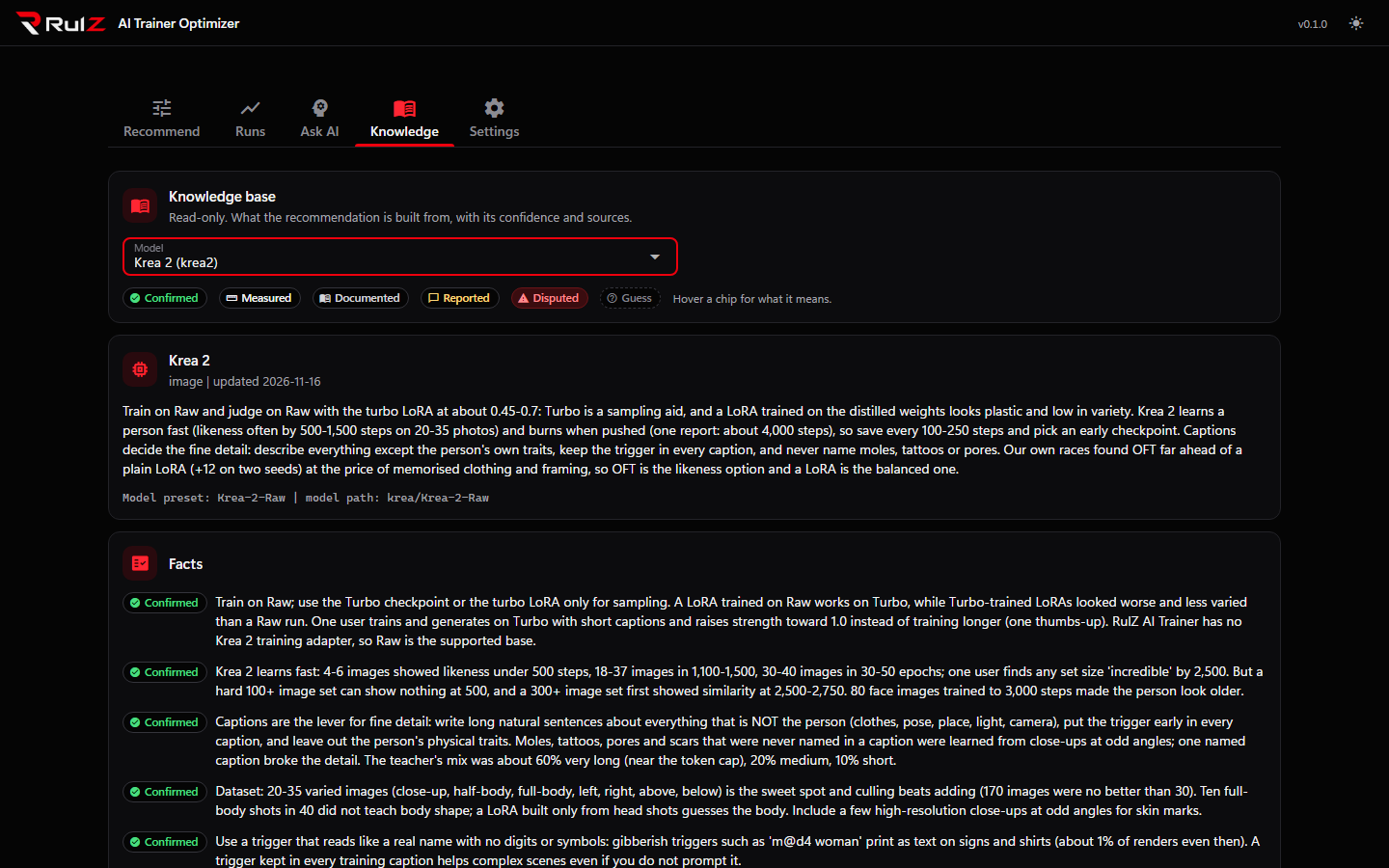
Every recommendation comes from the knowledge base: plain YAML files in the app's knowledge folder. The Knowledge
tab shows exactly what a recommendation used, one model at a time, read-only.
Recommendations are a starting point. Version 0.3.0 has never been checked against a finished training run, and the evidence behind each model differs a lot. Read the confidence rating on each setting.
Community training reports, official model cards, the trainer's documentation and our own measured RulZ AI Trainer runs. For each fact the knowledge base records the kind of place, the month, how many people agreed and the kind of evidence. It carries no names and no dataset details. The ratings are explained in Recommendations.
Pick a model to see:
- the summary and the trainer's model preset and model path
- Facts with their confidence
- the character starting recipe: the base settings, each with value, reason, confidence and sources
- Steps: how the step count is worked out
- Adjustments by dataset and goal: the rules that change the recipe, for example for a tiny dataset
- How to evaluate: the strength, sampler, steps and CFG to test checkpoints with
- Known flaws and fixes: the model's own and the general ones, which the Runs tab proposes from
- Open questions nobody has settled, and the Sources
Hover a chip for what the rating means.
The knowledge files were last updated on 2026-11-16. This is how much they stand on:
| Model | Evidence |
|---|---|
| Krea 2 | Strong. About a dozen community reports and our own races. Most base settings are confirmed or measured. Train on Raw and judge on Raw. |
| Qwen-Image 2.1 | Strong, with one open fight. Many community reports and our own matched runs. The optimizer choice is disputed. |
| MiniMax H3 (FL2VA and Ref2VA) | Strong for likeness from still photos. Many reports. Clips and voice are separate, harder jobs with little evidence. |
| MiniMax-H3-Image | Thin. A new model with a few single-user runs and our own measurements. Expect to change things. |
| MOSS-Image | Moderate. Many reports, but two public recipes disagree on optimizer and timesteps, so the file starts on the safer one and documents the other. |
| Ideogram 4 | Moderate. Many reports about captions (it was trained on structured JSON captions), but no character recipe newer than June. The starting numbers are partly borrowed. |
| FLUX.2 Klein 9B | Moderate. A handful of reports. The best-supported start is a low learning rate, which differs from the trainer's default, so the file starts in between. |
| FLUX.2 Klein 4B | None. New in the trainer, never measured. The file borrows the 9B's recipe with 4B's sampling defaults, and every setting is marked as a guess. One report says a 4B fine-tune lost its editing ability after about 20 epochs. |
| Z-Image | None in RulZ AI Trainer. New in the trainer, never measured. The base and turbo recipes follow Fizgig's and ai-toolkit's published settings, and every setting is marked as a guess. |
| FLUX.3 Klein | Poor. Several people got no likeness or a poor one on it where other models worked on the same photos. The file gives the vendor's recipe with one optimizer change. None of it is a verified character recipe. Pick another model if you can. |
| FIBO 2 | Thin. A vendor recipe for objects, one object test and a few likeness reports. Many numbers are reasoned defaults. |
| P-H3-Image | None. No proven recipe for a person. Everything is borrowed from the MiniMax-H3 family and marked as a guess. |
| PAN 2 | None from the community. The only evidence is our own first run. |
| SDXL | Old advice only. Three public guides, and the trainer's SDXL support has never run on real weights. |
A model with thin or no evidence shows many Guess rows and the warning that some settings are reasoned defaults. Treat a first run on such a model as an experiment.
The knowledge base is data only, so you can change it without touching the program. Each model is one file,
knowledge\models\<model>.yaml, and knowledge\general.yaml holds what is shared: the list of flaws (symptoms), the
cross-model fixes and the sources. Use UTF-8 and LF line endings.
To edit a model, change its file. To add one, copy a similar file to a new name. Rules:
-
idmust be the same as the file name (without.yaml), and should be one of RulZ AI Trainer's model ids. - Required:
id,name,kind(imageorvideo),updated,summary,baseandsteps.stepsneedsepochs,min,max,round_to,why,confidenceandsources. - Every setting is a key from the trainer's config with a
value, awhy, aconfidence(CONF,MEAS,DOC,REP,DISPorGUESS) andsources, a list of ids from the file'ssources. A key the trainer doesn't know is dropped when the config is made. - Optional:
facts,adjust(rules with awhencondition, such asimages_max,goal,focus,vram_max_gb,targetorhas_captions, and aset),evaluate,flaws,variants,open_questions,model_presetandmodel_path. - Public wording only: no names, no handles, no personal details and no dataset names. A source names the place, the month and how many people agreed.
A small example of a setting and a source:
base:
  lora_rank:
    value: 16
    why: "Low rank was enough for one person in two independent reports."
    confidence: CONF
    sources: [community_2026_10]
sources:
  community_2026_10:
    kind: community        # community | web | official | measured
    where: "a training Discord"
    date: "2026-10"
    people: 2
Then open Settings, click Reload knowledge, and reload the browser page. Problems with the knowledge files are listed on the Knowledge tab, with the file name, so you can fix them. If a file is so broken that it can't be read, the Recommend tab can't make a recommendation until you fix it.
The full format is in the app's design file.
A launcher update may replace the files in the app folder, so keep a copy of your changes. If you have evidence that should be in the shared knowledge base, open an issue.