Repository navigation
ComfyUI Launcher
Starts and stops ComfyUI servers that run inside WSL. Save a configuration for each way you run ComfyUI (GPUs, port, options, environment), then start one or several with a click and watch their logs in one window.
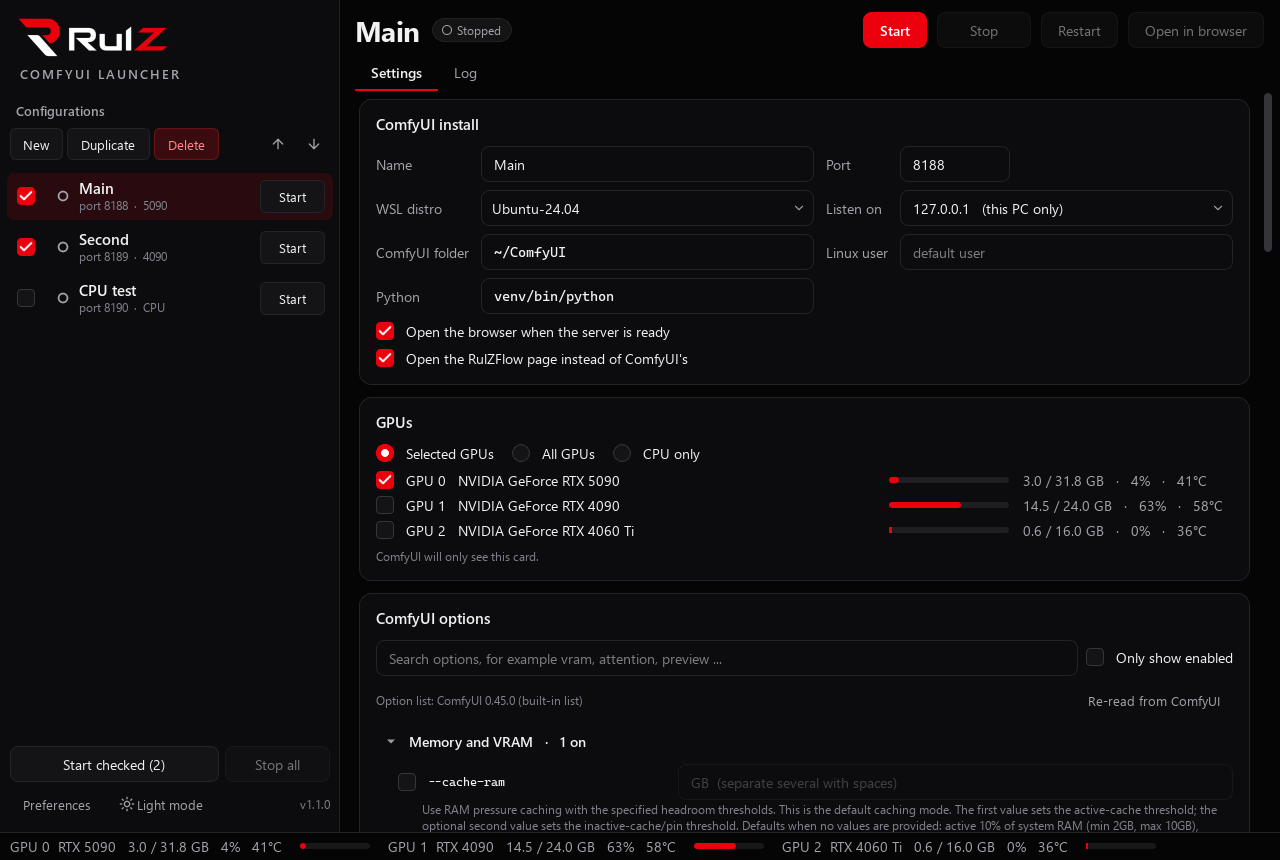
- Configurations: create, duplicate, reorder and delete them. Tick the ones that belong together and start them all with Start checked.
- GPUs by name: pick one or more cards, all cards or CPU only. Memory use, load and temperature are shown live.
- ComfyUI options: every command line option of your own ComfyUI, with its help text, searchable.
-
Environment: variables and bash commands that run before ComfyUI starts, with an import from
~/.bashrc. - Browser: opens ComfyUI when the server is ready, or the RulZFlow page instead if you tick that option.
- Logs: one per server, shown the way a terminal shows them.
- Dark or light: black and red, or white and red, like the other RulZ apps.
| If you want to… | Read |
|---|---|
| Install it and start your first server | Getting Started |
| Know what a setting does, or open the RulZFlow page | Configurations |
| Find your settings, or fix a problem | Settings and Troubleshooting |
- Windows 10 or 11 with WSL 2 and a distro that already has ComfyUI. The launcher installs neither.
- The NVIDIA driver on Windows (for
nvidia-smi) if you want to pick GPUs.
- Source code: https://github.com/speedyrulz/RulZ-AI-Tools-Suite/tree/main/apps/RulZ-ComfyUI-Launcher
- Full technical README: README
- Report a bug or request a feature: Issues
- License: MIT. The RulZ name and logo are excluded from it (see LOGO-NOTICE).
| Version | Highlights |
|---|---|
| 1.1.1 | The buttons of the question shown when you close the launcher with instances still running (Keep running in the tray, Stop all and exit) are no longer cut off; every dialog's buttons are now as wide as their labels. |
| 1.1.0 | First version in the RulZ AI Tools Suite. A configuration can open the RulZFlow page instead of ComfyUI's own. Dark and light look, with the same colours, buttons and keyboard focus outline as the launcher, and its own icon. The current Open the browser when the server is ready setting is used when a server becomes ready, also if you changed it after pressing Start. Only one button per view is red: Start, or Open in browser while the server runs. |
| 1.0.0 | Before the suite: configurations, GPU selection, options from your own ComfyUI, environment, logs and close to tray. |