Repository navigation
Model Merger
Merges image models with ComfyUI: checkpoint with checkpoint, LoRA with LoRA, and LoRA into a checkpoint, with sample grids at different mixes so you can compare results before you save one.
Version 0.6 merges checkpoints and diffusion models, bakes LoRAs into them, merges LoRAs with LoRAs, renders sweeps of a merge with your own ComfyUI workflow, compares them on a Results page, and keeps a history.
-
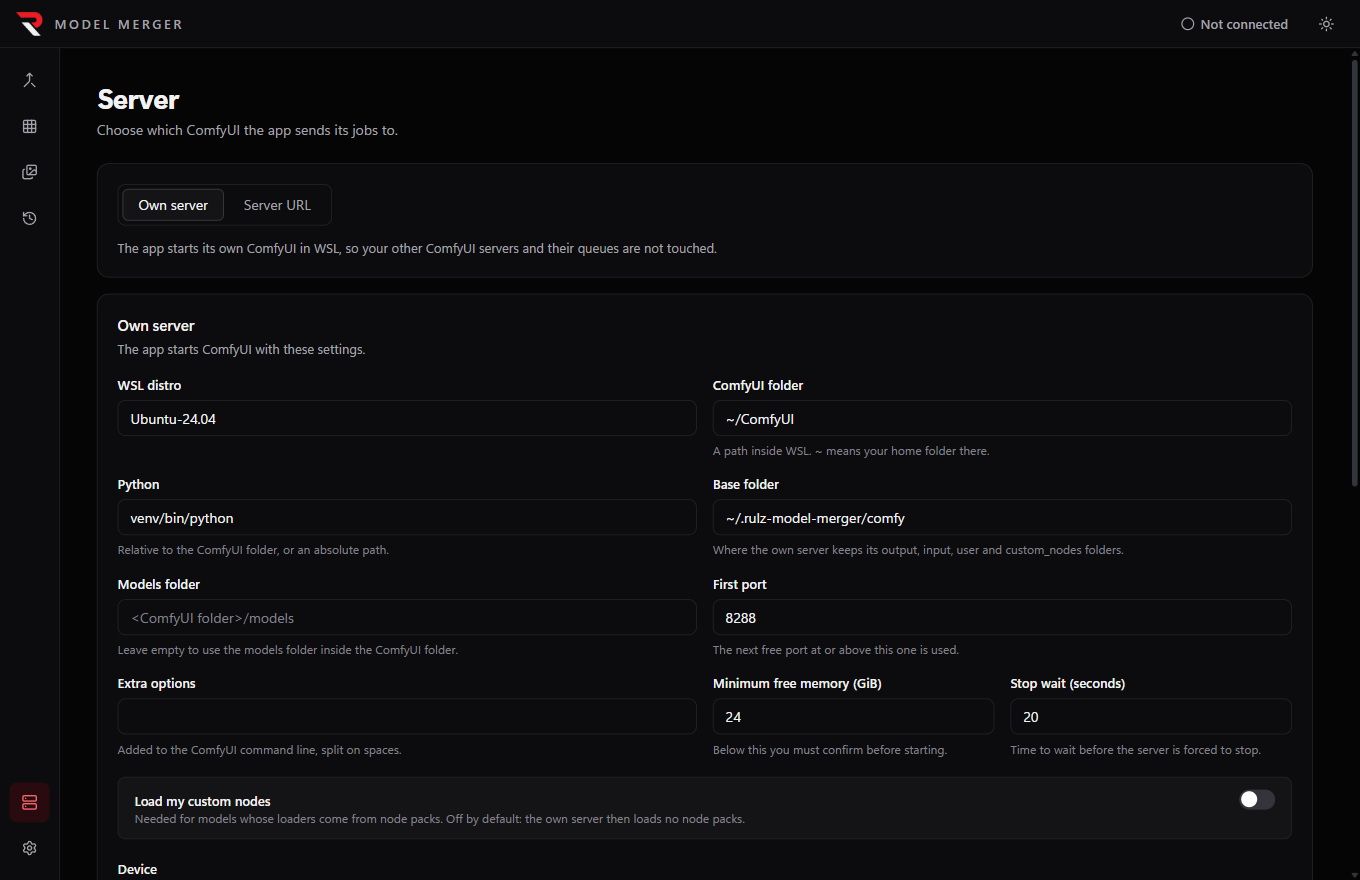
Its own ComfyUI (default): the app starts a ComfyUI inside WSL from your ComfyUI folder, on a GPU you pick or on
the CPU. It reads your models but keeps its own output, input and user folders, listens on
127.0.0.1only, and uses the first free port from 8288. Your other ComfyUI servers and their queues are not touched. Closing the app stops it. - Or a server you already run: enter its address. Before the first job the app asks once whether it may put jobs in that server's queue. It never clears that queue, cancels other jobs or unloads its models.
- Checks before starting: free WSL memory, a free port (checked on Windows and in WSL), which GPUs your other ComfyUI servers use, and whether the folders and Python exist. Anything that needs your OK has to be ticked first.
- GPU picker with memory and load, a live server log, and a summary of what the server can do (models found, merge and save nodes, per-model block merge nodes).
- Install it from the launcher, under ComfyUI.
- Open the Server page. The defaults expect ComfyUI in
~/ComfyUIof theUbuntu-24.04distro, with its Python invenv/bin/python. Change them if yours differ. - Pick CPU or a GPU, click Check, tick anything that needs your OK, then Start server. The top bar shows Connected when it is ready.
To use a server you already run instead, choose Server URL, enter its address and click Check connection.
The Merge page merges two models through the connected ComfyUI and saves the result. It takes diffusion-model files
(models/diffusion_models) or full checkpoints (models/checkpoints, with text encoder and VAE).
| Mode | What it computes |
| --- | --- |
| Weighted | A x r + B x (1 - r). The slider is the share of A. |
| Add difference | A + (B - C) x m: adds what C changed to make B (for example a fine-tune) onto A. |
| Per block | A different share of A per block, through ComfyUI's block merge node for that model type. The app picks the node that fits model A and shows only the blocks the model has. |
-
Pick the source type, then A and B (and C for add difference).
-
The check panel reads the files' headers (the weights are not loaded) and blocks the merge if A and B are different
model types or have layers of different shapes. It also shows whether the files are quantized and how much memory
the merge needs against what is free in WSL.
-
Set the mix, name the result and click Merge and save. The jobs list shows progress; Cancel removes or stops
only this merge, also on a server you share.
-
On the own server, Move into models puts the file into
models/diffusion_models/merged/ormodels/checkpoints/merged/so ComfyUI lists it. An existing file is never overwritten; the new one is named-2,-3... instead.
-
Quantized files (int8, fp8, nvfp4) can be merged: ComfyUI unpacks the weights, merges them and saves the result in
A's format again, which adds a little loss. Merging the bf16 originals is best when you have them.
-
Full checkpoints: the text encoder is merged with the same share or taken from A or B; the VAE is taken from A or
B, never merged.
-
The recipe (sources, mode, numbers, app version) is stored in the saved file's header and, on the own server, in a
.recipe.jsonnext to it. The app then checks that the saved file is this merge's and has the same layers as A. -
One merge runs at a time. On the CPU, two 5 GB models take about three minutes.
Bake LoRAs applies up to 10 LoRAs to model A, in list order, each with its own strength (and a text-encoder
strength for full checkpoints), and saves the result as a new model. LoRAs can also be added in the other modes; they
are then applied to the merge result.
-
Before baking the app reads each LoRA's header: format (LoRA, LoKr, LoHa, DoRA), rank, and how many of its layers
are in model A. A LoRA made for another model type (none of its layers in A) blocks the bake. LoRAs with diffusers
layer names (
transformer.…) are mapped by ComfyUI itself, so the app cannot check them beforehand and says so. -
After baking (own server) the app counts the LoRA weights ComfyUI could not place (
lora key not loadedin itslog). If any were skipped, the result is marked as failed, with a few of the names.
-
The LoRA names and their header hashes are stored in the recipe with the saved file.
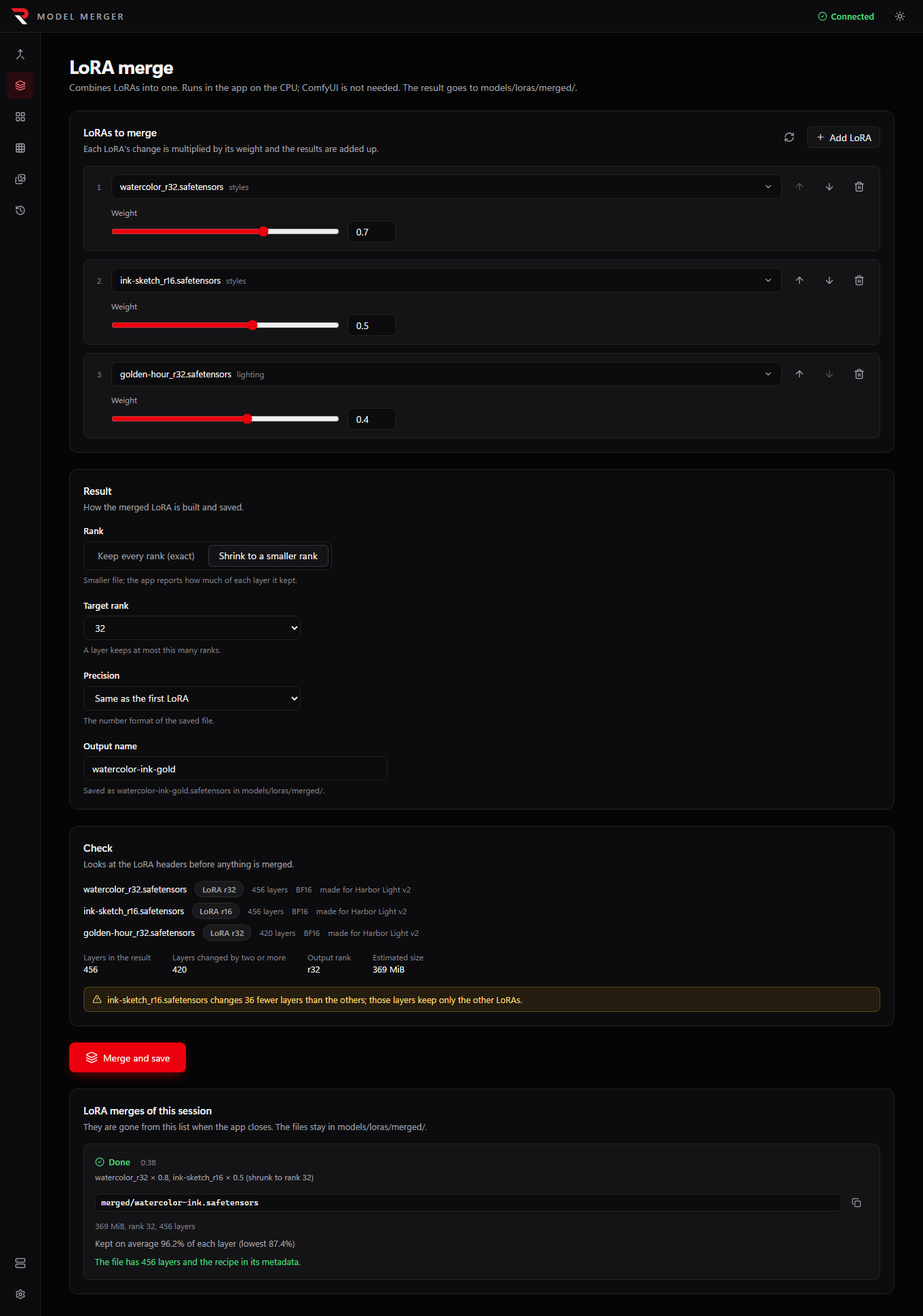
The LoRA merge page combines two to ten LoRAs into one new LoRA. The app computes it itself, on the CPU in a
background thread; ComfyUI does not need to run. It reads the LoRAs from the own server's models folder
(models/loras) and saves the result to models/loras/merged/, where ComfyUI lists it.
Each LoRA gets a weight (the slider covers −2 to 2, the number box takes −10 to 10; negative weights subtract a LoRA).
| Result | What it computes |
| --- | --- |
| Keep every rank (exact) | The result equals the weighted sum of the LoRAs' changes exactly (up to the saved precision). Its rank is the sum of the inputs' ranks, so the file is as large as the inputs together. |
| Shrink to a smaller rank | Reduces each layer of that exact result to the chosen rank (8 to 512). The app reports how much of each layer it kept (mean and lowest). |
-
Before merging the app reads each LoRA's header and blocks the merge when a file cannot be merged (LoKr, LoHa,
DoRA, LoCon mid weights, full diffs), when the LoRAs use different layer names (different trainers or model types),
when they share no layer, or when a shared layer has different shapes. It warns when they share less than half their
layers, name different base models, or add up to more than 8 GiB (the app holds them in memory).
-
After saving the app reads the file back and compares 16 of its layers with the weighted sum of the inputs.
-
An existing file is never overwritten; the new one gets
-2,-3… instead. A.recipe.jsonwith the inputs,weights, mode and rank is saved next to it. Cancel removes only the merge's own partial file.
-
Speed on the CPU, two rank-32 LoRAs with 252 layers: exact merge about 10 s, shrink to rank 32 about 25 s. Shrinking
many high-rank LoRAs can take minutes.
-
LoRA files reached through a symbolic link with an absolute target cannot be read from Windows; use a hard link or a
copy in the models folder.
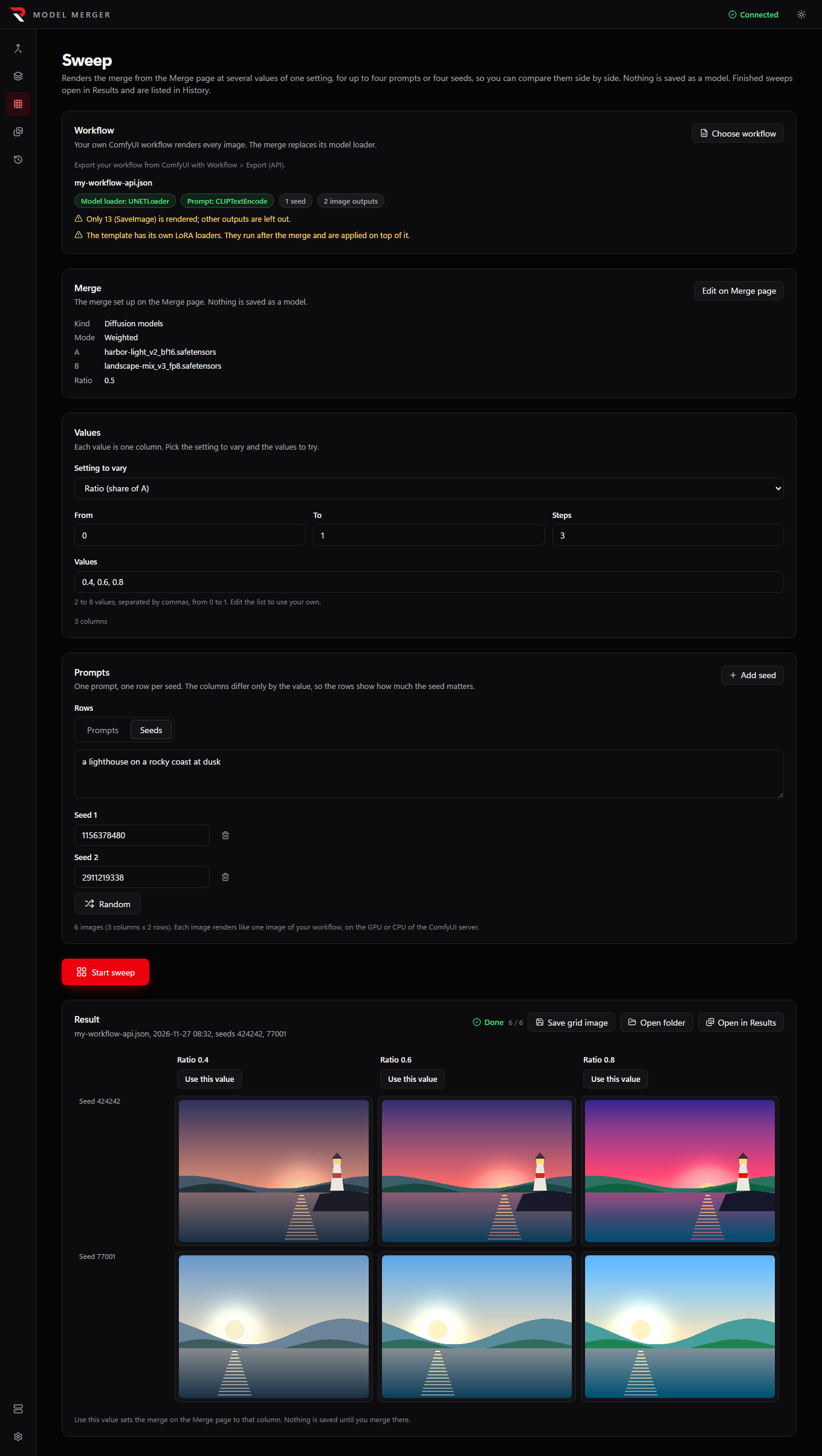
The Sweep page renders the merge set up on the Merge page at 2 to 8 values of one setting (the columns) as a grid of sample images. No model file is saved: each image builds the merge inside its own ComfyUI job. The rows are either prompts (1 to 4, the same seed everywhere) or seeds (one prompt, 1 to 4 seeds, to see whether a difference holds for other seeds).
| Setting to vary | Mode on the Merge page |
|---|---|
| Ratio (share of A) | Weighted, or Per block for the blocks that have no value of their own |
| Multiplier | Add difference |
| Strength of one LoRA | Any mode with LoRAs, including Bake LoRAs |
- Your own workflow renders the images. Pick a ComfyUI workflow saved in API format (Workflow > Export (API)). The app replaces its model loader with the merge, writes your prompt into its positive prompt node and your seed into its seed inputs, and keeps the sampler, steps, size, text encoder, VAE and model patches. A diffusion-model merge needs a workflow with a UNETLoader, a checkpoint merge one with a CheckpointLoaderSimple.
- Only what the image needs runs. The app picks one image output (a SaveImage first) and leaves out everything that output does not need: other outputs and previews, comparers, and prompt generators such as LLM or vision-API nodes, because the sweep's prompt replaces their text. A model loader on a side branch (for example a SAM 3 mask loader) is left as it is.
- Warnings say what the app found and changed, for example where the prompt came from or that the workflow's own LoRA loaders are applied on top of the merge.
- The images run one at a time, column by column. Cancel removes only this sweep's job (on a server you share, a job that is already running finishes and its image is dropped).
- Speed on an RTX 4060 Ti, Krea 2 int8 at 1 megapixel and 8 steps: about 60 s for the first image with model loading, about 40 s for each of the others.
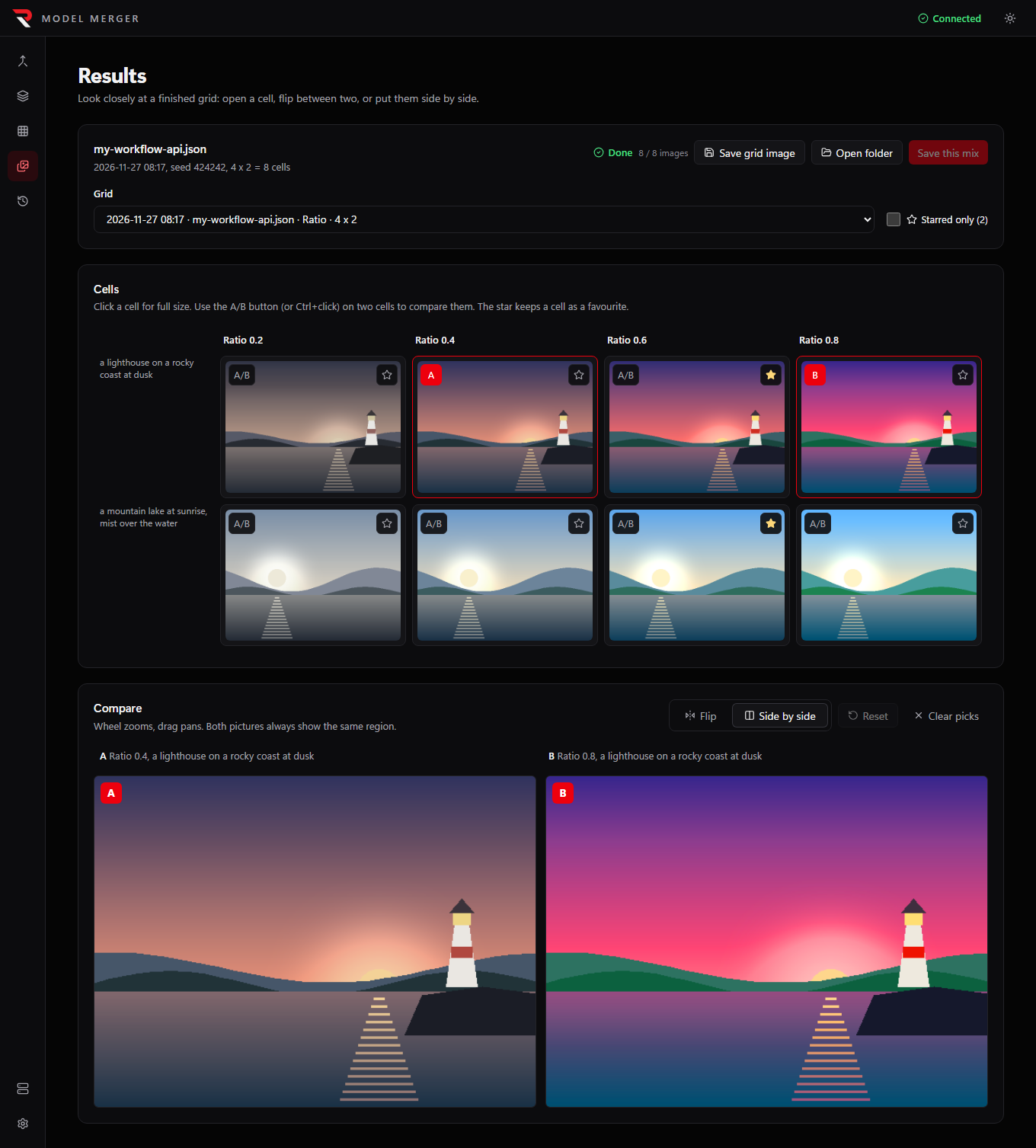
The Results page shows any finished sweep for a close look.
- Full size: click a cell. Arrow keys move along the row and the column, Esc closes.
- Compare two cells: pick them with their A/B button (or Ctrl+click). Flip shows one at a time and swaps on Space or a click; Side by side shows both, and the mouse wheel zooms and dragging pans both pictures together.
- Stars mark the cells you like and are saved with the sweep; Starred only shows just those.
- Save this mix sends the picked cell's value to the Merge page. Save grid image saves one labelled PNG of the grid; Save image in the full-size view saves one cell.
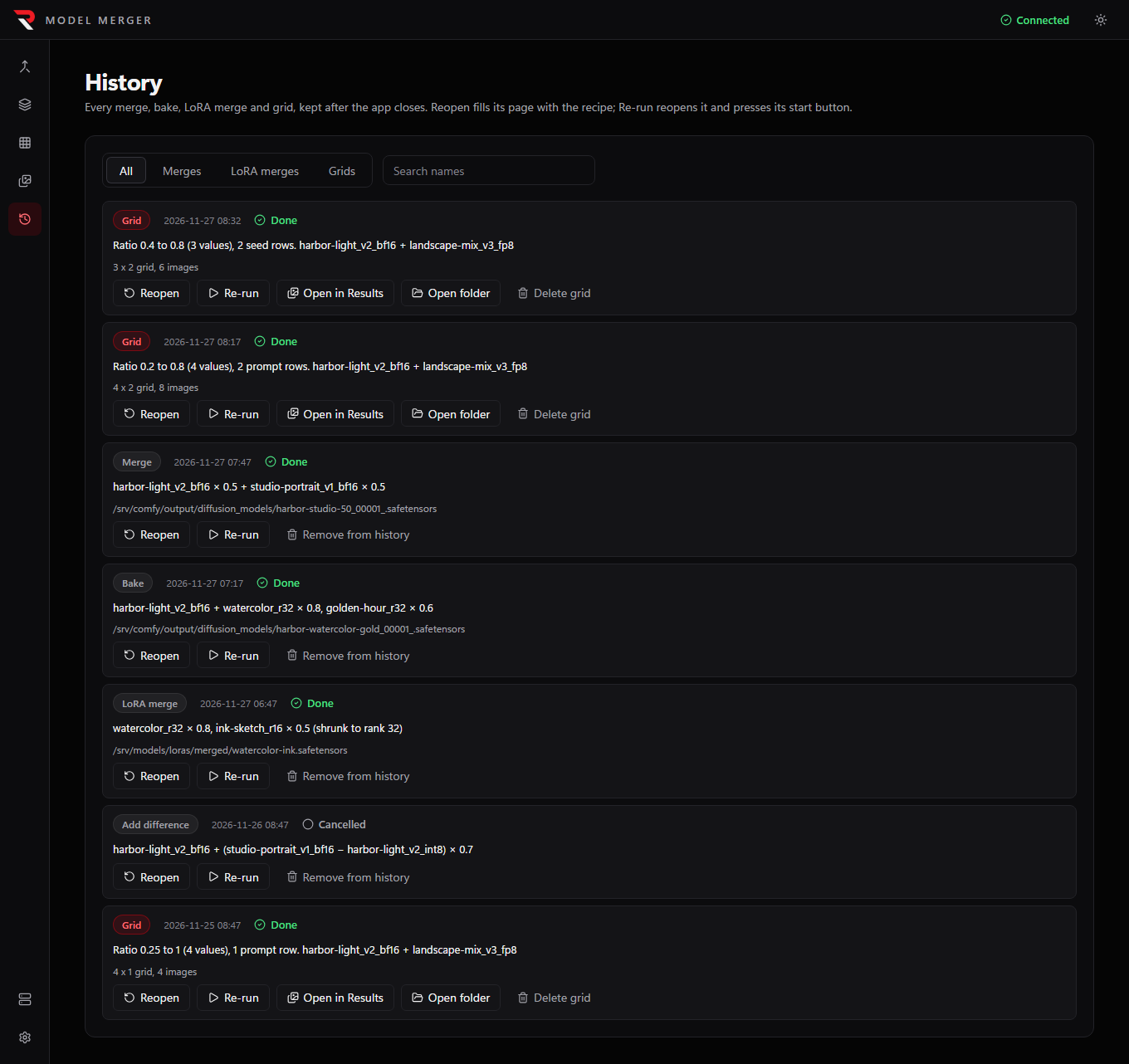
The History page lists every merge, bake, LoRA merge and sweep, newest first, and keeps them after the app closes. Filter by kind or search by name.
- Reopen fills the entry's page with its recipe; for a sweep it also sets the Merge page to the sweep's merge and loads its workflow again.
- Re-run reopens the entry and starts it with the same checks as that page's start button; if a check fails, or you change the recipe while it checks, it stops and says why.
- Remove from history forgets a merge entry (the saved file stays). Delete grid moves a sweep's folder to the Recycle Bin.
-
GPU numbers are the ones
nvidia-smishows. The app starts its server withCUDA_DEVICE_ORDER=PCI_BUS_ID, so the number means the same card. A GPU that another ComfyUI server already uses is marked In use by :port; starting a second server on it can run out of memory and slow its renders down. - Node packs: the own server loads none by default. Turn on Load my custom nodes for models whose loaders come from a node pack.
- Memory: a second ComfyUI that loads large models can use up WSL's memory, which stops the whole WSL machine. The app asks you to confirm when free memory is below the minimum you set (24 GiB by default).
- Extra options may not repeat the flags the app sets itself (port, listen, base or models folder, GPU, CPU).
- Stopping: the app sends Ctrl+C, then forces the server to stop after the wait you set. It only ever signals its own server, recognised by its base folder and start time, never one you started yourself.
- Windows 10 or 11 with WSL 2 and a distro that already has ComfyUI. The app installs neither.
- The NVIDIA driver on Windows (for
nvidia-smi) to run the server on a GPU.
-
0.7.0: Fixes from an audit. Re-running the same merge on the same server now saves a file again (ComfyUI no
longer serves it from its cache). Stop or quitting while the server's start checks run now really stops the start.
The server writes its own
rulz_extra_model_paths.yamlinstead of overwritingextra_model_paths.yamlin the base folder. Cancel no longer reports success while a merge or sweep is still waiting in the queue. Merging models stored in different formats (packed 4-bit against bf16 or int8) is no longer blocked by their scale data. LoRA merges refuse files with weights outside an up/down pair instead of dropping them, and an unreadable settings file is no longer replaced by defaults. - 0.6.0: Sweep, Results and History pages: seed rows, a full-size and A/B viewer with synced zoom, stars, and a history of every merge and sweep with Reopen and Re-run.
- 0.5.0: Sample grids: render a merge at 2 to 8 values of the ratio, multiplier or one LoRA's strength for 1 to 4 prompts, with your own ComfyUI workflow and no model saved.
- 0.4.0: Merge LoRAs with LoRAs: two to ten LoRAs into one, exact or shrunk to a smaller rank, computed by the app on the CPU, with checks before merging and after saving.
- 0.3.0: Bake LoRAs: up to 10 LoRAs into a model or on top of a merge, fit check before and skipped-weight check after the bake.
- 0.2.0: the Merge page: weighted, add-difference and per-block merges of diffusion models and checkpoints, header checks before merging, recipe saved with the file, move into models without overwriting.
- 0.1.0: first version: own ComfyUI server in WSL or a running server by URL, checks before starting, GPU picker, live log, server capabilities, dark and light theme.