Repository navigation
AWS Security
Caution
Authorized use only. The techniques below are for authorized assessment, education, and defensive research. Test only AWS accounts you own or have explicit written permission to assess, and follow AWS's customer support policy for penetration testing. See LEGAL.md.
AWS security reference - the IAM model, the recurring misconfigurations, how an account is enumerated and escalated in an authorized test, and how to harden and monitor it.
Covers IAM (users, roles, policies, privilege escalation paths), S3 exposure, instance metadata (IMDS) credential theft, enumeration and assessment tooling (Prowler, ScoutSuite, Pacu), and the hardening/logging baseline (CloudTrail, GuardDuty, Security Hub, IAM Access Analyzer).
Let a reader assess an AWS account methodically and recommend concrete hardening mapped to AWS-native controls and the CIS AWS Benchmark.
- Authorized configuration review or penetration test of an AWS account
- Looking up IAM privilege-escalation paths or S3/IMDS issues
- Building an AWS hardening and monitoring baseline
- Identity & Access Management
- S3 Storage Exposure
- Instance Metadata (IMDS) & Credential Theft
- Enumeration & Assessment
- Privilege Escalation Paths
- Hardening & Detection
- Resources
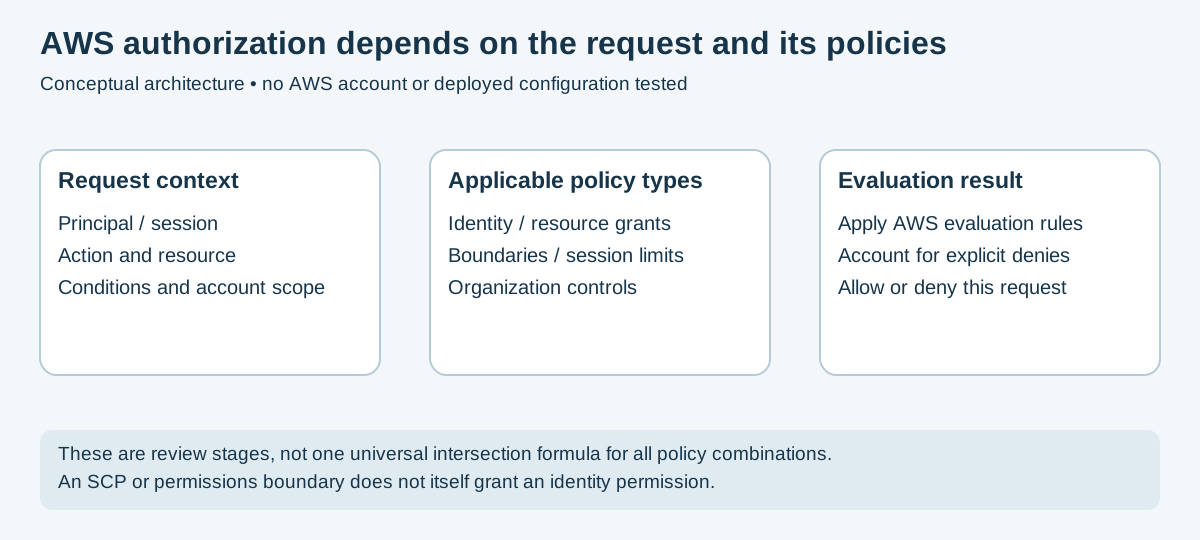
Figure 1 — Based on AWS policy evaluation. Original conceptual review model, not an exhaustive decision tree.
Review the principal, request context and all applicable policy types. Key concepts:
- Users / Groups - users can have credentials; groups organize user permissions and are not principals that can sign in or assume roles.
- Roles - assumable identities with temporary credentials (preferred over keys).
-
Policies - JSON permission documents;
"Action": "*"/"Resource": "*"andiam:*are red flags. -
STS - issues temporary credentials via
AssumeRole.
Common IAM problems: over-broad policies, long-lived access keys, no MFA, unused privileged roles, and policies that allow a principal to escalate (edit policies, create keys, or pass a privileged role).
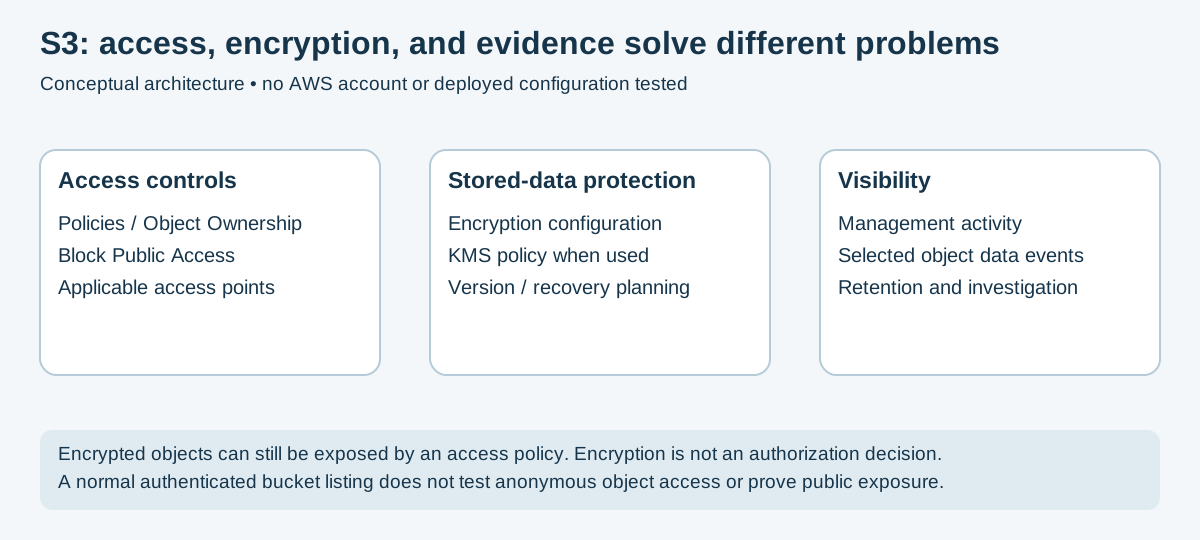
Figure 2 — Original conceptual control map. See S3 Block Public Access and CloudTrail data events.
- Public buckets/objects - the classic breach; check bucket policy, ACLs, and the account-level Block Public Access setting.
-
Review (authorized):
aws s3 ls s3://BUCKETuses the caller's credentials by default; success does not prove public access, and bucket listing differs from object reading. Evaluate bucket/access-point policy, Object Ownership, applicable Block Public Access settings, and intended principals. - Defend: enable Block Public Access account-wide; use bucket policies over ACLs (disable ACLs); enable default encryption and versioning; log access.
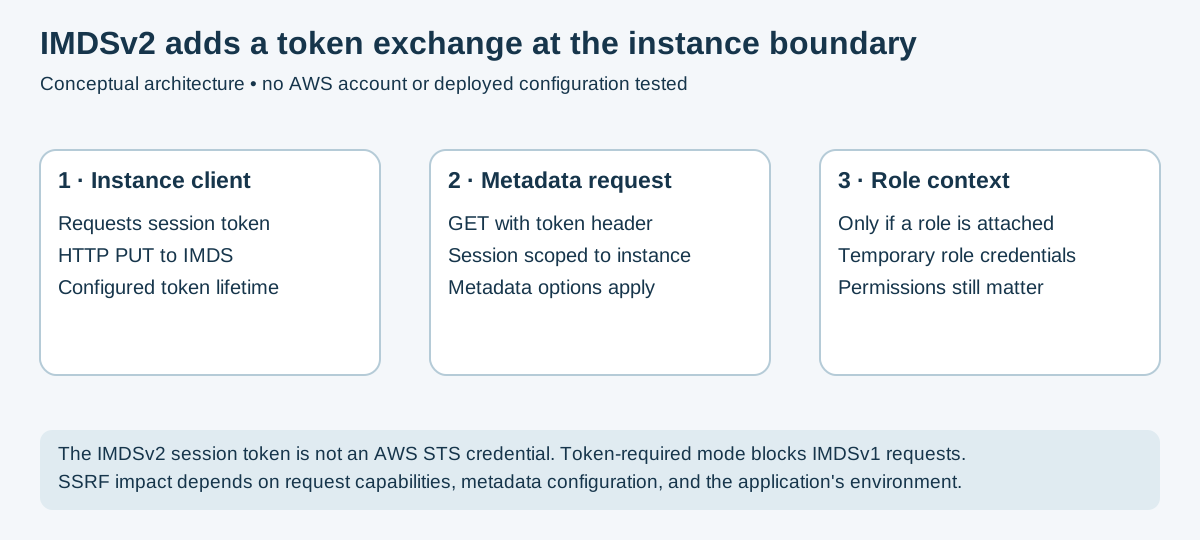
Figure 3 — Original conceptual exchange based on EC2 metadata documentation. No tokens or credentials were collected.
When an EC2 instance has an IAM role attached, IMDS can provide its temporary role credentials. The IPv4 endpoint is 169.254.169.254; availability and access depend on instance metadata options. SSRF may expose metadata if the application's request capabilities and environment allow it.
- IMDSv1 uses request/response without the IMDSv2 session token; compatible SSRF can expose its metadata.
-
IMDSv2 uses a session token (
PUTthen token-bearingGET). Require it where supported, but do not treat it as a universal SSRF fix. Patch the application and scope role permissions too.
# On an instance (authorized) - IMDSv2 flow
TOKEN=$(curl -sX PUT "http://169.254.169.254/latest/api/token" \
  -H "X-aws-ec2-metadata-token-ttl-seconds: 60")
curl -s -H "X-aws-ec2-metadata-token: $TOKEN" \
  http://169.254.169.254/latest/meta-data/iam/security-credentials/
Defend: require IMDSv2 (HttpTokens: required), limit the hop count, and
scope instance-role permissions tightly.
# Identify the caller; this does not enumerate effective permissions
aws sts get-caller-identity
# For an actual IAM user only: one subset of its policies
aws iam list-attached-user-policies --user-name NAME

# Configuration assessment (CIS / best practice)
prowler aws                       # https://github.com/prowler-cloud/prowler
scout aws # https://github.com/nccgroup/ScoutSuite- Prowler - CIS AWS Benchmark and hundreds of checks; good for compliance evidence.
- ScoutSuite - multi-cloud config audit with an HTML report.
- Pacu - offensive AWS exploitation framework (enumeration, privesc modules) - authorized engagements only. https://github.com/RhinoSecurityLabs/pacu
Potential privilege-escalation paths depend on resource scope, policy conditions, trust relationships, applicable limits, and additional service permissions. Examples to review:
-
iam:CreatePolicyVersion/iam:SetDefaultPolicyVersion- create or select a permissive version of a managed policy that affects a principal, if the relevant resource/action is allowed. -
iam:AttachUserPolicy/AttachRolePolicy- potentially attach a more permissive managed policy, subject to allowed targets and constraints. -
iam:CreateAccessKey- mint keys for a more privileged user. -
iam:PassRole+ a compute service (lambda:CreateFunction,ec2:RunInstances) - potentially pass a privileged role to a resource. Service execution permissions and the role's trust policy also matter;iam:PassRolealone is not sufficient.
Assess: collect identity, resource, trust, session and organization policy evidence for specific candidate actions; a scanner's permission enumeration may be incomplete. Defend: restrict privileged actions and PassRole to justified targets/conditions. Use boundaries and organization controls where applicable without assuming they grant permissions or cover every principal identically.
- Logging: configure multi-Region CloudTrail coverage, log-file validation and protected centralized storage; select required data events explicitly. S3 object-level activity is not logged by default merely by creating a trail. Enable appropriate Config recording for resource history.
- Threat detection: GuardDuty (anomaly/threat detection), Security Hub (aggregated findings + CIS score).
- IAM: enforce MFA, rotate/eliminate long-lived keys, least privilege, use IAM Access Analyzer to find external/over-broad access; apply SCPs at the org.
- Data: verify encryption choice and key policy (SSE-S3 and SSE-KMS differ), public-access controls and recovery/versioning requirements; encryption does not replace authorization.
-
Network: least-privilege security groups; no management ports to
0.0.0.0/0. - Benchmark against the CIS AWS Foundations Benchmark.
Source and visual review: November 17, 2026. Three original conceptual diagrams; no AWS API calls, account assessment, scanner execution or exploit reproduction performed. Tool versions and deployment-specific policy behavior require separate validation.
- AWS Penetration Testing Policy - what is allowed without prior approval
- AWS Well-Architected - Security Pillar
- Pacu (AWS exploitation framework)
- Prowler / ScoutSuite
- MITRE ATT&CK Cloud (IaaS)
- README.md - Cloud Security section index
- azure.md - Azure & Entra ID security
- gcp.md - Google Cloud Platform security
📄 Source: Cloud/aws.md | ✏️ Suggest an edit | ⬅️ Back to Cloud