Repository navigation
Checklists
Comprehensive security checklists for penetration testing, security audits, and compliance assessments
Part of the ULTIMATE CYBERSECURITY MASTER GUIDE


- Overview
- Current Checklists
- Checklist Categories
- How to Use These Checklists
- Security & Legal Disclaimer
- Contributing
- Resources
This directory contains comprehensive security checklists, assessment templates, and methodologies for cybersecurity professionals conducting authorized security testing, audits, and compliance assessments.
What You'll Find Here:
- 📝 Penetration testing attack path checklists
- 🔍 Security assessment methodologies
- 🖥️ System hardening and configuration reviews
- 🌐 Network and infrastructure security checklists
- 📱 Application security testing guides
- 🔐 Active Directory security assessments
- ⚡ Privilege escalation methodologies
- 📊 Security configuration baselines
These checklists serve as:
- Methodology guides for systematic security assessments
- Quality assurance to ensure comprehensive testing coverage
- Documentation aids for tracking assessment progress
- Training materials for developing security assessment skills
- Attack path references for penetration testing
| Checklist | Description | Focus Area |
|---|---|---|
| ActiveDirectory.md | Comprehensive Active Directory security assessment and attack vectors | AD Security |
| Domain-Escalation.md | Domain privilege escalation techniques and paths | Escalation |
| Domain-Persistence.md | Domain-level persistence mechanisms and detection | Persistence |
| Checklist | Description | Focus Area |
|---|---|---|
| Initial-Access.md | Initial access techniques and vectors (MITRE ATT&CK) | Entry Points |
| Credential-Access.md | Credential dumping, theft, and access techniques | Credentials |
| Environment-Breakout-Checklist.md | Container and sandbox escape techniques | Breakout |
| Checklist | Description | Focus Area |
|---|---|---|
| Windows-Privilege-Escalation.md | Windows privilege escalation vectors and techniques | Windows PrivEsc |
| Linux-Privilege-Escalation.md | Linux/Unix privilege escalation methodologies | Linux PrivEsc |
| Checklist | Description | Focus Area |
|---|---|---|
| Lateral-Movement.md | Lateral movement techniques across networks | Movement |
| Persistence.md | System-level persistence mechanisms | Persistence |
| command-and-control.md | Command and Control (C2) techniques and channels | C2 |
| Checklist | Description | Focus Area |
|---|---|---|
| Defense-Evasion.md | Defense evasion techniques and anti-forensics | Evasion |
| AppLocker.md | AppLocker bypass techniques and misconfigurations | Bypass |
| Checklist | Description | Focus Area |
|---|---|---|
| Android-Applications-Checklist.md | Android application security assessment | Mobile Security |
| voip-checklist.md | Voice over IP security testing and assessment | VoIP Security |
| microsoft-exchange.md | Microsoft Exchange server security assessment | Exchange |
| Checklist | Description | Focus Area |
|---|---|---|
| Windows-Build-Review-Checklist.md | Windows system build and configuration review | Hardening |
Purpose: Comprehensive assessment of Active Directory environments and domain security controls.
What's Covered:
- Domain enumeration techniques
- Trust relationship exploitation
- Kerberos attacks (Kerberoasting, AS-REP roasting)
- Domain privilege escalation paths
- Persistence mechanisms in AD
- Golden/Silver ticket attacks
- DCSync and replication attacks
Use Cases:
- Internal penetration testing
- Red team operations
- Active Directory security assessments
- Domain compromise simulation
- Security hardening validation
Purpose: Techniques for gaining initial foothold and obtaining credentials.
What's Covered:
- Phishing and social engineering vectors
- Exploit delivery mechanisms
- Credential dumping (LSASS, SAM, LSA Secrets)
- Pass-the-hash/ticket attacks
- Kerberos delegation abuse
- NTLM relay attacks
Use Cases:
- Initial access testing
- Credential security assessment
- Password policy evaluation
- Authentication mechanism testing
- User awareness training validation
Purpose: Systematic methodology for escalating privileges on Windows and Linux systems.
What's Covered:
- Kernel exploits
- Service misconfigurations
- Scheduled task abuse
- DLL hijacking
- Token manipulation
- Sudo/SUID misconfigurations
- Capabilities abuse
Use Cases:
- Local privilege escalation testing
- System hardening validation
- Configuration review
- Exploit chain development
- Security baseline verification
Purpose: Techniques for moving laterally across networks and maintaining access.
What's Covered:
- Remote execution methods (WMI, PSExec, WinRM)
- Pass-the-hash lateral movement
- RDP/VNC pivoting
- Service installation
- Registry persistence
- Scheduled tasks
- WMI event subscriptions
- Startup folder abuse
Use Cases:
- Network segmentation testing
- Detection capability assessment
- Persistence mechanism identification
- Post-exploitation operations
- Blue team detection validation
Purpose: Techniques for evading security controls and anti-malware solutions.
What's Covered:
- AppLocker/WDAC bypass
- AMSI bypass techniques
- PowerShell logging evasion
- AV/EDR evasion
- Process injection
- Code obfuscation
- Living-off-the-land binaries (LOLBins)
Use Cases:
- Detection capability testing
- Security control validation
- Purple team exercises
- EDR/AV efficacy assessment
- Security monitoring gaps
Purpose: Security assessment of mobile applications and specialized infrastructure.
What's Covered:
- Android application vulnerabilities
- VoIP security weaknesses
- Microsoft Exchange misconfigurations
- API security issues
- Authentication/authorization flaws
- Data storage security
Use Cases:
- Mobile application security testing
- VoIP infrastructure assessment
- Exchange server security review
- Third-party application assessment
- Compliance verification
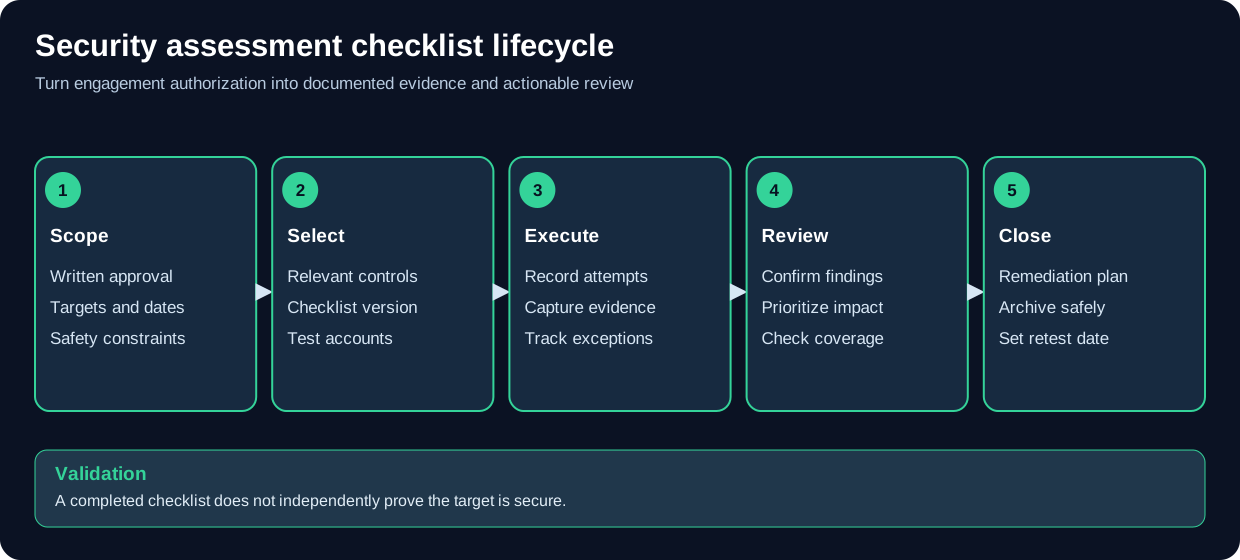
A checklist helps ensure consistent coverage but is not proof of complete security.
1. Pre-Engagement
   └─> Select appropriate checklist(s) for engagement type
   └─> Review MITRE ATT&CK mapping
   └─> Obtain written authorization
   └─> Prepare testing environment and tools

2. During Assessment
   └─> Follow checklist systematically by phase
   └─> Document all findings with evidence
   └─> Use checklists to ensure coverage
   └─> Track successful and unsuccessful techniques
   └─> Note defense mechanisms encountered

3. Post-Assessment
   └─> Map findings to checklist items
   └─> Identify attack paths and chains
   └─> Provide remediation recommendations
   └─> Archive checklist with engagement documentation

4. Quality Assurance
   └─> Verify all applicable items tested
   └─> Ensure proper documentation
   └─> Review for missed techniques
1. Planning Phase
   └─> Select checklists aligned with objectives
   └─> Map to adversary TTPs
   └─> Plan attack paths using checklists
   └─> Identify required tools and capabilities

2. Execution Phase
   └─> Use checklists as technique reference
   └─> Adapt based on environment
   └─> Document successful techniques
   └─> Note detection and response

3. Reporting Phase
   └─> Map activities to MITRE ATT&CK
   └─> Highlight successful attack paths
   └─> Provide detection recommendations
   └─> Suggest defensive improvements
1. Understanding Threats
   └─> Study attack techniques in checklists
   └─> Map to MITRE ATT&CK framework
   └─> Identify relevant threats to environment
   └─> Prioritize high-risk techniques

2. Detection Development
   └─> Create detection rules for techniques
   └─> Develop hunting queries
   └─> Build correlation rules
   └─> Test detection coverage

3. Hardening & Mitigation
   └─> Implement preventive controls
   └─> Harden configurations per checklists
   └─> Validate security baselines
   └─> Test detection capabilities

4. Purple Team Exercises
   └─> Use checklists for controlled testing
   └─> Validate detection and response
   └─> Measure coverage and gaps
   └─> Improve security posture iteratively
1. Audit Planning
   └─> Select relevant security checklists
   └─> Map to compliance requirements
   └─> Schedule assessment activities
   └─> Request necessary access

2. Assessment Execution
   └─> Conduct systematic review per checklist
   └─> Verify security control implementation
   └─> Document findings and evidence
   └─> Test configuration effectiveness

3. Reporting
   └─> Compare findings against checklist
   └─> Assess risk and severity
   └─> Provide actionable recommendations
   └─> Create audit report with checklist results
⚠️ LEGAL AND ETHICAL USE ONLY ⚠️

These security checklists contain attack techniques and methodologies for:

✅ AUTHORIZED USES:
   • Penetration testing with explicit written authorization
   • Red team operations with organizational approval
   • Security assessments with client permission
   • Blue team training and detection development
   • Purple team exercises in controlled environments
   • Security research in isolated lab environments
   • Educational purposes with proper supervision
   • CTF competitions and authorized challenges

🚫 STRICTLY PROHIBITED:
   • Unauthorized penetration testing or "hacking"
   • Attacking systems without explicit written permission
   • Exceeding authorized scope of engagement
   • Testing techniques on production systems without approval
   • Using attack techniques for malicious purposes
   • Bypassing security controls without authorization
   • Causing harm, disruption, or data loss
   • Any illegal or unethical activities
CRITICAL: ALWAYS obtain written authorization that explicitly includes:
- ✅ Specific systems, networks, and IP ranges in scope
- ✅ Testing methodology and techniques approved
- ✅ Time windows for testing activities
- ✅ Out-of-scope systems and explicit restrictions
- ✅ Emergency contact information and escalation
- ✅ Data handling and confidentiality requirements
- ✅ Liability, indemnification, and insurance terms
- ✅ Deliverables, reporting requirements, and format
✅ IN SCOPE (With Explicit Authorization):
   • Systems explicitly listed in engagement letter
   • Networks defined in written agreement
   • Specific techniques approved by client
   • Test accounts created for engagement
   • Designated time windows only

🚫 OUT OF SCOPE (Even If Discovered):
   • Third-party systems or cloud services
   • Production systems not explicitly authorized
   • Personal devices of employees
   • Partner or vendor systems
   • Anything not explicitly in writing
   • Techniques not approved (e.g., DoS, destructive)
Essential Guidelines for Attack Technique Testing:
- Stop Immediately if Uncertain: If scope is ambiguous, STOP and get clarification
- Report Critical Vulns Immediately: Don't wait for final report if system is at risk
- No Destructive Actions: Unless explicitly authorized (ransomware, wipers, etc.)
- No Denial of Service: Unless specifically approved and planned
- Data Protection: Never exfiltrate, modify, or delete real production data
- Communication Protocol: Use established secure channels for updates
- Social Engineering Limits: Respect agreed boundaries (no physical threats, etc.)
- Physical Access: Only if specifically authorized in writing
- Time Windows: Test only during approved times
- Document Everything: Every command, technique, and finding
⚠️ CRITICAL LEGAL WARNING:

The Computer Fraud and Abuse Act (18 U.S.C. § 1030) criminalizes:
   • Unauthorized access to protected computers
   • Exceeding authorized access
   • Damaging protected computers
   • Trafficking in passwords
   • Extortion involving computers

PENALTIES:
   • Up to 10 years imprisonment (first offense)
   • Up to 20 years (repeat offense)
   • Significant financial penalties
   • Civil liability in addition to criminal charges

CRITICAL: Authorization must be:
   ✓ Explicit and in writing
   ✓ From someone with authority to grant it
   ✓ Specific about scope and techniques
   ✓ Current and not expired
- UK Computer Misuse Act 1990: Unauthorized access is criminal offense
- EU Cybercrime Directives: Harmonized computer crime laws across EU
- Canada Criminal Code Section 342.1: Unauthorized computer use
- Australia Cybercrime Act 2001: Computer-related offenses
Key Point: These laws apply even when using the techniques in these checklists without proper authorization.
⚠️ WARNING: Credential Access Techniques

LEGAL CONSIDERATIONS:
   • Dumping credentials is unauthorized access
   • Pass-the-hash attacks may violate CFAA
   • Stealing credentials can be theft charges
   • Use ONLY with explicit authorization

REQUIRED AUTHORIZATION:
   ✓ Explicit permission to access credentials
   ✓ Approval for specific dumping techniques
   ✓ Data handling and storage requirements
   ✓ Credential disposal procedures

PROHIBITED WITHOUT AUTHORIZATION:
   🚫 Accessing others' accounts or credentials
   🚫 Using stolen credentials on unauthorized systems
   🚫 Exfiltrating credential databases
   🚫 Selling or sharing stolen credentials
⚠️ WARNING: Privilege Escalation Techniques

LEGAL CONSIDERATIONS:
   • Exceeding authorized access is a crime
   • Gaining admin/root without permission is illegal
   • Exploiting systems may constitute unauthorized access
   • Even "just testing" without approval is illegal

REQUIRED AUTHORIZATION:
   ✓ Permission to attempt privilege escalation
   ✓ Approval for exploit usage
   ✓ Clear scope of accounts and systems
   ✓ Rollback and restoration procedures

PROHIBITED:
   🚫 Escalating privileges without authorization
   🚫 Using exploits on unauthorized systems
   🚫 Leaving backdoors or persistence
   🚫 Modifying system security settings
⚠️ WARNING: Defense Evasion Techniques

LEGAL CONSIDERATIONS:
   • Disabling security controls may violate authorization
   • AMSI/AppLocker bypass requires explicit approval
   • AV/EDR evasion must be within scope
   • Creating malware-like tools has legal risks

REQUIRED AUTHORIZATION:
   ✓ Explicit permission to test evasion techniques
   ✓ Approval for security control bypass
   ✓ Agreement on tools and methods
   ✓ Restoration of security controls post-test

PROHIBITED:
   🚫 Disabling security on unauthorized systems
   🚫 Distributing evasion tools publicly
   🚫 Using evasion for malicious purposes
   🚫 Leaving systems in insecure state
Core Principles:
- Authorization: Never test without explicit written permission
- Integrity: Act honestly and transparently with clients
- Confidentiality: Protect all client information and findings
- Competence: Only use techniques you fully understand
- Responsibility: Accept accountability for all actions
- Legal Compliance: Follow all applicable laws and regulations
- Do No Harm: Minimize risk and impact of testing
✅ DO:
   • Obtain written authorization before every test
   • Verify authorization is current and valid
   • Document all activities and techniques used
   • Report findings responsibly and promptly
   • Protect client confidentiality at all times
   • Restore systems to secure state after testing
   • Maintain professional liability insurance
   • Continue professional development and training

🚫 DON'T:
   • Test without written authorization (ever)
   • Exceed authorized scope "just to see"
   • Use findings for personal gain or harm
   • Share client vulnerabilities publicly
   • Disclose techniques used without permission
   • Leave systems in compromised state
   • Misrepresent your qualifications or findings
   • Guarantee results or claim infallibility
System Impact:
- Exploitation attempts may cause system instability
- Privilege escalation can crash services
- Credential dumping may trigger lockouts
- Persistence mechanisms may conflict with production
- Lateral movement may cause network disruption
Detection & Response:
- Security tools will detect and alert on techniques
- EDR/AV may quarantine testing tools
- SOC teams may respond to testing activities
- Incident response may be triggered
- Legal/compliance may be notified
Data Risks:
- Accidental access to sensitive data
- Credential theft may expose real passwords
- Logs may contain PII or confidential information
- Evidence must be properly secured
- Data disposal must follow procedures
Criminal Liability:
- Federal computer crime charges (CFAA)
- State computer crime charges
- Wire fraud or identity theft charges
- Conspiracy or aiding/abetting charges
- International prosecution under various laws
Civil Liability:
- Damages from system disruption
- Data breach liability
- Privacy violations and lawsuits
- Breach of contract (exceeding scope)
- Loss of business or reputation
Professional Consequences:
- Loss of security certifications (OSCP, CEH, etc.)
- Professional license revocation
- Employment termination
- Industry blacklisting
- Inability to work in cybersecurity
✅ Mitigation Measures:

Authorization & Documentation:
   • Comprehensive written authorization
   • Clear scope and boundaries defined
   • Regular authorization verification
   • Detailed activity logging
   • Evidence preservation procedures
   • Client communication protocols

Technical Controls:
   • Test in non-production first
   • Use snapshots and backups
   • Implement rollback procedures
   • Monitor testing impact
   • Have emergency contacts ready
   • Prepare incident response plan

Professional Practices:
   • Maintain $1M+ E&O insurance
   • Consult legal counsel when uncertain
   • Follow industry standards (PTES, OSSTMM)
   • Participate in professional organizations
   • Continuous education and training
   • Peer review of methodologies
🚨 IMMEDIATE ACTIONS:

1. STOP all testing immediately
2. Document exactly what happened
3. Notify client using emergency contact
4. Preserve all evidence and logs
5. Assess system status and impact
6. Assist with remediation if requested
7. Document incident for final report
8. Conduct post-incident review
9. Update procedures to prevent recurrence
🔴 CRITICAL VULNERABILITY PROTOCOL:

1. Document finding thoroughly with evidence
2. Assess immediate risk to organization
3. Verify exploitability and impact
4. Notify client IMMEDIATELY (don't wait for report)
5. Provide temporary mitigation recommendations
6. Offer emergency remediation assistance
7. Follow up to ensure remediation
8. Document in final report with timeline
⚠️ DISCLAIMER OF WARRANTIES ⚠️

These security checklists are provided "AS IS" without warranty of any kind,
either expressed or implied, including but not limited to:

• Warranties of accuracy or completeness
• Warranties of technique effectiveness
• Warranties of safety or non-disruption
• Warranties of legal compliance
• Warranties of fitness for a particular purpose

THE AUTHORS, CONTRIBUTORS, AND MAINTAINERS:
• Make no guarantees about checklist completeness
• Are not responsible for damages from checklist use
• Do not warrant techniques will work in all environments
• Are not liable for legal consequences of misuse
• May update content without notice
• Disclaim all liability for unauthorized use

USERS EXPLICITLY ACKNOWLEDGE:
• They use these checklists at their own risk
• They are responsible for obtaining authorization
• They must comply with all applicable laws
• They are liable for their testing activities
• They understand legal implications of techniques
• They accept all risks of using attack methodologies

CRITICAL REMINDER:
These are ATTACK TECHNIQUES that can cause:
   - System disruption or damage
   - Data loss or corruption
   - Security control bypass
   - Legal prosecution if misused
   - Professional and personal consequences
The Authors, Contributors, and Maintainers are NOT liable for:
- Direct, indirect, incidental, or consequential damages
- Criminal charges resulting from unauthorized use
- Civil lawsuits from testing activities
- System failures, crashes, or data loss
- Security breaches or compromises
- Network disruption or service outages
- Privacy violations or regulatory fines
- Professional license loss or termination
- Employment termination
- Legal fees or criminal defense costs
- Any damages whatsoever arising from checklist use
Maximum Liability: To the extent permitted by law, total liability shall not exceed the amount paid for these checklists (which is zero for free distribution).
User Assumption of Risk: By using these attack technique checklists, users explicitly acknowledge and accept all risks, including criminal prosecution, civil liability, professional consequences, and any other damages that may result.
We welcome contributions from security professionals to improve and expand this collection.
To Submit a New Checklist:
- Fork the repository
- Create checklist following MITRE ATT&CK format where applicable
- Include clear sections for each technique
- Add tool recommendations and commands
- Include detection/mitigation guidance
- Add comprehensive legal warnings
- Test techniques in authorized environments
- Submit pull request with detailed description
Checklist Quality Standards:
- ✅ Clear, systematic technique organization
- ✅ MITRE ATT&CK technique mapping
- ✅ Tool and command examples
- ✅ Detection and mitigation guidance
- ✅ Risk ratings for each technique
- ✅ Authorization reminders throughout
- ✅ Proper attribution for sources
- ✅ Legal warnings prominently displayed
High Priority:
- Cloud platform attack techniques (AWS, Azure, GCP)
- Container security and Kubernetes attacks
- API security testing methodologies
- Modern authentication bypass techniques
- EDR/XDR evasion techniques
- Zero-trust architecture testing
- DevSecOps security assessments
- MITRE ATT&CK: https://attack.mitre.org/
- PTES: Penetration Testing Execution Standard
- OWASP Testing Guide: https://owasp.org/www-project-web-security-testing-guide/
- OSSTMM: Open Source Security Testing Methodology Manual
- NIST SP 800-115: Technical Guide to Information Security Testing
- MITRE ATT&CK Enterprise: https://attack.mitre.org/matrices/enterprise/
- LOLBAS Project: Living Off The Land Binaries and Scripts
- GTFOBins: Unix binaries for privilege escalation
- WADComs: Windows/AD attack cheat sheets
- HackTricks: Pentesting methodology and techniques
- OSCP: Offensive Security Certified Professional
- OSCE: Offensive Security Certified Expert
- OSEP: Offensive Security Experienced Penetration Tester
- GPEN: GIAC Penetration Tester
- GXPN: GIAC Exploit Researcher and Advanced Penetration Tester
- CRTP: Certified Red Team Professional
- 🏠 Main Repository
- 🎯 START HERE Guide
- 💻 Cybersecurity Master Guide
- 🗡️ Tradecraft Deep Dives - full write-ups behind several of these checklists
- 📘 Playbooks - blue-team investigation procedures
- 📄 PDF Library - reference PDFs behind several of these checklists
- 💻 Security Scripts & Tools - scripts that implement several of these techniques
- 🔍 OSINT Resources
- 📚 Documentation
- 🔒 OPSEC Guidelines
📁 Current Checklists: 17 comprehensive checklists
📖 Categories: AD Security, Initial Access, PrivEsc, Lateral Movement, Evasion, Applications
🔄 Last Updated: November 2024
👥 Maintained by: Pacific Northwest Computers (PNWC)
📝 Status: Active & Growing
Legal Requirements:
- ✅ Written authorization is MANDATORY (no exceptions)
- ✅ Clear scope and boundaries documented
- ✅ Current, valid authorization verified
- ✅ Professional liability insurance maintained
- ✅ All activities documented with timestamps
Technical Safety:
- ✅ Test in non-production first when possible
- ✅ Have rollback and restoration procedures
- ✅ Monitor system impact during testing
- ✅ Maintain emergency contacts and procedures
- ✅ Document every technique and command used
Professional Ethics:
- ✅ Never exceed authorized scope
- ✅ Report findings responsibly
- ✅ Protect client confidentiality
- ✅ Restore systems to secure state
- ✅ Accept responsibility for all actions
- Open an issue on GitHub
- Review documentation and warnings thoroughly first
- Provide specific context about your situation
- Include authorization status (never share client details)
- Respect response times
- Report inaccuracies or outdated techniques
- Suggest additional attack techniques
- Share detection/mitigation strategies
- Contribute new checklists
- Help improve documentation
- MITRE Corporation - ATT&CK Framework
- Offensive Security - OSCP methodology
- SANS Institute - GPEN methodology
- SpecterOps - Active Directory research
- Security research community - Technique disclosure
- Penetration testers sharing methodologies
- Red team operators documenting TTPs
- Blue team defenders providing detection logic
- Security researchers discovering techniques
- Open source tool developers
Thank you for responsible security testing and ethical hacking.
📖 Use These Checklists Responsibly: Authorization is MANDATORY
Attack techniques are powerful - use them ethically and legally.
Repository: ULTIMATE CYBERSECURITY MASTER GUIDE
Maintained by: Pacific Northwest Computers
⭐ Star this repo if you find it useful! ⭐
- Active Directory
- Android Mobile Application
- AppLocker Bypass
- Command & Control
- Credential Access
- Defense Evasion
- Domain Escalation
- Domain Persistence
- Environment Breakout
- Initial Access
- Lateral Movement
- Linux Privilege Escalation
- Microsoft Exchange
- Persistence
- VoIP Checklist
- Windows Build Review
- Windows Privilege Escalation
📂 Folder: Checklists | ✏️ Suggest an edit | 🗺️ Browse by Topic