Repository navigation
HCXTools and Hashcat Cheat Sheet
Practical reference for properly authorized WPA-PSK capture evidence, offline PMKID/EAPOL conversion and bounded password-strength validation with Hashcat. Capture behavior must be independently verified; this is not a passive-only hcxdumptool recipe.
Organized around authorization/mode review, preserved packet evidence, supported offline conversion and applicable PBKDF2 audit cases. The hcxtools utilities have different purposes: hcxdumptool operates a radio and may use active behavior, whereas hcxpcapngtool reads an existing capture offline.
See Aircrack-ng_Commands.md for the traditional active-deauth workflow, WEP attacks, and WPS attacks.
Validate captured PSK-derived PMKID/EAPOL records from approved test systems and, where authorized, assess the resilience of known lab passphrases. Explicitly document cases where protocol, packet coverage or key-derivation assumptions prevent a meaningful test.
- For an authorized PSK lab capture that includes an applicable PMKID record; availability depends on the AP and protocol
- When comparing truly receive-only packet observation to active wireless testing, after confirming the chosen program's behavior
- When integrating with a Pwnagotchi or similar automated passive capture rig (see pwnagotchi_cheatsheet.md)
- When you have a
.pcapngfrom any source and need to convert it to Hashcat format
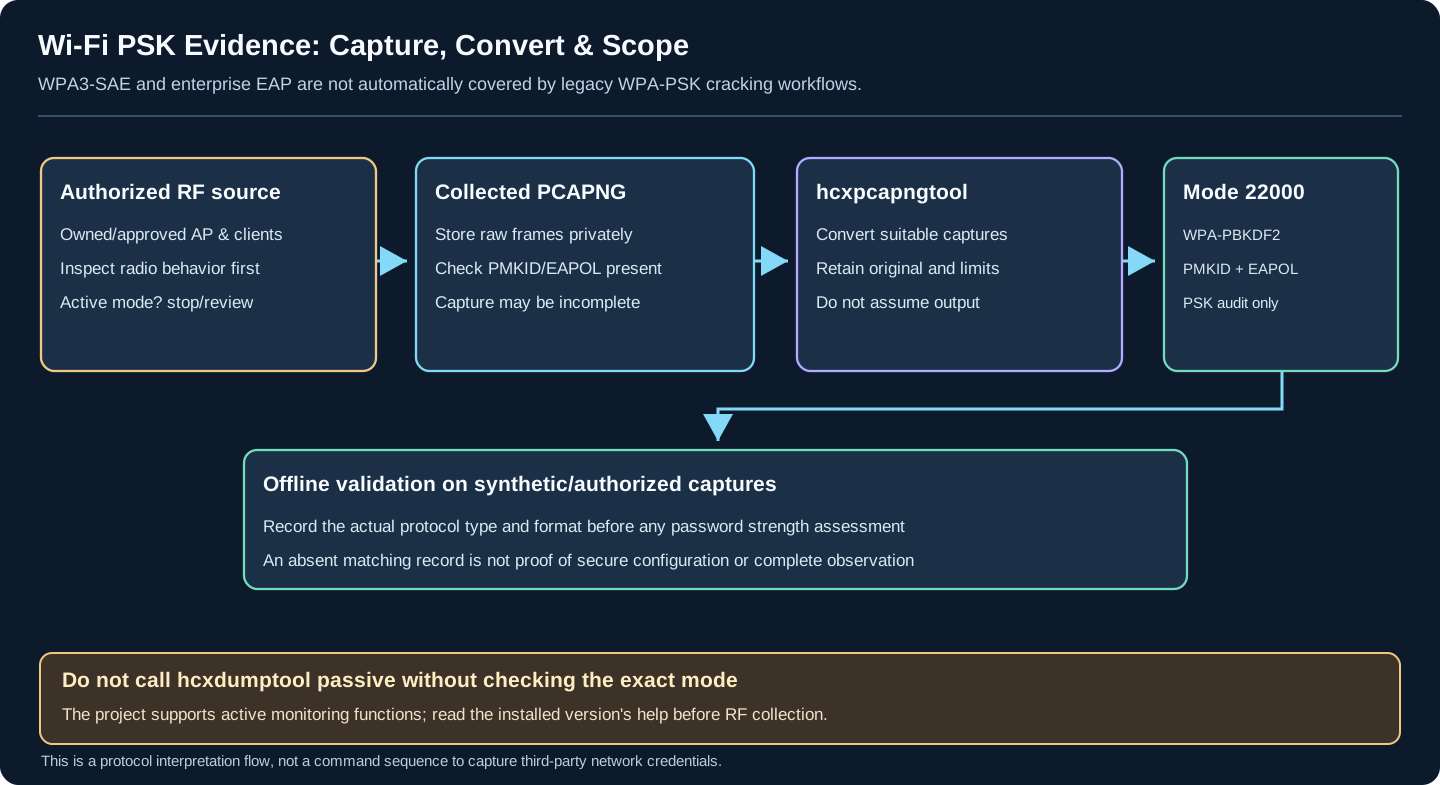
Conceptual format and authorization boundaries, not a live RF capture. The upstream hcxdumptool project supports active monitoring and modes/settings change across releases. Never assume a command is passive merely because it does not explicitly request deauthentication. The Hashcat 22000 source module handles WPA-PBKDF2-PMKID/EAPOL material; it does not automatically crack WPA3-SAE-only handshakes or enterprise EAP credentials.
1. Confirm capture policy and installed versions
Before operating a wireless receiver, check the exact adapter/driver, RF permissions, monitor capability, capture scope and installed program options. hcxdumptool is not a passive-only tool: some modes transmit or interact actively. Command-line switches in old blog posts have changed across releases; do not copy outdated --filtermode, --bssid, --enable_status or other RF options without validating hcxdumptool --help on the installed version.
For a strictly passive lab observation, use a receive-only configuration verified against known owned equipment; capture may be produced separately by TShark or another appropriately configured packet receiver. Never use this guide to interfere with third-party clients.
2. Preserve and examine an existing, authorized capture
Save the raw PCAP/PCAPNG with source, device, UTC time, channel coverage, adapter mode and file checksum. Use Wireshark or TShark to check which frames were actually captured and whether the observation is relevant to the intended PSK network. Missing data cannot be interpreted as proof of strong security.
3. Convert eligible WPA-PSK material offline
# Read an existing, authorized PCAPNG only; do not operate a radio.
# Confirm current syntax against hcxpcapngtool --help.
hcxpcapngtool -o hash.hc22000 capture.pcapng
An output file or a conversion success status does not establish that a valid, auditable PMKID/EAPOL exchange was present. Review tool warnings, protocol type and candidate suitability. On a WPA3-only SAE network, do not assume a WPA-PBKDF2 PMKID/EAPOL workflow applies. On mixed transition deployments, scope the PSK mode separately.
| Scenario | Required check |
|---|---|
| Receive-only radio survey | Confirm the exact firmware/program version does not transmit in the selected mode |
| hcxdumptool use | Inspect current project README/help; default behavior and options may include active interactions |
| PMKID / EAPOL | Verify relevant exchange and PSK/PBKDF2 applicability before attempting an offline audit |
| WPA3-SAE-only | Do not label it crackable by Hashcat WPA-PBKDF2 mode 22000 without a separate documented applicability proof |
| Conversion/reporting | Preserve original capture, tool version, output warnings and authorization |
Mode 22000 is identified by Hashcat as WPA-PBKDF2-PMKID+EAPOL. It consolidates legacy PBKDF2 PMKID and EAPOL formats (formerly 16800 and 2500); it is not a generic WPA3-SAE password-recovery method. Check the installed Hashcat release and the actual capture's key-derivation type.
Authorized WPA/WPA2 PSK/PBKDF2 Offline Password Check
hashcat -m 22000 hash.hc22000 /path/to/wordlist.txtUsing Rules for Advanced Cracking
# Apply a rule file to transform the wordlist (e.g., append numbers, capitalization)
hashcat -m 22000 hash.hc22000 wordlist.txt -r rules/best64.rule
Tip
For leetspeak passphrases, chain a leet rule file such as rules/unix-ninja-leetspeak.rule. See leet in passwords.
Hybrid Attack: Wordlist + Brute-Force Mask
# Append 4 digits to each wordlist entry
hashcat -m 22000 hash.hc22000 wordlist.txt -a 6 ?d?d?d?d
Session Management
# Resume a previous cracking session
hashcat -m 22000 hash.hc22000 /path/to/wordlist.txt --session=mysession --restore

# Show cracked passwords
hashcat -m 22000 hash.hc22000 --showFile Conversion & Cleaning
# Convert a legacy .cap file to pcapng for hcxpcapngtool input
editcap -F pcapng capture.cap output.pcapng

# Merge multiple pcapng files before conversion
mergecap -w merged.pcapng file1.pcapng file2.pcapng

# Clean up handshake files (remove unneeded data)
wpaclean cleaned.cap capture-01.cap
Inspecting and Filtering Captured Data
# View unique BSSIDs/ESSIDs found in a capture file (use hcxpcapngtool for .pcapng)
hcxpcapngtool --info=stdout capture.pcapng

# Deduplicate and filter hashes before cracking
hcxhashtool -i hash.hc22000 -o unique.hc22000AngryOxide is an actively developed Rust 802.11 assessment tool that can combine surveying with active Wi-Fi attack/capture features. It is a distinct toolchain, not part of the hcxdumptool/hcxtools command examples above. Use a deliberately isolated, authorized RF lab, confirm adapter support and firmware before testing, and avoid active interference during ordinary wardriving.
IMPORTANT: These tools are for authorized security testing only. Unauthorized use is illegal.
- Get written permission before testing any network. Only test networks you own or have explicit authorization to test.
- All cracking attempts must be done in an isolated lab environment against hashes you are authorized to possess.
- Strictly comply with all local laws and regulations.
Legal Use Cases:
- Penetration testing with client authorization
- Testing your own home or lab network security
- Security research in isolated lab environments
- README.md - Documentation section index: all guides and cheat sheets in this directory
- Aircrack-ng_Commands.md - Traditional active-deauth workflow, WEP, WPS attacks
- pwnagotchi_cheatsheet.md - Automated passive PMKID/handshake capture using hcxtools output
- WifiMarauder_CheatSheet.md - ESP32-based WiFi attacks (different hardware path)
- ../Cryptography/Classical/security.md - Leet substitutions and hashcat leet rule files
Section Index | Master Index | Legal Notice
📄 Source: Documentation/hcxtoolshashcat.md | ✏️ Suggest an edit | ⬅️ Back to Technical Guides & Cheat Sheets