Repository navigation
Fail2Ban Log Triggered Automatic Banning
Watches your logs, bans the IPs that earn it — the lightest-weight IPS in this repo
Part of the ULTIMATE CYBERSECURITY MASTER GUIDE · Incident Response · IDS & IPS section


Guide for deploying Fail2Ban, a lightweight host tool that monitors configured logs or a supported backend, matches failures with filters, and runs configured actions when a jail threshold is reached. Firewall rules are a common action; the selected action and platform determine the actual response.
Covers install, the jail/filter/action configuration model, protecting SSH (the most common use case) plus other common services, testing a jail actually works, and the operational commands for inspecting and manually unbanning.
Configure a jail for a service whose authentication failures are recorded in a supported source and matched by an appropriate filter. Fail2Ban can add a host-level response to repeated failures; it does not replace strong authentication, application rate limits, or network-level monitoring.
- Consider it for exposed services when their logs or journal entries are available, a matching filter is appropriate, and the configured action fits the host.
- Use service-specific jails only after confirming the application’s log format, filter, and supported backend on the installed Fail2Ban version.
- You want some automatic response to brute-forcing without deploying a full network IDS/IPS stack
- A honeypot or IDS from elsewhere in this repo flagged repeated brute-force attempts and you want the actual mitigation, not just visibility
- Where This Fits
- Deployment Workflow
- Installation
- The Jail / Filter / Action Model
- Protecting SSH
- Protecting Other Services
- Validating & Operating
- Common Gotchas
⚠️ Security Notes- Resources
Fail2Ban is not a replacement for Suricata/Snort or Security Onion. It does not inspect packets or understand protocols. A jail connects a configured log or supported backend to a filter and one or more actions. When the filter records enough failures within the configured window, the action runs; a firewall ban is common, but behavior depends on the selected action and host. Fail2Ban is useful for targeted, host-level responses to events its filters can reliably identify. It does not provide universal application coverage or replace strong authentication, application controls, or network monitoring.
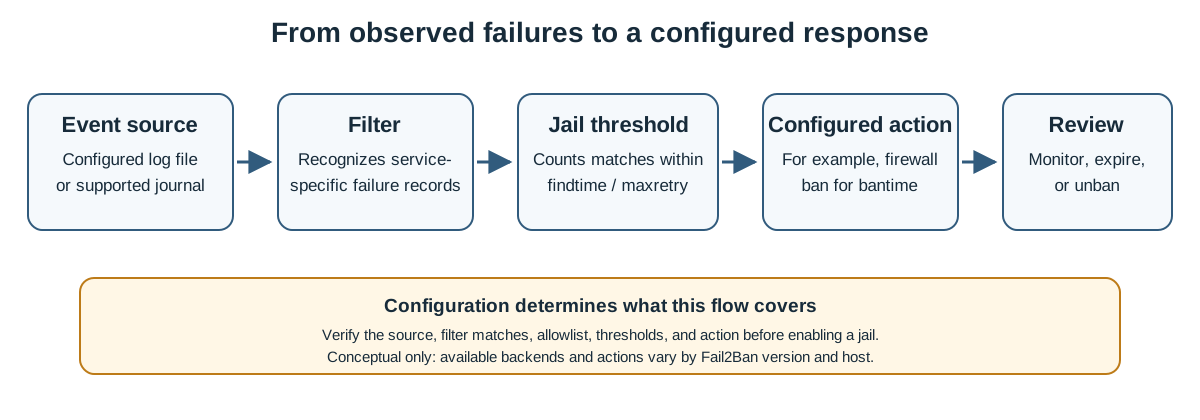
Conceptual flow only: the source, filter, thresholds, action, and ban duration depend on the service, installed version, and host configuration.
1. Install:
   └─> apt install fail2ban (or your distro's equivalent).

2. Copy the default config to your override file:
   └─> jail.conf -> jail.local. Never edit jail.conf directly —
       package updates will overwrite it.

3. Set your baseline [DEFAULT] policy:
   └─> ignoreip (your own management IPs — don't lock yourself out),
       bantime, findtime, maxretry.

4. Enable the jails you need:
   └─> Enable only jails for services actually running, after confirming
       the log source, filter, and action match the host.

5. Restart and validate:
   └─> systemctl restart fail2ban
   └─> Deliberately fail auth a few times from a test IP, confirm
       the ban actually happens.

6. Operate:
   └─> fail2ban-client status <jail> to check state.
   └─> Unban manually when you lock out something legitimate.
sudo apt-get update
sudo apt-get install -y fail2ban
sudo systemctl enable fail2ban
sudo systemctl start fail2ban
Key files, all under /etc/fail2ban/:
| File | Purpose |
|---|---|
fail2ban.conf |
Global daemon settings — don't edit |
fail2ban.local |
Your overrides to the above, if needed |
jail.conf |
Default jail definitions — don't edit |
jail.local |
Your jail overrides — edit this one |
filter.d/ |
Regex filter definitions (one per service type) |
action.d/ |
Ban action definitions (iptables, sendmail, etc.) |
The pattern throughout Fail2Ban's config is the same as much of this repo's other tooling: never edit the .conf shipped by the package, always override in the matching .local file so package updates don't silently discard your changes.
- A jail ties a service to a filter and a response — "watch this log, using this pattern, and do this when it matches."
- A filter is the regex that recognizes a failure in that service's log format.
- An action is the configured response for a ban or unban event. Firewall rules are common, but the action can vary by platform and configuration.
Baseline [DEFAULT] section in jail.local:
[DEFAULT]
# Never ban these — your own management IPs, always
ignoreip = 127.0.0.1/8 ::1 192.168.1.0/24

# How long a ban lasts (seconds)
bantime = 3600

# The window failures are counted within (seconds)
findtime = 600

# Failures allowed before a ban triggers
maxretry = 5

# Optional email on ban (needs working local mail/SMTP)
# destemail = you@example.com
# sender = fail2ban@example.com
# mta = sendmail
# action = %(action_mwl)s
Set ignoreip before enabling anything else. This is the single most important line in the file — get it wrong and you can ban your own management access.
The default, and most common, use case:
[sshd]
enabled = true
port = ssh
filter = sshd
logpath = /var/log/auth.log
maxretry = 3
bantime = 3600
findtime = 600
Distro-specific source: Check the installed package’s defaults: authentication log locations and backends vary by distribution and version. Use the configured path for file-based monitoring. With the systemd backend, follow the installed filter’s journal matching configuration; upstream documents that
logpathis not valid with this backend. Do not combine a guessed file path with a journald backend.
If you moved SSH to a non-standard port (a pattern used elsewhere in this repo's honeypot guides — see Cowrie and OpenCanary), update port to match.
Fail2Ban ships filters for dozens of services out of the box. A couple of common additions:
[apache-auth]
enabled = true
port = http,https
filter = apache-auth
logpath = /var/log/apache2/error.log
maxretry = 5
bantime = 3600

[nginx-http-auth]
enabled = true
port = http,https
filter = nginx-http-auth
logpath = /var/log/nginx/error.log
maxretry = 5
bantime = 3600
Only enable jails for services actually running on the box — an enabled jail watching a log file that never gets written to is harmless but pointless.
Check jail status:
sudo fail2ban-client status sshdOutput shows currently-failed counts, total failures, and the list of currently-banned IPs.
See the actual firewall rules Fail2Ban created:
sudo iptables -L f2b-sshd -n --line-numbersManually unban an IP (e.g. you locked out something legitimate, or a test ban you triggered on purpose):
sudo fail2ban-client set sshd unbanip <ip-address>Dump the fully-resolved effective config — invaluable when a jail isn't behaving as expected, since it shows the merged result of jail.conf → jail.local → jail.d/*.conf:
sudo fail2ban-client -dTest a filter's regex against real log lines before trusting it in production — a bad regex either misses real attacks or bans legitimate users:
fail2ban-regex /var/log/auth.log /etc/fail2ban/filter.d/sshd.conf| Symptom | Cause | Fix |
|---|---|---|
| Locked out of your own SSH session | Your own IP wasn't in ignoreip and you triggered the threshold (common while testing) |
Add your management IP(s) to ignoreip before testing; if already locked out, access via console/out-of-band and run the unban command above |
Jail shows enabled = true but never bans anything |
logpath points at a file that doesn't exist or isn't being written on this distro (e.g. Ubuntu-style path used on RHEL) |
Confirm the actual log path/backend for your specific distro — see the SSH section's distro-specific note above |
Edits to jail.conf disappear after a package update |
jail.conf is the package-managed default, meant to be read-only |
Always edit jail.local (or drop files in jail.d/) instead — never jail.conf directly |
| Filter doesn't match despite obviously-failed log lines present | Log format differs slightly from what the bundled filter regex expects (common after a service version upgrade) | Use fail2ban-regex against the actual log file and filter to see exactly where the match fails |
| Bans aren't persistent across service restarts | This is expected default behavior — Fail2Ban's ban list is in-memory unless configured otherwise | Acceptable for most use cases; if persistence matters, look into Fail2Ban's database (dbfile) settings rather than assuming this is a bug |
═══════════════════════════════════════════════════════════════
                    ⚠️ CRITICAL WARNING ⚠️
═══════════════════════════════════════════════════════════════

► SET ignoreip BEFORE ANYTHING ELSE. This is the single most
  common way people lock themselves out of their own systems
  with this tool. Add every management IP you access the box
  from before enabling any jail.

► THIS IS A COMPLEMENT, NOT A REPLACEMENT. Fail2Ban stops
  simple brute-forcing; it does nothing against a slow, low-and-
  slow attack that stays under the threshold, or an attacker
  rotating source IPs. Pair it with the other detection layers
  in this repo, don't treat it as sufficient on its own.

► TEST FROM A SEPARATE SESSION. When validating a new jail,
  trigger the failure condition from a connection you're
  prepared to lose — never from the only session you have open
  to the box.

═══════════════════════════════════════════════════════════════
- Fail2Ban GitHub: github.com/fail2ban/fail2ban
-
Bundled filter/jail reference:
/etc/fail2ban/jail.confand/etc/fail2ban/filter.d/on any installed system — the shipped comments are thorough and version-accurate for your install
- IDS&IPS/README.md - Sub-section index and platform comparison
- IDS&IPS/suricata+zeek.md - Full network-level IDS/IPS for when log-based banning alone isn't enough
- Honeypots/opencanary.md - A honeypot's SSH-port-move pattern this guide's SSH jail should be updated to match
- Homelab/HomeLab_Setup.md - Broader firewall/segmentation context this tool operates within
🛡️ Use These Resources Responsibly
Detection first, blocking second.
Repository: ULTIMATE CYBERSECURITY MASTER GUIDE
Maintained by: Pacific Northwest Computers
⭐ Star this repo if you find it useful! ⭐
📄 Source: IncidentResponse/IDS&IPS/fail2ban.md | ✏️ Suggest an edit | ⬅️ Back to Incident Response