Repository navigation
Linux Auditd and Syslog Hardening Guide
Linux Auditd and Syslog hardening and configuration guide - covering kernel-level auditing rules, syslog aggregation, and log forwarding for Linux endpoint visibility in a SOC or IR context.
Covers: auditd rule syntax (syscall auditing, file access monitoring, user session tracking), pre-built rule sets (STIG, CIS), rsyslog/syslog-ng configuration, log forwarding to SIEM, auditd log parsing (ausearch, aureport), and common detection use cases.
Configure Linux endpoints with comprehensive audit logging that feeds a SIEM, enabling detection of privilege escalation, lateral movement, persistence, and data exfiltration on Linux hosts.
- Hardening a new Linux server for a production environment
- Setting up endpoint visibility before a purple team exercise
- Investigating a Linux compromise and needing to understand available audit trails
- Building auditd-based detection rules for specific MITRE ATT&CK techniques
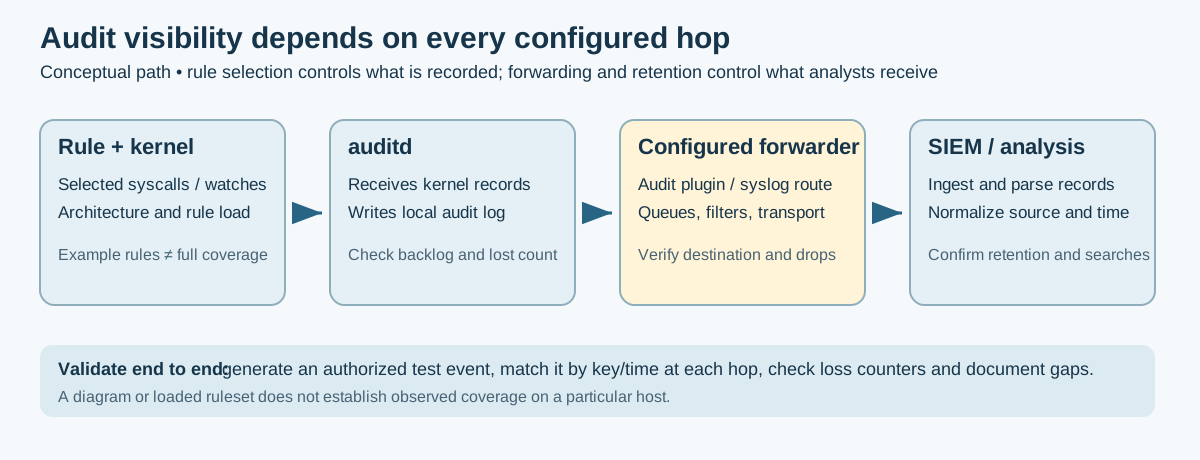
Auditd (Linux Audit Daemon) and Syslog are foundational components for Linux security monitoring. Auditd provides granular kernel-level auditing of system calls, file access, and user activity, while Syslog aggregates application and system logs. Together, they form the backbone of Linux endpoint visibility.
This guide covers configuring both systems for security monitoring and forwarding logs to your SIEM.
| Feature | Auditd | Syslog |
|---|---|---|
| Purpose | Kernel-level auditing | Application/system logging |
| Data Source | System calls, file access, auth | Application messages, services |
| Granularity | Very detailed | Varies by application |
| Performance Impact | Higher (configurable) | Lower |
| Compliance | PCI-DSS, HIPAA, SOX | General logging |
| Log Location | /var/log/audit/audit.log |
/var/log/syslog, /var/log/messages
|
- Auditd: Security monitoring, compliance, forensics, detecting unauthorized access
- Syslog: General system health, application debugging, service monitoring
- Both: Comprehensive visibility (recommended for security)
| Distribution | Auditd Package | Syslog Package |
|---|---|---|
| Ubuntu/Debian | auditd |
rsyslog |
| RHEL/CentOS/Rocky | audit |
rsyslog |
| Fedora | audit |
rsyslog |
| SUSE | audit |
rsyslog |
- Root or sudo access
- SIEM server configured to receive logs
- Network connectivity to SIEM (port 514 or custom)
Debian/Ubuntu:
sudo apt update
sudo apt install -y auditd audispd-plugins
RHEL/CentOS/Rocky:
sudo yum install -y audit audit-libs audispd-plugins
# Or on RHEL 8+/Rocky
sudo dnf install -y audit audispd-pluginssudo systemctl enable auditd
sudo systemctl start auditd
# Verify status
sudo systemctl status auditd
# Check audit rules are loaded
sudo auditctl -l| File | Purpose |
|---|---|
/etc/audit/auditd.conf |
Daemon configuration (log size, rotation) |
/etc/audit/rules.d/*.rules |
Audit rules (what to monitor) |
/etc/audit/audit.rules |
Compiled rules (auto-generated) |
/etc/audit/plugins.d/ |
Dispatcher plugins - auditd 3.x (Ubuntu 20.04+, RHEL 8+) |
Audit rules define what activities to monitor. There are three types:
| Type | Flag | Purpose | Example |
|---|---|---|---|
| Control |
-D, -b, -f
|
Configure audit system |
-b 8192 (buffer size) |
| File Watch | -w |
Monitor file/directory access | -w /etc/passwd |
| System Call | -a |
Monitor specific syscalls | -a always,exit -S execve |
Create /etc/audit/rules.d/99-security.rules:
Review the existing ruleset before loading this example. The
-Dauditctl option deletes all loaded rules and watches. This sample omits it so a routine example load does not silently clear the host's current policy. If a controlled replacement is intended, plan it explicitly, preserve required rules, and test the result on the target distribution first.
## ============================================
## Linux Audit Rules for Security Monitoring
## ============================================

## Keep the existing loaded rules intact in this example.
## Resolve duplicate or conflicting rules through the host's approved policy.

## Set buffer size (increase for busy systems)
-b 8192

## Set failure mode (1=printk, 2=panic)
-f 1

## ============================================
## Self Auditing (Audit Configuration Changes)
## ============================================

## Monitor audit configuration changes
-w /etc/audit/ -p wa -k audit_config
-w /etc/libaudit.conf -p wa -k audit_config
-w /etc/audisp/ -p wa -k audit_config

## Monitor audit tools
-w /sbin/auditctl -p x -k audit_tools
-w /sbin/auditd -p x -k audit_tools
-w /usr/sbin/auditctl -p x -k audit_tools

## ============================================
## Authentication and Authorization
## ============================================

## Monitor authentication files
-w /etc/passwd -p wa -k identity
-w /etc/shadow -p wa -k identity
-w /etc/group -p wa -k identity
-w /etc/gshadow -p wa -k identity
-w /etc/security/opasswd -p wa -k identity

## Monitor PAM configuration
-w /etc/pam.d/ -p wa -k pam_config
-w /etc/security/ -p wa -k pam_config

## Monitor sudo configuration
-w /etc/sudoers -p wa -k sudo_config
-w /etc/sudoers.d/ -p wa -k sudo_config

## Monitor SSH configuration
-w /etc/ssh/sshd_config -p wa -k sshd_config
-w /etc/ssh/ssh_config -p wa -k ssh_config
-w /root/.ssh/ -p wa -k ssh_keys

## ============================================
## Privilege Escalation
## ============================================

## Monitor setuid/setgid
-a always,exit -F arch=b64 -S setuid -S setgid -S setreuid -S setregid -k privilege_escalation
-a always,exit -F arch=b32 -S setuid -S setgid -S setreuid -S setregid -k privilege_escalation

## Monitor sudo usage
-a always,exit -F path=/usr/bin/sudo -F perm=x -k sudo_execution
-a always,exit -F path=/usr/bin/su -F perm=x -k su_execution

## Monitor privilege changes
-a always,exit -F arch=b64 -S seteuid -S setfsuid -k privilege_modification
-a always,exit -F arch=b32 -S seteuid -S setfsuid -k privilege_modification

## ============================================
## Process Execution
## ============================================

## Record selected process-execution syscalls (partial overlap with endpoint telemetry)
-a always,exit -F arch=b64 -S execve -k process_execution
-a always,exit -F arch=b32 -S execve -k process_execution

These rules record configured `execve` syscall events; they do not reproduce every field or event in Sysmon Event ID 1. Confirm syscall names and architecture support on the target host, and test the loaded rule set before relying on it.

## Monitor specific suspicious binaries
-w /usr/bin/wget -p x -k suspicious_download
-w /usr/bin/curl -p x -k suspicious_download
-w /usr/bin/nc -p x -k netcat
-w /usr/bin/ncat -p x -k netcat
-w /usr/bin/netcat -p x -k netcat
-w /usr/bin/nmap -p x -k recon_tool
-w /usr/bin/base64 -p x -k encoding
-w /usr/bin/python -p x -k scripting
-w /usr/bin/python3 -p x -k scripting
-w /usr/bin/perl -p x -k scripting
-w /usr/bin/ruby -p x -k scripting

## ============================================
## Network Activity
## ============================================

## Monitor network socket creation
-a always,exit -F arch=b64 -S socket -F a0=2 -k network_socket_ipv4
-a always,exit -F arch=b32 -S socket -F a0=2 -k network_socket_ipv4
-a always,exit -F arch=b64 -S socket -F a0=10 -k network_socket_ipv6
-a always,exit -F arch=b32 -S socket -F a0=10 -k network_socket_ipv6

## Monitor network connections
-a always,exit -F arch=b64 -S connect -k network_connect
-a always,exit -F arch=b32 -S connect -k network_connect

## Monitor hosts file changes
-w /etc/hosts -p wa -k hosts_file
-w /etc/resolv.conf -p wa -k dns_config

## ============================================
## File System Monitoring
## ============================================

## Monitor temporary directories (malware staging)
-w /tmp/ -p wa -k tmp_activity
-w /var/tmp/ -p wa -k tmp_activity
-w /dev/shm/ -p wa -k shm_activity

## Monitor cron (persistence)
-w /etc/cron.d/ -p wa -k cron_config
-w /etc/cron.daily/ -p wa -k cron_config
-w /etc/cron.hourly/ -p wa -k cron_config
-w /etc/cron.monthly/ -p wa -k cron_config
-w /etc/cron.weekly/ -p wa -k cron_config
-w /etc/crontab -p wa -k cron_config
-w /var/spool/cron/ -p wa -k cron_jobs

## Monitor systemd (persistence)
-w /etc/systemd/ -p wa -k systemd_config
-w /lib/systemd/ -p wa -k systemd_config
-w /usr/lib/systemd/ -p wa -k systemd_config

## Monitor init scripts (persistence)
-w /etc/init.d/ -p wa -k init_scripts
-w /etc/rc.local -p wa -k rc_local

## ============================================
## Kernel and Modules
## ============================================

## Monitor kernel module loading
-a always,exit -F arch=b64 -S init_module -S finit_module -k kernel_module_load
-a always,exit -F arch=b32 -S init_module -S finit_module -k kernel_module_load
-a always,exit -F arch=b64 -S delete_module -k kernel_module_unload
-a always,exit -F arch=b32 -S delete_module -k kernel_module_unload

## Monitor modprobe configuration
-w /etc/modprobe.d/ -p wa -k modprobe_config

## Monitor kernel parameters
-w /etc/sysctl.conf -p wa -k sysctl_config
-w /etc/sysctl.d/ -p wa -k sysctl_config

## ============================================
## Time and Locale (Anti-Forensics)
## ============================================

## Monitor time changes
-a always,exit -F arch=b64 -S adjtimex -S settimeofday -S clock_settime -k time_change
-a always,exit -F arch=b32 -S adjtimex -S settimeofday -S clock_settime -k time_change

## Monitor timezone changes
-w /etc/localtime -p wa -k time_change
-w /etc/timezone -p wa -k time_change

## ============================================
## Log Tampering (Anti-Forensics)
## ============================================

## Monitor log files
-w /var/log/audit/ -p wa -k audit_logs
-w /var/log/auth.log -p wa -k auth_log
-w /var/log/secure -p wa -k auth_log
-w /var/log/syslog -p wa -k syslog
-w /var/log/messages -p wa -k syslog
-w /var/log/wtmp -p wa -k login_log
-w /var/log/btmp -p wa -k login_log
-w /var/log/lastlog -p wa -k login_log

## ============================================
## Container Activity
## ============================================

## Monitor Docker
-w /usr/bin/docker -p x -k docker
-w /var/lib/docker/ -p wa -k docker_data
-w /etc/docker/ -p wa -k docker_config

## Monitor containerd
-w /usr/bin/containerd -p x -k containerd
-w /usr/bin/ctr -p x -k containerd

## ============================================
## Make Rules Immutable (Optional - Requires Reboot to Change)
## ============================================
## Uncomment to prevent rule changes without reboot
# -e 2# Check rules syntax
sudo augenrules --check
# Load rules
sudo augenrules --load
# Verify rules are loaded
sudo auditctl -l | head -20
# Check rule count
sudo auditctl -l | wc -lFor pre-built security-focused rules, consider:
STIG (Security Technical Implementation Guide) Rules:
# Download STIG rules
sudo wget -O /etc/audit/rules.d/90-stig.rules \
  https://raw.githubusercontent.com/linux-audit/audit-userspace/master/rules/30-stig.rules
Laurel (MITRE ATT&CK Focused):
# Laurel transforms audit logs into JSON with ATT&CK tagging
# https://github.com/threathunters-io/laurelEdit /etc/audit/auditd.conf:
#
# Auditd Configuration for Security Monitoring
#

# Log file location
log_file = /var/log/audit/audit.log

# Log file format (RAW or ENRICHED)
log_format = ENRICHED

# Log group (for permissions)
log_group = adm

# Priority boost for audit daemon
priority_boost = 4

# Flush frequency (INCREMENTAL_ASYNC recommended for performance)
flush = INCREMENTAL_ASYNC

# How often to flush (in records)
freq = 50

# Maximum log file size (MB)
max_log_file = 100

# Number of log files to keep
num_logs = 10

# Action when max log file reached
max_log_file_action = ROTATE

# Space left on partition (MB) before warning
space_left = 200

# Action when space_left reached
space_left_action = SYSLOG

# Admin space left (MB) - critical
admin_space_left = 50

# Action when admin_space_left reached
admin_space_left_action = SUSPEND

# Action when disk is full
disk_full_action = SUSPEND

# Action on disk error
disk_error_action = SUSPEND

# Name format for logs (HOSTNAME adds hostname)
name_format = HOSTNAME

# TCP listen for remote logging (0 = disabled)
tcp_listen_port = 0

# Max TCP connections
tcp_max_per_addr = 1# Restart to apply changes
sudo systemctl restart auditd
# Verify configuration
sudo auditctl -sEdit /etc/audit/plugins.d/syslog.conf (auditd 3.x: Ubuntu 20.04+, RHEL 8+) or /etc/audisp/plugins.d/syslog.conf (auditd 2.x: Ubuntu 18.04, RHEL 7):
active = yes
direction = out
path = /sbin/audisp-syslog
type = always
args = LOG_LOCAL6
format = string
Then configure rsyslog to forward (see Part 6).
For direct forwarding to a remote audit server:
Edit /etc/audit/plugins.d/au-remote.conf (auditd 3.x) or /etc/audisp/plugins.d/au-remote.conf (auditd 2.x):
active = yes
direction = out
path = /sbin/audisp-remote
type = always
format = string
Configure /etc/audisp/audisp-remote.conf:
remote_server = <SIEM-IP>
port = 60
transport = tcpInstall Filebeat and configure /etc/filebeat/filebeat.yml:
filebeat.inputs:
  - type: log
    enabled: true
    paths:
      - /var/log/audit/audit.log
    fields:
      log_type: auditd
    multiline:
      pattern: '^type='
      negate: true
      match: after

output.logstash:
hosts: ["<SIEM-IP>:5044"]Wazuh automatically collects audit logs. Verify in /var/ossec/etc/ossec.conf:
<localfile>
    <log_format>audit</log_format>
    <location>/var/log/audit/audit.log</location>
</localfile>Most systems have rsyslog pre-installed:
# Verify installation
rsyslogd -v

# Install if needed (Debian/Ubuntu)
sudo apt install -y rsyslog

# Install if needed (RHEL/CentOS)
sudo yum install -y rsyslog| File | Purpose |
|---|---|
/etc/rsyslog.conf |
Main configuration |
/etc/rsyslog.d/*.conf |
Drop-in configuration files |
Edit /etc/rsyslog.conf or create /etc/rsyslog.d/50-default.conf:
#
# Rsyslog Local Logging Configuration
#

# Log auth messages (important for security)
auth,authpriv.*                 /var/log/auth.log

# System messages
*.*;auth,authpriv.none          -/var/log/syslog

# Kernel messages
kern.*                          -/var/log/kern.log

# Emergency messages to all users
*.emerg                         :omusrmsg:*

# Log cron activity
cron.*                          /var/log/cron.log

# Daemon messages
daemon.*                        -/var/log/daemon.log

# Mail system
mail.*                          -/var/log/mail.log

# User messages
user.* -/var/log/user.logCreate /etc/rsyslog.d/60-remote.conf:
#
# Forward logs to SIEM
#

# Load TCP module for reliable delivery
module(load="omfwd")

# Template for forwarding (optional - adds hostname)
template(name="ForwardFormat" type="string"
    string="<%PRI%>%TIMESTAMP% %HOSTNAME% %syslogtag%%msg%\n")

# Forward all logs via TCP (more reliable)
*.* action(type="omfwd"
    target="<SIEM-IP>"
    port="514"
    protocol="tcp"
    template="ForwardFormat"
    queue.type="LinkedList"
    queue.filename="siem_fwd"
    queue.maxdiskspace="1g"
    queue.saveonshutdown="on"
    action.resumeRetryCount="-1"
    action.resumeInterval="30")

# Alternative: Forward via UDP (less reliable but simpler)
# *.* @<SIEM-IP>:514

# Forward only specific facilities
# auth,authpriv.* @@<SIEM-IP>:514
# kern.* @@<SIEM-IP>:514Create /etc/rsyslog.d/61-audit.conf:
#
# Forward audit logs to SIEM
#

# Forward audit facility (if using audisp syslog plugin)
local6.* action(type="omfwd"
    target="<SIEM-IP>"
    port="514"
protocol="tcp")# Test configuration
sudo rsyslogd -N1
# Restart service
sudo systemctl restart rsyslog
# Verify status
sudo systemctl status rsyslog# Send test message
logger -t TEST "This is a test message from $(hostname)"
# Check local log
tail /var/log/syslog | grep TEST
# Verify on SIEM server
# Check your SIEM for the test message# Restrict permissions on log files
sudo chmod 640 /var/log/syslog
sudo chmod 640 /var/log/auth.log
sudo chown root:adm /var/log/*.log
# Restrict rsyslog configuration
sudo chmod 640 /etc/rsyslog.conf
sudo chmod 640 /etc/rsyslog.d/*.conf# Restrict audit log permissions
sudo chmod 600 /var/log/audit/audit.log
sudo chown root:root /var/log/audit/audit.log
# Make audit rules immutable (requires reboot to change)
# Add to end of rules file:
# -e 2Edit /etc/logrotate.d/rsyslog:
/var/log/syslog
/var/log/auth.log
/var/log/kern.log
{
    rotate 14
    daily
    compress
    delaycompress
    missingok
    notifempty
    create 640 root adm
    sharedscripts
    postrotate
        /usr/lib/rsyslog/rsyslog-rotate
    endscript
}
# Search by key
sudo ausearch -k process_execution

# Search by user
sudo ausearch -ua root

# Search by time range
sudo ausearch -ts today -te now

# Search for failed events
sudo ausearch --success no

# Search for specific syscall
sudo ausearch -sc execve

# Search for file access
sudo ausearch -f /etc/passwd# Summary report
sudo aureport --summary
# Authentication report
sudo aureport -au
# Failed authentication
sudo aureport -au --failed
# Executable report
sudo aureport -x
# File access report
sudo aureport -f
# Anomaly report
sudo aureport --anomaly
# Generate report for specific time
sudo aureport -ts yesterday -te todayAudit log entry example:
type=SYSCALL msg=audit(1641234567.123:456): arch=c000003e syscall=59 success=yes exit=0 a0=55f4e8a2c8c0 a1=55f4e8a2c900 a2=55f4e8a2d940 a3=7ffc12345678 items=2 ppid=1234 pid=5678 auid=1000 uid=0 gid=0 euid=0 suid=0 fsuid=0 egid=0 sgid=0 fsgid=0 tty=pts0 ses=1 comm="sudo" exe="/usr/bin/sudo" key="sudo_execution"
| Field | Description |
|---|---|
type |
Record type (SYSCALL, PATH, EXECVE, etc.) |
msg |
Timestamp and event ID |
arch |
Architecture (c000003e = x86_64) |
syscall |
System call number (59 = execve) |
success |
Whether call succeeded |
ppid |
Parent process ID |
pid |
Process ID |
auid |
Audit UID (original login user) |
uid |
Effective user ID |
comm |
Command name |
exe |
Full executable path |
key |
Rule key that triggered this |
| Log File | Content | Distribution |
|---|---|---|
/var/log/auth.log |
Authentication events | Debian/Ubuntu |
/var/log/secure |
Authentication events | RHEL/CentOS |
/var/log/faillog |
Failed login attempts | All |
/var/log/lastlog |
Last login info | All |
/var/log/wtmp |
Login records (binary) | All |
/var/log/btmp |
Failed login records (binary) | All |
| Log File | Content |
|---|---|
/var/log/syslog |
General system messages (Debian) |
/var/log/messages |
General system messages (RHEL) |
/var/log/kern.log |
Kernel messages |
/var/log/dmesg |
Boot messages |
/var/log/daemon.log |
Daemon messages |
| Log File | Content |
|---|---|
/var/log/apache2/ |
Apache web server |
/var/log/nginx/ |
Nginx web server |
/var/log/mysql/ |
MySQL database |
/var/log/postgresql/ |
PostgreSQL database |
# Check status
sudo systemctl status auditd

# Check for rule errors
sudo augenrules --check

# View auditd logs
sudo journalctl -u auditd

# Check the composed rules, then load them with the configured distro rule loader
sudo augenrules --check
sudo augenrules --load# Check audit backlog
sudo auditctl -s
# If backlog is full, increase buffer
sudo auditctl -b 16384
# Reduce noisy rules
# Comment out high-volume rules like execve monitoring# Test rsyslog configuration
sudo rsyslogd -N1
# Check rsyslog errors
sudo journalctl -u rsyslog
# Test network connectivity
nc -zv <SIEM-IP> 514
# Send test message
logger -n <SIEM-IP> -P 514 "Test message"# Check log sizes
du -sh /var/log/*
# Rotate logs manually
sudo logrotate -f /etc/logrotate.conf
# Vacuum old journal logs
sudo journalctl --vacuum-time=7d-
auditctl manual - documents that
-Ddeletes all rules and watches. -
Red Hat system auditing guide - explains
/etc/audit/rules.dandaugenrules --load. -
Red Hat syscall audit guidance - describes the architecture field in syscall rules.
- Laurel - Transform audit logs to JSON with ATT&CK mapping
- go-audit - Alternative audit daemon with JSON output
| Command | Purpose |
|---|---|
auditctl -l |
List current rules |
auditctl -s |
Show audit status |
auditctl -D |
Delete all rules |
auditctl -w /path -p rwxa -k key |
Add file watch |
augenrules --load |
Load rules from rules.d |
ausearch -k <key> |
Search by key |
aureport --summary |
Generate summary report |
| Command | Purpose |
|---|---|
rsyslogd -N1 |
Check configuration |
systemctl restart rsyslog |
Restart rsyslog |
logger "message" |
Send test message |
logger -n <ip> -P <port> "msg" |
Send remote test |
| Key | What It Monitors |
|---|---|
identity |
User/group file changes |
pam_config |
PAM configuration |
sudo_execution |
sudo usage |
process_execution |
All process execution |
network_connect |
Network connections |
cron_config |
Scheduled task changes |
time_change |
System time modifications |
| Action | Command |
|---|---|
| Start Auditd | systemctl start auditd |
| Stop Auditd | systemctl stop auditd |
| Restart Auditd | systemctl restart auditd |
| Start Rsyslog | systemctl start rsyslog |
| Restart Rsyslog | systemctl restart rsyslog |
Part of the Incident Response & Log Aggregation Branch
- ../../../README.md - IncidentResponse section index
- osquery.md - Complementary Linux endpoint visibility via SQL-based queries
- ../Windows/sysmon.md - Windows equivalent: Sysmon for event logging
- ../../SIEM/wazuh.md - Wazuh SIEM that ingests auditd logs
- ../../SIEM/elk_stack.md - ELK stack for auditd log analysis
📄 Source: IncidentResponse/Endpoint-Visibility/Linux/auditd_syslog.md | ✏️ Suggest an edit | ⬅️ Back to Incident Response