Repository navigation
OpenSCAD Functional Design and Prototyping Guide
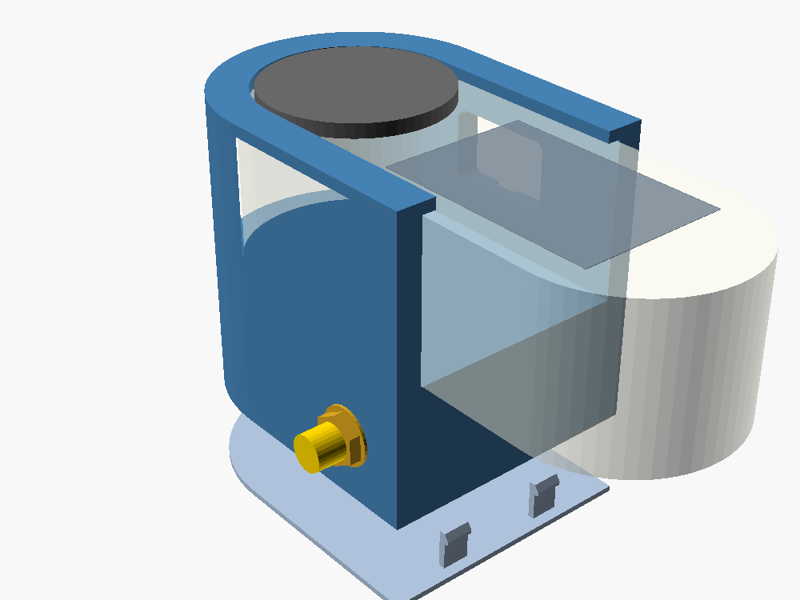
Last reviewed: 2026-11-14
Code-first CAD for printable cases, adapters, mounts, replacement parts and new gear
Part of CAD & 3D Printing in the ULTIMATE CYBERSECURITY MASTER GUIDE


Navigate: Main Guide · Start Here · CAD Index · All Documentation
A practical path from "I need a bracket for this radio" to a part that fits the first time. You will learn the OpenSCAD language, how to structure a parametric project, how to mock up the real hardware (devices, boards, connectors, cables) and prove clearance before printing, and how to design features that print well, all anchored by a complete worked example: a T-Embed CC1101 sleeve with a GT-U7 GPS pod, SMA bulkhead, routed cable, PCB snap latches and a snap-on lid.
Tip
Why bother? Design skills turn a 3D printer into a repair shop and prototyping lab: replacement clips and covers, protective cases, mounts, jigs and function-expanding accessories, plus your own inventions. See Why CAD Skills & a Capable 3D Printer Belong Together.
- Designing a case, cradle or holster for field hardware (handhelds, SDRs, dev boards, battery packs)
- Making an adapter (antenna bracket, mount plate, connector panel) or a replacement part (battery door, clip, knob)
- Checking whether a new module, connector or cable will physically fit before you buy, cut or print
- Building a reusable, parametric design others can adjust from the Customizer
| Resource | What It Provides |
|---|---|
| 01 · Fundamentals | Editor workflow, primitives, 2D extrusion, transforms, booleans, hull()/offset(), modules, functions, loops, modifiers, assert()
|
| 02 · Project Structure & Parameters | Folder layout, Customizer annotations, include vs use, reusable libraries, part selector, parameter sets, command-line export |
| 03 · Mockups & Fit Checks | Measuring, proxy models of devices/PCBs/connectors/cables, keep-outs, section views, automatic clash tests, test coupons |
| 04 · Tutorial: GPS Cradle | 17-step (0–16) build of the example: sleeve, port window, pod, SMA hole, cable notch, PCB latches, snap lid, inlay, cable routing, checks, export |
| 05 · Design for Printing | Tolerances, line/layer math, holes, orientation & strength, overhangs, snap-fit strain, multi-color inlays, materials, troubleshooting |
| 06 · Keyboard & Mouse Cheat Sheet | Printable one-page sheet (SVG/PNG) plus tables of the most-used shortcuts, verified against the OpenSCAD source |
| Project | Files | Highlights |
|---|---|---|
| T-Embed CC1101 + GT-U7 GPS Cradle |
gps_cradle.scad, tutorial_steps.scad, lib/, check.sh
|
Offset-ladder enclosure, hardware mockups, D-flat SMA hole, PCB side latches, snap lid, two-color inlay, clash test, gauges |
| Goal | Recommended Route |
|---|---|
| Brand new to OpenSCAD |
Fundamentals → open tutorial_steps.scad and step through the Tutorial
|
| Design a case for a device you own | Mockups & Fit Checks → Tutorial Steps 1–5 → Design for Printing |
| Add a connector, antenna or cable exit | Tutorial Steps 6, 8, 9 and 13 |
| Hold a PCB or lid without screws | Snap Fits → Tutorial Steps 10–11 |
| Automate exports / checks |
Command-Line Export → check.sh
|
- Install OpenSCAD from openscad.org/downloads. The stable release is still 2021.01 (a 2026.11 release candidate was tagged in October 2026); development snapshots are much faster with the Manifold engine (Preferences → Advanced → 3D Rendering → Backend). The examples work on both.
-
Open
examples/gps-cradle/tutorial_steps.scad, then Window → Customizer, and move thestepslider. -
Open
examples/gps-cradle/gps_cradle.scadfor the real design. Changeparttobody,lidorgauge, press F6 (render) then F7 (export STL). - Check from a terminal (Linux/macOS/WSL):
cd CAD/OpenSCAD/examples/gps-cradle
./check.sh # design checks + STL export + clash test measure ─► 2D plan ─► offset ladder ─► slabs ─► cutters ─► mockups ─► checks ─► coupons ─► print
│ │ │ │ │ │ │ │
calipers hull()/ offset(r=) linear_ difference % ghosts assert() gauge,
+ source stadium() walls, gaps extrude # debug keep-outs clash hole
comments lips section ladder
- Measure the hardware and record the source of every number.
-
Draw a 2D plan of the device and grow/shrink it with
offset()into bores, walls and cavities. - Extrude plans into slabs; cut windows, holes and recesses with overshooting tools.
- Mock up devices, boards, connectors and cables in the same coordinate frame.
- Check with assertions, an automatic clash test and section views.
- Print coupons (a gauge slice, a hole ladder) before the full part, then update parameters.
| Convention | Detail |
|---|---|
| Units | Millimeters everywhere |
| Clearances | Per side, named *_gap
|
| Libraries | Loaded with use <lib/...>; every module documents its local frame |
| Parts | One part selector per project; printable branches apply their own print orientation |
| Hardware | Mockups only in preview/clash branches; never in printable output |
| Verification | Each example ships a check.sh; a doc's "Last reviewed" date means its examples were re-rendered and its links re-checked, not that a physical print was tested |
Note
Physical testing status: the GPS cradle example is verified in software (renders, exports, passes its clash test and assertions). Dimensions marked "measure yours" are vendor or estimated values. Print the gauge coupons and record your results before relying on a fit.
| Item | How It Was Checked | Result |
|---|---|---|
Example .scad files, all part outputs |
Rendered and exported with OpenSCAD 2021.01 (check.sh), default + 3 presets + fit_gap / wall sweeps |
Pass; clash test empty except deliberate fit_gap ≤ 0 cases |
| Assertions and strain echoes | Fed bad inputs (pcb_y0=0, tab_len=4) |
Fail with the documented messages |
| Language snippets in Fundamentals | Self-contained snippets executed in 2021.01 | Pass |
| Keyboard and mouse shortcuts | Read from OpenSCAD source: tag openscad-2021.01 and master (2026-11-14) |
Version differences marked |
| CLI options, Manifold default, empty-export behavior |
openscad --help (2021.01) and master source (openscad.cc, RenderSettings.cc) |
Documented as found |
| Customizer rules | OpenSCAD User Manual: Customizer | Main-file literals only; description from the line above |
| Hardware facts (T-Embed, GT-U7, SMA, Qwiic) | Vendor wiki, retail and data sheets, connector vendors, SparkFun Qwiic pages (linked in each page) | Starting points; measure your parts |
| Snap-fit strain limits | Bayer/BASF cantilever equation; filament data sheets (elongation at yield) | Conservative starting points |
| Physical prints | Not yet performed | Record printer, material and result here after test printing |
- CAD & 3D Printing index
- Hardware Hacking · SDR & RF · Wardriving · PNWC Cyberdeck · uConsole: the gear these designs carry
- OpenSCAD Cheat Sheet · OpenSCAD User Manual
⬅️ Back to Master Index | 🎯 Role Navigation | Legal Notice
📄 Source: CAD/OpenSCAD/README.md | ✏️ Suggest an edit | ⬅️ Back to CAD