Repository navigation
Journalist Device Mobile Account and Network Protection
Last reviewed: 2026-11-18 (official Apple and Google platform guidance checked; verify menus and capability against the device and OS release)
Prerequisites: Press Freedom and Source Security · Encrypted Drives · Security Keys
A well-encrypted message is still exposed to someone controlling either endpoint. A reporter's laptop or phone may disclose source identities through contacts, message previews, app backups, location metadata, synchronized photo libraries, browser histories and Wi-Fi association records. Assess accounts and backups, not just the phone.
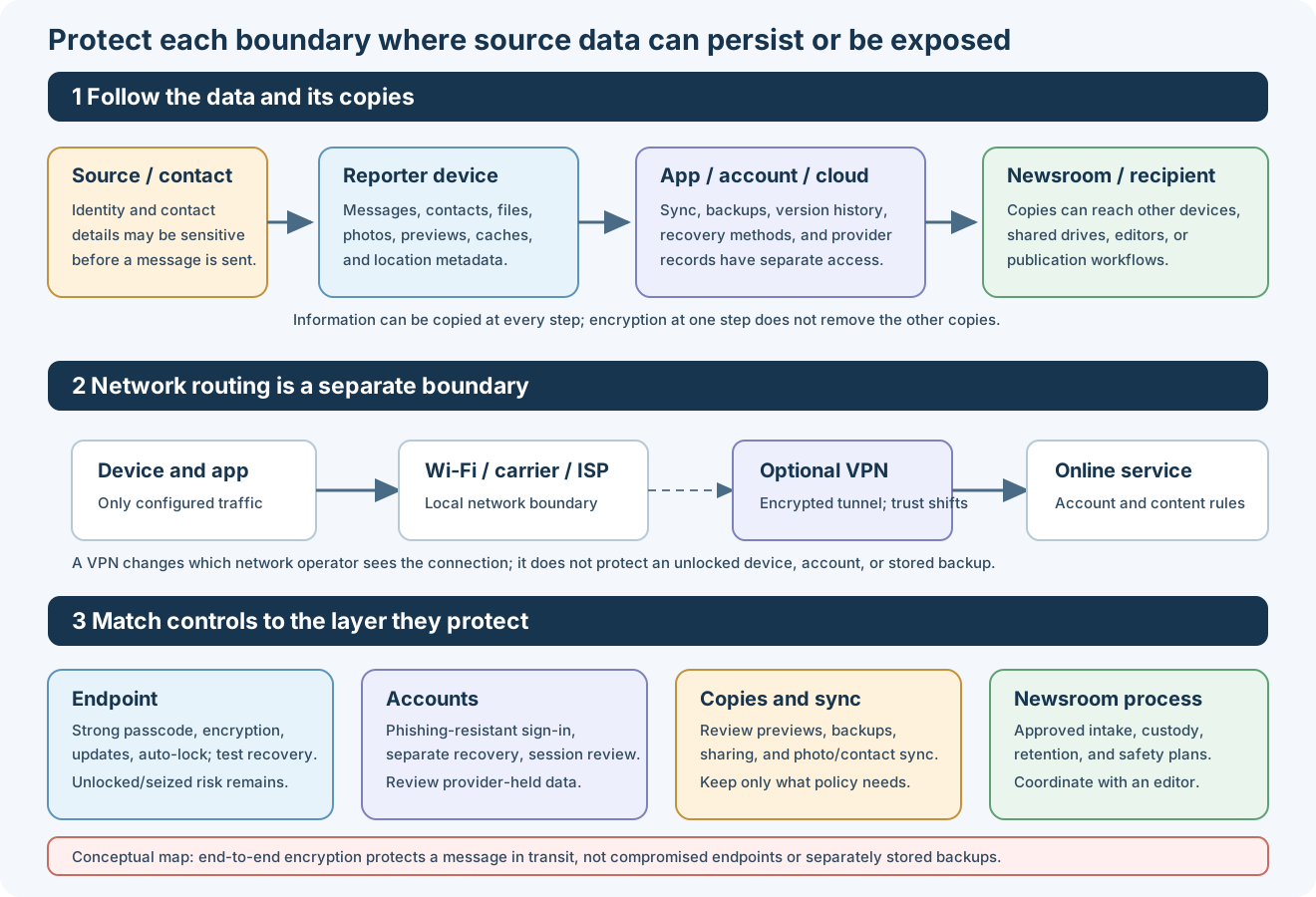
Conceptual map: device encryption, secure messaging, account protection, and network routing cover different parts of the workflow. Sync and backups create additional copies that need their own review.
- Use a supported, patched Windows edition and enable the appropriate BitLocker / device encryption configuration; verify the status and securely store a recovery key separate from the laptop.
- Use an individually assigned standard user, unique admin credentials, quick automatic screen lock, secure boot where supported and approved endpoint protection.
- Review OneDrive, browser sync, cloud file histories, clipboard/screenshot integrations, and external-drive handling. Do not store source records in personal sync folders by default.
- Confirm full shutdown vs sleep behavior for sensitive travel; a sleeping or unlocked machine can retain secrets in accessible memory.
- Enable FileVault, maintain a strong login password and a separately protected recovery plan. Use current OS/security updates and screen-lock settings.
- Review iCloud Drive/Photos, Messages, backups, AirDrop, nearby-device sharing, and location/metadata exposure. Avoid sharing sensitive documents before reviewing embedded metadata.
- For those at elevated risk of mercenary spyware, evaluate Apple's Lockdown Mode on supported devices; it restricts features and is distinct from ordinary screen locking.
- Prefer an installation with LUKS2 full-disk encryption; verify swap, temporary directories, snapshots and backup locations are included in the security model.
- Use up-to-date packages, least privilege and a firewall; check remote-access services, mounted network shares, USB automount and SSH keys.
- For temporary research work, evaluate Tails; for separated persistent workspaces evaluate Whonix + Kicksecure. Neither protects against compromised host hardware or exposed online accounts.
- Install manufacturer security updates and use a strong PIN or password instead of a short predictable PIN; configure fast auto-lock and keep notifications private on the lock screen.
- Review Google account sync, photo and messaging backups, notification-access permissions, device-administrator apps, accessibility services, sideloading, USB debugging, location and permissions.
- On Android versions that provide Lockdown, that feature temporarily disables biometric unlocking and lock-screen notification display / extended unlock until the next unlock. The exact menu and key combinations vary by manufacturer/version. Review Google's Android Lockdown instructions. This is a local screen-lock feature, not the same as Apple's anti-spyware Lockdown Mode.
- Avoid assuming that manufacturer secure folders, work profiles or second users defeat forensic extraction or coercion. Validate the actual device/OS and attacker model.
- When a phone is confiscated or searched, treat all signed-in accounts and copied identifiers as potentially exposed and follow the incident plan.
- Enable a strong device passcode and short auto-lock; review iCloud, Photos, Messages, backups, shared albums, Find My, location sharing, lock-screen previews and trusted devices.
- Apple's Lockdown Mode is an optional anti-spyware attack-surface reduction mode for people at unusually high risk of targeted attacks: Settings → Privacy & Security → Lockdown Mode, on supported systems. It can limit attachments, calls, links and app functionality; it is not a covert or emergency wipe feature.
- Temporarily disabling Face ID is a different action. On supported Face ID iPhones, Apple documents holding Side + either Volume for about two seconds until sliders appear, then pressing Side to lock; the next unlock requires the passcode. See Apple's Face ID guide. Do not assume equivalent steps for every hardware revision.
- High-risk users should review Apple Lockdown Mode documentation before deployment and test compatibility with necessary reporting tools.
- Use phishing-resistant FIDO2/WebAuthn where the service supports it, and enroll a second independent security key or recovery method when feasible for email, cloud storage, password managers, code repositories and newsroom identity providers.
- Use distinct personal, newsroom and source-contact identities where the reporting threat model requires separation.
- Limit push notifications and lock-screen message previews; verify endpoints when first establishing a sensitive encrypted conversation.
- Prefer end-to-end encrypted communication tools configured with appropriate disappearing-message and backup policies only where compatible with legal/editorial preservation needs.
- Audit shared drives, mobile photo sync, contact backups, communications metadata, secondary devices and account recovery. Encryption in transit does not remove stored copies.
- Use an editor-approved source-submission channel when receiving documents; isolate unknown files and consider document metadata before circulating.
Proxy caution: Do not transmit confidential-source communications, login sessions or documents through unknown public proxies or Froxy-discovered proxy lists. Use vetted privacy tooling and the newsroom's approved threat model; IP masking alone is not source protection.
- Upgrade router and access-point firmware, disable remote administration unless needed, use WPA2-AES/WPA3 and unique credentials, and place guest/IoT devices on separate networks.
- Treat public Wi-Fi as untrusted: prefer HTTPS, verify captive-portal addresses and use a trusted VPN where appropriate. VPN does not guarantee anonymity or secure a compromised device.
- Avoid automatically joining previously used SSIDs; check for unauthorized mobile hotspots and nearby-pairing prompts.
- Carry a minimal-data travel device for high-risk assignments when feasible; prepare it before travel and arrange secure access to only what is needed.
- For field travel, share a check-in plan with someone trusted without placing source or story details into insecure location-sharing services.
- Encryption enabled and recovery tested
- Restart/shutdown lock state evaluated
- OS and browser patches current
- Hardware key + backup registered and tested
- Source contacts not exposed by notification, sync or messaging backup
- Sensitive folders excluded from unapproved cloud sync
- Trusted communication channel and verification phrase confirmed
- VPN/firewall and safe network settings checked
- Emergency contact, response plan and secure backups available
- CPJ Digital Safety Kit
- Freedom of the Press Foundation — digital security checklist
- Apple Lockdown Mode
- Apple Face ID settings
- Google Android Lockdown
- EFF Surveillance Self-Defense
Press Freedom Index | OPSEC Index | Master Index
📄 Source: OPSEC/press-freedom/device-network-protection.md | ✏️ Suggest an edit | ⬅️ Back to Operations Security (OPSEC)