Repository navigation
Homelab
Building, configuring, and maintaining isolated environments for offensive and defensive research
Part of the ULTIMATE CYBERSECURITY MASTER GUIDE


Additional operating references: Docker CLI, Compose and hardening cheat sheet for self-hosted container labs; curated technical documentation links to Packer for reproducible VM image workflows. Docker containers are not the same isolation boundary as VMs.
Index and entry point for the Homelab section - covering the hardware, software, and network architecture needed to build an isolated cybersecurity lab for offensive and defensive research.
Links to HomeLab_Setup.md (comprehensive build guide) and provides a quick-reference overview of hardware choices, network topology, virtualization platforms (Proxmox, VMware, VirtualBox), and security considerations for lab isolation.
Help practitioners build a legally-safe, network-isolated lab environment where every other technique in this guide can be practiced without risk to production systems.
- Starting point for anyone building their first security homelab
- Reference for lab architecture decisions (hardware, hypervisor, VLAN isolation)
- Cross-referencing which lab tools correspond to which Documentation/ guides
Open The PNWC Cyberdeck Public Reference for the GL.iNet/MikroTik zone architecture, staged authorization and offline evidence workflow. The proprietary operator console and live collectors are not published.
Proxmox IDS sensor coverage: Traffic visibility checklist adapts the h4cker Proxmox lab without assuming that an unmanaged switch can mirror packets.
- Overview
- Infrastructure & Directory Contents
- Guides & Standard Operating Procedures
- Getting Started: Lab Architecture
⚠️ CRITICAL Security & Isolation Warning- Resources
A homelab is the absolute backbone of practical cybersecurity research. This directory is dedicated to the architecture, deployment, and maintenance of a safe, isolated environment. It provides the foundation necessary to practice offensive operations, develop defensive analytics, and reverse-engineer malware without jeopardizing production networks or violating the law.
Core Objectives:
- Simulate Real-World Scenarios: Deploy vulnerable machines, Active Directory domains, and attack infrastructure safely.
- Standardize Workflows: Develop and follow Standard Operating Procedures (SOPs) for repeatable, automated success.
- Test Tools & Malware: Analyze dangerous software, test exploits, and study malware behavior in controlled sandboxes.
- Master Infrastructure: Gain hands-on engineering experience with Type-1 hypervisors, software-defined networking, and enterprise infrastructure.
The core computational layer of the lab.
| Category | Description | Examples / Tools |
|---|---|---|
| Hypervisors | Guides for configuring bare-metal and hosted hypervisors. | Proxmox VE, ESXi, VMware Workstation, VirtualBox |
| Attack Boxes | Setup scripts and configurations for offensive platforms. | Kali Linux, Parrot OS, BlackArch, CommandoVM |
| Target Machines | Resources for deploying intentionally vulnerable endpoints. | Metasploitable, Windows AD Ranges, DVWA, Juice Shop |
Physical tools, edge devices, and radio frequency hardware.
| Category | Description | Examples / Tools |
|---|---|---|
| SDR (Radio) | Notes and guides for capturing, analyzing, and transmitting RF. | HackRF One, RTL-SDR, YardStick One |
| Hak5 Gear | Payloads and physical access tooling setup. | Rubber Ducky, Bash Bunny, WiFi Pineapple, LAN Turtle |
| SBCs | DIY pentesting rigs and embedded systems configurations. | Raspberry Pi, Pwnagotchi, ClockworkPi uConsole |
| Resource | Description |
|---|---|
| The Black Wire Maker's Technical Reference Guide | Raspberry Pi and other single-board computer (SBC) references: GPIO pinouts, connector diagrams, power data and manufacturer sources. |
The routing, switching, and boundary protection of the lab.
| Category | Description | Examples / Tools |
|---|---|---|
| Isolation | Routing infrastructure to contain malware and attacks. | pfSense, OPNsense, VLAN tagging, Air-Gapping |
| Anonymity | Privacy-focused routing and OS integration. | Tor routing, VPN chaining, Tails, Whonix |
This is a living library. This section contains detailed guides and SOPs covering essential lab administration tasks to ensure your environment remains stable, recoverable, and secure.
| SOP / Guide | Focus Area | Description |
|---|---|---|
| PNWC Cyberdeck Public Reference | Portable Field Assessment | Hardware roles, segmented topology, staged procedures and evidence handling (private portal not included). |
| Lab Setup & Maintenance | Architecture | Core procedures for architecting, deploying, and maintaining homelab environments. |
| Provisioning Workflows | Automation | Step-by-step guides for deployment workflows (Ansible/Terraform) and automation playbooks. |
| Wireless Lab Security Assessment | Authorized Testing | Master playbook with RaspyJack Pi deployment & six labs, network isolation and defensive validation. |
| Incident Response | Blue Team | SOPs for log ingestion (ELK/Splunk) and artifact analysis within the lab environment. |
| Hardware Prep | Physical Assets | OS installation, firmware flashing, and setup of physical pentest tools (e.g., Proxmark3). |
Portable firmware assessment companions: Standalone Marauder · Flipper Marauder · Bruce · OUI-SPY · Biscuit.
- WiFiForge — a virtual, sandboxed wireless-security training environment built on Mininet-WiFi; ideal for rehearsing wireless attack/detection concepts without transmitting on real radio channels. Do not assume its virtual behavior reproduces every physical RF condition.
- Project NOMAD — offline-first, self-hostable reference library and education server. Useful for isolated training networks that cannot depend on cloud lookups. Verify local content licensing, update packages before disconnecting, and keep any AI model/data stores within the lab's storage and access-control policy.
- Reticulum — a cryptography-oriented networking stack for experimentation with resilient, low-bandwidth networks and transports such as LoRa or IP. Test with non-sensitive messages first; it is not an automatic guarantee of anonymity or operational security. Review upstream design and supported interfaces before pairing devices.
- NetAlertX — optional baseline discovery/change monitoring for your authorized lab subnets, complementing (rather than replacing) the IDS/IPS guides.
Keep experiments on test VLANs with clear ownership, explicit routing/firewall rules, and separate credentials. Use the Network Audit Playbook to document scope.
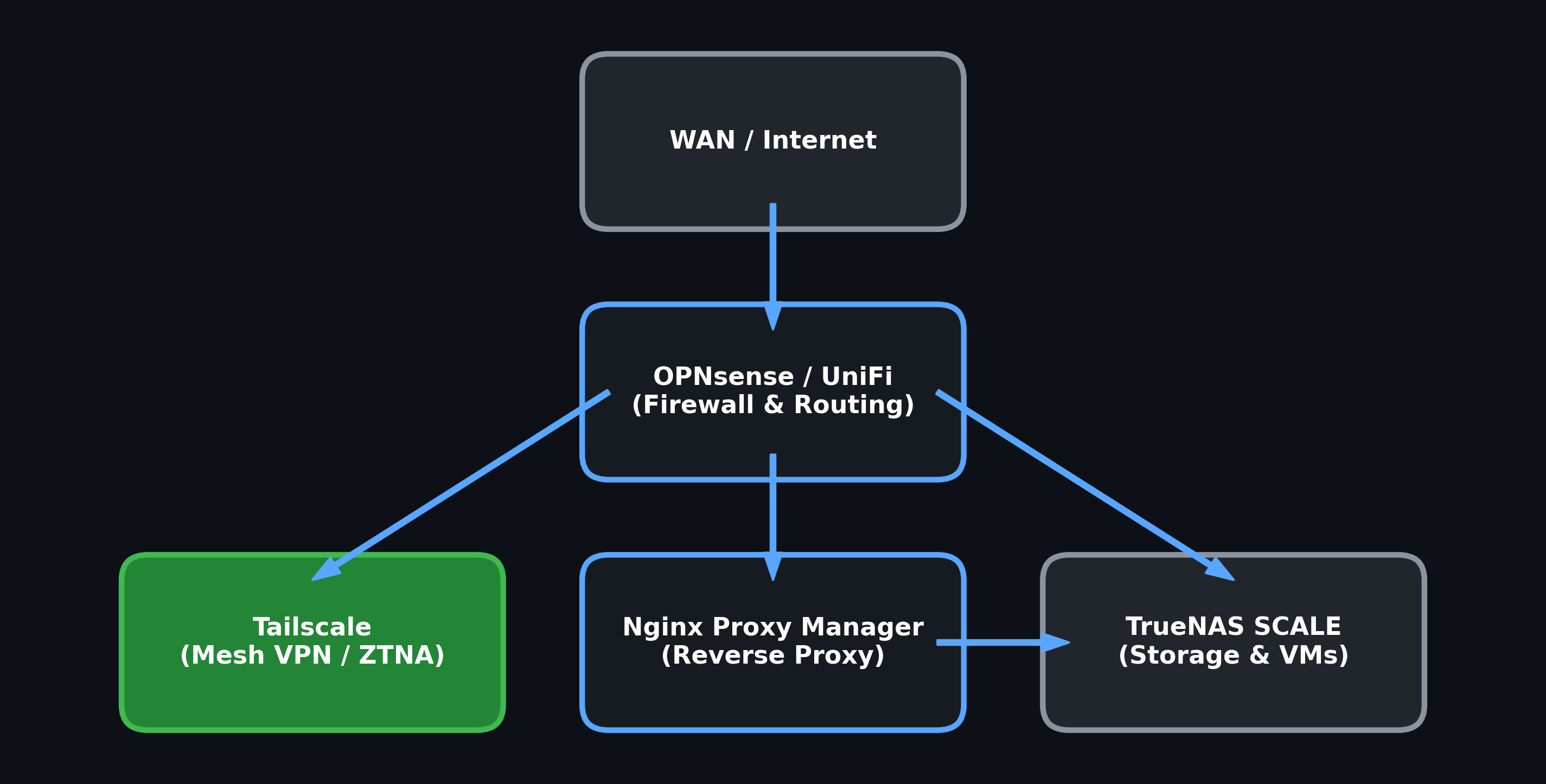
Example design for layered network protection and segmentation. This is a reference topology, not an inventory or validation of the reader's actual routers, firewalls, VLANs, hypervisors or storage.
- Minimum: A modern multi-core CPU (i5/i7/Ryzen), 16GB+ RAM, 500GB SSD.
- Recommended: Dedicated hardware (e.g., Intel NUC, Dell OptiPlex, or custom server), 64GB+ RAM, 2TB+ NVMe storage for running complex Active Directory environments alongside SIEMs.
- Type-1 (Bare Metal): Best for dedicated hardware. Install Proxmox VE or VMware ESXi.
- Type-2 (Hosted): Best for running a lab on your daily-driver laptop. Install VMware Workstation Pro or VirtualBox.
Before spinning up vulnerable VMs or executing malware, you must architect the network:
- Host-Only / Internal Networks: Configure your hypervisor's virtual switches so that Target VMs can only talk to the Attack VM, and cannot reach your physical home network or the internet.
- Virtual Router: Deploy a pfSense/OPNsense VM with dual NICs (one connected to your home network for internet access, one connected to the isolated lab LAN) to strictly control ingress/egress traffic.
═══════════════════════════════════════════════════════════════
                    ⚠️ CRITICAL WARNING ⚠️
═══════════════════════════════════════════════════════════════

Building a cybersecurity lab involves handling LIVE MALWARE, inherently
vulnerable systems, and potent offensive tools.

1. CONTAINMENT FAILURE (BRIDGING)
   ► NEVER bridge a vulnerable VM (like Metasploitable) directly to your
     home's physical network. If your home network is exposed to the internet,
     your vulnerable VM WILL be compromised by real-world threat actors.
   ► Malware detonated in an improperly isolated lab can escape and infect
     your host operating system or personal home network.

2. AUTHORIZED TARGETS ONLY
   ► Having a lab does NOT give you permission to attack infrastructure
     outside of it.
   ► If your Attack VM (e.g., Kali) has internet routing configured, ensure
     you do not accidentally launch scans or exploits against external,
     unauthorized IP addresses. Unauthorized attacks are a FEDERAL CRIME.

3. EDUCATIONAL USE ONLY
   ► The tools, scripts, and vulnerable environments provided or referenced
     here are strictly for educational purposes and authorized testing.
   ► Pacific Northwest Computers (PNWC) is not liable for data loss, network
     compromise, or legal issues arising from improper lab configuration.

═══════════════════════════════════════════════════════════════
- ✅ Security Checklists
- 📚 Documentation
- 📄 PDF Resources
- 📘 Playbooks
- 💻 Scripts & Tools
- 📻 Hardware & Firmware References
- 🏠 Main Repository
- 🎯 START HERE Guide
- 💻 Cybersecurity Master Guide
- 🔒 OPSEC Guidelines
- 🚨 Incident Response
📁 Categories: Virtualization, Hardware/RF, Network Security
💻 Focus: Infrastructure provisioning, Isolation, Active Directory simulation
⚙️ Tech Stack: Proxmox, VMware, pfSense, Linux, Windows Server
🔄 Last Updated: June 2026
👥 Maintained by: Pacific Northwest Computers (PNWC)
📝 Status: Active - Ensure strict isolation before deployment
To contribute to the Homelab section:
- Follow the 4-header standard:
## 🎯 Purpose,## ⚙️ Function,## 🏆 Goal,## 📋 When to Useafter every H1 - Add a
## Related Filessection at the bottom with bidirectional links - Use hyphens (-) not em-dashes
- Include network isolation requirements for any vulnerable VM or attack tool guide
- Verify all hypervisor and OS versions before adding configuration steps
- Add warnings whenever content involves live malware, exploit testing, or vulnerable machines
- Proxmox VE: https://www.proxmox.com/en/proxmox-ve
- VMware Workstation Pro: https://www.vmware.com/products/workstation-pro.html
- VirtualBox: https://www.virtualbox.org/
- pfSense: https://www.pfsense.org/
- OPNsense: https://opnsense.org/
- Metasploitable: https://sourceforge.net/projects/metasploitable/
- HackTheBox: https://www.hackthebox.com/
- VulnHub: https://www.vulnhub.com/
- TryHackMe: https://tryhackme.com/
- HomeLab_Setup.md - Full build guide: hardware, network, hypervisor, and VM deployment
- ../Documentation/virtualmachines.md - VM catalog for the VMs you'll deploy in this lab
- ../IncidentResponse/ - IR infrastructure deployed within the homelab environment
- ../Documentation/wireshark.md - Wireshark for monitoring the lab's network traffic
📖 Use This Lab Responsibly: Authorization is MANDATORY for Pentesting
The best place to learn how an attacker breaches a network is on a network you built yourself.
Repository: ULTIMATE CYBERSECURITY MASTER GUIDE
Maintained by: Pacific Northwest Computers
⭐ Star this repo if you find it useful! ⭐
Master Index | Start Here | Legal Notice
📂 Folder: Homelab | ✏️ Suggest an edit | 🗺️ Browse by Topic