Repository navigation
Proxy Types DNS Leaks and Froxy Research Reference
Last reviewed: 2026-11-18 (official project docs and protocol references checked; no third-party proxy was tested)
Caution
Authorized use only. This reference is for owned lab environments, permitted OSINT research and assessing the confidentiality of your own network clients. Never route sensitive client data, credentials, browser sessions, incident artifacts, or journalists' source material through anonymous public proxies. A proxy is not an anonymity guarantee. See Legal terms.
Prerequisites: OPSEC overview · Anonymity layering · VPN guide · Tor guide.
Froxy is an MIT-licensed Python package for retrieving/filtering listings of free public proxies. Its upstream README says it consumes the clarketm/proxy-list feed. It provides filtering by country, claimed anonymity class, protocol and whether a proxy passed a Google-specific check. Its documentation also warns that many returned addresses do not work.
This is a proxy discovery library, not a VPN service, a Tor client, a
secure managed proxy provider, a security audit or a validated anonymity
mechanism. The source's N / A / H categories and HTTP/HTTPS labels
describe metadata in the public list; they do not prove confidentiality,
lack of logging, trusted ownership, TLS correctness or that your real identity
cannot be correlated.
Use case: learning about open-proxy inventories in a disposable lab, studying proxy-list reliability, or building a list-quality experiment with synthetic requests to hosts you control. This repository does not endorse Froxy for source protection, engagement infrastructure, credentials or production scraping.
| Layer | What it may do | Critical limitation / correct use |
|---|---|---|
| HTTP forward proxy | Relay HTTP requests; may use CONNECT for HTTPS | Plain HTTP content is visible to the proxy. With CONNECT to a TLS site, it still sees the client address, requested host, and connection metadata; valid end-to-end TLS protects the page contents unless an interception certificate is trusted. |
| HTTPS proxy | Protect the client-to-proxy hop with TLS | The proxy still sees connection and destination metadata. A CONNECT tunnel can carry separate client-to-site TLS; verify the destination certificate and understand any TLS interception. |
| SOCKS5 proxy | Relay supported TCP connections; SOCKS5 also defines UDP association | SOCKS does not encrypt application data. DNS location depends on the client mode (socks5h sends the hostname to the proxy); use destination TLS separately. |
| SSH dynamic tunnel | Forward supported client connections through an authenticated SSH session | The local-to-server hop is protected by SSH. The VPS still sees destination metadata and any non-TLS content; enforce client scope and egress logging for active testing. |
| VPN | Tunnel traffic selected by the device or app configuration to the VPN operator | The local network sees the VPN endpoint and traffic patterns; the provider may see source and destination metadata. Apps outside the tunnel may bypass it; destination TLS remains separate. |
| Tor Browser / Whonix | Route Tor Browser traffic or configured Workstation traffic through Tor | The guard sees the source network address; the exit reaches the destination. HTTPS separately protects page contents. Other apps are not automatically covered by Tor Browser; use documented architecture. |
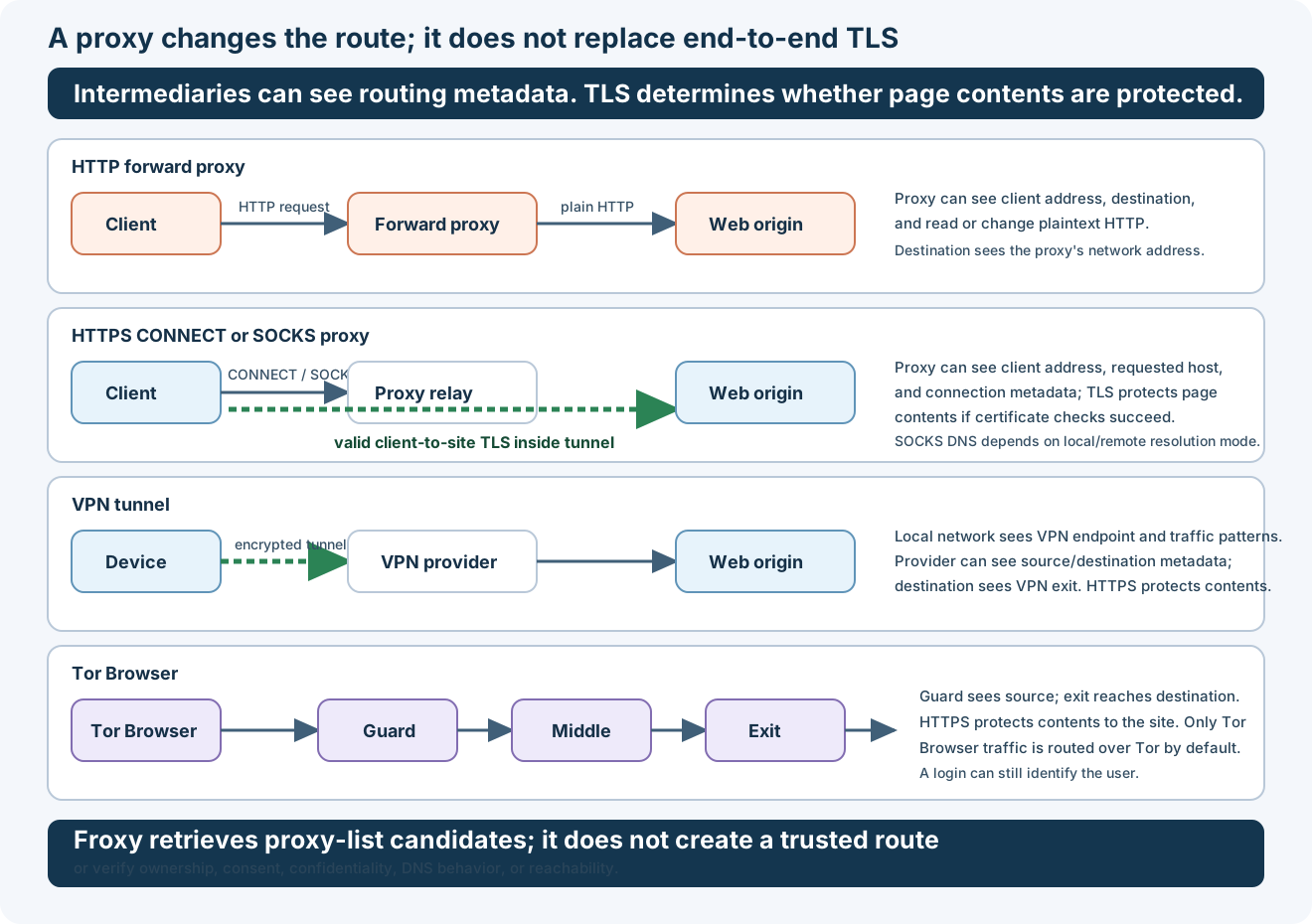
Conceptual routes only: actual visibility depends on client and server configuration. A valid TLS connection protects application contents to the destination; intermediaries can still see some routing metadata.
Priority: trusted system design and task separation first. A chain of arbitrary free proxies can increase, not reduce, the number of untrusted parties who can observe traffic.
- Client-authorized active assessment: use a fixed, agreed egress (such as an allowlisted VPS / VPN gateway) with an audit trail. Do not rotate public proxies; authorization and customer logs matter.
- Passive OSINT: prefer a separately managed research VM and a vetted VPN or, where appropriate, Tor Browser. If a contracted residential proxy is authorized, verify sourcing, jurisdiction, access logs and data-processing terms.
- Journalist, whistleblower or confidential-source workflow: use trusted, well-documented privacy tools and independent threat modeling, not Froxy or anonymous public proxy lists.
- Safe network lab: local HTTP proxy for app behavior testing, or a trusted SSH SOCKS proxy to an owned host. Keep all test data synthetic.
These examples do not discover or select public proxies. Replace
approved-gateway.example with an SSH server you operate. The SSH
command opens a local SOCKS listener and stays running; stop it when the
lab ends. Do not assume every application uses the proxy.
# Create a SOCKS5 proxy on local loopback via a gateway you administer.
ssh -N -D 127.0.0.1:1080 analyst@approved-gateway.example

# In a separate terminal: remote DNS resolution through SOCKS.
curl --max-time 15 --fail --silent --show-error \
  --socks5-hostname 127.0.0.1:1080 \
  https://example.com/ -o /dev/null

# Tor daemon example ONLY when Tor has been installed/configured.
curl --max-time 15 --fail --silent --show-error \
  --socks5-hostname 127.0.0.1:9050 \
  https://check.torproject.org/api/ip
The --socks5-hostname option sends hostname resolution through the proxy
rather than resolving locally. The exit-IP response, if any, proves only
that one request used a certain route, not that DNS, UDP, WebRTC,
raw-socket scanners or another process cannot leak.
If your workflow uses Python requests, the
Requests proxy documentation
and requests[socks] extras explain SOCKS support; socks5h://
requests remote DNS, while socks5:// resolves locally. Do not disable
TLS verification to force a proxy to work. Note that environment proxy
variables, NO_PROXY rules and application-specific behavior can override
your intended network path.
The upstream project documents a public-list discovery interface:
from froxy import Froxy

# Research only, in a disposable VM; may fetch an external public list.
inventory = Froxy()
https_candidates = inventory.https()
us_candidates = inventory.country("US")
claimed_high_anonymity = inventory.anonymity("H")

# Do NOT automatically select or connect through these proxies.
print("Candidate count:", len(https_candidates))
The above is adapted as an illustrative API usage sketch, not a
runtime-tested integration. Fetching a public list leaks your IP to the
feed host and the values may be outdated, malicious, malformed or
inaccessible. Do not treat .https() or .anonymity("H") as a security
control. Froxy's PyPI package and source may have changed since its README
examples; examine dependencies, provenance and installed API before use.
No package or proxy has been installed or configured in this repo.
- Confirm the proxy belongs to a trusted party, its protocol, egress IP, credentials, logging and retention agreement.
- Verify TLS certificate validation stays enabled; never bypass errors simply to route through a proxy.
- Inspect resolver behavior and confirm whether DNS goes through the proxy (for SOCKS, check the hostname-resolution mode).
- Test IPv4 and IPv6, browser WebRTC and non-HTTP traffic separately. A SOCKS proxy does not transparently catch UDP, raw packets or arbitrary binaries.
- Avoid proxy credentials in shell history, debug logs, process listings and committed configuration.
- Use a dedicated lab profile/VM for experimental proxy traffic; never share cookies or client credentials with that environment.
- Verify target scope, terms and permission. Do not bypass access controls or terms by rotating public exit addresses.
- Log the stable, client-approved exit for authorized active tests and distinguish failures/timeouts from successful routing.
- Froxy source and documentation (MIT license).
- clarketm/proxy-list (upstream feed; list health is unverified here).
- RFC 9110, CONNECT method and RFC 1928, SOCKS5 — proxy tunneling protocols.
- Tor Browser traffic scope — only Tor Browser traffic is routed over Tor by default.
- RFC 9110, CONNECT method and RFC 1928, SOCKS5 — proxy tunneling protocols.
- Tor Browser traffic scope — only Tor Browser traffic is routed over Tor by default.
- curl proxy options.
- Python Requests proxy guide.
- Tor documentation and Whonix documentation.
- Anonymity-layering decision guide · Tor/Proxychains guide · VPN guide · OSINT section · Press and source safety.
OPSEC index · Main guide · Legal notice
📄 Source: OPSEC/proxy-reference-froxy.md | ✏️ Suggest an edit | ⬅️ Back to Operations Security (OPSEC)