Repository navigation
Encrypted Drives Removable Storage and Key Protection
Last reviewed: 2026-11-17 (primary-source and visual review; no hardware, mount, key, or encryption operations performed)
Part of Cryptography in the Ultimate Cybersecurity Master Guide.
Select, set up, and evaluate encrypted drives for portable workflows, secure backups, and authorized client engagements. This guide distinguishes data-at-rest encryption from authentication keys and hidden-volume behavior.
Important
Encryption protects a locked volume against certain offline access threats. It does not make an unlocked host trustworthy, guarantee data integrity, erase host-side traces, or replace backups. Verify regulatory and client-specific requirements before storing evidence or protected information.
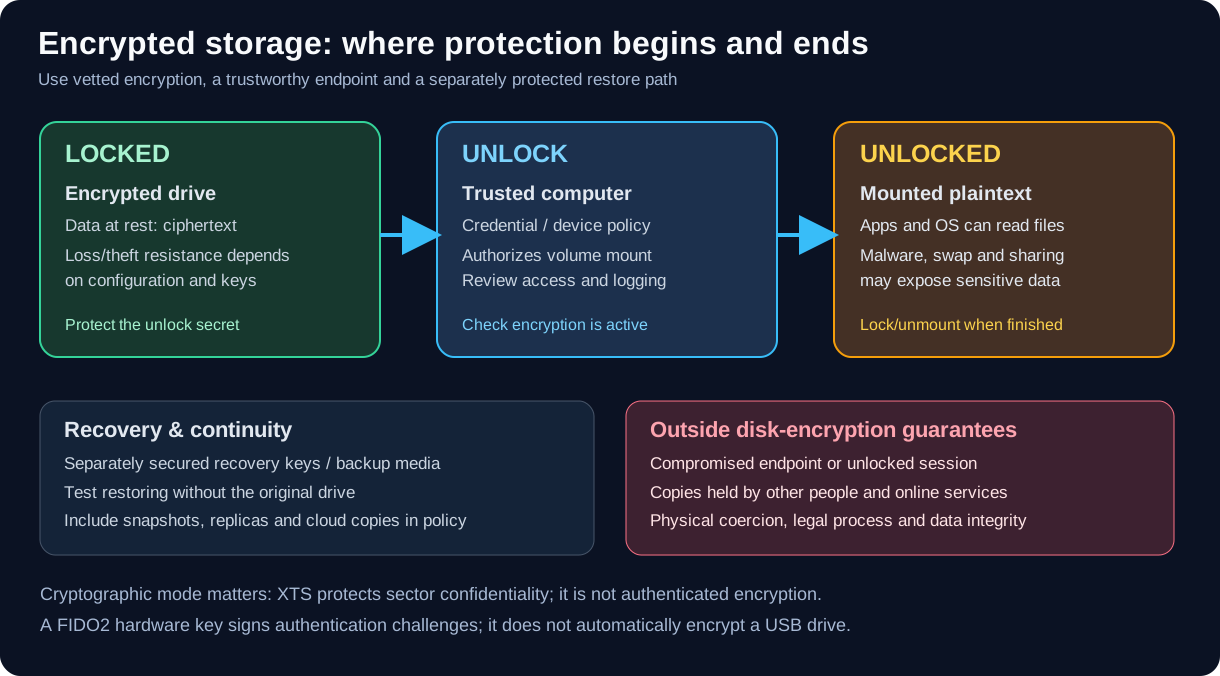
Encryption is strongest against offline access to locked data. Once mounted, the trusted host and its applications can access plaintext; use independently protected backups and test recovery.
| Approach | Common examples | Strengths | Important limitations |
|---|---|---|---|
| Operating-system disk encryption | BitLocker, FileVault, Linux LUKS2/dm-crypt | Mature OS integration, practical full-disk protection | Depends on boot security, configuration, recovery-key custody and endpoint trust |
| Portable encrypted container/volume | VeraCrypt | Cross-platform workflows, file-container option | Software must be available; mount state and host traces remain important |
| Hardware-encrypted removable drive | Vendor-specific encrypted USB SSD/flash drive | May support on-device PIN/keypad, management policies | Claims differ by exact model; verify validation, firmware, unlocking and recovery behavior |
| Experimental hidden encrypted USB | PhantomDrive | Interesting open-source CH569W hardware and stealth-partition research | No independent professional audit is established by this guide; keep evaluation to disposable non-sensitive data |
| Experimental DIY vault | PNWC ESP32-S3 Encrypted Vault | Hands-on embedded-storage cryptography lab | Development project; validate its threat model and tests; not production storage |
| Hardware authentication / cryptographic token | SoloKeys, YubiKey, Nitrokey | Protect authentication or signing keys; some models also support OpenPGP/PIV cryptographic operations | Not a general-purpose storage drive; FIDO2 itself does not encrypt disks |
- Storage encryption: a secret or key-encryption key controls access to drive contents.
- FIDO2/WebAuthn: a private signing key authenticates to a service using origin-bound public-key challenges. It does not automatically unlock or encrypt a disk.
- OpenPGP/PIV on supported multi-protocol devices: separate application functions can protect private keys for signing or encryption. This requires application-specific setup and backups.
- Recovery: an account recovery code or FIDO backup key is not interchangeable with a disk recovery key, LUKS header backup, or VeraCrypt recovery procedure. A header backup and a backup of user data also serve different purposes.
Read Security Keys and Passkeys before selecting a token to complement a storage workflow.
Before purchasing or initializing any drive, record:
- Data classification: ordinary files, client evidence, legal records, incident images, or personal secrets.
- Attacker access: lost drive only, a stolen powered-off laptop, malicious USB host, firmware tampering, or an unlocked session.
- Platform support: Windows, Linux, macOS; ability to run installers and preserve file metadata.
- Crypto controls: published protocol/mode, KDF, firmware provenance, updates, independent review or relevant validation.
- Recovery: availability of recovery credentials, restore tests, key rotation, and at least one separately protected backup.
- Operational handling: auto-lock, removable media restrictions, approved transfer channels, USB device trust and malware scanning.
- Evidence integrity: hash manifests, chain-of-custody records, write-protection where needed, and whether the encryption mode authenticates writes.
Warning
AES-XTS is a common disk encryption mode for confidentiality, not authenticated encryption. NIST SP 800-38E explicitly excludes data/source authentication. Do not infer tamper detection, integrity, or plausible deniability from an AES-256 label or a hidden partition.
Use a disposable test drive first, confirm the identifier and capacity, and never run format, partition, or encryption-initialization commands against a drive with valuable files.
Get-Disk | Select-Object Number,FriendlyName,SerialNumber,Size,PartitionStyle
Get-Volume | Select-Object DriveLetter,FileSystemLabel,FileSystem,Size
manage-bde -status
The BitLocker status command reports conversion, protection and lock status, among other fields. Inspect these separately: an encrypted volume can still have suspended protection or be unlocked.
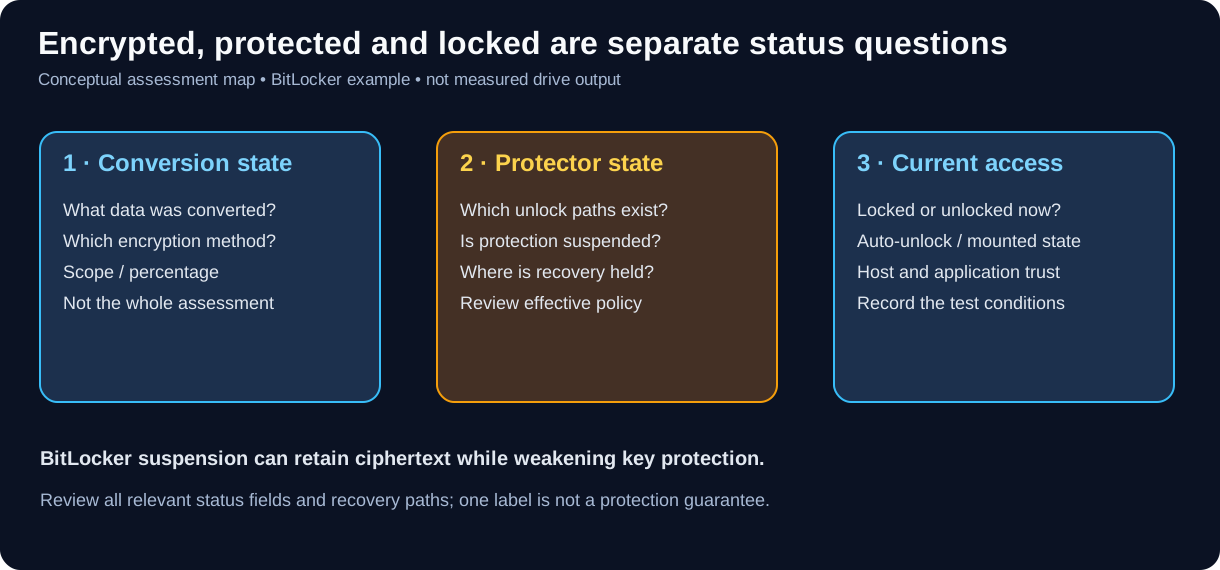
Original conceptual status map, matching this guide's existing vector style. Microsoft's BitLocker operations guide distinguishes encrypted conversion state from active protection. It is not captured output from a tested drive.
BitLocker suspension can retain encrypted data while leaving a clear-key path available, as described in Microsoft's FAQ. Do not infer offline protection from percentage encrypted alone, and do not change protectors as part of a read-only inventory.
lsblk -o NAME,SIZE,MODEL,TRAN,FSTYPE,TYPE,MOUNTPOINTS
lsusb
For a verified LUKS device only, optional header inspection (no passphrase entered):
# Replace the example with the known, verified LUKS block-device path.
sudo cryptsetup luksDump /dev/disk/by-id/YOUR-VERIFIED-DEVICE
Never infer the correct target from /dev/sdX lettering alone; identifiers can change as drives are attached. Treat identifiers and header/keyslot metadata as sensitive assessment records; these inventory examples were not executed in this review.
Before collection: verify written scope and retention policy; inventory the drive; check the available capacity and current lock state; confirm the backup and recovery method; record operator and serial number. Prefer vetted encryption over a demonstration build.
During collection: keep a validated evidence hash log; use known-clean workstations; minimize time spent unlocked; avoid placing credentials in screenshots, scripts, shared notes, swap, or shell history. For forensic acquisitions, use appropriate write-blocking and preserve originals.
After collection: safely dismount and lock; verify the intended protection and lock state, including approved auto-unlock paths; preserve recovery materials separately; move evidence into approved storage; test restoration on a spare device; log disposition and retention date.
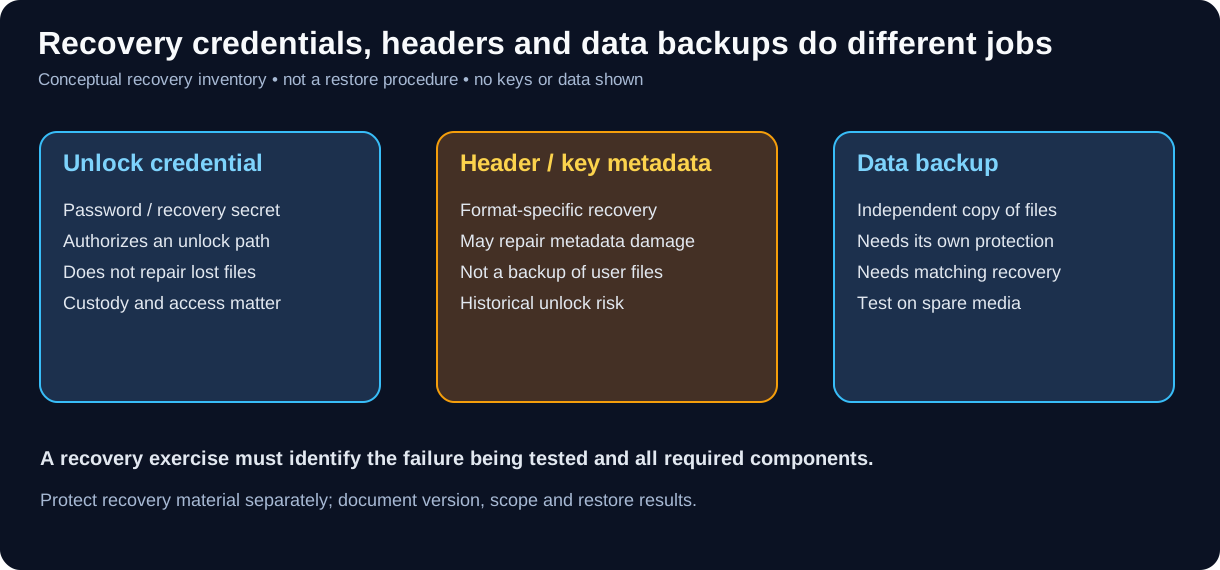
Original conceptual recovery inventory. cryptsetup's header-backup documentation describes header/keyslot recovery; VeraCrypt's program documentation describes header backup and restore. Neither is a copy of all user files.
A LUKS header backup can retain access through a passphrase valid when that backup was made, even after it is removed from the current header, while the data still uses the corresponding volume key. VeraCrypt header restoration can likewise restore historical password/PIM/keyfile requirements. Protect and inventory old recovery material as part of a credential-change plan; do not treat changing a passphrase as proof that every old recovery path is revoked.
Distinguish a credential-change operation from changing the volume's underlying data-encryption key. Follow the exact product/version recovery process and test on disposable copies; this guide does not supply a universal key-rotation command.
- Device and firmware model identified accurately
- Intended locked/protection state recorded, with auto-unlock and other approved paths accounted for
- Correct unlock works after safe eject and power cycle
- Incorrect unlock fails without disclosing meaningful information
- Files survive normal unplug/reconnect after safe ejection
- Backups can be restored independently of the original device
- Test-file changes are compared with SHA-256 against an independently trusted baseline; hashes alone do not authenticate the writer
- Credentials, header metadata and data backups are inventoried separately; required recovery materials are not stored only on the protected volume
- Applicable compliance and product certification claims independently verified
- BitLocker / BitLocker To Go: manage protectors and recovery information through supported Windows and enterprise policy; do not assume removable-drive settings mirror OS-drive defaults.
- LUKS2/dm-crypt: securely retain recovery information and, where appropriate, protected header backups. Loss of all usable metadata/key material can make data unrecoverable; metadata backups are not file backups and can preserve historical unlock capability.
- VeraCrypt: evaluate encrypted containers and volume support on all intended platforms, plus backup, header recovery, and mount-time exposure.
- Hardware-encrypted USB: investigate on-device PIN throttling, failure lockout, key destruction policy, supply-chain and firmware updates. Verify each specific model rather than trusting broad marketing terms.
- PhantomDrive: see the research-specific guide for its AES-XTS/CTR build variants and unlock caveats.
- PhantomDrive research and safe evaluation
- Security keys, FIDO2, passkeys and certification
- SoloKeys setup and verification
- Applied Cryptography
- OPSEC and portable workstations
- PNWC Network Audit Playbook
- PNWC ESP32-S3 Encrypted Vault
Section Index | Master Index | Legal Notice
📄 Source: Cryptography/encrypted-storage.md | ✏️ Suggest an edit | ⬅️ Back to Cryptography