Repository navigation
Hardware Security Keys FIDO2 Passkeys and Certification Levels
Last reviewed: 2026-11-17 (standards and official documentation reviewed; no device testing performed)
Part of Cryptography. Related: SoloKeys hands-on guide, Encrypted Storage, and Applied Cryptography.
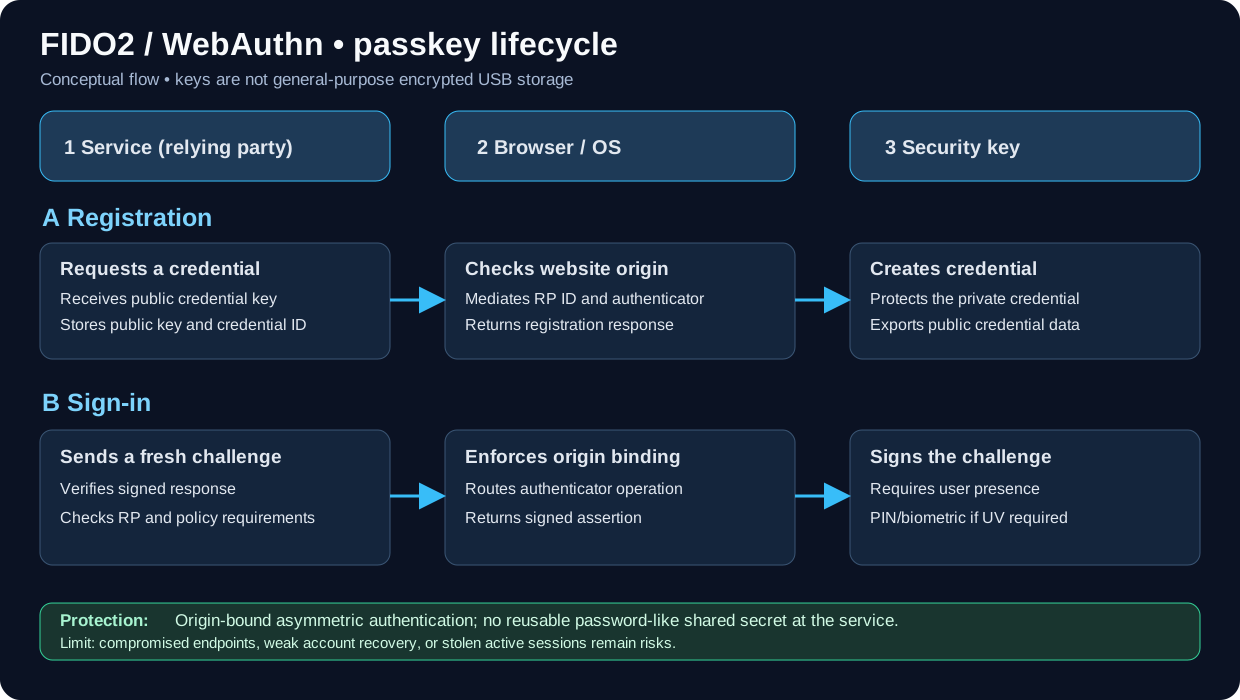
FIDO2 overview: the authenticator protects a credential's private key while the service uses public-key challenge verification. Browser origin binding and user presence/verification are separate checks. This is a conceptual diagram, not a certification of any device.
A hardware security key (roaming authenticator) can hold or derive cryptographic credentials used to prove account possession. In a standard FIDO/WebAuthn sign-in, a service verifies a signed challenge using a public key; a corresponding private credential secret remains protected by the authenticator's design. Browser origin binding helps resist look-alike login sites.
A key's touch/user presence is not necessarily the same as user verification (PIN or biometric). Confirm what the service enforces. A hardware key is not inherently a general-purpose encrypted flash drive.
| Term | What it means | Main use |
|---|---|---|
| FIDO2 | Family of WebAuthn + CTAP standards | Passwordless sign-in and phishing-resistant MFA |
| WebAuthn | W3C browser/platform API for public-key credentials | Website and application registration and sign-in |
| CTAP2 | Client-to-Authenticator Protocol | Communicates with external/roaming authenticators |
| FIDO U2F / CTAP1 | Predecessor protocol; usually password + second factor | Legacy phishing-resistant MFA |
| Passkey | FIDO-based authentication credential | Passwordless account sign-in, or a phishing-resistant factor |
| Discoverable credential | Authenticator can find a credential for an RP without a supplied credential ID | Usernameless/passkey flows where supported |
| Non-discoverable credential | Service provides credential identifier for lookup | Frequently second-factor flows |
| User presence (UP) | User physically acknowledges use, e.g., by touch | Reduces silent authenticator use |
| User verification (UV) | Authenticator verifies PIN, biometric, etc. | Stronger local verification and multi-factor use |
| Attestation | Evidence about authenticator origin/model, when provided and trusted | Managed-device assurance policies |
| AAGUID | Authenticator model/type identifier within FIDO metadata | Enterprise allowlisting with other checks |
| PIV / OpenPGP / OATH | Separate, model-dependent cryptographic applications | Smart cards, file/SSH signing/encryption, TOTP/HOTP |
A reported AAGUID alone is not proof of device origin. A relying party that restricts models must validate applicable attestation evidence against trusted metadata and its policy; self-reported identifiers do not establish certification. See the WebAuthn attestation requirements.
Synced passkeys: credential material is protected and synchronized by a passkey provider across user devices. They improve usability and are phishing-resistant, but organizational assurance depends on provider account security, recovery, device enrollment and sharing controls.
Device-bound passkeys: credential private keys remain bound to one authenticator or device. Hardware security keys are a common example; they are useful when organizations need controlled physical custody and stronger non-exportability assurances.
AAL2/AAL3 are not FIDO certification levels. NIST SP 800-63B-4 defines authenticator assurance requirements. For AAL3, credentials must meet non-exportability, phishing resistance and applicable cryptographic validation requirements; syncable passkeys cannot satisfy AAL3. A FIDO label by itself does not certify a complete deployment to NIST AAL3.
L1 is the baseline; L1+ addresses software hardening, while L2 through L3+ add hardware isolation and physical-attack assurance. These are not five interchangeable steps for every authenticator type. A device's specific model, firmware and certification entry determine its verified level.
| Level | Description / main assurance distinction |
|---|---|
| L1 | Baseline authenticator security requirements against scalable remote attacks; functional/interoperability certification is a related, separate process |
| L1+ | Software-authenticator hardening and additional independent testing |
| L2 | Stronger isolation of authenticator operations in an allowed restricted operating environment; accredited-lab document review |
| L3 | Adds independently evaluated protection against physical attacks such as probing and certain fault/side-channel attacks |
| L3+ | Highest level, including stronger secure-element and invasive-attack resistance requirements |
Important
FIDO L2 ≠ FIDO2; FIDO L2 ≠ NIST AAL2; FIDO L2 ≠ FIPS 140 Level 2. Certification claims must be checked in the FIDO Certified Products database for the exact product and version. A vendor claiming FIDO2 protocol support does not by itself establish a particular security certification level.
See the FIDO Authenticator Security Levels for the current detailed requirements.
| Device / family | Typical roles | Selection notes |
|---|---|---|
| SoloKeys / Solo 2 | Open-source FIDO2 security key; Solo 2 also documents model-dependent OATH, PIV, and OpenPGP apps | Distinguish production Secure firmware lock state from Hacker unlocked firmware |
| YubiKey | FIDO2-only and multi-protocol product lines | PIV, OpenPGP, OTP, NFC, firmware and FIPS vary by model |
| Nitrokey | FIDO2 and other model-dependent security functions | Check exact model's secure-element, OpenPGP/PIV and firmware capabilities |
| Google Titan Security Key | FIDO security-key sign-in | Verify current model, connectors and account support |
| FEITIAN | FIDO authenticators and smart-card options | Model-specific certification, form factor and enterprise manageability |
| Phone or OS passkey | Convenient platform authenticator | Can be device-bound or synced, depending on credential provider and policy |
Avoid assuming each vendor or product supports the same features, certification level, firmware lifecycle or storage capacity.
- Confirm the service supports FIDO2/WebAuthn and whether it permits security-key-only sign-in or passkey sign-in.
- Obtain two trusted, independently identified keys per high-value account where permitted: a daily key and a separately secured backup.
- Update the operating system and browser, and update key firmware only when the exact model supports vendor-approved updates. Some keys have fixed firmware and require replacement to address a firmware issue. Confirm the model and certification entry where required.
- Open the service's Security / Passkeys / Security Keys enrollment screen; do not follow links from unsolicited email.
- Register the primary authenticator, set a device PIN when required, and test sign-in from a clean second browser/session.
- Register and test the backup key independently. Record key identifier, custodian, account, enrollment date and revocation instructions without storing PINs.
- Review weaker fallback methods, account-recovery codes and help-desk reset procedures. Protect recovery codes offline.
- Periodically verify key inventory, lost-token response, service policy enforcement and employee offboarding.
Warning
Even a phishing-resistant key cannot protect an already-compromised authenticated session, a malicious endpoint, or an account recovered through an easily phished fallback. TOTP generated on a hardware key is still phishable; FIDO U2F/WebAuthn is the origin-bound protection.
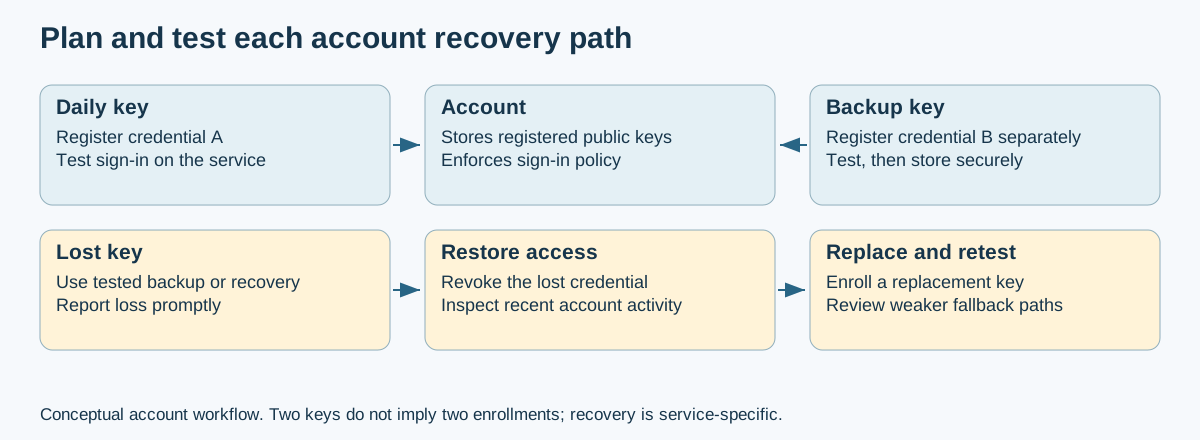
Recovery planning: the second key gets its own credential enrollment. A fallback or help-desk reset follows the service's recovery policy and needs separate scrutiny; possessing two physical keys does not establish that both are registered.
- Inventory high-risk accounts (admin, email, IdP, source control, financial portals)
- Record enrollment method: password + FIDO2 second factor, passkey, or synced passkey
- Verify WebAuthn origin binding and relying-party configuration
- Verify whether user verification is required rather than only touch
- Determine whether device-bound credentials and attestation are required
- Check exact authenticator model, firmware and FIDO certification level
- Confirm at least two functioning recovery methods with documented custody
- Review SMS, TOTP, email reset, help-desk escalation and temporary-access paths
- Test lost-key, replaced-phone and terminated-employee scenarios on test accounts
- Review sign-in logs, access policy, revocation and training
On a Linux test workstation with the appropriate package installed:
# Debian/Ubuntu package is typically fido2-tools
fido2-token -L
This enumerates supported authenticators. It does not verify certification, credential protection, enrollment correctness or suitability for all target services.
Standard WebAuthn sign-in uses a signed challenge; a normal account credential is not automatically a disk-unlock method. However, FIDO2 extensions can support storage-unlock integrations. For example, systemd-cryptenroll supports LUKS2 enrollment with compatible FIDO2 tokens implementing hmac-secret. Host software uses the extension output in the unlock process; the token does not store the user's files.
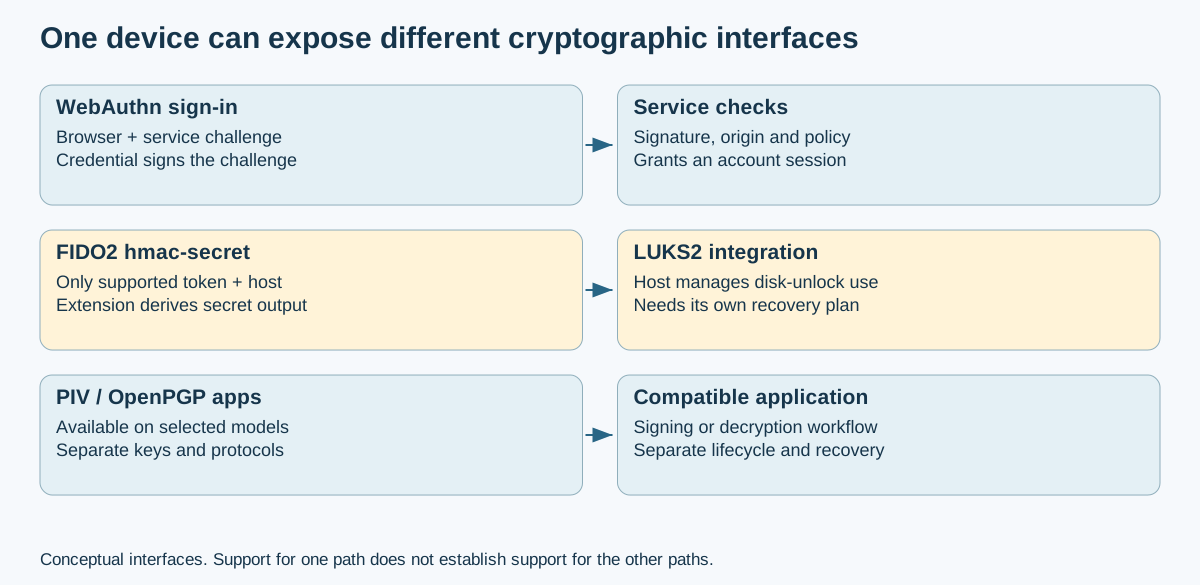
Protocol boundaries: standard account authentication, a supported secret-derivation extension, and PIV/OpenPGP are different integrations. Support for one does not imply support for the others. This conceptual figure is not an enrollment procedure.
Selected multi-protocol devices also support OpenPGP or PIV, with their own software, key-management, and recovery requirements. Check the token, host version, boot environment, PIN/touch policy, and recovery compatibility before enrollment. Test an independent disk-recovery method on a disposable volume before relying on a token; a backup key registered for a website is not automatically enrolled for disk unlock. See SoloKeys and Encrypted Storage.
- FIDO Alliance specifications (FIDO2 / WebAuthn / CTAP)
- FIDO authenticator security levels
- FIDO Certified Products
- FIDO passkeys explanation
- NIST SP 800-63B-4
- W3C WebAuthn
- systemd-cryptenroll: supported tokens and LUKS2 requirements
- Yubico firmware lifecycle and update limits
-
EUCLEAK 2024 Case Study - Physical ECDSA side channel, affected token versions and vendor guidance
Section Index | Master Index | Legal Notice
📄 Source: Cryptography/security-keys-passkeys.md | ✏️ Suggest an edit | ⬅️ Back to Cryptography