Repository navigation
Security Onion Turnkey Network Security Monitoring
A network security monitoring platform that combines Suricata, Zeek, Elastic data services, and analyst workflows in managed node roles
Part of the ULTIMATE CYBERSECURITY MASTER GUIDE · Incident Response · IDS & IPS section


Guide for deploying Security Onion, a free and open-source platform for network security monitoring. It manages Suricata and Zeek sensors, Elastic-based log and search services, optional endpoint log collection, and analyst workflows through Security Onion Console (SOC). Available components and node roles depend on the selected installation type and release.
Covers representative node roles, hardware sizing, ISO installation, management and sniffing interface planning, and the data path from sensor capture to searchable events and analyst access. Role names and exact components vary by release.
Give an informed sizing and architecture decision before burning a full ISO install cycle on hardware that turns out to be undersized — this is the single most common way people waste time with Security Onion.
- You've already worked with standalone Suricata/Zeek and want the integrated dashboards, alerting, and case-management layer without building it yourself
- You want the NSM (network security monitoring) equivalent of what T-Pot is for honeypots — pre-integrated, appliance-style, dashboards included
- You have dedicated hardware to spare (this is not a Raspberry Pi project — see sizing below) and want full packet capture retention alongside alerts
- What Security Onion Actually Is
- Architecture & Node Types
- Hardware Sizing
- Installation
- Post-Install Configuration
- Where the Pieces You Already Know Live
- Common Gotchas
⚠️ Security Notes- Resources
Security Onion isn't a new detection engine — it's the same Suricata and Zeek covered in this repo's standalone guide, plus:
- Elastic services including Elasticsearch, Logstash, Kibana, and Redis, used according to the selected node roles
- Elastic Agent for transporting logs; Windows endpoints can optionally send Sysmon events through a supported collection configuration
- Strelka for file analysis, including YARA-based detections
- Security Onion Console (SOC) for alerts, hunt, cases, detections, and grid administration; the platform also provides analyst tools such as CyberChef
- Separate detection types: NIDS rules load into Suricata, Sigma rules into ElastAlert, and YARA rules into Strelka
- IDH (Intrusion Detection Honeypot) nodes, which use OpenCanary and must join a separate Security Onion deployment
Think of it as: everything you'd otherwise assemble by hand from this repo's Suricata/Zeek and SIEM guides, pre-wired together and given a management console.
Security Onion supports everything from a single evaluation VM to a fully distributed enterprise deployment. Pick the smallest type that fits your actual need — sizing scales up dramatically with each step:
| Type | What it is | Use case |
|---|---|---|
| Import | Minimal processes to import PCAP/EVTX files and review them | Forensic analysis of files you already have, not live monitoring |
| Eval | Single machine sniffing live traffic, no Logstash/Redis (lower RAM) | Homelab, evaluation, temporary — not for production |
| Standalone | Manager + sensor components on one box, production-capable | Small-to-medium single-sensor deployments |
| Distributed (Manager + Sensor + Search nodes) | Roles split across multiple machines | Larger networks or need to scale monitoring and search independently |
Security Onion also documents additional roles such as ManagerSearch, Heavy, Fleet, Receiver, and Desktop. This summary is not an exhaustive role list; check the current architecture documentation before sizing. | IDH node | Dedicated lightweight honeypot node | Very low resource requirement (1 GB RAM), complements the main grid |
Start with Import for saved evidence, Eval for a temporary or homelab live sensor, or Standalone for a single-node deployment. For distributed deployments, the manager should generally be configured first and sensor/search roles can be separated as needs grow. See upstream sizing and architecture guidance before choosing.
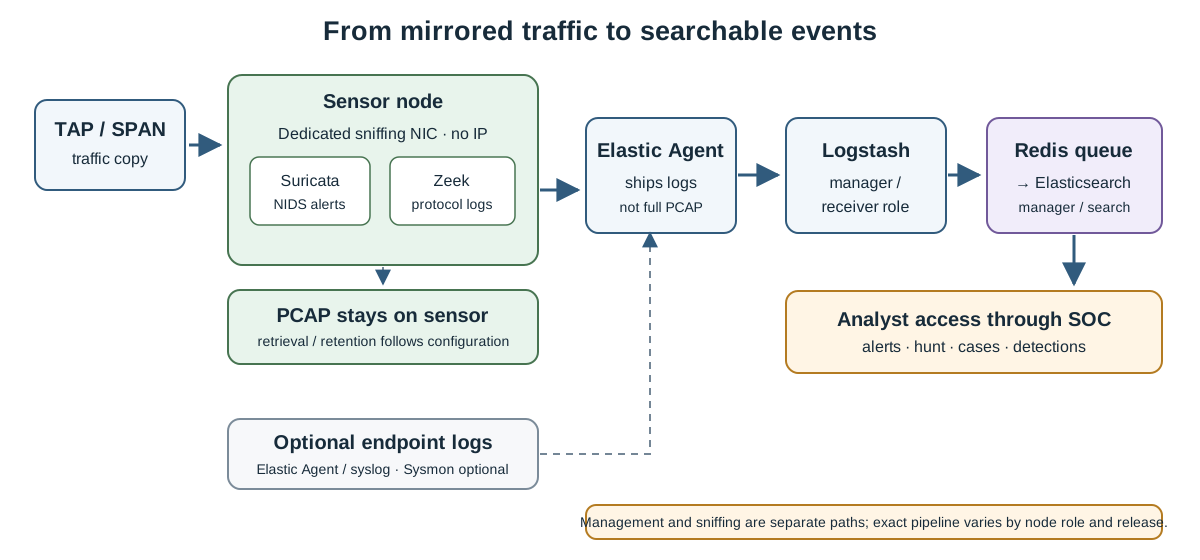
Conceptual distributed data path; exact services and storage placement depend on the selected node roles and release.
This is where most first attempts go wrong — Security Onion is not lightweight, even at its smallest production-capable size:
| Node Type | CPU cores | RAM | Storage | NICs |
|---|---|---|---|---|
| Import | 2 | 4 GB | 100 GB | 1 |
| Eval | 4 | 8 GB | 200 GB | 2 |
| Standalone | 4 | 24 GB | 200 GB | 2 |
| Manager | 4 | 16 GB | 200 GB | 1 |
| Search node | 4 | 16 GB | 200 GB | 1 |
| Sensor | 4 | 12 GB | 200 GB | 2 |
| IDH node | 2 | 1 GB | 12 GB | 1 |
Critical detail easy to miss: even the "minimum" Standalone spec (24 GB RAM) explicitly may need swap space to avoid instability at that floor — the docs themselves recommend 32 GB+ if monitoring any real traffic volume. This is not a project to try to squeeze onto a Pi or a small VM the way OpenCanary or standalone Suricata can be.
NIC planning: you need one interface with an IP for management, and a separate interface with no IP dedicated to sniffing (fed by a TAP or SPAN port). Security Onion automatically disables NIC offload features (tso, gso, gro) on sniffing interfaces so Suricata/Zeek see accurate traffic — don't try to "fix" this yourself.
Storage for full packet capture can grow quickly: a continuous 50 Mbps stream is about 540 GB/day using decimal units, before filesystem or capture overhead. Actual volume depends on monitored traffic and capture settings. Size storage against a defined retention requirement.
CPU architecture: Security Onion supports x86-64 only; ARM devices such as Raspberry Pi are unsupported, including as IDH nodes. IDH has lower resource requirements but still needs to join a supported Security Onion grid.
- Review Hardware and Release Notes on the official docs before downloading anything — confirm your target hardware actually meets the node type you're planning.
- Download and verify the ISO from the official Download page — verify the checksum, don't skip this on a security tool.
- Boot the ISO on hardware meeting the minimum specs for your chosen node type.
- Follow the installer prompts to completion, then reboot.
- Log in with the username/password set during install. Setup starts automatically.
If Setup doesn't auto-start (e.g. after manually exiting it), restart it explicitly:
sudo SecurityOnion/setup/so-setup iso- Proceed through Configuration — choose your node type (Import / Eval / Standalone / Distributed manager-first), set network interfaces (management vs. sniffing), and complete the guided setup.
⚠️ Get the hostname right the first time. Setup generates certificates based on the hostname during install, and changing the hostname afterward is not supported. This isn't a "fix it later" setting.
For a distributed deployment, install and fully configure the Manager node first, then join Sensor/Search nodes to it — nodes are approved via Administration → Grid Members on the Manager after they attempt to join.
- Security Onion Console (SOC) is your main web UI — alerts, dashboards, hunt, cases, detections, PCAP retrieval, and grid administration all live here.
- Kibana is available underneath SOC for deeper Elastic-native dashboarding.
- Add host-level visibility with Elastic Agent or supported syslog sources. On Windows, Sysmon can add endpoint events that Elastic Agent transports to Security Onion.
- Detections are managed centrally but run in different engines: NIDS rules in Suricata, Sigma in ElastAlert, and YARA in Strelka. Their configuration and update behavior differ.
If you've already worked through this repo's other guides, Security Onion's components map directly:
| You already know this from... | It shows up in Security Onion as... |
|---|---|
| Suricata & Zeek | The NIDS/NSM engine layer — same engines, centrally managed rules and config |
| SIEM: ELK Stack | The Elasticsearch/Logstash/Kibana backend, pre-wired to ingest Suricata/Zeek output automatically |
| Honeypots | The IDH (Intrusion Detection Honeypot) node type — a purpose-built, low-resource honeypot role in the grid |
| Endpoint Visibility: Sysmon | Sysmon event logs can be collected through a configured Elastic Agent; Sysmon itself is not the transport agent |
This is the practical value proposition: if you understand Suricata, Zeek, and ELK from this repo's other guides already, you're not learning new detection concepts here — you're learning how Security Onion wires the pieces together and manages them centrally.
| Symptom | Cause | Fix |
|---|---|---|
| Standalone install is unstable / services keep restarting | Hardware sized at the bare 24 GB RAM floor, no swap configured | Add swap space, or better, provision 32 GB+ if monitoring any real traffic — the docs are explicit that the minimum is genuinely minimal |
| Suricata/Zeek show dropped packets or inaccurate traffic view | NIC offload features (tso/gso/gro) weren't disabled on the sniffing interface |
The installer does this automatically on interfaces it identifies as sniffing-only (no IP) — confirm the interface has no IP assigned if this persists |
| Can't change the hostname after a botched initial setup | Certificates were generated against the original hostname during install; this is explicitly unsupported to change later | Reinstall rather than fight it — this is a documented hard limitation, not a bug to work around |
| Distributed sensor won't join the manager | Node approval step skipped | Check Administration → Grid Members → Pending Members on the Manager and explicitly Review/Accept the joining node |
| Running out of disk far faster than expected | Packet capture retention wasn't sized against traffic and capture settings | Recalculate from representative traffic and configured capture behavior, then add a safety margin |
| Tried it on a Raspberry Pi or other ARM hardware | Security Onion is x86-64 only | Use x86-64 hardware for the main grid; ARM isn't supported at all (the lightweight IDH honeypot role is the only ARM-friendly-adjacent piece, and even that assumes an x86-64 grid it joins) |
═══════════════════════════════════════════════════════════════
                    ⚠️ CRITICAL WARNING ⚠️
═══════════════════════════════════════════════════════════════

► THIS PLATFORM SEES EVERYTHING. A Security Onion deployment
  with full packet capture retains complete network traffic
  content, not just metadata. Treat its storage and access
  controls accordingly — this is one of the most sensitive
  systems you can run on a network.

► DEDICATED MANAGEMENT NETWORK RECOMMENDED. Keep the management
  interface off the general network where possible; SOC and
  Kibana access should be restricted to trusted administrators.

► GET THE HOSTNAME RIGHT BEFORE INSTALLING. Certificates are
  tied to it permanently — there is no supported migration path
  if you get this wrong.

► SIZE STORAGE FOR YOUR ACTUAL RETENTION NEEDS BEFORE DEPLOYING,
  not after. Running out of disk on a system holding full packet
  captures of your network traffic is a worse failure mode than
  most other tools in this repo.

═══════════════════════════════════════════════════════════════
- Security Onion docs: docs.securityonion.net
- Architecture and event flow: Architecture and Ingest
- Current minimum hardware: Hardware requirements
- Detection engine mapping: Rules overview
- Sysmon collection: Sysmon
- Intrusion Detection Honeypot: IDH
- Security Onion GitHub: github.com/Security-Onion-Solutions/securityonion
- Security Onion Solutions (official appliances/support): securityonionsolutions.com
- Community support (GitHub Discussions): linked from the official docs site
- IDS&IPS/README.md - Sub-section index and platform comparison
- IDS&IPS/suricata+zeek.md - The standalone version of this platform's core detection engines
- Honeypots/tpot.md - The honeypot-domain equivalent of this "everything pre-integrated" approach
- Honeypots/README.md - Including the IDH honeypot role this platform can run natively
- IncidentResponse/SIEM/elk_stack.md - The standalone version of the backend this platform bundles
- IncidentResponse/SIEM/wazuh.md - Available as a host-visibility integration alongside this platform
🛡️ Use These Resources Responsibly
Detection first, blocking second.
Repository: ULTIMATE CYBERSECURITY MASTER GUIDE
Maintained by: Pacific Northwest Computers
⭐ Star this repo if you find it useful! ⭐
📄 Source: IncidentResponse/IDS&IPS/security-onion.md | ✏️ Suggest an edit | ⬅️ Back to Incident Response